
Windows Errors? Fix Them Before They Spread
Repair common Windows errors and clear accumulated junk for a smoother, more stable PC - no reinstall needed.Free scan · no reinstallOutdated Drivers Are Slowing You Down
One free scan finds every outdated or missing driver and matches the right update for your exact hardware.Free scan · exact hardware matchiTechGuides is reader-supported. When you buy through links on our site, we may earn an affiliate commission. As an Amazon Associate I earn from qualifying purchases. Learn more
The best thermal paste for CPU and GPU in 2024 is ARCTIC MX-6 for most users because it is non-conductive, suitable for CPU coolers and bare GPU dies, and designed to resist pump-out. Noctua NT-H2 is the better premium CPU choice, while liquid metal is a specialist option with meaningful electrical and material-compatibility risks.
Thermal paste is a small purchase, but choosing correctly depends on the contact surface and the reason for repasting. A desktop CPU usually has a metal integrated heat spreader (IHS), while a graphics card, laptop, or console commonly cools an exposed silicon die. The safest high-value choice for a normal PC is therefore not automatically the paste with the highest advertised thermal-conductivity figure.
This is a 2024 buying guide. Product availability and prices change by country and date; no unverified 2024 street prices are presented.
Do these 3 things before closing this tab:
1Repair Windows errors before they cause bigger problems2Scan for outdated or missing drivers - takes under a minute3Clear out junk files and repair common Windows errorsKey takeaways
- ARCTIC MX-6 is the best overall conventional paste for most CPUs and GPUs because it is non-conductive, thick, direct-die suitable, and designed to reduce pump-out.
- Noctua NT-H2 is the best premium CPU-focused choice when predictable application, cleanup, and documentation matter more than saving a small amount of money.
- Thermal Grizzly Kryonaut is a strong enthusiast CPU option, but its advertised conductivity should not be treated as proof that it is the best long-term GPU paste.
- Liquid metal such as Thermal Grizzly Conductonaut is electrically conductive, must not contact aluminum, and is inappropriate for most beginners.
- Repaste only when temperatures have materially worsened, the cooler has been removed, or the original interface is visibly degraded; an annual schedule is not universally necessary.
Which thermal paste should you buy for a CPU or GPU in 2024?
For one safe, versatile product, buy ARCTIC MX-6. MX-6 is suitable for CPU coolers, graphics cards, consoles, and other direct-die applications, and ARCTIC positions its high viscosity as a way to reduce pump-out during thermal cycling. The recommendation is an editorial judgment based on safety, versatility, application method, and durability—not a claim that MX-6 produces the lowest temperature in every test.
Popular on Amazon

- CONSISTENT QUALITY: Our thermal paste packaging design has evolved over time, but the formula has remained the same, ensuring reliable performance.
- EXCELLENT PERFORMANCE: ARCTIC MX-4 thermal paste is made of carbon microparticles, guaranteeing extremely high thermal conductivity. This ensures that heat from the CPU/GPU is dissipated quickly & efficiently
- SAFE APPLICATION: The MX-4 is metal-free and non-electrical conductive which eliminates any risks of causing short circuit, adding more protection to the CPU and VGA cards
- HIGH DURABILITY: In contrast to metal and silicon thermal compound, the MX-4 does not compromise over time. Once applied, you do not need to apply it again as it will last at least for 8 years
- EASY TO APPLY: With an ideal consistency, the MX-4 is very easy to use, even for beginners
Choose Noctua NT-H2 for a premium desktop CPU installation where easy, repeatable application and cleanup are priorities. Choose Thermal Grizzly Kryonaut for an enthusiast CPU or benchmarking build. Choose Corsair TM30 when it is substantially cheaper or easier to source. Use Conductonaut liquid metal only for specialized work when you understand electrical conductivity, masking, cooler-material compatibility, and the consequences of a spill.
| Product | Best for | Electrical behavior | CPU suitability | GPU/direct-die suitability | Application and durability notes |
|---|---|---|---|---|---|
| ARCTIC MX-6 | Best overall | Non-conductive and non-capacitive | Excellent for ordinary desktop CPUs | Strong choice where conventional paste is appropriate | Very viscous; mount the cooler rather than spreading with a spatula; designed to resist pump-out |
| Noctua NT-H2 | Premium CPU paste | Conventional non-conductive paste | Excellent, especially for high-heat CPUs and users who value easy application | Not automatically the best choice for a bare GPU die | Predictable application and cleanup; performance advantage depends on heat load and mounting conditions |
| Thermal Grizzly Kryonaut | Enthusiast CPU and benchmarking | Non-conductive | Very good for performance-focused CPU use | Use caution when long-term pump-out resistance is the main concern | Do not confuse conventional Kryonaut with Conductonaut liquid metal |
| Corsair TM30 | Mainstream maintenance and value | Non-conductive | Good general-purpose option | Usable for ordinary maintenance, but not specifically the thickest pump-out-oriented option | Zinc-oxide-based and relatively low viscosity; availability and price vary by region |
| Thermal Grizzly Conductonaut | Advanced liquid-metal applications | Electrically conductive | Specialist use only | Specialist use only; high rework and leakage risk | Never use on aluminum; requires controlled application and compatible cooling hardware |
What does thermal paste do?
Thermal paste fills microscopic imperfections between the processor and cooler base so that air gaps do not dominate the thermal interface. Paste is not meant to be a thick thermal blanket. The desired result is a thin, continuous bond line created by suitable paste quantity, flat contact surfaces, and even mounting pressure.
A desktop CPU normally transfers heat through a metal IHS. A bare-die GPU transfers heat directly from exposed silicon to the cooler. Laptops and consoles often use direct-die cooling and may also use separate thermal pads or thermal putty for memory and voltage-regulator components. Thermal paste, thermal pads, and thermal putty are different interface materials; a cooler generally uses the appropriate one at a given contact point rather than stacking paste and a pad together. iFixit’s CPU replacement guidance provides general cooler-contact and paste context.
Free tools Windows power users keep installed
One-click scans. No signup required.
Why is CPU thermal paste different from GPU thermal paste?
CPU and GPU paste selection differs because the contact geometry, mounting arrangement, and failure risks differ. A CPU IHS is comparatively simple to cover, while a GPU die may be larger, exposed, and mounted beneath a cooler that flexes or applies uneven pressure.
What matters for a desktop CPU?
For a CPU, prioritize reliable coverage across the IHS, non-conductivity, easy application, long-term stability, compatibility with the cooler’s mounting pressure, and reasonable cost per application. A premium compound can produce a measurable improvement, but cooler quality, mounting pressure, fan curves, dust, case airflow, ambient temperature, and CPU power limits often matter more.
Noctua’s comparison of NT-H1 and NT-H2 explains that the difference depends on heat load, bond-line thickness, mounting pressure, contact quality, and cooler type. Noctua notes that the difference can be negligible on a 65 W processor but more visible on a 250 W CPU; those figures describe the conditions in Noctua’s comparison, not a universal temperature rule. Read Noctua’s NT-H1 versus NT-H2 comparison.
What matters for a bare-die GPU?
For a GPU, prioritize complete die coverage, resistance to pump-out, correct cooler pressure, and preservation of the card’s thermal pads or putty. A paste that gives a good initial result can still be a poor long-term choice if repeated heating and cooling displaces paste away from the hottest area.
ARCTIC explicitly describes MX-6 as suitable for graphics-card direct-die applications and says its viscosity is intended to help prevent pump-out. ARCTIC’s MX-6 product information supports that positioning. Independent comparisons also treat CPU and GPU suitability as separate questions and identify pump-out as a durability concern for some conventional compounds. Igor’s Lab’s thermal-paste comparison is useful context, but results remain dependent on the test hardware and procedure.
Also popular on Amazon

- WELL PROVEN QUALITY: The design of our thermal paste packagings has changed several times, the formula of the composition has remained unchanged, so our MX pastes have stood for high quality
- EXCELLENT PERFORMANCE: ARCTIC MX-4 thermal paste is made of carbon microparticles, guaranteeing extremely high thermal conductivity. This ensures that heat from the CPU/GPU is dissipated quickly & efficiently
- SAFE APPLICATION: The MX-4 is metal-free and non-electrical conductive which eliminates any risks of causing short circuit, adding more protection to the CPU and VGA cards
- 100 % ORIGINAL THROUGH AUTHENTICITY CHECK: Through our Authenticity Check, it is possible to verify the authenticity of every single product
- EASY TO APPLY: With an ideal consistency, the MX-4 is very easy to use, even for beginners, Spatula incl.
What about laptops, consoles, pads, and putty?
Do not assume that a laptop or console originally using a phase-change material should receive ordinary paste. Check the device’s service design first. Thermal pads or putty commonly serve memory and VRM components, where the required thickness and compression are specific to the exact model and cooler revision. Incorrect pad thickness can prevent the GPU die from making proper contact even when the new paste is excellent.
Which thermal paste is best for each use case?
ARCTIC MX-6: best overall
ARCTIC MX-6 is the strongest all-round recommendation for most readers. The compound is non-electrically conductive and non-capacitive, is offered in 2 g, 4 g, and 8 g sizes, and is rated for continuous use from −50 to 150 °C according to ARCTIC’s technical information. See the MX-6 technical sheet.
MX-6 is unusually thick, with a listed viscosity of 45,000 poise. That thickness is part of its direct-die and pump-out-oriented design, not evidence of poor quality. ARCTIC says not to spread MX-6 with a spatula; cooler mounting pressure should distribute the compound. ARCTIC also describes the compound as non-drying and non-bleeding and positions it for CPUs, GPUs, consoles, and other direct-die uses. Check ARCTIC’s MX-6 application guidance and specifications.
What’s actually slowing this PC down?
Pick the symptom - the matching free tool is one click away.
Buy MX-6 if: you want one conventional, non-conductive paste for a desktop CPU and occasional GPU or console work. Do not buy it expecting: a universal benchmark victory or a paste that should be manually smeared thin with a tool.
Noctua NT-H2: best premium CPU paste
Noctua NT-H2 is a premium CPU-focused choice for users who value predictable application, cleanup, and detailed support documentation. Noctua’s application guidance supports applying the compound directly and allowing cooler pressure to distribute it rather than requiring manual spreading. Some package sizes include cleaning wipes. Follow Noctua’s NT-H2 application and removal guidance.
NT-H2 makes the most sense on a high-heat CPU, an air cooler or AIO installation where repeatability matters, or a build where the small convenience premium is acceptable. NT-H2 is not automatically the best GPU paste: GPU die size, cooler geometry, thermal cycling, and pump-out resistance remain separate concerns.
Thermal Grizzly Kryonaut: best enthusiast CPU paste
Conventional Thermal Grizzly Kryonaut is a non-conductive paste aimed at high-performance and overclocking applications. Kryonaut is not Conductonaut: Kryonaut is conventional paste, while Conductonaut is electrically conductive liquid metal. Thermal Grizzly’s FAQ distinguishes the products and explains its conductivity guidance.
Kryonaut is a reasonable choice for enthusiast desktop CPUs and benchmark-oriented systems. It should not be selected solely because of a claimed W/mK number, and it should not automatically be transferred from a CPU recommendation to a GPU repaste. Peak initial performance and long-term direct-die durability are different selection criteria.
Also popular on Amazon

- SAFETY APPLICATION: BSFF is metal-free and non-conductive, which eliminates any risk of short circuit and adds more protection to the CPU and VGA card.
- BETTER THAN LIQUID METAL: It is made of carbon microparticles, guaranteeing extremely high thermal conductivity. This ensures that heat from the CPU/GPU is dissipated quickly & efficiently.
- HIGH DURABILITY: BSFF thermal paste Edition formula has excellent component heat dissipation performance and has the stability to push the system to the limit.
- EXCELLENT PERFORMANCE: In contrast to metal and silicon thermal conductive adhesives, BSFF thermal paste will not compromise over time. After applying, you do not need to apply again because it will last at least 5 years.
- EASY TO APPLY: BSFF thermal paste has ideal consistency and is very easy to use even for beginners
Corsair TM30: practical mainstream alternative
Corsair TM30 is a non-conductive, zinc-oxide-based compound with a relatively low viscosity intended to fill microscopic surface irregularities. Corsair states that TM30 is designed for long-term stability and does not require periodic replacement under normal conditions. See Corsair’s TM30 product information.
TM30 is a sensible purchase when it is cheaper or more readily available than MX-6, NT-H2, or Kryonaut. Corsair’s US store displayed TM30 at $7.99 on August 16, 2026; that is a later commercial observation, not a verified 2024 price, and it should not be used to reconstruct the 2024 ranking.
Thermal Grizzly Conductonaut: liquid metal for specialists
Conductonaut is not ordinary thermal paste. Conductonaut liquid metal is electrically conductive, must not contact aluminum, and can short nearby components if spilled. Thermal Grizzly identifies Conductonaut as the conductive product among its listed materials and ties the aluminum warning specifically to liquid metal. Consult Thermal Grizzly’s application documentation before considering Conductonaut.
Quick wins for a faster PC:
Clear out junk files and repair common Windows errorsFree Scan →Fix the driver behind crashes, sound loss and screen glitchesFind Drivers →Repair Windows errors before they cause bigger problemsFix Now →Conductonaut may suit an experienced enthusiast using a compatible copper or nickel-plated cooling surface and controlled direct-die setup. Conductonaut is a poor default choice for laptops, GPUs, warranty-sensitive systems, aluminum coolers, and anyone who cannot confidently mask surrounding components and control leakage. A theoretical 1–2 °C gain is rarely worth liquid-metal failure risk in an ordinary gaming PC.
Why do advertised W/mK numbers fail to identify the best paste?
Advertised thermal conductivity is not a universal ranking because bulk-material conductivity is only one part of the completed cooler-to-chip interface. Bond-line thickness, surface flatness, mounting pressure, application method, cooler geometry, temperature, and test procedure all affect thermal resistance.
Thermal Grizzly says conductivity figures are difficult to compare consistently because contact pressure, temperature, surface quality, and application are difficult to standardize, and the company has reduced its emphasis on theoretical conductivity figures. Read Thermal Grizzly’s explanation of thermal-conductivity figures.
Independent rankings can therefore disagree without either test being useless. Tom’s Hardware’s testing placed MX-6 highly among conventional pastes while identifying other products as leaders under its own conditions. Review the test conditions in Tom’s Hardware’s thermal-paste guide. Treat a ranking as evidence from a specific setup, not a guarantee for every CPU, GPU, cooler, workload, and mounting method.
| Decision criterion | What to prefer | Why it matters |
|---|---|---|
| Electrical safety | Non-conductive compound | Spills near exposed components are less dangerous than conductive liquid metal. |
| Contact type | Match the product to CPU IHS, bare GPU die, laptop, console, or delidded CPU | Different contact geometries impose different coverage and durability demands. |
| Viscosity | Thin for easy dispensing; thick when direct-die pump-out resistance is important | Thick paste can improve stability but needs suitable mounting pressure. |
| Application method | Follow the manufacturer’s blob, dot, or spreading instructions | MX-6 and NT-H2, for example, do not require the same handling assumptions. |
| Longevity | Evidence or manufacturer positioning for non-drying and pump-out resistance | Initial temperature is not the same as long-term thermal-cycle performance. |
| Value | Compare price per gram and applications per tube | A cheaper tube may contain less compound, while a large tube may be wasteful for one build. |
| Risk tolerance | Conventional paste for ordinary systems | Liquid metal adds electrical, material-compatibility, and rework risks. |
How should you apply thermal paste to a desktop CPU?
Apply a small amount to the center of the CPU, place the cooler straight down, and let even mounting pressure create the thin bond line. Noctua supports direct application and cooler-pressure distribution, while ARCTIC specifically says MX-6 should not be spread with a spatula. Use Noctua’s application instructions for NT-H1 or NT-H2 and ARCTIC’s instructions for MX-6.
Also popular on Amazon
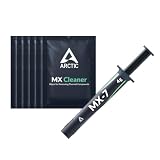
- NEXT-LEVEL THERMAL PERFORMANCE: MX-7 features a performance-optimized, dense, and highly viscous consistency. Its high filler content ensures exceptional heat transfer
- LONG-TERM STABILITY: High cohesion prevents pump-out, dry-out, or bleeding even under repeated thermal cycles, ensuring long-lasting and consistent performance without the need for frequent reapplication
- PERFECT APPLICATION: MX-7 cannot be spread manually by design. Its low adhesion allows the paste to distribute naturally under cooler pressure, forming a thin bond line without trapping air bubbles
- SAFE FOR ALL DEVICES: MX-7 is electrically non-conductive and non-capacitive, making it completely safe for CPUs, GPUs, laptops, consoles, and other, no risk of short circuits or electrical discharge
- INCLUDES MX CLEANER: Thoroughly removes old thermal paste and prepares contact surfaces for optimal performance before applying new thermal compound.
- Shut down the PC, switch off the power supply, unplug the system, and allow the components to cool.
- Remove the cooler evenly. Loosen screws gradually in a cross pattern when the mounting hardware supports that pattern.
- If the cooler is stuck, gently twist it to break the paste seal. Do not pull vertically with force, which can potentially extract the CPU from its socket.
- Remove old compound from the CPU and cooler with lint-free material and a suitable high-purity isopropyl-alcohol cleaner. ARCTIC’s cleaning guidance covers the preparation step.
- Allow both surfaces to become clean and dry. Do not touch the cleaned contact areas.
- Apply a small central amount suited to the CPU size and paste viscosity—roughly rice-grain-to-small-pea scale for a conventional desktop CPU, with larger CPUs needing enough compound to cover the IHS under pressure.
- Place the cooler straight down without sliding it unnecessarily.
- Tighten the mounting hardware gradually and evenly. Do not fully tighten one corner while the other corners remain loose.
- Reconnect the fan or pump, boot the PC, and compare temperatures under the same workload, fan settings, ambient conditions, and power limits used before the repaste.
Too much paste is wasteful, while too little can leave uncovered areas. With conventional non-conductive paste, a slightly oversized blob normally squeezes outward; complete thin contact under correct pressure matters more than achieving a visually perfect pattern. Clean and reapply paste whenever a mounted cooler is removed rather than reusing contaminated compound.
How do you repaste a GPU safely?
GPU repasting is a repair procedure rather than harmless routine maintenance. Opening the card can affect warranty coverage, damage fragile cables or pads, or worsen temperatures if the cooler is remounted unevenly. Check the warranty and identify the exact card model and cooler revision before disassembly.
- Photograph the assembled card and record the position, shape, and thickness of every thermal pad or putty application.
- Remove the cooler carefully without bending the PCB or tearing fan and sensor cables.
- Preserve the existing pads and insulating materials unless replacement is necessary. Never generalize pad thickness across a GPU family or assume that a visually similar card uses the same dimensions.
- Clean the exposed die and cooler contact surface with suitable lint-free material and isopropyl alcohol.
- Apply enough conventional paste to cover the entire die under cooler pressure. For thick MX-6, use a controlled central amount or several small dots rather than forcing a spatula spread.
- Reinstall the cooler straight and tighten screws in stages using a cross pattern where applicable.
- Check that the cooler makes complete contact with the die and that pads or putty have not lifted the cooler away from the die.
- Test core temperature, hotspot temperature, memory temperature, fan speed, clock speed, and power under a repeatable workload.
An acceptable edge temperature with an abnormally high hotspot often points to incomplete die coverage, uneven mounting pressure, cooler distortion, or incorrect pad thickness rather than automatically proving that the paste brand is defective. iFixit’s GPU thermal-paste replacement guide illustrates the disassembly context and why overheating diagnosis should precede replacement.
Recommended Free Tools
When should you replace thermal paste?
Replace thermal paste when there is a demonstrated thermal or maintenance reason, not simply because a calendar reminder says one year has passed. A properly mounted cooler using a quality paste may not need annual replacement.
- Temperatures rise materially under a comparable workload.
- Fan noise increases without a matching change in ambient temperature, software, power limits, or fan settings.
- The cooler has been removed from the CPU or GPU.
- The compound is visibly cracked, dry, displaced, or contaminated.
- A GPU develops worsening hotspot behavior.
- A laptop or console has known thermal-maintenance requirements and is outside warranty.
Direct-die systems exposed to severe thermal cycling can experience pump-out sooner than a stable desktop CPU IHS installation. Conversely, a temperature problem may come from dust, a failing fan or pump, poor case airflow, high ambient temperature, background processes, incorrect fan curves, GPU cooler contact, incorrect thermal-pad thickness, BIOS power limits, degraded bearings, or a warped cooler surface.
Should you use a phase-change pad instead of paste?
A phase-change material can be a useful alternative for laptops, GPUs, or other direct-die systems that repeatedly suffer from pump-out, but the exact product must fit the device’s dimensions, compression, and electrical requirements. A phase-change interface softens at operating temperature; it is not interchangeable with every paste, pad, or sheet.
Check the manufacturer’s service design before replacing an original phase-change material with conventional paste. For expensive GPUs, sealed laptops, or warranty-sensitive systems, manufacturer service may be safer than experimenting with a different interface material.
What should you troubleshoot after repasting?
| Symptom | Likely causes to check | Next action |
|---|---|---|
| No temperature improvement | The original paste was adequate; cooler, airflow, ambient temperature, fan curve, or workload is the real limit | Compare the same workload and inspect cooler mounting before trying a more expensive paste. |
| Higher GPU hotspot after repasting | Incomplete die coverage, uneven pressure, cooler distortion, or incorrect pad thickness | Inspect contact pattern and pad placement; do not assume a different brand will fix poor contact. |
| CPU temperature spikes | Insufficient coverage, cooler not seated, uneven screws, or cooler/fan problem | Check mounting and fan or pump operation, then clean and reapply if necessary. |
| Paste squeezed out | Excess compound or high mounting pressure | Clean and reapply the correct amount; non-conductive paste is generally safer than liquid metal in this situation. |
| Cooler stuck to CPU | Dried paste forming a seal | Warm the system first when safe, then twist the cooler gently rather than pulling straight up. |
| GPU memory is hotter after repair | Pad or putty moved, was damaged, or has the wrong thickness | Restore the exact original arrangement or use device-specific replacement specifications. |
| Tube is dry or separated | Age, poor storage, or a compromised product | Do not use visibly contaminated or hardened compound; buy from a reputable source and verify packaging. |
What is the practical buying decision?
Buy MX-6 if you want one safe conventional product for most desktop CPUs, GPUs, consoles, and other direct-die systems. Buy NT-H2 if premium CPU application convenience and support documentation matter most. Buy Kryonaut for enthusiast CPU use and benchmarking, not merely because of a conductivity number. Buy TM30 when mainstream availability and value outweigh the need for a particularly thick, pump-out-oriented compound.
Also popular on Amazon

- NEXT-LEVEL THERMAL PERFORMANCE: MX-7 features a performance-optimized, dense, and highly viscous consistency. Its high filler content ensures exceptional heat transfer
- LONG-TERM STABILITY: High cohesion prevents pump-out, dry-out, or bleeding even under repeated thermal cycles, ensuring long-lasting and consistent performance without the need for frequent reapplication
- PERFECT APPLICATION: MX-7 cannot be spread manually by design. Its low adhesion allows the paste to distribute naturally under cooler pressure, forming a thin bond line without trapping air bubbles
- SAFE FOR ALL DEVICES: MX-7 is electrically non-conductive and non-capacitive, making it completely safe for CPUs, GPUs, laptops, consoles, and other, no risk of short circuits or electrical discharge
- EFFORTLESS CLEANING WITH MX CLEANER: Removes old thermal paste thoroughly, preparing contact surfaces for optimal performance. Also available as a convenient bundle with MX-7
Do not open a working GPU solely to chase a small temperature difference. First rule out dust, airflow, fan behavior, ambient temperature, and software or power-limit changes. If the GPU genuinely needs service, document the pads and cooler revision before disassembly.
Use Conductonaut liquid metal only when you understand the risks. Conductonaut is conductive and incompatible with aluminum, and a spill can cause immediate damage. For nearly everyone, a good non-conductive conventional paste is the better total solution because it combines adequate thermal performance with substantially lower failure risk.
Frequently Asked Questions
Is ARCTIC MX-6 safe for a GPU bare die?
ARCTIC MX-6 is intended for direct-die applications such as graphics cards and is non-electrically conductive, making it a safer default than liquid metal. Correct coverage, cooler pressure, and thermal-pad placement still determine the result for the exact GPU model.
The Tool Desk
Outbyte PC Repair FREEClear out junk files and repair common Windows errorsFree Scan →Outbyte Driver Updater FREEFix the driver behind crashes, sound loss and screen glitchesFind Drivers →Is liquid metal better than thermal paste for every CPU or GPU?
Liquid metal can provide excellent thermal performance, but liquid metal is not the best choice for every CPU or GPU because it is electrically conductive, must not contact aluminum, and is harder to apply safely. Conventional non-conductive paste is the appropriate default for most systems.
How often should CPU thermal paste be replaced?
CPU thermal paste does not have to be replaced every year when the cooler remains mounted and temperatures are normal. Replace paste after cooler removal, a material unexplained temperature increase, or visible cracking, drying, displacement, or contamination.
Why is my GPU hotspot still high after repasting?
A high GPU hotspot after repasting can result from incomplete die coverage, uneven mounting pressure, cooler distortion, or incorrect thermal-pad thickness. Check the contact pattern and pad arrangement before blaming the paste brand.
The Bottom Line
For most buyers, ARCTIC MX-6 is the best thermal paste for CPU and GPU in 2024. Noctua NT-H2 is the premium CPU alternative, Kryonaut suits enthusiast CPU work, and Conductonaut belongs only in experienced hands. Match the interface to the device, mount the cooler evenly, and repaste because testing shows a problem—not because a calendar says it is time.

