
Do these 3 things before closing this tab:
1Scan for outdated or missing drivers - takes under a minute2Repair Windows errors before they cause bigger problems3Fix the driver behind crashes, sound loss and screen glitchesiTechGuides is reader-supported. When you buy through links on our site, we may earn an affiliate commission. As an Amazon Associate I earn from qualifying purchases. Learn more
For most U.S. households that print color documents regularly, a refillable ink-tank printer is the best printer with cheap ink in 2026 because bottled ink usually costs less to replace than cartridges. Occasional users may spend less overall with a cheap cartridge printer, while mostly black-text users should consider a monochrome laser printer.
The cheapest printer to buy is not necessarily the cheapest printer to own. A cartridge printer can have the lowest checkout price, but a refillable Epson EcoTank, Canon MegaTank, or HP Smart Tank generally offers a much larger initial ink supply and lower ongoing color-printing costs. A monochrome laser printer changes the calculation entirely by eliminating liquid-ink maintenance, although it cannot print color.
This guide compares the main U.S. options by purchase price, realistic print volume, color needs, replacement supplies, duplexing, scanning, photo output, connectivity, maintenance, and subscription requirements. Model availability, prices, and included features can change by retailer and region, so confirm the exact U.S. configuration before buying.
Key takeaways
- Refillable ink-tank printers are usually the strongest value for households printing color every week, but their higher purchase price may not pay back for people printing fewer than about 25 pages per month.
- Epson says the ET-2800’s included bottles are rated for up to 4,500 black and 7,500 color pages, while HP advertises up to 6,000 black and 8,000 color pages for selected Smart Tank models; actual results vary with coverage, cleaning, setup, and photos.
- Automatic duplexing matters for schoolwork and office documents: HP lists manual two-sided printing on its 5000/5100 series and automatic duplexing on the 6000 and 7600 series.
- A monochrome laser printer is usually the better category for frequent black-text printing or a printer that may sit unused for weeks, provided color output is unnecessary.
- HP Instant Ink starts at a manufacturer-advertised $1.79 per month, but subscription value depends on page allowances, rollover rules, account requirements, cancellation terms, and actual monthly use.
What is the best printer with cheap ink in 2026?
The best printer with cheap ink in 2026 depends on what you print. For regular color printing, choose a refillable tank model. For very occasional printing, choose an inexpensive cartridge model after comparing replacement-cartridge prices. For mostly black text, choose a monochrome laser. For a busy home office, pay more for automatic duplexing, an automatic document feeder, better paper handling, and faster operation.
Popular on Amazon

- Affordable Versatility - A budget-friendly all-in-one printer perfect for both home users and hybrid workers, offering exceptional value
- Crisp, Vibrant Prints - Experience impressive print quality for both documents and photos, thanks to its 2-cartridge hybrid ink system that delivers sharp text and vivid colors
- Effortless Setup & Use - Get started quickly with easy setup for your smartphone or computer, so you can print, scan, and copy without delay
- Reliable Wireless Connectivity - Enjoy stable and consistent connections with dual-band Wi-Fi (2.4GHz or 5GHz), ensuring smooth printing from anywhere in your home or office
- Scan & Copy Handling - Utilize the device’s integrated scanner for efficient scanning and copying operations
| Category | Recommended direction | Best for | Main compromise |
|---|---|---|---|
| Best overall low-cost color printer | Epson EcoTank ET-3850 or a current successor with equivalent features | Regular color documents and home-office use | Verify the current 2026 model, price, ADF, duplexing, and bottle number before purchase |
| Best budget tank | Epson EcoTank ET-2800 | Students and light home color printing | Entry-level speed and paper handling; likely no automatic duplexing |
| Best Canon alternative | Canon PIXMA G3270 MegaTank, or a current G3290 variant if it has replaced it | Budget color printing and buyers who prefer Canon’s output | Confirm duplexing, paper capacity, bottle pricing, and printhead availability |
| Best family tank with automatic duplex | HP Smart Tank 6001 or equivalent U.S. 6000-series model | Families printing two-sided school and office documents | Exact model names and street prices vary by retailer |
| Best inexpensive HP tank | HP Smart Tank 5101 | Basic print, scan, and copy use | Manual two-sided printing and no document-feeder advantage |
| Best home-office tank | HP Smart Tank 7602 | Higher volume, multi-page scanning, duplexing, fax, and Ethernet | Higher upfront cost than entry-level tank printers |
| Best high-volume option | Epson EcoTank Pro ET-5850 | Heavy home-office or small-business printing | Not a low-purchase-price budget printer |
| Best for mostly black text | Monochrome laser printer | Fast, reliable black-and-white documents | No color printing |
| Best for very occasional use | Low-cost cartridge all-in-one | Fewer than roughly 25 pages per month | Higher replacement-ink cost and possible cartridge interruptions |
Which budget ink home printer should you buy?
A budget ink home printer should be selected by print volume and document type rather than by its advertised ink yield alone. The following recommendations separate low acquisition cost, low operating cost, and office productivity so an entry-level model is not unfairly compared with a much more expensive workhorse.
Epson EcoTank ET-2800: best low-cost entry into refillable color printing
The Epson EcoTank ET-2800 is a sensible starting point for a student or household that wants refillable color ink without paying for office-class features. The U.S. product page identifies the ET-2800 as a wireless color all-in-one that prints, scans, and copies, and Epson lists a $239.99 price on that product page; prices can change.
Epson rates the included ET-2800 bottles for up to 4,500 black pages and 7,500 color pages. Those are manufacturer-rated yields, not a promise that every household will reach those numbers. Setup ink, maintenance cycles, dense graphics, and photos can reduce real-world yield. The ET-2800 is a poor fit for fast document production, automatic two-sided printing, or frequent multi-page scanning.
What’s actually slowing this PC down?
Pick the symptom - the matching free tool is one click away.
Promotional pricing illustrates why date stamps matter: TechRadar reported the ET-2800 at $199.99 on August 12, 2026, but a temporary sale should not become the model’s permanent price or ranking. Check the official Epson ET-2800 product page for the current U.S. configuration and supplies.
Epson EcoTank ET-3850: a more complete general-purpose choice
The Epson EcoTank ET-3850 is the more appropriate direction when a buyer wants a general-purpose home office rather than the lowest tank-printer entry price. Before publication or purchase, verify whether the live 2026 configuration still includes automatic duplexing and an automatic document feeder, along with its paper capacity, replacement-bottle number, price, and successor status.
The distinction matters because a slightly more expensive printer can save considerable time when several people print forms, school assignments, or multi-page documents. Independent 2026 coverage places the related Epson ET-3950 in an upper-midrange cheap-ink category and the ET-4850 among strong home options, so Epson’s more capable models deserve consideration when office features matter more than the lowest initial cost. See the current RTINGS cheap-ink printer coverage and TechRadar ink-tank printer guide rather than assuming an older listing is still current.
Canon PIXMA G3270 MegaTank: best Canon budget alternative
The Canon PIXMA G3270 MegaTank is a budget refillable color all-in-one alternative to Epson’s entry-level EcoTank models. Canon’s U.S. product page promotes high-yield bottles and claims savings of up to $1,000 on ink. That is a manufacturer comparison claim, not an independently guaranteed lifetime saving; the result depends on the comparison cartridge, yields, ink prices, and usage.
Confirm whether the current U.S. model is still the G3270 or has been replaced by a G3290 variant. Also confirm automatic versus manual duplexing, scanner features, paper capacity, borderless printing, current GI-series bottle prices, and whether replacement printheads are available. The Canon PIXMA G3270 product page is the appropriate starting point for the live specification.
HP Smart Tank 5101: attractive when discounted
The HP Smart Tank 5101 targets basic family printing with bottled ink, wireless connectivity, and print, scan, and copy functions. HP lists manual two-sided printing rather than automatic duplexing for this class, making the 5101 less appealing for document-heavy households.
HP advertises up to 6,000 color pages of included ink for selected Smart Tank models. HP also describes self-healing Wi-Fi on the product material. TechRadar reported a $170 promotional price for the 5101 on August 14, 2026, against a stated $260 regular price. That was a dated promotion, not a dependable current MSRP. Check the HP U.S. home-printer page for current availability and the exact model’s features.
HP Smart Tank 6001: better for families that need automatic duplexing
The HP Smart Tank 6001 is the more practical family choice when automatic two-sided printing matters. HP’s Smart Tank comparison material lists print, scan, and copy functions, automatic duplexing, and dual-band Wi-Fi for the 6000 series. HP lists up to 6,000 black and 8,000 color pages of included ink for the series.
Recommended Free Tools
Also popular on Amazon
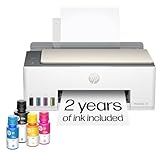
- SET IT UP ONCE AND PRINT WITH CONFIDENCE. No complicated maintenance. Just easy, reliable printing you can count on.
- INK FOR YEARS. NOT MONTHS. Up to 2 years of ink included. Get thousands of pages of cartridge-free printing. More pages, less hassle
- KEEPS PRINTING WELL AFTER COMPETITORS HAVE QUIT. No complex maintenance. Sharper text, richer colors.[2] Only with HP Smart Tank
- PREMIUM SUPPORT - Strong technical expertise to solve issues faster
- THE LAST PRINTER YOU'LL EVER NEED. Enjoy years of refillable, cartridge-free printing.
The 6001 makes more sense than a 5101 when school packets, forms, and household documents are common. Confirm the exact U.S. model number and live price because HP naming can vary by retailer and region. A buyer who prints almost exclusively black text should not choose the 6001 solely for its large color-ink supply.
HP Smart Tank 7602: best-equipped home-office tank in this shortlist
The HP Smart Tank 7602 is aimed at a higher-volume home office and includes the features that entry-level tank printers commonly omit: automatic duplexing, fax, Ethernet, USB-host connectivity, and an automatic document feeder. HP’s specification sheet lists a 35-page ADF for the 7602 series, and HP lists up to 6,000 black and 8,000 color pages of included ink for the series.
The 7602 is worth the higher purchase price only when the owner will use the ADF, two-sided printing, fax, Ethernet, or larger office-oriented feature set. Consumer Reports’ 2026 buying-guide material placed the model around $350, but that figure should be checked against a live U.S. seller before publication or purchase. RTINGS identifies the HP Smart Tank 7602 as an alternative for people printing more color documents. Consult the HP Smart Tank 7602 specification sheet for the documented feature set.
Epson EcoTank Pro ET-5850: best for genuinely high volume
The Epson EcoTank Pro ET-5850 belongs in the high-volume category, not the cheapest-printer category. RTINGS names the ET-5850 its leading cheap-ink printer in 2026 testing, but the ET-5850’s higher purchase price only makes sense for a home office or small business that will use its productivity and operating-cost advantages.
The RTINGS 2026 testing supports considering the ET-5850 when low ongoing ink cost matters more than the lowest checkout price. Buyers should still check live U.S. availability, warranty terms, paper capacity, speed, and the current replacement-bottle cost.
How much does cheap printer ink really save?
Cheap printer ink can mean four different things: a low bottle price, a low cost per printed page, a low total ownership cost, or a low first-year cost because the box includes a large supply. Those measures can point to different printers.
| Cost measure | What it includes | Why it can mislead |
|---|---|---|
| Purchase price | The printer at checkout | A cheap cartridge printer may require expensive replacement cartridges |
| Cost per black page | Ink or toner used for black output | Does not show color, paper, cleaning, or printer cost |
| Cost per color page | Black, cyan, magenta, and yellow supplies | Photos and heavy graphics use more ink than standard test pages |
| Three-year ownership cost | Printer, supplies, paper, subscriptions, and likely maintenance | Requires realistic page counts and current prices |
| Included starter supply | Ink or toner supplied in the box | Initial yield may not represent future replacement cost |
For a basic comparison, calculate ink cost per page as:
Ink cost per page = cost of ink used ÷ number of pages producedFor a four-color tank printer, a simplified color calculation is:
Free tools Windows power users keep installed
One-click scans. No signup required.
Estimated color cost per page =
(black-bottle cost ÷ black yield)
+ (cyan-bottle cost ÷ cyan yield)
+ (magenta-bottle cost ÷ magenta yield)
+ (yellow-bottle cost ÷ yellow yield)
The simplified formula is useful for comparing compatible supplies, but it excludes setup ink, cleaning cycles, photo coverage, paper, shipping, sales tax, replacement printheads, wasted pages, and subscription fees. A more realistic three-year calculation is:
Three-year ownership cost =
printer price
+ expected ink or toner purchases
+ paper
+ subscription fees
+ likely maintenance costs
− resale value, if relevant
HP describes a break-even method that compares the extra purchase price of a Smart Tank with recurring cartridge expenses. Use the method with current model-specific prices rather than treating HP’s generic example as a universal result. The HP cost-per-page and break-even explanation provides the framework.
What happens at different monthly print volumes?
Monthly volume is the most useful first filter, but the bands below are practical decision guides rather than universal break-even rules. A household printing 25 color pages and a household printing 25 black-text pages may reach different conclusions.
Also popular on Amazon
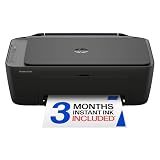
- PERFECT FOR BASIC PRINTING NEEDS – Print everyday color documents like to-do lists, letters, financial documents and recipes
- KEY FEATURES – Color print, copy, scan, and a 60-sheet input tray, plus mobile and wireless printing
- OPTIMIZE PRINT FORMATTING WITH HP AI – Print web pages and emails with precision—no wasted pages or awkward layouts; HP AI easily removes unwanted content, so your prints are just the way you want
- ICON LCD – Print your basic documents with ease from the intuitive control panel
- PRINT SPEED – Up to 7.5 ppm black, 5.5 ppm color
| Approximate monthly volume | Usually worth considering | Why | Check before buying |
|---|---|---|---|
| Under 25 pages | Cheap cartridge printer | The lower purchase price may outweigh tank savings for a long time | Replacement-cartridge price, drying risk, and whether color is needed |
| 25–100 pages | Compare a tank with a high-yield cartridge model | The result depends heavily on color percentage and price premium | Three-year cost and included starter ink |
| 100–300 pages | Refillable tank, especially for color | Recurring bottle savings become more meaningful | Duplexing, paper capacity, speed, and maintenance |
| 300 or more pages | Higher-end tank or laser | Productivity features and supply capacity matter as much as cost per page | ADF, automatic duplexing, tray capacity, speed, and duty expectations |
| 50 pages plus occasional photos | Tank if documents are frequent; compare photo output separately | Photo ink and paper can dominate the calculation | Independent photo tests and photo-media cost |
HP recommends considering a Smart Tank when printing exceeds roughly 100 pages monthly or cartridges are replaced every few months. That threshold is HP’s manufacturer recommendation, not an independent break-even rule. A person printing 10 pages per month should not assume a tank will be cheaper simply because the included bottle yield is large.
Outdated Drivers Are Slowing You Down
One free scan finds every outdated or missing driver and matches the right update for your exact hardware.Free scan · exact hardware matchPC Slower Than It Used to Be?
A free scan shows the junk files, broken settings and background clutter dragging Windows down - then fixes them in one click.Free scan · Windows 10 & 11What is the difference between an ink tank, cartridge printer, and monochrome laser?
Refillable tanks, cartridges, and monochrome lasers solve different ownership problems. The right choice depends on color requirements, volume, maintenance tolerance, and how long the printer may sit unused.
| Printer type | Operating pattern | Strengths | Weaknesses | Best match |
|---|---|---|---|---|
| Refillable ink tank | Buy ink bottles as needed | Large included supply, lower recurring color cost, fewer refill interruptions | Higher purchase price, possible clogs, liquid-ink handling, occasional slow entry-level models | Weekly color printing |
| Cartridge inkjet | Replace individual or combined cartridges | Low initial price, compact choices, simple replacement | Higher cost per page, starter cartridges may be small, some models stop when one color is empty | Very occasional printing |
| Monochrome laser | Replace black toner | Black-text speed, no liquid-ink drying, good fit for long idle periods | Cannot print color; toner and printer prices vary | Mostly black documents |
| Ink subscription | Pay monthly for a page allowance and receive compatible cartridges | Automatic delivery and predictable billing for steady users | Account, internet, page-plan, rollover, cancellation, and cartridge-use restrictions may apply | Predictable cartridge printing |
Is an ink subscription worth it?
An ink subscription can be worthwhile for a compatible cartridge printer with predictable monthly usage, but HP Instant Ink is not automatically cheaper than bottled ink or high-yield cartridges. HP advertises Instant Ink plans starting at $1.79 per month, with pricing tied to a page allowance rather than the amount of ink physically consumed.
Before enrolling, compare the plan’s monthly page limit with actual use, rollover rules, plan-change terms, cancellation terms, and the price of normally purchased cartridges. Heavy photo printing can use a page allowance quickly. Irregular users may pay for capacity they do not use. Users who want unrestricted third-party ink or who dislike account requirements may prefer a tank printer.
HP states that HP+ requires an HP account, an internet connection, and Original HP ink. Do not confuse HP+ with every HP printer or every Instant Ink plan, but check the setup screen and terms for the exact model. The HP U.S. printer and Instant Ink information describes the current advertised plan and account-related requirements.
Which printer features matter more than the ink price?
A printer with cheap ink can still be frustrating if it lacks the feature that matches the household’s workflow. Prioritize these features in order of how often they affect your actual documents.
Automatic duplex printing
Automatic duplexing prints both sides without manually turning pages. Automatic duplexing is valuable for school assignments, forms, and office documents because manual two-sided printing is slower and more error-prone. HP lists manual two-sided printing for its 5000/5100 series and automatic duplexing for its 6000 and 7600 series.
Automatic document feeder
An automatic document feeder is important for scanning or copying multi-page documents. A flatbed scanner is adequate for an occasional single page, but an ADF is much faster for tax packets, signed forms, and school paperwork. HP lists a 35-page ADF on the Smart Tank 7602-series specification sheet.
Paper capacity and media support
Small 60- to 100-sheet trays can be acceptable for light home use but require frequent refilling in a family or home office. Check support for envelopes, heavier paper, different paper sizes, borderless printing, and photo paper before buying. Photo paper can cost more than the ink used on a casual photo, so media support is part of the ownership calculation.
The Tool Desk
Outbyte PC Repair FREERepair Windows errors before they cause bigger problemsFix Now →Outbyte Driver Updater FREEScan for outdated or missing drivers - takes under a minuteDriver Scan →Speed and connectivity
Advertised pages-per-minute figures normally use standardized test pages, so independent testing is more useful for judging real document speed. Check for dual-band Wi-Fi, Wi-Fi Direct, Ethernet, USB printing, mobile apps, Apple AirPrint, and Mopria. Do not assume that every entry-level tank has Ethernet or USB-host printing.
Photo quality
Cheap ink does not guarantee cheap or excellent photos. Tank printers can be economical for everyday color documents, but photo quality varies substantially. Epson often appeals to photo-oriented buyers and Canon can be attractive for casual photo printing, but an independent photo test should decide between models. Photo pages use more ink than ordinary text pages, and photo paper can dominate total cost.
Also popular on Amazon

- FROM AMERICA'S MOST TRUSTED PRINTER BRAND – The Envy 6155 is perfect for homes printing everyday high-quality color documents like homework and borderless photos. Print speeds up to 10 ppm black, 7 ppm color.
- 3 MONTH TRIAL OF INSTANT INK – Subscribe to the Instant Ink delivery service to get ink delivered directly to your door before you run out, and you save up to 50% on ink. After 3 months, a monthly fee applies unless cancelled.
- KEY FEATURES – Color print, copy and scan, plus auto 2-sided printing and a 100-sheet input tray
- HP'S MOST INTUITIVE COLOR TOUCHSCREEN – Smoothly navigate your printer with the easy-to-use 2.4" touchscreen
- WIRELESS PRINTING – Stay connected with our most reliable dual-band Wi-Fi, which automatically detects and resolves connection issues
Printhead design and repair risk
TechRadar notes a design difference between brands: HP Smart Tank and Canon MegaTank models use user-installed printheads, while many Epson EcoTank models have the printhead built in. A user-installed printhead can affect long-term repairability and replacement risk, although the design alone does not establish reliability. Read the TechRadar ink-tank printer coverage alongside the manufacturer’s warranty and support documentation.
Independent reader supportYour contribution helps us test, update, and keep practical guides available for everyone.How do you keep ink costs low?
- Use draft mode for internal documents. Draft output can reduce ink use when presentation quality is unimportant.
- Use black-only output where appropriate. A color document can consume color ink even when the page appears mostly black, depending on the printer and driver settings.
- Print fewer full-color pages. Heavy graphics and photographs can consume substantially more ink than standard text pages.
- Buy the exact compatible bottle. Ink bottles are model-specific. Match the bottle number, not merely the brand, color, or bottle shape.
- Use genuine or well-supported supplies. Third-party ink may lower cost but can introduce clogging, color-consistency, quality, or warranty problems. Third-party ink should not be the default recommendation without model-specific evidence.
- Print a small test page periodically. Occasional black and color use can reduce the chance that nozzles remain unused for long periods, but follow the manufacturer’s maintenance instructions.
- Use ordinary office paper for ordinary documents. Reserve photo paper and specialty media for pages that need them.
- Compare replacement supplies before buying. A large included supply is useful, but future bottles or cartridges determine long-term cost.
Use the bottle number listed for the exact printer. HP’s supply documentation distinguishes Smart Tank bottle families, so a search for generic “cheap HP ink” can lead to incompatible supplies. The HP Smart Tank supply-compatibility document is a useful example of why model-specific checking matters. Epson and Canon buyers should likewise follow the bottle number shown on the product’s U.S. supply page.
What are the main failure modes with cheap-ink printers?
Infrequent use can cause inkjet maintenance problems
Ink tanks are not maintenance-free. A printer used only a few times a year may perform cleaning cycles, waste ink, or develop clogged nozzles. A household with extremely infrequent printing may be better served by a cartridge model or monochrome laser, depending on the need for color.
“Two years of ink” is not a calendar guarantee
Claims about two or three years of included ink depend on page yields and monthly-use assumptions. HP’s current Smart Tank material ties some three-year claims to assumptions such as 167 or 200 pages per month. Actual duration changes with page coverage, photos, setup, cleaning, and wasted pages.
Manufacturer savings claims are comparisons, not promises
Claims such as “save up to 90%” or Canon’s “save up to $1,000” depend on the comparison cartridge, page yields, ink prices, and methodology. Epson says its comparison uses MSRP and yields as of March 2024, so an older comparison should not be treated as a universal 2026 ownership-cost guarantee.
Some models require accounts or internet services
Check whether printer setup, mobile printing, HP+, or a subscription requires an account and an active internet connection. A buyer who wants a printer to work without cloud enrollment should read the exact model’s setup and service terms before purchase.
Quick wins for a faster PC:
Scan for outdated or missing drivers - takes under a minuteDriver Scan →Repair Windows errors before they cause bigger problemsFix Now →Fix the driver behind crashes, sound loss and screen glitchesFind Drivers →Availability can change
U.S. model numbers, bundled supplies, features, and prices can differ by retailer. Recommendation pages can also retain discontinued printers after replacements appear. RTINGS notes that its selections can change as models become unavailable, so confirm live availability immediately before publication or purchase.
Which printer should you choose?
- Print fewer than 25 pages monthly: Buy the cheapest reliable cartridge model that meets your color and scanning needs, unless long idle periods make a monochrome laser more suitable.
- Print color every week: Buy an entry-level refillable tank such as the Epson ET-2800, Canon G3270, or HP Smart Tank 5101 after comparing the live price and replacement supplies.
- Need automatic two-sided printing: Choose a midrange tank such as the HP Smart Tank 6001 or a verified Epson or Canon equivalent with automatic duplexing.
- Scan multi-page documents: Choose a tank with an ADF, such as the HP Smart Tank 7602, rather than a flatbed-only entry-level model.
- Print mostly black text: Choose a monochrome laser unless color is an occasional but important requirement.
- Print hundreds of pages monthly: Choose a higher-volume tank such as the Epson EcoTank Pro ET-5850 or a suitable business laser, prioritizing speed, paper capacity, duplexing, and maintenance.
Frequently Asked Questions
Are ink-tank printers cheaper than cartridge printers?
Ink-tank printers are generally cheaper to operate for sustained color printing because replacement bottles usually provide more ink at a lower cost per page. A cartridge printer can still be cheaper overall for a very occasional user because the cartridge printer costs less to buy.
Is a cheap printer with included ink really a good deal?
A printer with included ink can be a good deal, but included-ink claims are based on manufacturer-rated yields and usage assumptions rather than a guaranteed number of calendar years. Compare the price and yield of replacement bottles or cartridges before buying.
Should I buy a laser printer instead of an ink tank?
Buy a monochrome laser printer when nearly all output is black text, speed matters, or the printer may sit unused for weeks. Buy an ink tank when regular color printing, color graphics, or economical color pages are important.
Does HP Instant Ink always save money?
HP Instant Ink does not always save money. The subscription can suit predictable cartridge printing, but page allowances, rollover rules, account requirements, cancellation terms, photo usage, and restrictions on third-party ink determine whether the plan is economical for a particular household.
Can I use any ink bottle in an EcoTank, MegaTank, or Smart Tank printer?
No. Ink bottles are model-specific, and buyers should use the exact bottle number listed for the printer. Using an incompatible bottle can create quality, clogging, color, or support problems.
The Bottom Line
Bottom line: Choose a refillable tank printer for regular color printing, a cartridge printer for genuinely low-volume use, and a monochrome laser for mostly black text. The best cheap-ink purchase is the model whose purchase price, supplies, features, maintenance, and expected monthly volume fit together—not necessarily the printer with the lowest price or the largest “up to” yield claim.

