
iTechGuides is reader-supported. When you buy through links on our site, we may earn an affiliate commission. As an Amazon Associate I earn from qualifying purchases. Learn more
The best photo printers for iPhone in 2026 depend on print size and volume: the Epson EcoTank Photo ET-8500 is the best all-round home choice, the Epson ET-8550 is better for prints up to 13×19 inches, and the Canon SELPHY CP1500 is the simplest compact 4×6 option. The Fujifilm instax mini Link 3 is best for small instant-film-style keepsakes.
Those printers solve very different problems. A refillable ink-tank printer is designed for frequent home printing, a dye-sublimation printer is convenient for occasional 4×6 photos, and an instant-film printer prioritizes portability and personality over accurate, large-format reproduction.
Key takeaways
- The Epson EcoTank Photo ET-8500 is the strongest general-purpose choice for high-quality home photos, documents, scanning, low ink costs, and AirPrint.
- The Epson EcoTank Photo ET-8550 is the large-format choice, supporting borderless output up to 13×19 inches and specialty media up to 1.3 mm thick.
- The Canon SELPHY CP1500 is the best fit for compact, dry, durable 4×6 dye-sublimation prints and supports AirPrint, Wi-Fi, USB, memory cards, and Canon’s app.
- The Canon PIXMA TR160 is genuinely portable and prints both documents and photos, but its optional battery and cartridge-based operation make it a different compromise from a pocket printer.
- The Fujifilm instax mini Link 3 prints a small instant-film-style image in approximately 15 seconds, with development taking approximately 90 seconds.
- iPhone photos commonly use a 4:3 aspect ratio while 4×6 paper uses 3:2, so an iPhone photo may be cropped or bordered unless the image is reframed before printing.
Which is the best photo printer for iPhone in 2026?
The Epson EcoTank Photo ET-8500 is the best overall photo printer for iPhone users who want a home all-in-one rather than a pocket gadget. The ET-8500 combines photo-oriented six-color tank printing with everyday documents, scanning, Wi-Fi, AirPrint, and Epson’s mobile-app support. Independent testing coverage from RTINGS’ iPhone printer recommendations currently places the ET-8500 at the top of its category.
Recommended Free Tools
Choose a different model when the main requirement changes:
Popular on Amazon

- User-Friendly Portable Photo Printer for iPhone, Android & PC - Get beautiful and colourful memories with Liene 4x6 photo printer! After opening the entire package, you can find one cartridge + 20 sheets of photo paper (placed inside the machine packaging), as well as an additional box containing 80 sheets of photo paper (which includes two cartridges + 80 sheets of photo paper). Full package includes smartphone photo printer, Liene 4x6 photo printer papers (100 sheets), 3 colour cartridges, and fully sealed cassette to prevent dust. Minimalist and magnetic design for compact storage.
- Superior Quality 4x6 Photo Printer - Print photos like no other thanks to the thermal-dye sublimation tech adopted by the picture printer for iphone. The dyes deeply penetrate the paper for vibrant photo printing, and the laminated surface is resistant to water, scratches, fingerprints and fading. Clean the print head promptly if smudges are observed on printed photos during operation. Get Liene photo printers now for yourself and your loved ones, print your happy moments together and keep your love forever!
- Wi-Fi Photo Printer for Smartphone - The built-in hotspot of the photo printer makes it easy to print pictures from your phone, avoiding outside interference with a fast and stable connection. No other networks required! Simply connect your device to the independent instant photo printer 4x6 hotspot.
- Multiple Device Compatibility - Liene phone printer provides instant photo printing for up to 5 simultaneous connections. Share with family and friends or print from your different devices. No additional cables or Bluetooth required when printing photos with this picture printer. Note: Ensure the ink cartridge clicks into place before printing.
- Customize your Printing with the Liene App - Customize your photos with our specialized App! You can add a Square border, insert filters, enhance the contrast and brightness, check printing status, and more. You can even print your ID and Visa photos from home with this photo printer for iphone 4x6 prints.
| What you need | Recommended printer | Why | Main compromise |
|---|---|---|---|
| Best all-round home printing | Epson EcoTank Photo ET-8500 | High-quality photos, documents, scanning, tank ink, AirPrint | Too large for travel and not intended for very large prints |
| Large photos and creative media | Epson EcoTank Photo ET-8550 | Borderless output up to 13×19 inches and specialty-media support | High purchase price and bulky design |
| Compact 4×6 photos | Canon SELPHY CP1500 | Dye-sublimation prints emerge dry and support several finishes | Uses proprietary media and is limited compared with an inkjet |
| Lower-cost everyday tank printing | Epson EcoTank ET-2980 | Refillable ink, Wi-Fi, AirPrint, documents, and occasional photos | Less photo-focused, with some reported oversaturation and grain |
| Portable full-size printing | Canon PIXMA TR160 | Prints documents plus 4×6, 5×7, and 8×10 photos | Optional battery and less photo-specialized output |
| Small, playful keepsakes | Fujifilm instax mini Link 3 | Bluetooth app printing with an instant-film appearance | Small image area and film-like rather than faithful reproduction |
What are the best photo printers for iPhone?
Best overall: Epson EcoTank Photo ET-8500
Buy the ET-8500 if: you want one home printer for iPhone photos, documents, scanning, and frequent printing without relying on expensive replacement cartridges.
The ET-8500 is the most balanced recommendation for a typical home user. Its refillable ink-tank design suits people who print regularly, while its photo-oriented six-color system is a better fit for color images than a basic two-cartridge printer. Wi-Fi and AirPrint allow direct printing from an iPhone, and the all-in-one design adds scanning and everyday document work.
The ET-8500 is not the right choice for someone who prints only a handful of photos each year, needs a battery-powered printer, or wants 13×19-inch output. A photo lab may cost less for very occasional printing, while the ET-8550 is the logical upgrade for large creative prints.
Do these 3 things before closing this tab:
1Scan for outdated or missing drivers - takes under a minute2Repair Windows errors before they cause bigger problems3Fix the driver behind crashes, sound loss and screen glitchesBest for large prints: Epson EcoTank Photo ET-8550
Buy the ET-8550 if: you need borderless photos up to 13×19 inches, print on cardstock or specialty media, or want a wider-format photo printer for artwork, portfolios, and creative projects.
Epson lists a U.S. price of $749.99 and a maximum paper size of 13×19 inches on the ET-8550 product page, with those figures observed in August 2026. The official Epson ET-8550 specifications and price should be checked again before purchase because prices and availability change.
The ET-8550 also handles cardstock and specialty media up to 1.3 mm thick, according to Epson. That flexibility makes the ET-8550 more useful than a dedicated 4×6 printer for invitations, art prints, scrapbook pages, and other projects. The trade-off is size, upfront cost, and the need for a stable home setup.
Epson claims an estimated 4×6 cost of approximately 4 cents per print, compared with approximately 40 cents for traditional ink cartridges. Those are Epson’s estimates, not independent measurements. Actual cost depends on image coverage, paper, cleaning cycles, borderless-printing waste, regional prices, and how often the printer is used. Epson also claims up to two years of printing from an included or replacement bottle set under its stated assumptions.
Best compact 4×6 printer: Canon SELPHY CP1500
Buy the CP1500 if: you mainly want attractive 4×6 photos for albums, parties, events, or gifts and prefer dry prints with little inkjet maintenance.
The Canon SELPHY CP1500 uses dye-sublimation rather than liquid inkjet cartridges. Dye-sublimation prints are produced through a multi-pass process and receive a protective finish, so prints emerge dry and ready to handle. The CP1500 supports postcard-size 4×6 prints plus smaller square and card formats, and Canon offers glossy, semi-gloss, and satin-style finishes through compatible media.
Canon’s U.S. shop displayed promotional pricing of $159.99 against a regular price of $179.99 when checked for this article in August 2026. The official Canon SELPHY CP1500 page is the appropriate place to verify current price, stock, included accessories, and media compatibility.
Also popular on Amazon
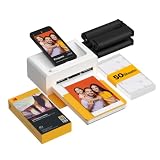
- Dock Photo Printer: The KODAK Dock Plus is a home photo printer that produces high-quality 4x6” prints directly from compatible smartphones. Featuring an integrated docking station, users can place their phone on the printer for better connection while simultaneously charging the device during printing.
- Genuine 4PASS dye sublimation printing: Each photo is produced in three color layers and finished with a clear protective lamination layer. In approximately 55 seconds, you receive a smooth, detailed print designed to resist fingerprints, water, and fading for long-lasting quality.
- Easy to Use: Print photos quickly without complicated setup or technical steps. Simply power on, connect wireless bluetooth, and start printing within seconds. The Dock Plus is built for straightforward operation, making it ideal for first time users and everyday photo printing.
- Home Printing Station: Designed for stable desktop use, this dock photo printer connects to a power outlet for consistent performance and larger 4x6” prints. Ideal for home printing, photo albums, framing, family events, and everyday picture printing.
- KODAK Photo Printer APP: Featuring integrated Bluetooth connectivity, this portable printer connects to compatible iOS and Android devices through the KODAK Photo Printer app. Edit, crop, and customize your photos before printing for creative results.
The CP1500 supports AirPrint, Wi-Fi, USB, memory cards, and Canon’s SELPHY app. Canon says an optional battery can produce up to 54 prints per charge. The battery is not the same as a built-in battery, so confirm whether the bundle includes it before treating the CP1500 as travel-ready.
Canon describes CP1500 prints as water-resistant and says they can last up to 100 years under specified storage conditions. The longevity claim depends on Canon’s testing and storage assumptions; light, heat, humidity, paper handling, and display conditions still matter.
The CP1500 is a poor fit for 8×10 or 13×19 prints, documents, art media, or very high-volume users who want the lowest possible media cost. Dye-sub media is convenient, but the paper and color ribbon are proprietary and bundled together.
Best value tank printer: Epson EcoTank ET-2980
Buy the ET-2980 if: you want refillable ink and everyday all-in-one functionality, with occasional iPhone photo printing rather than a dedicated photo workflow.
The ET-2980 is a sensible middle ground for households that print documents more often than photographs. RTINGS reports good photo quality, high page yield, low maintenance cost, Wi-Fi, AirPrint, and Epson mobile-app support, while also noting somewhat oversaturated color and visible grain in some photos. Those trade-offs make the ET-2980 less compelling for photographers but reasonable for casual family snapshots and school projects.
The Tool Desk
Outbyte Driver Updater FREEScan for outdated or missing drivers - takes under a minuteDriver Scan →Outbyte PC Repair FREEClear out junk files and repair common Windows errorsFree Scan →The ET-2980 should not be treated as a smaller ET-8500. The ET-8500 is more photo-oriented, while the ET-2980 emphasizes affordable general-purpose tank printing. Compare current models and availability through Epson’s EcoTank photo-printer range.
Best portable full-size printer: Canon PIXMA TR160
Buy the TR160 if: you need to print both documents and photos away from home and want more useful paper sizes than a pocket printer provides.
The Canon PIXMA TR160 supports AirPrint and can print 4×6, 5×7, and 8×10 photos as well as documents. An optional rechargeable battery allows operation away from a wall outlet, but battery availability depends on the configuration. RTINGS reports an optional-battery rating of roughly 330 prints; the figure should be understood as a test or rating result rather than a guarantee for every document, photo, paper type, or battery condition.
The TR160 is portable in the practical, full-size-printer sense—not pocket-sized. It needs more setup, power planning, and ink maintenance than a compact dye-sub printer. Photo quality is also below the priority level of a dedicated photo printer, but the TR160 is much more versatile for travel documents, forms, and occasional photos. Canon’s PIXMA printer range is the starting point for checking the exact U.S. model and battery bundle.
Best instant-film look: Fujifilm instax mini Link 3
Buy the instax mini Link 3 if: you want small physical keepsakes with an instant-film aesthetic, app effects, and an easy social or party workflow.
Also popular on Amazon

- STEP UP YOUR PRINTING GAME. KODAK Step Printer Connects to Any iOS or Android Device [Via Bluetooth or NFC] Turn Your Selfies, Portraits, Social Media Posts Into Physical Photos.Package Includes : KODAK STEP Instant Mobile Photo Printer, Micro USB Charging Cable, Starter Pack of KODAK ZINK Photo Paper, Quick Start Guide, Limited Warranty
- AMAZING ZERO-INK TECHNOLOGY. ZINK 2” x 3” Sticky-Back Paper with Embedded Dye Crystals Delivers High-Quality, Durable, Affordable, Beautifully Detailed Prints That are Resistant to Moisture, Rips, Tears & Smudges.
- FULL EDITING SUITE VIA APP. Download the KODAK App to Create Collages & Customize Your Snaps with Stunning Filters, Interesting Borders, Cool Stickers, Funny Text & Other Personalized Flair.
- TAKE YOUR PROJECTS TO GO. Our Palm-Sized Printer Weighs Less Than a Pound, Sets Up Fast & Delivers Gorgeous Prints You Can Peel & Stick Everywhere.
- CUTE, COMPACT & COLORFUL. Step Printer is Designed for Photo-Loving Influencers & Crafters of All Ages & Skill Levels! Portable, Lightweight Device Features Built-In Lithium-Ion Rechargeable Battery [Prints 25 Photo on a Full Charge]
The instax mini Link 3 prints from iOS through Fujifilm’s instax mini Link app over Bluetooth. Fujifilm lists approximately 15 seconds for image exposure and approximately 90 seconds for film development on its product information and instax mini Link 3 specifications page.
The instax Mini image area is 62×46 mm. The small format is ideal for wallets, journals, scrapbooks, and gifts, but it is not a substitute for a 4×6 or large-format photo printer. Instax film also has a characteristic look and develops after exposure, so the physical result may not match the iPhone display exactly. Fujifilm cautions that the actual print finish can differ from the smartphone display on its instax mini Link 3 product page.
Choose the instax mini Link 3 for fun rather than color-critical reproduction, archival claims, low media cost, or large prints. Film cost is an ongoing part of ownership and should be included in the buying decision.
Why is Canon SELPHY QX20 not a primary recommendation?
The Canon SELPHY QX20 is a compact sticker-photo printer, but its availability is too uncertain to recommend as a dependable primary buy without checking stock immediately before publication or purchase.
Canon’s product and category pages have shown conflicting availability signals, including unavailable, discontinued, and out-of-stock states. The Canon SELPHY QX20 product page can still be useful for comparing its features, but readers should not assume that a marketplace listing represents a current U.S. model, a new unit, or a full manufacturer warranty. The QX20 is best treated as a model to monitor unless a verified retailer has confirmed stock and exact consumables.
What is the difference between AirPrint and a printer app?
AirPrint lets an iPhone send a document or image from a supported app without installing a manufacturer-specific print driver. An app-dependent printer requires its own iOS app and may use Bluetooth or a direct Wi-Fi connection instead.
For the normal AirPrint workflow, Apple says to connect the iPhone and printer to the same Wi-Fi network, open the image, tap Share or the app’s Actions button, tap Print, tap No Printer Selected, choose the printer, select available options, and tap Print. Apple’s AirPrint instructions also note that not every app supports printing.
Quick wins for a faster PC:
Repair Windows errors before they cause bigger problemsFix Now →Scan for outdated or missing drivers - takes under a minuteDriver Scan →| Printer or category | iPhone connection | Requires manufacturer app? | What the workflow means |
|---|---|---|---|
| Epson ET-8500, ET-8550, and ET-2980 | Wi-Fi and AirPrint | No for basic AirPrint; Epson app available | Print from supported iPhone apps on the same network |
| Canon SELPHY CP1500 | Wi-Fi, AirPrint, USB, memory cards, SELPHY app | No for basic AirPrint; app adds layouts and features | Flexible wireless workflow with both native and app-based options |
| Canon PIXMA TR160 | Wi-Fi, USB, AirPrint | No for basic AirPrint | Useful when printing photos and documents from a portable full-size printer |
| Fujifilm instax mini Link 3 | Bluetooth | Yes, instax mini Link app | Choose the image and effects in Fujifilm’s app before exposure |
| Compact sticker and instant-film printers | Usually Bluetooth or direct Wi-Fi | Usually yes | “Works with iPhone” does not necessarily mean native AirPrint support |
What print size should you choose?
Print size should be the first buying decision because a pocket printer cannot replace a wide-format inkjet, and a 13×19-inch printer is excessive for someone who only wants wallet photos.
| Intended print | Typical use | Best match |
|---|---|---|
| Wallet, sticker, or small instant print | Journals, gifts, scrapbooks, social photos | Fujifilm instax mini Link 3 or a confirmed compact sticker printer |
| Instax Mini image area: 62×46 mm | Instant-film keepsakes | Fujifilm instax mini Link 3 |
| 4×6 inches | Albums, frames, parties, everyday snapshots | Canon SELPHY CP1500, ET-8500, or ET-2980 |
| 5×7 or 8×10 inches | Framed enlargements and travel printing | Canon PIXMA TR160 or an Epson inkjet |
| Up to 13×19 inches | Portfolios, posters, artwork, creative media | Epson EcoTank Photo ET-8550 |
How much does an iPhone photo printer cost to run?
Running cost depends on the complete media system rather than the printer’s purchase price. Compare the printer price, paper, ink or film, replacement consumables, optional battery, and expected number of prints.
| Printer type | Cost pattern | Best economic case | Important limitation |
|---|---|---|---|
| Refillable ink-tank inkjet | Higher initial purchase; separate ink and paper | Frequent home printing and mixed documents/photos | Cleaning cycles, paper, and ink waste affect real cost |
| Cartridge inkjet | Lower entry price; cartridges can become expensive | Occasional general-purpose printing | Less attractive for frequent photo volume |
| Dye-sublimation 4×6 | Proprietary paper-and-ribbon sets | Predictable small batches and immediate dry prints | Less flexible and often costly at high volume |
| Instant film | Film is the principal recurring expense | Small keepsakes and instant-film style | Small output and no conventional paper flexibility |
| Photo lab | Pay per print with no hardware or maintenance | Only a few prints per year or large professional output | Less immediate and less private than printing at home |
For frequent printing, tank models deserve priority. Epson’s approximately 4-cent 4×6 estimate for the ET-8550 is useful as a manufacturer benchmark, but the estimate is not a universal real-world price. A user printing infrequently may still spend less by using a local pharmacy, retail photo counter, online service, or professional lab.
Also popular on Amazon

- 2x3" Portable Photo Printer: The upgraded PP01 photo printer uses advanced inkjet technology. This portable photo sticker printer produces vivid, full-color prints on premium sticky-backed photo paper that is smudge-proof, water-resistant, and tear-resistant. The Nelko mini photo printer is pocket-sized and weighs only 308 g, making it ultra-portable for school, travel, and field trips. Each ink cartridge prints up to 80 full-color 2x3 photos on sticky-backed paper
- Easy Printing via Bluetooth: The PP01 mini photo printer is compatible with iOS and Android phones via Bluetooth. Simply download the Nelko app from Google Play or the App Store. Load the 2x3 photo paper with the smooth side facing down. Install the ink cartridge, connect via Bluetooth, and print directly using the Nelko app. A USB charging cable is included; the adapter is not included
- High-Quality Photos: This mini photo sticker printer uses advanced inkjet technology for clear, vibrant prints. This portable photo printer produces 600 DPI high-resolution images with precise colors, capturing fine details and realistic tones. Each photo comes with adhesive backing, ideal for scrapbooks and preserving your memories with this sticker printer. Personalize every photo for holidays, birthdays, or daily events
- Powerful App: The Nelko 2x3" PP01 photo printer app lets you edit photos and offers a variety of frame designs, making it perfect for personalizing your photos for projects like scrapbooking or journaling. Download the Nelko app to create collages and customize photos with filters, graffiti, borders, stickers, text, AI image editing, and many other features. Edit photos on your phone, then send them to the Nelko app for instant printing in under 90 seconds
- Versatile Uses: This portable photo printer is ideal for travel journals, party favors, and family gatherings. Students use it for planners and photo printing. Crafters use it for DIY projects, custom labels, and scrapbooking. It's a practical photo sticker printer for bloggers, small businesses, and event photographers to create instant giveaways. Create holiday surprises and capture heartfelt moments with loved ones by printing photos on Nelko sticky-backed photo paper.
How do dye-sublimation and inkjet photo printers differ?
Dye-sublimation printers are usually better for convenient occasional 4×6 printing, while inkjet printers are better for paper flexibility, documents, enlargements, and high-volume home use.
What’s actually slowing this PC down?
Pick the symptom - the matching free tool is one click away.
| Criterion | Dye-sublimation | Inkjet |
|---|---|---|
| Print handling | Prints emerge dry and are commonly overcoated | Prints may need careful handling until dry |
| Media flexibility | Usually limited to proprietary sizes and packs | Supports more paper sizes, finishes, and specialty media |
| Maintenance | No inkjet nozzle-clogging routine | Nozzles can clog after long periods of inactivity |
| Documents | Not the practical choice | Suitable, especially with an all-in-one model |
| Large prints | Generally unsuitable | Much better, especially with a wide-format model |
| Running cost | Media packs can be expensive at high volume | Tank systems can reduce ink cost, but paper and cleaning still count |
How can you prevent iPhone photo cropping?
Crop the image to the target paper ratio before printing because most iPhone photos use a 4:3 ratio while 4×6 paper uses a 3:2 ratio. The mismatch can remove content at the sides, create white borders, or make the printer fill the paper by cutting into the image.
- Choose the paper size first. Select 4×6, 5×7, 8×10, or another target before editing the photo.
- Match the crop ratio. Crop a 4:3 iPhone image to 3:2 for a full-bleed 4×6 print, or use the printer app’s layout controls.
- Choose “fit” when preserving the whole image matters. Fit may leave borders, but it avoids unexpected cropping.
- Choose “fill” only when cropping is acceptable. Fill uses the paper more completely but can cut off faces, text, or important edges.
- Inspect the preview. Check faces, hands, horizon lines, and captions before sending the job.
Manufacturer apps often provide more precise layout and border controls than the basic AirPrint sheet. AirPrint is convenient, but readers should not assume that AirPrint exposes every crop, border, or color option available in a printer’s dedicated app.
How important are paper and color settings?
Paper can change the apparent quality of an iPhone print as much as a modest difference between printers. Glossy paper usually emphasizes contrast and saturation, matte paper reduces reflections and suits artwork, and semi-gloss or satin paper offers a middle ground.
Use the printer manufacturer’s recommended photo paper when evaluating a new printer. Select the correct paper type in the print dialog, confirm that the printer supports borderless output at the chosen size, and check whether specialty media or cardstock is allowed. The ET-8550’s support for cardstock and specialty media up to 1.3 mm is one reason it suits creative work better than a compact dye-sub model.
Crashes, No Sound, or Screen Glitches?
Random freezes, missing sound and display glitches usually trace back to one bad driver. Find and replace yours safely.Free scan · under a minutePC Slower Than It Used to Be?
A free scan shows the junk files, broken settings and background clutter dragging Windows down - then fixes them in one click.Free scan · Windows 10 & 11Phone screens are bright and often set to vivid display modes, so a print can look darker or less saturated than the same image on the iPhone. For consistent results, avoid judging a print immediately beside a brightly illuminated screen, use the recommended paper setting, and investigate color profiles only if you are prepared to manage color from a computer or advanced application.
Independent reader supportYour contribution helps us test, update, and keep practical guides available for everyone.What does portable mean for an iPhone photo printer?
“Portable” describes three very different experiences: a full-size inkjet that can travel, a compact 4×6 dye-sub printer that may use an optional battery, and a pocket printer designed around small proprietary media.
- Portable full-size inkjet: The Canon PIXMA TR160 can print documents and several photo sizes, but it needs more setup and may need a separately sold battery.
- Portable 4×6 dye-sub: The Canon SELPHY CP1500 is better for events, parties, and albums; its optional battery is rated by Canon for up to 54 prints per charge.
- Pocket printer: The instax mini Link 3 is easier to carry, but it produces a small film image and requires Bluetooth plus the instax app.
Before buying a “portable” model, check its dimensions, weight, battery inclusion, charger, media capacity, and whether the printer can operate without a home router. A printer that is movable between rooms is not necessarily suitable for travel.
How do you fix common iPhone photo-printer problems?
AirPrint printer does not appear
- Confirm that the iPhone and printer are connected to the same Wi-Fi network.
- Wake the printer and finish its initial setup.
- Make sure the printer is not connected only by USB.
- Confirm that the iPhone app supports printing.
- Update the printer firmware and iPhone software when updates are available.
- Check whether guest Wi-Fi or router isolation blocks device discovery.
- Restart the printer, iPhone, and router.
Apple’s normal AirPrint process requires the iPhone and printer to share a Wi-Fi network. A Bluetooth app printer such as the instax mini Link 3 follows a different connection process and will not necessarily appear in the iPhone’s AirPrint printer list.
Free tools Windows power users keep installed
One-click scans. No signup required.
Prints are cropped
Change the image to the target aspect ratio, choose “fit” instead of “fill,” use the manufacturer’s layout app for precise borders, and leave extra space around faces and text before printing.
Also popular on Amazon

- Dual 4x6" & 3x3" Photo Printer Paper Tray Convenience: Seamlessly print both 6-inch standard photo paper and 3-inch sticky-backed paper with our innovative dual tray design. This compact phone photo printer for smartphone offers easy storage and quick access, making it perfect for diverse printing needs without taking up much space. Enjoy vibrant, high-quality prints every time.
- Fast Bluetooth Connectivity: Experience lightning-fast printing with our liene photo printer's Bluetooth connection, which pairs in just 13 seconds. Enjoy a seamless and efficient printing experience, perfect for capturing and sharing memories on the go without the hassle of cables or complex setups.
- Superior Quality Photo Printer 4x6 - Print photos like no other thanks to the thermal-dye sublimation tech adopted by the picture printer for iphone. The dyes deeply penetrate the paper for vibrant photo printing, and the laminated surface is resistant to water, scratches, fingerprints and fading. Get Liene photo printers now as amazing gifts for yourself and your loved ones, print your happy moments together and keep your love forever!
- Multiple Device Compatibility - Liene picture printer for iphone provides instant photo printing for up to mutiple simultaneous connections. Share with family and friends or print from your different devices. No additional cables required when printing photos with this phone printer.
- Customize your Printing with the Liene App - Customize your photos with our specialized App! You can add a Polaroid border, insert filters, enhance the contrast and brightness, check printing status, and more. You can even print your ID and Visa photos from home with this iphone photo printer for 4x6 & 3x3 prints.
Colors are too dark or oversaturated
Use the correct manufacturer paper setting, try the printer’s recommended paper, and compare the print under neutral lighting rather than directly beside a bright phone display. Advanced users can investigate application-managed color and paper profiles.
An inkjet print has streaks or missing colors
Run a nozzle check, perform one standard cleaning cycle, and check the nozzle pattern again. Avoid repeated deep-cleaning cycles because they consume ink, and print regularly rather than leaving an inkjet unused for long periods. Tank printers reduce cartridge replacement but are not clog-proof.
A dye-sub printer refuses to print
Verify that the cassette matches the printer model, load the paper in the correct orientation, check the ribbon or ink cassette level, and follow the model’s instructions for clearing a jam. Do not substitute an incompatible paper size.
Which printer should you buy?
Use this decision path to narrow the choice quickly:
- Need only compact 4×6 photos? Choose the Canon SELPHY CP1500.
- Need borderless prints up to 13×19 inches or specialty media? Choose the Epson ET-8550.
- Need frequent home photos plus documents and scanning? Choose the Epson ET-8500.
- Want lower-cost refillable ink for general home printing? Consider the Epson ET-2980.
- Need travel documents and photos in several sizes? Consider the Canon PIXMA TR160, checking whether the optional battery is included.
- Want small, playful instant-film prints? Choose the Fujifilm instax mini Link 3.
- Print only a few photos each year? Compare a local or online photo lab before buying a printer.
Do not rank these models solely by AirPrint support. AirPrint answers the connection question, not the questions of print quality, crop control, media cost, battery life, maintenance, or availability.
Should you use a photo lab instead?
A photo lab may be the better choice when you print only a few photos per year, need large professional-looking enlargements, or do not want to maintain a printer. Local pharmacy and retail photo counters offer convenience, while online services can provide more paper and size choices. A dedicated home printer becomes more attractive when immediate access, privacy, frequent small batches, or creative control matter more than minimizing the cost of occasional prints.
Compare the complete ownership cost before buying: printer, ink or film, paper, optional battery, replacement media, maintenance, and the number of prints you expect to make. A low-priced compact printer can become expensive if every image requires proprietary media, while a large tank printer can be wasteful if it spends most of the year unused.
Do these 3 things before closing this tab:
1Scan for outdated or missing drivers - takes under a minute2Clear out junk files and repair common Windows errors3Fix the driver behind crashes, sound loss and screen glitchesFrequently Asked Questions
Can I print iPhone photos without Wi-Fi?
You can print iPhone photos without a home Wi-Fi network when the printer supports direct Wi-Fi, Bluetooth through a manufacturer app, or another direct connection method. Standard AirPrint normally requires the iPhone and printer to be on the same Wi-Fi network, while the Fujifilm instax mini Link 3 uses Bluetooth and its instax app.
Are dye-sublimation printers better than inkjet printers for iPhone photos?
Dye-sublimation printers are usually better for convenient occasional 4×6 photos because prints emerge dry and the media is purpose-designed. Inkjet printers are better for large prints, documents, specialty paper, and frequent home printing, especially when the inkjet uses refillable tanks.
Why do my iPhone photos print cropped on 4×6 paper?
Most iPhone photos use a 4:3 aspect ratio, while 4×6 paper uses a 3:2 ratio. Crop the image to 3:2 before printing, choose “fit” to preserve the whole image with possible borders, or choose “fill” when some cropping is acceptable.
Is the Epson ET-8550 worth buying for occasional photo printing?
The Epson ET-8550 is usually difficult to justify for occasional printing because its U.S. price was listed at $749.99 in August 2026 and its main strengths are 13×19-inch output, specialty media, and frequent-use tank economics. Occasional users may spend less with a photo lab or compact 4×6 printer.
Quick wins for a faster PC:
Fix the driver behind crashes, sound loss and screen glitchesFind Drivers →Clear out junk files and repair common Windows errorsFree Scan →The Bottom Line
The Epson EcoTank Photo ET-8500 is the best overall iPhone photo printer for a home user who prints regularly and wants documents, scanning, AirPrint, and lower long-term ink costs. Choose the Canon SELPHY CP1500 for simple compact 4×6 prints, the Epson ET-8550 for 13×19-inch creative work, the Canon TR160 for portable full-size printing, and the instax mini Link 3 for small instant-film keepsakes.

