
The Tool Desk
Outbyte Driver Updater FREEScan for outdated or missing drivers - takes under a minuteDriver Scan →Outbyte PC Repair FREERepair Windows errors before they cause bigger problemsFix Now →iTechGuides is reader-supported. When you buy through links on our site, we may earn an affiliate commission. As an Amazon Associate I earn from qualifying purchases. Learn more
For PWM/flicker-sensitive people, the best current high-performance starting point is the OnePlus 15R, while the TCL NXTPAPER 70 Pro is the clearest choice for buyers trying to avoid conventional OLED behavior. Neither phone is guaranteed comfortable for everyone: brightness, refresh rate, waveform, modulation depth, software, and personal sensitivity all matter.
This guide ranks phones by display behavior rather than camera quality or processor speed. The recommendations separate manufacturer claims from independent testing and include a practical return-period test, because a phone that feels comfortable to one person can trigger eye strain, nausea, headaches, or migraine symptoms in another.
| # | Preview | Product | Price | |
|---|---|---|---|---|
| 1 |
|
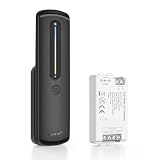
RGBZONE 2.4GHz RF CCT LED Strip Dimmer Controller Kit with Remote | RF Dimming, 0–100%... | $22.22 | Buy on Amazon |
Key takeaways
- The OnePlus 15R is the best current high-performance OLED candidate for many PWM-sensitive buyers, with adaptive 60/90/120/144/165Hz refresh rates, eye-comfort controls, and a reported high-frequency PWM mode.
- The TCL NXTPAPER 70 Pro is the strongest nontraditional-display option, with a 6.9-inch FHD+ 120Hz display and TCL’s claim of hardware-level DC dimming and zero-flicker protection.
- High PWM frequency is not automatically better: modulation depth, waveform, brightness level, refresh-rate behavior, temporal dithering, and individual response can matter just as much.
- Current Samsung Galaxy and Google Pixel OLED flagships deserve careful testing rather than automatic recommendations, particularly for users who need a user-controlled DC-like dimming fallback.
- A short store demo is not a reliable comfort test; use the exact phone at normal indoor and nighttime brightness during the seller’s return window.
Which phones are best for PWM/flicker-sensitive people?
The best starting point depends on whether the buyer wants a powerful OLED phone or wants to avoid conventional OLED dimming altogether. The OnePlus 15R leads the high-performance OLED category, while the TCL NXTPAPER 70 Pro is the more direct alternative for someone who has repeatedly reacted badly to OLED screens.
Quick wins for a faster PC:
Repair Windows errors before they cause bigger problemsFix Now →Scan for outdated or missing drivers - takes under a minuteDriver Scan →| Phone | Display approach | Why consider it | Main risk or trade-off | Best for | Evidence |
|---|---|---|---|---|---|
| OnePlus 15R | OLED with eye-comfort features | 165Hz adaptive refresh, low-brightness controls, reported high-frequency PWM mode, current flagship-class performance | OLED comfort remains individual; complete brightness-by-brightness flicker data is not published on the official page | Buyers who want performance without immediately abandoning OLED | Official specifications and marketing plus independent coverage |
| TCL NXTPAPER 70 Pro | LCD-oriented matte, paper-like NXTPAPER display | TCL claims hardware-level DC dimming, zero-flicker protection, 1-nit minimum brightness, and hardware blue-light filtering | Lower performance, cameras, contrast, software support, and resale value than premium flagships | Readers and buyers trying to avoid conventional OLED behavior | Official TCL specifications and claims |
| Selected Motorola models | OLED with model-specific anti-flicker or DC-like control | A named setting can provide a useful alternative dimming behavior | Availability, menu labels, and behavior vary by model, region, brightness, and software | Buyers willing to verify a specific model in person | Independent model-specific coverage |
| OnePlus 15 | Premium OLED | 1.5K LTPO display, 165Hz refresh, 1-nit capability, and TÜV Rheinland Intelligent Eye Care 5.0 marketing | Reported PWM behavior should not be assumed to match the 15R or suit every user | Premium buyers who want to test a flagship alternative | Official announcement plus independent coverage |
| Samsung Galaxy and Google Pixel OLED flagships | OLED | Excellent general display quality and broad software ecosystems | Do not assume premium OLED quality means flicker comfort; user-controlled DC-like fallback may be absent or model-specific | Existing brand loyalists prepared to test before keeping the phone | Model-specific documentation and independent comparisons |
Why is the OnePlus 15R the best overall starting point?
The OnePlus 15R is the best current high-performance starting point for many PWM-sensitive buyers because it combines a modern flagship-class experience with unusually prominent eye-comfort controls and a reported high-frequency PWM mode. The recommendation means “best candidate to try,” not “universally safe” or “guaranteed flicker-free.”
Popular on Amazon
- Precision Sliding Dimmer & Flicker-Free Performance: Experience smooth, 0-100% brightness adjustment with the touch-sensitive sliding bar. The advanced PWM technology ensures a perfectly stable, flicker-free light output that protects your eyes for TV backlighting and reading environments
- 2.4G RF Stable Connection & 30M Range: Unlike IR remotes, this 2.4GHz radio frequency controller offers a reliable, long-range control distance of up to 30 meters in open areas. Supports one-to-many and many-to-one pairing, allowing you to control multiple LED strips with one remote or use several remotes for a single strip
- Magnetic Docking & Plug-and-Play Installation: The included remote control features a sleek black design with a magnetic holder. Simply dock the remote on the mount for convenient storage
- Brightness & Color Temperature Adjustment: Adjustable brightness and CCT (2700K-6500K) to meet various lighting needs.Requires a separate Tuya gateway (not included) to enable phone APP control
- Safe & Premium Build Material: The controller features a V0 flame retardant ABS+PC shell and high-quality electrical components. It works with DC5-24V power supplies and handles up to 6A per channel (12A total), making it suitable for 120W@12V or 288W@24V dual-white installations
According to OnePlus’s official 15R specifications, the phone has a 6.83-inch display with 2800×1272 resolution, adaptive 60/90/120/144/165Hz refresh rates, OxygenOS 16 based on Android 16, and a 7,400mAh typical battery. OnePlus also lists Reduce White Point, eye-comfort reminders, motion cues, and eye comfort for gaming among the phone’s features.
OnePlus markets TÜV Rheinland Intelligent Eye Care 5.0 certification and a brightness level down to 1 nit with Reduce White Point on the official OnePlus 15R product page. Certification and software controls are useful evidence, but certification does not prove that an individual user will tolerate the panel.
Independent coverage, including Android Central’s PWM-sensitive phone comparison and Tom’s Guide’s OnePlus 15R testing, identifies a high-frequency PWM mode or unusually strong eye-comfort behavior. Treat the exact frequency as an independent test result, not as a complete universal hardware specification. A responsible test should still cover low brightness, different refresh modes, and several hours of use.
PC Slower Than It Used to Be?
A free scan shows the junk files, broken settings and background clutter dragging Windows down - then fixes them in one click.Free scan · Windows 10 & 11Outdated Drivers Are Slowing You Down
One free scan finds every outdated or missing driver and matches the right update for your exact hardware.Free scan · exact hardware matchWhich OnePlus 15R settings should you try?
- Enable Reduce White Point or the equivalent eye-comfort brightness control.
- Try the phone at the brightness level you normally use indoors and at night.
- Compare adaptive refresh with fixed refresh options where the software permits it.
- Test eye-comfort reminders and motion-related options separately rather than changing every setting at once.
- Check whether the display becomes less comfortable at very low hardware brightness. A software brightness-reduction feature may produce a better result than driving the panel to its lowest native brightness.
The OnePlus 15R is a strong choice when performance, battery life, gaming, and a smooth display remain important. The phone is a weaker choice if every OLED phone you have tried has caused symptoms, because eye-care branding does not change the fact that the display is OLED.
What is the best phone for someone who cannot tolerate OLED?
The TCL NXTPAPER 70 Pro is the clearest current option for someone who wants to move away from conventional OLED display behavior. TCL describes the phone’s NXTPAPER display as using hardware-level DC dimming and “zero-flicker protection,” but those are manufacturer claims rather than a universal medical guarantee.
The TCL US product page lists a 6.9-inch FHD+ 120Hz NXTPAPER display. TCL’s official announcement describes hardware-level blue-light filtering, hardware-level DC dimming, zero-flicker protection, a dedicated NXTPAPER key, and Color Paper, Ink Paper, and Max Ink modes. The same announcement says minimum brightness can reach 1 nit.
The matte, paper-like finish may be easier for reading and may reduce distracting reflections, but the finish can also reduce perceived contrast and sharpness compared with a glossy premium OLED. Buyers who care about HDR video, photography, demanding games, flagship processing performance, long software support, carrier compatibility, or resale value should evaluate those compromises separately.
How much does the TCL NXTPAPER 70 Pro cost?
US TCL store prices observed on August 18, 2026, were $299.99 for 128GB, $329.99 for 256GB, and $359.99 for 512GB. The TCL 512GB product page and the 256GB page showed those prices as reduced from higher former prices, but promotions, stock, taxes, and country availability can change.
| Configuration | Observed US price on August 18, 2026 | What the price does not establish |
|---|---|---|
| 128GB | $299.99 | Future price, permanent MSRP, international price, or carrier compatibility |
| 256GB | $329.99 | Long-term software support or flagship-level performance |
| 512GB | $359.99 | Universal flicker tolerance or unchanged future availability |
Choose the NXTPAPER 70 Pro when display comfort and reading are more important than maximum performance. Choose a different phone when the NXTPAPER finish, camera system, or software support would create a larger daily compromise than the original display problem.
Which Motorola phones should PWM-sensitive buyers consider?
Motorola is a useful direction only when a specific model provides an explicit anti-flicker, flicker-prevention, or DC-dimming control. Motorola does not give every OLED phone the same display behavior, so a comfortable experience on one Motorola model cannot be generalized to the entire brand.
Current coverage of the Motorola Razr Fold 2026 display reports DC-like dimming at medium-to-high brightness and PWM at lower brightness by default, along with a setting intended to change that behavior. That makes the model notable, but foldable buyers must test both the outer display and the inner display. The two panels can behave differently at different brightness levels and refresh rates.
Do these 3 things before closing this tab:
1Scan for outdated or missing drivers - takes under a minute2Clear out junk files and repair common Windows errors3Fix the driver behind crashes, sound loss and screen glitchesMenu labels and paths can vary by model, region, and software version. On a retail unit, look under Display, Eye comfort, or a similarly named section for an explicit anti-flicker or flicker-prevention option. Do not treat a generic blue-light filter as equivalent to a flicker-control mode. An anti-flicker setting can also alter brightness, color, black levels, or image quality.
Are iPhones suitable for PWM-sensitive people?
Some iPhones may be tolerable for particular users, but OLED iPhones should not be treated as universally suitable for PWM-sensitive people. Different generations, panel suppliers, brightness levels, refresh modes, and software settings can produce different experiences.
An older iPhone can be more comfortable for one person than a newer iPhone, while another person may experience the opposite. Apple’s accessibility and display controls can reduce perceived visual strain, but software controls do not necessarily eliminate temporal modulation or every other display artifact. Test the exact iPhone model, brightness, refresh-rate mode, and settings you plan to keep rather than relying on the iPhone name alone.
Are Samsung Galaxy phones suitable for PWM-sensitive people?
Samsung Galaxy OLED phones are high-risk starting points for strongly PWM-sensitive buyers who need a user-controlled DC-like dimming fallback, although Samsung phones are not automatically unusable for everyone.
Current coverage of the Galaxy S26 line reports that the series lacks a Motorola-style option to disable PWM dimming in favor of DC-like dimming. Display behavior still varies by model and brightness, and a premium Samsung panel can be excellent for color, brightness, and clarity while remaining uncomfortable for a particular user.
Samsung’s Eye Comfort Shield and similar blue-light controls should not be confused with flicker elimination. Buyers should not use a Galaxy phone’s price, brightness, or display quality as a proxy for comfort.
Are Google Pixel phones suitable for PWM-sensitive people?
Google Pixel phones deserve careful model-specific testing rather than an automatic recommendation or rejection. Google’s Pixel screen documentation confirms that Pixel phones use OLED screens, but general Google support material does not establish that every Pixel model is flicker-free or suitable for sensitive users.
Independent comparisons describe some Pixel models as using relatively low-frequency PWM behavior. Android Central’s comparison and its Pixel display coverage should be read as model- and test-specific evidence, not a permanent specification for every regional variant or software version.
Is LCD always better than OLED?
No. A well-behaved LCD is often a sensible first alternative for someone who reacts badly to OLED, but LCD alone does not prove that a phone is flicker-free.
LCD screens generally use a backlight rather than individually modulated OLED pixels, yet an LCD backlight can still use PWM. LCD phones can also produce temporal dithering, brightness instability, strobing at particular brightness levels, motion artifacts, poor viewing angles, low contrast, or glare. Ask for measurements of the exact device or test the device under normal use.
The practical rule is to prefer a stable LCD when a user’s symptoms consistently follow OLED phones, while recognizing that the LCD may sacrifice contrast, viewing angles, thinness, camera options, or performance. The TCL NXTPAPER 70 Pro is a display-focused option, but its hardware-level DC-dimming claim should still be distinguished from independently measured behavior.
Why does PWM frequency alone fail as a buying rule?
PWM frequency describes how often brightness modulation repeats, not how large the light variation is or how a person will respond to it. A higher number can be helpful for some users, but “higher Hz always equals better” is an oversimplification.
| Measurement or factor | What it describes | Why it matters |
|---|---|---|
| Frequency | How often the modulation repeats | Some users are sensitive to particular frequency ranges, but frequency alone does not predict everyone’s response |
| Modulation depth | How large the light output variation is | A high-frequency signal with deep modulation can still be uncomfortable |
| Waveform | The shape of the light variation, such as square-like, sine-like, sawtooth, hybrid, or irregular | Different waveforms can produce different visual experiences |
| Brightness range | Whether behavior changes at 100%, 50%, 30%, or minimum brightness | A phone can be tolerable at one brightness and uncomfortable at another |
| Refresh-rate interaction | How modulation changes at 60Hz, 90Hz, 120Hz, or adaptive refresh | Default adaptive behavior may not represent the setting a buyer ultimately uses |
| Temporal dithering | Rapid changes in pixel values used to simulate colors or shades | Temporal artifacts can bother a user even when conventional PWM measurements look favorable |
| Individual response | The user’s own sensitivity to flicker, motion, glare, spectrum, or text rendering | Two people can react differently to the same panel |
Academic research has examined the biological effects of flicker from OLED smartphone displays and compared PWM and DC-style behavior. The Taylor & Francis research paper is useful background, but it does not prove that a particular current phone is safe or unsafe for every person.
Independent reader supportYour contribution helps us test, update, and keep practical guides available for everyone.What is the best way to test a phone before keeping it?
The best test is several hours or repeated daily use with the exact retail phone, brightness, refresh setting, and software configuration you expect to use. Buy from a seller with a clearly stated return window, preserve the packaging, and do not assume that a brief store demonstration is enough.
- Start with normal use. Use the phone at the brightness level normally used indoors and at night. Test both a fixed refresh rate and adaptive refresh where both are available.
- Use several visual materials. Check white backgrounds, medium gray backgrounds, dark mode, scrolling text, video playback, and static reading. A phone that feels fine on a colorful home screen may feel different during gray-background reading.
- Compare display controls. Test eye-comfort mode off and on, anti-flicker or DC-dimming mode on if available, and Reduce White Point or an equivalent control. Change one setting at a time.
- Test realistic duration. Leave the phone unused for several hours before testing, then increase the session length gradually. Symptoms that appear after 20 minutes or repeated daily exposure will not necessarily appear in a two-minute shop visit.
- Stop when symptoms appear. Do not try to push through headache, nausea, eye pain, visual discomfort, or migraine symptoms merely to complete a comparison.
- Use camera tests only as clues. Filming a display with another phone can reveal rolling-shutter bands, but the result is not a calibrated measurement and can miss or exaggerate relevant flicker.
Store lighting, ambient brightness, viewing distance, reflections, and a short exposure can all make a demo misleading. A meaningful test should reproduce the room, brightness, text size, dark-room use, and scrolling habits that matter to the buyer.
Which settings may reduce visual discomfort?
The following settings may help some users, but they address different problems and do not convert an OLED panel into a true DC-dimmed display.
Free tools Windows power users keep installed
One-click scans. No signup required.
- Enable an explicit anti-flicker or DC-dimming mode when the phone provides one.
- Try Reduce White Point or an equivalent setting to lower perceived brightness without forcing the panel to its lowest native brightness.
- Compare fixed and adaptive refresh rates because modulation behavior can change with refresh rate.
- Increase text size and contrast so reading does not require squinting.
- Reduce motion effects and scrolling speed if motion contributes to discomfort.
- Match screen brightness to ambient light instead of using a bright screen in a completely dark room.
- Reduce reflections and glare, while remembering that a matte protector cannot fix PWM and may add haze or grain.
- Take regular breaks and vary screen distance and viewing posture.
Third-party brightness overlays and blue-light filters can change perceived brightness or color, but they cannot reliably convert an OLED panel’s underlying PWM behavior into true DC dimming.
How should buyers compare phones?
A transparent comparison should give more weight to measured behavior and the ability to change dimming modes than to a single PWM frequency number. The following scorecard is a practical buying framework.
| Criterion | Importance | What to verify |
|---|---|---|
| Modulation depth across brightness levels | Very high | Whether light output changes substantially at the brightness levels actually used |
| Low-brightness dimming behavior | Very high | Whether the phone switches behavior or becomes more strongly modulated near minimum brightness |
| DC-like or anti-flicker mode | Very high | Whether the exact model exposes a usable control and what image-quality compromises it creates |
| Independent waveform and frequency measurements | High | Tester, brightness, refresh mode, region, firmware, and measurement method |
| Refresh-rate control | Medium/high | Whether the user can lock or select a mode that feels more comfortable |
| Display quality | Medium | Brightness, contrast, grain, reflections, color, and text clarity |
| Performance and cameras | Medium | Whether the phone’s non-display compromises are acceptable |
| Software support and carrier compatibility | Medium | Regional support, update policy, and network compatibility |
| Return policy and local availability | Very high | Whether the buyer can complete a realistic multi-hour test and return the phone |
What should buyers do when no OLED phone works?
When repeated testing shows that OLED phones cause symptoms, stop optimizing around flagship specifications and try a verified stable LCD phone instead. A lower-cost LCD device may be more useful than an expensive phone that cannot be used comfortably.
For reading, an e-ink companion device can reduce dependence on a phone display, although an e-ink device is not a replacement for every smartphone task. A larger tablet or computer display that the user has already confirmed as tolerable can also reduce phone-screen exposure.
Persistent or severe symptoms, visual disturbances, or symptoms that occur away from screens warrant advice from an eye-care professional. This guide cannot diagnose migraine, vestibular sensitivity, eye disease, or another medical cause.
Methodology and limitations
This ranking treats official specifications and marketing claims, independent measurements, academic research, and user reports as different types of evidence. Manufacturer claims such as “zero flicker,” “flicker-free,” “eye-friendly,” and TÜV certification are reported as claims or certifications; they are not rewritten as guarantees of comfort or health.
Independent measurements are only meaningful when the tester identifies the brightness level, refresh mode, region, software version, panel behavior, and measurement method. Panel suppliers, firmware, carrier models, storage variants, manufacturing batches, and regional calibration can differ. A measurement from one unit should not automatically be applied to every unit sold under the same product name.
User reports are useful for finding possible failure modes, but user reports are anecdotal and often omit viewing distance, ambient light, brightness, exposure duration, and software version. No current phone can honestly be called medically safe for every PWM- or flicker-sensitive person.
Recommended Free Tools
Frequently Asked Questions
Is the OnePlus 15R flicker-free?
The OnePlus 15R should not be called universally flicker-free. OnePlus markets TÜV Rheinland Intelligent Eye Care 5.0 and eye-comfort controls, while independent coverage reports a high-frequency PWM mode; individual comfort still depends on brightness, refresh mode, modulation depth, waveform, and personal sensitivity.
Is the TCL NXTPAPER 70 Pro OLED?
The TCL NXTPAPER 70 Pro is the clearest nontraditional-display alternative in this comparison rather than a conventional OLED phone. TCL describes its 6.9-inch FHD+ 120Hz display as using hardware-level DC dimming and zero-flicker protection, but those statements remain manufacturer claims and are not a universal medical guarantee.
Does high-frequency PWM guarantee a comfortable phone?
No. High-frequency PWM does not guarantee comfort because modulation depth, waveform, brightness level, refresh-rate interaction, temporal dithering, and individual sensitivity also affect the experience.
Can a phone camera test prove that a display is flicker-free?
No. A phone camera can reveal rolling-shutter bands as a rough clue, but camera tests are not calibrated measurements and can miss or exaggerate flicker. A return-period test with the exact phone is more useful for personal tolerance.
What’s actually slowing this PC down?
Pick the symptom - the matching free tool is one click away.
Is LCD automatically flicker-free?
No. LCD can still use backlight PWM, temporal dithering, or other brightness and motion artifacts. A well-behaved LCD is often a sensible alternative to OLED, but the exact phone should still be measured or tested.
The Bottom Line
Start with the OnePlus 15R if you want a powerful OLED phone with unusually strong eye-comfort features and are willing to test it. Start with the TCL NXTPAPER 70 Pro if avoiding conventional OLED behavior is the priority. In either case, use a return-friendly seller, test realistic brightness and refresh settings for several hours, and treat every ranking as a shortlist—not a guarantee.

