
iTechGuides is reader-supported. When you buy through links on our site, we may earn an affiliate commission. As an Amazon Associate I earn from qualifying purchases. Learn more
The best ONVIF doorbell cameras are the Reolink Video Doorbell PoE for a wired local-NVR installation and the Reolink Video Doorbell WiFi for a conventional 12–24 V doorbell retrofit. DoorBird’s D1101V is the premium access-control choice, while Amcrest and Hikvision models require more careful firmware, conformance, availability, and NVR testing before purchase.
ONVIF is especially useful when a doorbell must work with a third-party NVR, NAS, VMS, or home-automation platform instead of depending entirely on a vendor cloud. The important qualification is that manufacturer-listed ONVIF support does not prove that discovery, video, audio, motion events, person detection, the physical doorbell button, and two-way talk will all work in every recorder.
Key takeaways
- Reolink Video Doorbell PoE is the strongest general-purpose choice when Ethernet can be run to the entrance because PoE carries network data and power over one cable, and Reolink lists ONVIF, RTSP, local recording, person detection, and 24/7 recording support.
- Reolink Video Doorbell WiFi is the better retrofit choice when Ethernet is unavailable but 12–24 V AC or 24 V DC doorbell power is already present.
- ONVIF support is not a guarantee of complete interoperability: a recorder may receive video while missing the doorbell-button event, person metadata, audio, or two-way talk.
- Battery doorbells are poor candidates for dependable continuous ONVIF recording; Reolink’s compatibility documentation identifies a Home Hub requirement for certain CGI, RTSP, and ONVIF functions on battery models.
- DoorBird D1101V is best understood as a premium PoE IP intercom with relay and access-control capabilities, not as a low-cost NVR camera.
Best ONVIF Doorbell Cameras at a glance
The table separates manufacturer-listed capabilities from verified ONVIF status. The dossier confirms that Reolink lists ONVIF and RTSP for its wired doorbells, but it does not provide an exact ONVIF database record, profile, or firmware match for every model below. Check the exact model and firmware in the official ONVIF conformant-products database before buying.
| Model | Network and power | Resolution | RTSP | ONVIF status | Local storage | Audio and detection | Weather rating | Best for | Price or availability signal |
|---|---|---|---|---|---|---|---|---|---|
| Reolink Video Doorbell PoE | PoE; also 12–24 V AC or 24 V DC | 5 MP; 2,560 × 1,920 at 20 fps, depending on variant | Manufacturer-listed | Manufacturer-listed; verify exact firmware | microSD up to 256 GB; NVR; 24/7, motion, and scheduled recording | Two-way audio; person and motion detection; pre-motion recording | IP65 | New Ethernet runs and self-hosted NVRs | Availability and price vary by region and date |
| Reolink Video Doorbell WiFi | Dual-band Wi-Fi; 12–24 V AC or 24 V DC | 5 MP | Manufacturer-listed | Manufacturer-listed; verify exact firmware | microSD up to 256 GB; Reolink NVR | Two-way audio; person and motion detection; pre-motion recording | IP65 | Wired-power retrofits without Ethernet | Availability and price vary by region and date |
| Amcrest AD410 | 2.4 GHz and 5 GHz Wi-Fi; power details require confirmation | 4 MP | Not established in this research pass | Exact conformance and profile require verification | Not established in this research pass | Conventional doorbell format; full third-party event and audio behavior requires testing | Not established in this research pass | Existing Amcrest users seeking an alternative | $154.99 observed; listed out of stock when crawled |
| Amcrest AD110 | 2.4 GHz Wi-Fi; power details require confirmation | 1080p-class | Not established in this research pass | Exact conformance and profile require verification | Not established in this research pass | Two-way audio; motion capabilities require model and firmware confirmation | IP55 | Lower-cost Amcrest deployments | $104.99 observed; listed out of stock when crawled |
| DoorBird D1101V | LAN and Wi-Fi; PoE | 1080p | Not established in this research pass | Exact profile and firmware behavior require verification | Not established in this research pass | Two-way audio; 4D motion sensor; configurable relay | Not stated in the supplied product evidence | Premium intercoms, gates, and electric strikes | Approximately $1,031.73 for one listed configuration when crawled |
| Hikvision DS-HD1 | 2.4 GHz and 5 GHz Wi-Fi; 16–24 V AC | 3 MP; 2,048 × 1,536 | Not established in this research pass | Exact model and firmware require verification | microSD up to 128 GB | PIR detection; two-way audio with noise suppression and echo cancellation | IP65 | Hikvision installations and specialist evaluation | Region, support, and availability require confirmation |
Which ONVIF doorbell camera should you buy?
Buy the Reolink Video Doorbell PoE if you can install Cat5e or Cat6 cable and want the most stable path to local recording. Buy the Reolink Video Doorbell WiFi if existing doorbell wiring is available but Ethernet is impractical. Choose DoorBird D1101V when an electric strike, gate relay, SIP, indoor station, or professional intercom system matters more than price or resolution.
Popular on Amazon

- 2K Super HD Day & Night! Incredible 2K HD, with advanced HDR/3D DNR and distortion correction technologies, brings you sharp and detailed images even in low light conditions.
- 2.4/5GHz WiFi & Waterproof! No worry about network disconnection; its 5GHz WiFi ensures a stable and fluent network experience. No worry about harsh weather as well; it's waterproof!
- 4:3 &180° Wide Viewing Angle! Find the right position for your doorbell with its 15° wedge kit and enjoy the super wide field of view (4:3 aspect ratio). Get more extra surrounding details for better and quicker responses.
- Chime V2 Included! Plug the chime included to any electrical socket at any room and be confidently alerted when visitors "knock". You can choose 1 of its 10 tunes and adjust its volume.
- Answer the Door Faster! With its built-in mic and speaker, you can hear and talk back to the visitors even if you're not at home. You can also preset voice messages or automatic replies for times when you're occupied.
Consider the Amcrest AD410 or AD110 only after confirming current stock and the exact ONVIF, RTSP, audio, and event behavior for the firmware you will receive. Treat the Hikvision DS-HD1 similarly: its hardware specification is detailed, but the supplied research does not establish third-party ONVIF interoperability.
What does ONVIF mean for a doorbell camera?
ONVIF is an interoperability standard that can allow a camera and a third-party recorder to exchange discovery, streaming, imaging, event, and control information, depending on the camera’s declared profile and implementation. ONVIF is not a promise that every native camera feature will appear in every NVR or VMS.
RTSP and ONVIF are also different. RTSP can provide a video stream to software such as a recorder or VMS. ONVIF may provide discovery, stream URIs, profiles, imaging controls, and events, but the available functions depend on the implementation. An RTSP stream can work even when ONVIF discovery or event integration fails.
What’s actually slowing this PC down?
Pick the symptom - the matching free tool is one click away.
ONVIF states that conformance applies to an individually listed model and its registered firmware or software version. ONVIF membership or a broad “ONVIF-compatible” claim is not a substitute for checking the exact entry. The ONVIF conformance FAQ also explains why a later firmware release should not automatically be assumed to retain the same conformance status.
Profile S versus Profile T
Profile S is associated primarily with basic video streaming and device interaction. Profile T covers more advanced video-streaming capabilities, including H.264/H.265-related functions and additional transport options. Neither profile means that motion metadata, button presses, audio, or two-way talk will work in every recorder.
ONVIF has announced plans to end support for Profile S and recommends Profile T as its replacement. Readers selecting equipment for a long-lived installation should identify the profile and firmware rather than treating the ONVIF logo as a complete compatibility specification. The technical definitions are available in the Profile S specification and Profile T specification.
Why is the Reolink Video Doorbell PoE the best overall pick?
The Reolink Video Doorbell PoE is the best overall ONVIF doorbell camera for most self-hosted users because it combines a wired network connection with manufacturer-listed ONVIF and RTSP support, local storage, NVR compatibility, person detection, two-way audio, and continuous-recording modes.
Reolink lists a 5 MP sensor and a default mode of 2,560 × 1,920 at 20 fps, depending on the exact model orientation or variant. Reolink also lists 12–24 V AC or 24 V DC hardwired power, microSD support up to 256 GB, 24/7, motion, and scheduled recording, pre-motion recording, person detection, two-way audio, and IP65 weather resistance. The Reolink Video Doorbell PoE product page and Reolink’s PoE support documentation should be treated as the current references for exact variants and settings.
PoE is the important advantage. One Ethernet cable supplies both data and power, which generally makes the camera a better fit for 24/7 recording, a dedicated camera VLAN, and an NVR cabinet than a wireless camera at the edge of a marginal Wi-Fi network.
Also popular on Amazon

- 【Complete Flexibility - Wired and Wireless】The Tapo D225 offers users complete flexibility to mount the doorbell as they need. If hardwired (8-24V), users can take advantage of existing doorbell wiring to install. Hardwiring provides a unique option for 24/7 continuous recording for comprehensive monitoring. The doorbell camera also has a built in 10,000mAh battery allowing for flexible installation wherever needed for up to 8 months of battery life between charges.
- 【Incredible 2K QHD Live View】View with incredible clarity monitoring in fine detail. Easily identify faces even when zoomed in, showing you everything you need to see outside your door. 2.4 GHz Wi-Fi required; does not support 5 GHz.
- 【180° Head-to-Toe Field of View】Say goodbye to blind spots. See the full picture with a 180° ultra-wide head-to-toe field of view. The ideal front door camera ensures you capture every detail from top to bottom, providing complete coverage.
- 【Ring Call – Never Miss a Visitor】Receive a phone call to answer your door without opening up the Tapo app. Quickly answer visitors with once-click convenience. Stay connected, stay informed, and never miss a visitor again. (Calls are generated via app and will not use cellular minutes)
- 【Free Person/Package/Vehicle Detection】This smart doorbell is equipped with advanced AI technology that detects any person, package or vehicle approaching your property. It sends real-time notifications directly to your device indicating person/vehicle/package detection, with the ability to select one, all, or no detection notifications.
What are the limitations of the Reolink PoE model?
The Reolink PoE model requires Ethernet cabling and a PoE source for the simplest installation. A PoE switch, injector, or compatible NVR may be needed. The camera is also not a DoorBird-style access-control intercom with an integrated relay for an electric strike or gate.
Manufacturer-listed ONVIF support does not establish that a particular Synology, Frigate, Blue Iris, or Home Assistant setup will receive the physical doorbell-button event, person-detection metadata, two-way audio, or every stream profile. Test the exact feature path before committing to the installation.
Reolink lists a 180-degree diagonal field of view, but horizontal and vertical values differ by color or orientation variant. Package visibility should therefore be judged from the exact model and mounting position rather than from one generic diagonal number. A 5 MP camera is not a 4K camera, and resolution alone does not determine whether faces or packages are framed well.
Why is the Reolink Video Doorbell WiFi the best retrofit?
The Reolink Video Doorbell WiFi is the best ONVIF doorbell camera for a retrofit when the entrance already has suitable conventional doorbell wiring but pulling Ethernet would be disruptive.
Reolink lists dual-band Wi-Fi, 5 MP video, manufacturer-listed RTSP and ONVIF support, 12–24 V AC or 24 V DC power, microSD support up to 256 GB, Reolink NVR compatibility, two-way audio, person and motion detection, pre-motion recording, and IP65 weather resistance. See the Reolink Video Doorbell WiFi product page, the Wi-Fi specification sheet, and Reolink’s CGI, RTSP, and ONVIF compatibility table.
The Wi-Fi model still needs wired power; “Wi-Fi doorbell” does not mean “battery doorbell.” Wi-Fi quality at the entrance matters for live view and RTSP recording. Signal strength, interference, channel congestion, access-point placement, and firewall or VLAN design can cause dropped frames even when the camera’s ONVIF implementation is functioning correctly.
The Tool Desk
Outbyte PC Repair FREEClear out junk files and repair common Windows errorsFree Scan →Outbyte Driver Updater FREEFix the driver behind crashes, sound loss and screen glitchesFind Drivers →What should you check before using existing doorbell wiring?
Confirm the transformer output, whether the supply is AC or DC, the available capacity under load, and whether the existing mechanical chime is compatible. Some installations require a supplied chime, a bypass, or a replacement chime. Continuous operation and recording should be checked against the manufacturer’s wiring instructions rather than assumed from the camera name.
Are the Amcrest AD410 and AD110 good ONVIF alternatives?
The Amcrest AD410 and AD110 are plausible alternatives for buyers already using Amcrest equipment, but the supplied research does not establish their exact current ONVIF conformance, profile, RTSP behavior, or complete third-party event and audio compatibility.
| Model | What the supplied official listing supports | Important uncertainty | Buying verdict |
|---|---|---|---|
| Amcrest AD410 | 4 MP; 2.4 GHz and 5 GHz Wi-Fi; conventional doorbell format | Exact ONVIF record, profile, firmware behavior, RTSP URL, event exposure, audio compatibility, and current stock | Reasonable qualified alternative; verify before purchase |
| Amcrest AD110 | 1080p-class; 2.4 GHz Wi-Fi; 140-degree wide angle; two-way audio; IP55 | Exact ONVIF record, profile, current firmware behavior, and availability | Potential budget option only when compatibility is independently confirmed |
The Amcrest official category listing showed an observed price of $154.99 for the AD410 and $104.99 for the AD110, with both products marked out of stock when the research result was crawled. Those are dated price signals, not current guarantees. Check the Amcrest doorbell category before publication or purchase.
Also popular on Amazon

- 𝐃𝐮𝐚𝐥 𝐂𝐚𝐦𝐞𝐫𝐚𝐬, 𝐃𝐨𝐮𝐛𝐥𝐞 𝐒𝐞𝐜𝐮𝐫𝐢𝐭𝐲 | Dual cameras work seamlessly together. The front camera captures visitors head-to-toe, while the downward camera clearly shows packages left on your doorstep. Never miss a delivery or porch activity again.
- 𝐋𝐨𝐜𝐚𝐥 𝐒𝐭𝐨𝐫𝐚𝐠𝐞,𝐍𝐨 𝐒𝐮𝐛𝐬𝐜𝐫𝐢𝐩𝐭𝐢𝐨𝐧 | 8GB emmc local storage built in. No subscription. No monthly fee. Ever! Saves you over $120 per year!
- 𝐒𝐞𝐞 𝐖𝐡𝐚𝐭 𝐌𝐚𝐭𝐭𝐞𝐫𝐬 𝐢𝐧 𝟐𝐊 𝐅𝐮𝐥𝐥 𝐇𝐃 𝐂𝐥𝐚𝐫𝐢𝐭𝐲 | When a stranger rings your bell, details matter. 2K clarity reveals more details. Get clear and detailed visuals of your doorstep and anyone who drops by.
- 𝐖𝐢𝐫𝐞𝐥𝐞𝐬𝐬 𝐨𝐫 𝐖𝐢𝐫𝐞𝐝, 𝐘𝐨𝐮𝐫 𝐂𝐡𝐨𝐢𝐜𝐞 | Mount and go with the quick-release rechargeable battery — swappable in seconds, zero downtime. For permanent installs, wire it to a 16–24V power source and let the battery top up continuously. Let the video doorbell that fits your home, not the other way around.
- 𝐂𝐨𝐥𝐨𝐫 𝐍𝐢𝐠𝐡𝐭 𝐕𝐢𝐬𝐢𝐨𝐧 𝐟𝐨𝐫 𝐚 𝐂𝐥𝐞𝐚𝐫 𝐕𝐢𝐞𝐰 | Introducing the industry's first dual-light system paired with an advanced light capturing and processing algorithm. Less blur than previous iterations of night vision and a clear nighttime viewing distance of up to 16ft (5m).
The AD110 has lower resolution, 2.4 GHz-only networking according to the supplied listing, and an IP55 rating on paper compared with the IP65 rating listed for the Reolink wired models. The AD410 is more competitive as a 4 MP dual-band alternative, but a buyer who needs low-risk plug-and-play NVR integration should obtain the exact firmware and test the target recorder first.
Free tools Windows power users keep installed
One-click scans. No signup required.
Is DoorBird D1101V worth the premium?
DoorBird D1101V is worth considering when the buyer needs a premium IP video intercom, access-control relay, SIP or indoor-station integration, and installer-oriented hardware. DoorBird describes the D1101V with LAN and Wi-Fi, PoE, 1080p video, night vision, an ultra-wide-angle lens, a 4D motion sensor, two-way audio, a configurable relay, and a premium metal housing.
One DoorBird listing showed an approximate price of $1,031.73 USD for a particular finish or configuration when crawled. The DoorBird D1101V product listing is the appropriate source for configuration and price details; additional indoor stations, relays, PoE equipment, wiring, and professional installation can raise the total cost.
The D1101V is not the best value for an ordinary homeowner who only needs a local video stream. The supplied research also does not verify the exact ONVIF profile or current third-party NVR feature set for the relevant D1101V firmware. Select DoorBird for the intercom and access-control ecosystem, then verify NVR behavior separately.
What about the Hikvision DS-HD1?
The Hikvision DS-HD1 is a hardware-rich specialist alternative, but the camera’s detailed specification does not establish ONVIF conformance or reliable third-party NVR behavior.
Quick wins for a faster PC:
Scan for outdated or missing drivers - takes under a minuteDriver Scan →Clear out junk files and repair common Windows errorsFree Scan →Hikvision’s U.S. flyer lists a 3 MP starlight sensor, 2,048 × 1,536 maximum resolution, adaptive network frame rates up to 30 fps, 2.4 GHz and 5 GHz Wi-Fi, 16–24 V AC power, microSD storage up to 128 GB, PIR detection, customizable alert areas, two-way audio with noise suppression and echo cancellation, IP65 protection, a stated operating range of −22°F to 140°F, and 105-degree horizontal and 180-degree vertical field of view. These specifications come from the Hikvision DS-HD1 U.S. flyer.
Before buying, match the exact DS-HD1 model, region, hardware revision, and firmware against ONVIF’s database. U.S. availability, support, firmware access, and regulatory considerations should be assessed separately from the technical specification. Hikvision’s app and ecosystem may provide a more complete experience than a generic ONVIF recorder.
How should you choose between PoE, Wi-Fi, and an IP intercom?
| Requirement | Best direction | Why | Main compromise |
|---|---|---|---|
| New Ethernet run or existing PoE network | Reolink Video Doorbell PoE | Stable wired data and power; well suited to continuous local recording | Requires cable and PoE hardware |
| Existing 12–24 V doorbell wiring; no Ethernet | Reolink Video Doorbell WiFi | Easier retrofit with local recording and dual-band Wi-Fi | Wireless reliability depends on the access point and environment |
| Electric strike, gate, relay, SIP, or indoor station | DoorBird D1101V | Designed as an IP intercom and access-control product | Very high purchase and installation cost |
| Existing Amcrest ecosystem | AD410 or AD110, after verification | May simplify vendor ecosystem management | Current stock and exact ONVIF behavior require confirmation |
| Existing Hikvision ecosystem | DS-HD1, after verification | May fit an established Hikvision deployment | Exact ONVIF and third-party NVR compatibility are not established here |
| Battery operation | Usually not suitable for 24/7 ONVIF recording | Battery cameras sleep or depend on a hub for certain interfaces | Less predictable continuous streaming and event behavior |
| Reliable video plus reliable independent button event | Separate ONVIF camera and doorbell button | Separates recording from button and automation reliability | More hardware and a less tidy all-in-one installation |
What features should you verify beyond resolution?
Doorbell usefulness depends heavily on framing. Check the vertical field of view, whether a face is visible at close range, whether packages near the threshold appear in frame, and whether the door-side edge creates a blind spot. WDR or HDR behavior, porch lighting, bright skies, night exposure, motion blur, and IR reflections from nearby walls can matter more than a headline megapixel count.
Local recording also has several meanings. A camera may record to microSD, an NVR may record an ONVIF stream, Frigate or another VMS may record RTSP, a NAS may provide storage, and a vendor may offer optional cloud recording. Event-only recording, continuous recording, scheduled recording, and pre-motion recording are different modes. Reolink’s PoE documentation specifically lists microSD support up to 256 GB and 24/7, motion, and scheduled recording, but storage retention still depends on bitrate, resolution, activity, and available capacity.
Also popular on Amazon

- 2K Super HD & 4:3 Aspect Ratio: Enjoy the super wide field of view of 135° (H) x 100° (V) x 180° (D). Find the right position for your doorbell with its 15° wedge kit. Incredible 2K HD, along with advanced HDR, 3D DNR, and distortion correction technologies, provides sharp and detailed images even in low light conditions.
- Chime V2 Included & Answer the Door Faster: Plug the chime included into any electrical socket in any room and be confidently alerted when visitors "knock". You can choose 1 of its 10 tunes and adjust its volume. You can also preset voice messages or automatic replies for times when you're occupied. Chime Compatibility: Reolink Chime-V2.
- Easy & Reliable PoE Setup: Finish the installation in minutes with a Power over Ethernet design (power supply NOT included) also with unmatched stability - data transfers with no reliance on spotty signal but with a wired connection. An internet break won't stop it from 24/7 recording. Please note that a third-party NVR is NOT supported. Supports 12-24V AC 50/60Hz, 24V DC power, IEEE802.3af PoE switch/injector, or Reolink PoE NVRs. Additionally, WiFi is NOT supported.
- Flexible Storage Options & Versatile Software: Reolink software provides lifetime service that requires NO monthly fee. It supports pre-roll recording, which provides valuable 6s footage from before an event is triggered. Recordings can be stored on a microSD card (Max. 256GB, not included), Reolink NVR for built-in 2TB/4TB HDD local storage, or FTP/NAS.
- Accurate Alerts by Humanoid Detection: You can set it to alert you when a human is detected, ignoring trivial non-human passers-by, and you can set the motion zone to decide where objects’ movements will be detected.
Audio needs separate verification. A doorbell can support two-way audio in its native app while a third-party NVR provides only video, one-way audio, no audio, or vendor-specific audio controls. The same distinction applies to person detection, motion zones, package detection, and the physical doorbell-button press.
How do you verify ONVIF compatibility before purchase?
- Write down the exact model number, region, hardware revision, and current firmware.
- Search the exact model in the ONVIF conformant-products database.
- Record the firmware or software version attached to the conformance entry.
- Ask the seller or manufacturer whether shipped firmware matches the registered version.
- Check whether the target recorder supports the camera’s ONVIF profile, codec, authentication method, and required audio or event functions.
- Confirm the voltage, PoE requirement, transformer capacity, chime arrangement, microSD limit, and any required hub or indoor station.
- Confirm availability, return terms, and regional support before installation.
A product page that says “supports ONVIF” is useful evidence but is not the same as an official conformance record. ONVIF’s own guidance makes exact model and firmware verification the safer standard.
How should you set up an ONVIF doorbell with an NVR or VMS?
- Install the camera on a trusted local network rather than exposing it directly to the Internet.
- Change the default password immediately and update firmware only after documenting the original version and checking for ONVIF or RTSP behavior changes.
- Give the camera a DHCP reservation or static local address.
- Enable ONVIF and RTSP if the camera requires those settings, and create a dedicated ONVIF user if supported.
- Test live view locally before adding the camera to the recorder.
- Open the NVR or VMS camera-add screen and select ONVIF discovery or manual ONVIF setup.
- Enter the camera’s local IP address and dedicated credentials, then select the discovered media profile.
- Test live video, recording, playback, motion events, audio, the physical doorbell button, and two-way talk separately.
- Reboot the camera and recorder to confirm that the integration recovers without manual intervention.
- Repeat the important tests after any firmware update.
Menu names differ among Synology Surveillance Station, Frigate, Blue Iris, Home Assistant, and other platforms, so a generic workflow is safer than inventing one universal set of labels. The exact software version and integration method can change which features are available.
What should you do if ONVIF discovery fails?
ONVIF discovery failure does not necessarily mean that the camera cannot provide a usable stream. Troubleshoot in this order:
Do these 3 things before closing this tab:
1Scan for outdated or missing drivers - takes under a minute2Repair Windows errors before they cause bigger problems3Fix the driver behind crashes, sound loss and screen glitches- Confirm that the camera and recorder are on the same VLAN or that routing between them is permitted.
- Check whether multicast discovery is blocked by the switch, firewall, or Wi-Fi network.
- Add the camera manually by local IP address.
- Enable ONVIF in the camera’s settings and use a separate ONVIF account.
- Confirm that the recorder supports the camera’s declared profile and authentication method.
- Check for a firmware mismatch and document the current firmware before changing it.
- Test RTSP separately to distinguish a streaming problem from an ONVIF discovery problem.
- Confirm that the model is not battery-powered or dependent on a hub for the required interface.
- Review firewall rules, reboot both devices, and reset the camera only after documenting its configuration.
Why might video work while events or audio fail?
Video working while events or audio fail is usually an interoperability limitation rather than a defective camera. Generic ONVIF video streaming does not guarantee that the recorder receives the physical button press, person-detection metadata, motion zones, audio events, or two-way talk controls.
Test native ONVIF motion events, vendor-specific event APIs, RTSP recording with motion analysis performed by the NVR or VMS, and any Home Assistant or MQTT integration separately. If the physical button is essential, a vendor integration, separate smart button, relay, contact sensor, or independent doorbell-button architecture may be more dependable.
Why are battery doorbells a poor fit for continuous ONVIF recording?
Battery doorbells are generally poor choices for reliable 24/7 ONVIF recording because battery-powered cameras may sleep, limit continuous streaming, or require a hub to expose network interfaces. Reolink’s compatibility table distinguishes battery products from wired doorbells and states that battery-powered models, including the battery doorbell, require a compatible Reolink Home Hub for certain CGI, RTSP, or ONVIF functions.
Before selecting a battery model, verify whether the stream is continuously available, whether the hub exposes the camera or only itself, whether continuous recording is supported, how quickly the camera wakes, and how recording affects battery life. For dependable 24/7 ONVIF recording, choose a wired model unless the hub-dependent design has been specifically tested with the intended recorder.
Recommended Free Tools
When is a separate camera and doorbell button better?
A separate ONVIF camera plus an independent wired or smart doorbell button can be better when reliable video recording and reliable button automation are both essential. The camera can be selected for PoE, framing, night performance, and NVR compatibility, while the button can be integrated through a vendor API, relay, contact sensor, or home-automation platform.
Also popular on Amazon
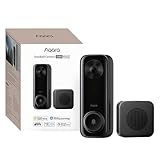
- Works with HomeKit Secure Video and All Major Ecosystems: Fully compatible with Apple HomeKit Secure Video (HSV) for encrypted recording, iCloud storage, and real-time notifications directly on Apple devices. Also compatible with Alexa, Google Assistant, and SmartThings. Pro-level compatibility provides more options via RTSP/ONVIF support, NVR integration, and other advanced setups. *Note: To use this device with HomeKit Secure Video, an iCloud+ plan and an Apple home hub are required.
- 2K HD 165° Head-to-Toe Vision: See everything from packages at your feet to faces at the door. Featuring 2K HD resolution and a 165° ultra-wide field of view with a 3:4 aspect ratio, the G400 doorbell camera provides a vertical perspective that traditional 16:9 cameras miss. Equipped with nearly invisible 940nm infrared LEDs, this doorbell captures bright, high-definition video in total darkness, monitoring discreetly without alerting intruders or disturbing neighbors. *Note: When connected to Apple HomeKit, the resolution is limited to 1200p. This limitation also applies to Aqara Home when both platforms are used simultaneously.
- Reliable Hardwired Power & Stable Wi-Fi 6: You can utilize the high-efficiency PoE connection or reuse your existing 8–24V AC/DC wiring, simplifying the upgrade path while maintaining stability. Additionally, the Wi-Fi video doorbell supports both 2.4GHz and 5GHz Wi-Fi 6 and meets WPA3 security standards for reliable and secure connections.
- Local AI Detections & Custom Replies: Reduce false alarms with local person recognition and zone intrusion, ensuring you're instantly notified when it matters, with no cloud processing required. When someone rings, use custom quick replies or the voice-changing intercom to answer the door safely. Our wired doorbell camera also features visitor face recognition and cloud package identification for total peace of mind.
- IP65 Weatherproof & Easy Setup: Built to withstand the elements with an IP65 rating for dust and water resistance, it works flawlessly in wind and rain. The package includes a wedge kit for optimal positioning and a plug-in chime for indoor alerts. The smart doorbell supports 24/7 continuous recording directly to a microSD card (up to 512GB, not included). For added peace of mind, all local footage is automatically backed up to your SMB-compatible NAS server, keeping your video safe and secure.
The separate-device approach costs more installation effort and may look less integrated, but it avoids assuming that a generic ONVIF recorder will understand a proprietary button event. It is particularly sensible for serious self-hosters, installers, and homes where a doorbell press must trigger a dependable automation.
What are the most common ONVIF doorbell buying mistakes?
- Confusing ONVIF with complete compatibility: verify video, events, audio, and two-way talk independently.
- Buying a battery model for continuous recording: confirm stream availability and hub requirements first.
- Ignoring firmware: ONVIF conformance and behavior are tied to specific firmware or software versions.
- Checking only the product family: match the exact model, region, hardware revision, and firmware.
- Forgetting installation hardware: budget for a PoE switch or injector, transformer, chime, hub, indoor station, cable, and mounting hardware.
- Assuming the button becomes an ONVIF event: test the physical press through the intended NVR or automation platform.
- Judging image quality by megapixels alone: evaluate vertical framing, close-range faces, packages, WDR, night exposure, and motion blur.
- Exposing RTSP or ONVIF to the Internet: use a VPN or secure gateway for remote access instead.
- Assuming Wi-Fi specifications predict recording reliability: test the actual signal, congestion, routing, and access-point position at the entrance.
- Treating an IP rating as installation immunity: account for rain, condensation, sun, snow, salt air, insects, IR reflections, and porch-light glare.
Final recommendations by use case
| Use case | Recommendation | Reason |
|---|---|---|
| Best overall local-NVR installation | Reolink Video Doorbell PoE | Wired networking, manufacturer-listed ONVIF and RTSP, local recording, detection, and 24/7 recording options |
| Best conventional doorbell retrofit | Reolink Video Doorbell WiFi | Uses existing wired doorbell power without requiring Ethernet |
| Best premium intercom and access-control option | DoorBird D1101V | PoE IP intercom design, relay capability, SIP and indoor-station ecosystem |
| Best alternative for Amcrest users | Amcrest AD410 | 4 MP dual-band Wi-Fi format, subject to current stock and compatibility verification |
| Best potential budget alternative | Amcrest AD110 | Lower-cost 1080p-class model, but lower resolution, 2.4 GHz-only listing, uncertain stock, and unverified ONVIF behavior |
| Best specialist Hikvision alternative | Hikvision DS-HD1 | Detailed hardware and detection features, subject to exact ONVIF, firmware, region, and NVR checks |
| Best for independent button reliability | Separate ONVIF camera and doorbell button | Separates video compatibility from proprietary doorbell-event integration |
The safest mainstream recommendation is the Reolink Video Doorbell PoE when Ethernet is available. The Reolink Video Doorbell WiFi is the practical alternative for wired-power retrofits. Neither should be described as guaranteed to expose every doorbell, audio, or detection feature to every third-party platform; verify the exact ONVIF entry, firmware, recorder, and event path before installation.
Frequently Asked Questions
Is ONVIF the same as RTSP on a doorbell camera?
ONVIF and RTSP are not the same. RTSP can provide a video stream, while ONVIF may add discovery, stream profiles, imaging controls, and events; the exact available features depend on the camera, firmware, profile, and recorder.
Windows Errors? Fix Them Before They Spread
Repair common Windows errors and clear accumulated junk for a smoother, more stable PC - no reinstall needed.Free scan · no reinstallOutdated Drivers Are Slowing You Down
One free scan finds every outdated or missing driver and matches the right update for your exact hardware.Free scan · exact hardware matchDo ONVIF doorbell cameras send the physical button press to an NVR?
Not necessarily. A third-party recorder may receive video and motion while missing the proprietary physical doorbell-button event, so the button path must be tested with the exact camera, firmware, and NVR.
Can a battery doorbell provide continuous ONVIF recording?
Battery doorbells are usually poor choices for dependable continuous ONVIF recording because they may sleep or require a hub. Reolink’s compatibility documentation identifies a compatible Home Hub requirement for certain CGI, RTSP, and ONVIF functions on battery models.
What transformer does the Reolink wired doorbell use?
Reolink lists 12–24 V AC or 24 V DC hardwired power for its Video Doorbell PoE and Video Doorbell WiFi models. The transformer’s capacity, chime compatibility, and any bypass requirement must be checked for the specific installation.
Is DoorBird D1101V a good value for ordinary local recording?
DoorBird D1101V is usually not the best value when the only requirement is inexpensive local video recording. The model is better suited to premium IP intercom, relay, SIP, indoor-station, and access-control installations.
Recommended Free Tools
The Bottom Line
Bottom line: Choose the Reolink Video Doorbell PoE for the strongest general-purpose ONVIF and local-NVR setup, or the Reolink Video Doorbell WiFi when existing doorbell wiring makes Ethernet impractical. Choose DoorBird D1101V for access control and professional intercom features. Treat Amcrest and Hikvision as qualified alternatives until exact ONVIF conformance, firmware, availability, and target-recorder behavior are confirmed.

