
What’s actually slowing this PC down?
Pick the symptom - the matching free tool is one click away.
iTechGuides is reader-supported. When you buy through links on our site, we may earn an affiliate commission. As an Amazon Associate I earn from qualifying purchases. Learn more
For most upgradeable laptops, Intel Wi‑Fi 6E AX210 is the best Wi‑Fi card to buy in 2026. It uses the standard removable PCIe/USB module design, supports 2.4, 5 and 6 GHz, and has mature Windows and Linux support. Choose Intel BE200 instead when your exact laptop, firmware, operating system and router are confirmed for Wi‑Fi 7. BE201, BE211 and BE213 are platform-specific CNVio3 modules, not universal replacements.
The key buying mistake is treating “M.2 2230” as a compatibility guarantee. That label describes the card’s physical size only. Interface, keying, BIOS policy, antenna leads, drivers, operating-system support and the laptop maker’s approved-parts list all determine whether an upgrade will work.
At a glance
| Name | Best for | Key spec | Platforms | Checked |
|---|---|---|---|---|
| Intel Wi‑Fi 6E AX210 | Safest general internal upgrade; best value and compatibility | Wi‑Fi 6E; 2.4/5/6 GHz; 2.4 Gbps listed maximum | Windows and Linux, subject to laptop support | Nov 2026 |
| Intel Wi‑Fi 7 BE200 | Best general-purpose Wi‑Fi 7 upgrade | Wi‑Fi 7; up to 5.8 Gbps listed; 320 MHz and 4096-QAM capability | Windows 11 and Linux, subject to platform support | Nov 2026 |
| Intel Wi‑Fi 7 BE201 | Best confirmed-CNVio3 option | Wi‑Fi 7; CNVio3 interface; up to 5.8 Gbps listed | Specific Intel platforms only | Nov 2026 |
| Qualcomm NCM865 | Selected AMD-oriented laptops | Wi‑Fi 7 alternative | Exact AMD laptop, BIOS and driver support required | Nov 2026 |
| Exact OEM-original module | BIOS-whitelisted or unusual laptops | Manufacturer-validated replacement | The exact laptop model and part number | Nov 2026 |
Which laptop Wi‑Fi card is best in 2026?
Intel AX210 is the best default choice for a standard removable slot. It offers Wi‑Fi 6E on all three bands, Bluetooth, a listed 2.4 Gbps maximum and broad Windows/Linux support. Intel’s catalog lists that 2.4 Gbps figure as a theoretical module capability, not a guarantee of internet or file-transfer speed. Intel’s ARK wireless catalog is the authoritative place to check the published figure for the exact SKU.
AX210 is the strongest “buy it unless proven otherwise” recommendation because it uses a standard PCIe/USB wireless-module architecture rather than Intel’s platform-bound CNVio link. You still must confirm the slot, keying, BIOS acceptance, antennas and drivers before ordering.
Popular on Amazon

- 【Wi-Fi 6E】With Intel Wi-Fi 6E technology network adapter provides strong performance and good compatibility, while reducing power consumption and improving service life.
- 【AX210 NGW Wireless LAN Card】Provides tri-band (6GHz, 5GHz and 2.4GHz) signal. Maximum speed up to 5374Mbps(2400Mbps @6GHz + 2400Mbps @5GHz + 574Mbps @2.4GHz).
- 【Bluetooth 5.3】Based on Bluetooth 5.2, Bluetooth 5.3 adds LE enhanced connection/Host set Controller key length function/LE channel hierarchy function. Make Bluetooth 5.3 lower latency, stronger anti-interference, improve battery life.
- 【Installation Requirements】For motherboards with Intel CPU and M.2 network slot, NGFF M2 2230 A/E key.Not supported CNVIo2 protocol M.2 slot and mini PCIe slot laptops.
- 【Compatible System】Support Windows 11/10 64-bit, WiFi and Bluetooth drivers need to be installed on the running PC (search "AX210NGW" from Intel website to download and install wifi and Bluetooth drivers).
When is Intel BE200 the right Wi‑Fi 7 upgrade?
Buy BE200 only when the laptop maker or service documentation confirms compatibility. Intel documents BE200 in M.2 2230 and 1216 packages with PCIe/USB connectivity, Windows 11/Linux support and Wi‑Fi 7 certification. Its listed Wi‑Fi 7 capability includes 320 MHz channels and 4096-QAM, with up to 5.8 Gbps in Intel’s catalog. The adapter guide gives the 2230 dimensions as 22 × 30 × 2.4 mm. Intel’s BE200/BE202 adapter guide documents the package and interface details.
BE200 is the best general-purpose Wi‑Fi 7 upgrade when all the surrounding pieces line up: a compatible M.2 socket, accepted firmware, suitable antennas, a supported operating system and a Wi‑Fi 7 access point. A Wi‑Fi 6E router can still connect, but it cannot provide Wi‑Fi 7 features.
Is BE201 a universal Wi‑Fi 7 replacement?
No. BE201 is not interchangeable with BE200. Although the cards can share an M.2 2230 outline, Intel identifies BE201’s connector interface as CNVio3. CNVio3 requires a compatible host platform; a physically matching socket wired for standard PCIe/USB will not make BE201 work. Intel’s BE201 adapter guide lists the CNVio3 interface and 2230 dimensions.
That makes BE201 the best confirmed-CNVio3 option, not a general replacement. Install it only when the laptop’s parts list, service manual or manufacturer support page names BE201 or the same CNVio3 family. If the machine originally shipped with a standard PCIe/USB card, choose AX210 or BE200 instead, provided the rest of the compatibility checks pass.
Also popular on Amazon
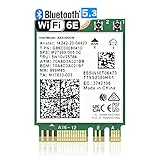
- 【Ultrafast Wi-Fi Speed】OKN AX210 Brings wifi into 6GHz, Update your wifi to Tri-Band. Max Speed up to 574Mbps @2.4GHz + 2400Mbps @5GHz +2400Mbps @6GHz. 2.4GHz for the long range, 5GHz for the high speed, 6GHz for the higher speed, Interference free and Ultra-low Latency
- 【WiFi 6E Technology 】AX210 wifi Module has the latest wifi 6 R2 technology and frequency band resources, which can be compatible with existing wifi routers and wifi routers to be released soon, such as ASUS, Netgear and tplink
- 【Upgraded from AX200】AX210 has all the features of AX200, such as MU-MIMO, 1024QAM, OFDMA, 160MHz, etc
- 【Compatible With BT 5.3】BT 5.3 is coming with AX210. Based on Bluetooth 5.2, it has larger capacity, higher speed, extremely low latency and stronger battery life
- 【WPA3 Network Security】Support WPA WPA2 WPA3 Network Security
What about BE211 and BE213?
Intel Wi‑Fi 7 R2 BE211 and BE213 belong in the “exact platform match” category. They are not drop-in upgrades merely because they are M.2 2230 modules or carry a Wi‑Fi 7 label. Confirm the laptop’s validated part number, CNVio3 host support, BIOS acceptance, antenna arrangement and operating-system driver before purchase.
BE211 can be the best lower-bandwidth CNVio3 option when an OEM specifically lists it, while BE213 is a later R2 choice that should generally be skipped for a new, generic purchase unless the laptop manufacturer requires that exact module. Intel lists BE211 Linux support from kernel 6.18 and BE213 from kernel 7.1, so support may be impractical on a distribution with an older kernel.
Do not repeat the old claim that Wi‑Fi 7 always means 320 MHz and 5.8 Gbps. Those are published capabilities for particular Intel configurations; channel width, modulation, client mode, regulatory rules and the access point determine what is actually usable.
Does any M.2 2230 Wi‑Fi card work in every laptop?
No. M.2 2230 tells you the footprint, not complete compatibility. Before buying, check all of the following:
Also popular on Amazon
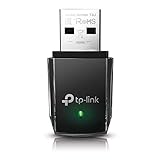
- AC1300 Dual Band Wi-Fi Adapter for PC, Desktop and Laptop. Archer T3U provides 2.4G/5G strong high speed connection throughout your house.
- Archer T3U also provides MU-MIMO, which delivers Beamforming connection for lag-free Wi-Fi experience.
- Usb 3.0 provides 10x faster speed than USB 2.0, along with mini and portable size that allows the user to carry the device everywhere.
- World's 1 provider of consumer Wi-Fi for 7 consecutive years - according to IDC Q2 2018 report
- Supports Windows 11, 10, 8.1, 8, 7, XP/ Mac OS X 10.9-10.14
- Electrical interface: AX210 and BE200 use standard PCIe/USB module connectivity; BE201, BE211 and BE213 use CNVio3-class platform links. They are not interchangeable.
- Keying and socket: confirm the connector key and that the socket is actually wired for a wireless module.
- BIOS policy: some laptops accept only cards on the manufacturer’s approved or whitelisted list.
- Antennas: count the installed leads and match their connector type and routing. A card cannot create a missing antenna path.
- Bluetooth wiring: Bluetooth uses the module’s USB connection. A missing or damaged internal USB lead can leave Wi‑Fi working while Bluetooth is absent.
- Operating system and drivers: check Windows driver availability or the Linux kernel and firmware level.
- Radio and region: 6 GHz availability depends on local regulation, the operating system and the router.
Should you still buy AX200, AX211 or an older card?
AX200 can make sense as a low-cost Wi‑Fi 6 replacement, but it is no longer the best new purchase for most standard slots. AX210 adds 6 GHz and is the better value when your router and region can use Wi‑Fi 6E. Treat AX200 as a budget or like-for-like repair when the price and laptop support clearly favor it.
AX211 is not a drop-in AX210 replacement. AX211 uses Intel’s platform-dependent CNVio2 connection, while AX210 uses the standard PCIe/USB architecture. Keep AX211 when it is factory-installed and working, or replace it with the exact OEM-approved module. Do not order AX211 as a generic substitute for AX210.
The best card to keep if factory-installed is usually the validated original. A working OEM card avoids whitelist, antenna, firmware and driver surprises. Upgrade only when you have a clear benefit—such as 6 GHz, a known Wi‑Fi 7 requirement or a failing module—and a documented compatible part.
Where do MediaTek MT7925 and Qualcomm NCM865 fit?
MediaTek MT7925 and Qualcomm NCM865 are alternatives that appear in selected laptop designs, especially AMD-oriented systems. They should be treated as OEM-specific choices rather than universal upgrades. Validate the exact laptop model, BIOS, antenna leads, Windows driver package and Linux support before buying either.
Also popular on Amazon

- AC600 Nano size wireless Dual band USB Wi-Fi adapter for fast and high speed Wi-Fi connection.
- Strong 2.4G/5G connection allows the user to use the Internet with lag-free experience.
- Sleek and miniature sized design allows the user to plug and leave the device in it's place.
- Industry leading support: 2-year and free 24/7 technical support
- This network transceiver supports Windows 11, 10, 8.1, 8, 7, XP/ Mac OS X 10.9-10.14
NCM865 is the researched Wi‑Fi 7 alternative for selected AMD laptops. It is a sensible choice only when the machine’s documentation or a reputable repair-parts listing confirms that module. Do not assume an Intel card, Qualcomm card and MediaTek card are electrically interchangeable because they share the same size.
How should you match the card to your router and operating system?
Wi‑Fi 7 benefits require a Wi‑Fi 7 access point and software that can expose those features. Intel notes that 6 GHz use depends on operating-system support, and that Wi‑Fi 7 functionality depends on the kernel, operating system and connected access point; functionality may therefore be limited. Intel’s wireless support guidance explains the operating-system and driver dependency.
For Linux, Intel lists these minimum kernel generations in its driver documentation:
Recommended Free Tools
| Card family | Kernel support listed by Intel |
|---|---|
| AX210 | 5.10 or newer |
| BE200 and BE202 | 6.5 or newer |
| BE201 | 6.11 or newer |
| BE211 | 6.18 or newer |
| BE213 | 7.1 or newer |
These are kernel-generation requirements, not a promise that every distribution includes the required firmware or backport. Check your running kernel with uname -r, install the distribution’s matching Intel firmware package, and verify that your router actually offers the band and security mode you intend to use. Intel’s Linux wireless-driver page provides the current support matrix.
Also popular on Amazon

- INTEL NETWORK AX210.NGWG.NV WI
How do you check compatibility before ordering?
Have the exact laptop model, its current card and the service documentation in front of you. A model family name is not enough: manufacturers can ship different wireless modules in different regional or CPU configurations.
- Identify the current card. In Windows, open Device Manager, expand Network adapters and record the full model. In Linux, use
lspci -nnandlsusbto identify the wireless and Bluetooth interfaces. - Check the service manual or parts list. Look for the supported wireless-card part numbers, connector type and antenna layout. This is the strongest evidence for BIOS acceptance.
- Inspect the socket and key. Remove the bottom cover only according to the manufacturer’s service instructions. Confirm the existing module is removable and compare the keying and screw position with the proposed card.
- Count antenna and Bluetooth connections. Photograph the lead routing before disconnecting anything. Match connector sizes and make sure the Bluetooth USB connection is present after installation.
- Classify the interface. Choose AX210 or BE200 for a documented standard PCIe/USB slot. Choose BE201, BE211 or BE213 only for a documented CNVio3 platform.
- Check software. Confirm Windows support, Linux kernel level and firmware availability before opening the laptop.
- Match the network. A Wi‑Fi 7 card delivers its distinctive features only with a compatible Wi‑Fi 7 router and permitted 6 GHz operation. Otherwise, the card will connect using the capabilities shared by the access point.
- Buy a genuine, correctly equipped module. Use only the official app store or the developer’s own site is not relevant to hardware; for this purchase, use a reputable parts seller whose listing identifies the exact module, bracket and antenna accessories. Avoid listings that blur AX210, AX211, BE200 and BE201 together.
What should you do if the replacement card is not detected?
| Symptom | Likely cause | First fix |
|---|---|---|
| Card absent in BIOS or Device Manager | Wrong interface, unsupported whitelist entry or poor seating | Power off, reseat the module and compare the exact part number with the service manual |
| Wi‑Fi works but Bluetooth is missing | Internal USB lead, driver or firmware issue | Reconnect the Bluetooth lead and install the matching chipset drivers and firmware |
| Only 2.4/5 GHz appears | Router, region, operating-system or driver limitation | Update drivers and verify that the router and local rules permit 6 GHz |
| Frequent disconnects after upgrade | Driver mismatch, antenna lead problem or unsupported platform | Restore the OEM card, update software and recheck antenna routing |
| BE201 or another CNVio3 card never initializes | Host platform is not CNVio3-compatible | Replace it with the documented OEM module or a standard-interface card such as AX210/BE200 |
How we picked
The ranking prioritizes electrical compatibility, documented Wi‑Fi generation and bands, Bluetooth support, Windows/Linux driver coverage, Linux kernel requirements, BIOS acceptance, antenna and connector practicality, router dependencies and the availability of a genuine OEM replacement. Published PHY rates and channel widths are manufacturer-listed capabilities, not independent laptop benchmarks.
Frequently Asked Questions
Can I use a Wi‑Fi 7 card with a Wi‑Fi 6 router?
Yes, a compatible Wi‑Fi 7 client can associate with an older access point, but it will operate using the features the router supports. The 320 MHz, 4096-QAM and other Wi‑Fi 7 benefits require a compatible Wi‑Fi 7 access point and suitable software.
Do these 3 things before closing this tab:
1Fix the driver behind crashes, sound loss and screen glitches2Clear out junk files and repair common Windows errors3Scan for outdated or missing drivers - takes under a minuteHow can I tell whether my laptop has a BIOS whitelist?
Check the service manual, parts catalog or the manufacturer’s support list for approved wireless-card part numbers. If documentation is unclear, the safest route is to retain the exact OEM module or buy the same approved replacement rather than relying on a generic listing.
Why does Bluetooth stop working after a Wi‑Fi card replacement?
On many internal modules, Bluetooth travels over a separate USB connection even though Wi‑Fi uses the card’s PCIe path. Reseat that internal lead, then install the correct Bluetooth driver and firmware for the new module.
Which Linux distribution is best for BE200?
The important variable is kernel and firmware age rather than the distribution name. BE200 support is listed from kernel 6.5, so choose a distribution that ships that kernel or newer and provides the matching Intel firmware package.

