
What’s actually slowing this PC down?
Pick the symptom - the matching free tool is one click away.
There is no universal BIOS setting or menu path for “link power management.” It may mean SATA Aggressive Link Power Management (ALPM), PCI Express Active State Power Management (ASPM), or another vendor-specific control. Check the exact option name and your computer or motherboard model before changing anything; the manufacturer’s manual is the reliable guide to its location, prerequisites, and default.
First identify which link the setting controls
SATA ALPM and PCIe ASPM are different power-management controls. Their similar names do not make them interchangeable: SATA ALPM concerns the SATA link, while PCIe ASPM applies to PCI Express links. Some BIOS interfaces expose more than one such control, sometimes at different levels of the system.
- SATA ALPM or Aggressive LPM: Look for it in SATA, storage-controller, or chipset I/O settings.
- PCIe ASPM: Look for it in PCIe, root-port, device, or system-profile settings. A setting may be global or specific to a port.
- Another “link power management” label: Do not assume what it controls from the wording alone. Check the BIOS help text and the manual for your exact model.
What SATA ALPM does
Supermicro’s manual for the C9Z890-MW, C9B860-MW, and C9Q870-M explains that, when enabled, the SATA AHCI controller manages SATA-link power: during extended periods without I/O, it places the link in a low-power mode and returns it to active when I/O resumes. In that manual, the feature is available when the SATA controller is enabled. Supermicro C9Z890-MW/C9B860-MW/C9Q870-M user manual
This description explains the intended behavior; it does not establish a guaranteed power saving, performance change, or best setting for every system.
The Tool Desk
Outbyte Driver Updater FREEScan for outdated or missing drivers - takes under a minuteDriver Scan →Outbyte PC Repair FREERepair Windows errors before they cause bigger problemsFix Now →#1 Best Overall

- SATA Power Cable Adapter can be SATA power supplies to power IDE hard drives
- Connector:1x 4-pin Molex (LP4) Female
- Connector: 1x SATA 15-pin Male
- SATA 15 Pin Male to Molex LP4 Female Power Cable Provides 7" in cable length
- SATA to LP4 Power Cable Adapter SATA 15pin revolution 4pin power cord.
Find the option in your system’s BIOS
- Record the exact option label. Note whether it says SATA ALPM, Aggressive LPM, PCIe ASPM, or something else. If the BIOS is already open, also note the surrounding menu and any explanatory text.
- Identify the exact computer or motherboard model. Use its manufacturer’s documentation, rather than a guide for a similar-looking model.
- Check the manual for your model and BIOS version. Search for the option name and confirm its menu path, prerequisites, scope, and default. BIOS menus and defaults can differ across products and firmware versions.
- Change only the setting you intend to change. Save and exit using the BIOS instructions, then check that the system behaves as expected. If it does not, return to the same setting and restore its previous value.
Model-specific examples—not universal paths
OnLogic’s Karbon K410/K430 manual lists “Aggressive LPM Support” at Advanced > RC Advanced Menu > PCH-IO Configuration > SATA Configuration. It lists Enabled as the default for those models. Neither that path nor that default should be assumed for another system. OnLogic Karbon K410/K430 user manual
For the Dell PowerEdge R6525, Dell documents “PCI ASPM L1 Link Power Management” under System Profile Settings. The guide says the profile must be set to Custom to change the other parameters listed there; it lists the PCI ASPM L1 control as Enabled by default. This is guidance for that server model, not a general BIOS recipe. Dell PowerEdge R6525 BIOS guide: System Profile Settings
Rank #2
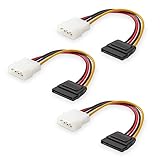
- Flexible SATA Power Cable for Internal Drive Connection: This SATA to Molex cable connects modern Serial ATA HDDs and optical drives to a legacy SATA power supply with 4 pin Molex LP4 ports. A reliable 4 pin Molex to SATA power cable solution for upgrading older PC systems while maintaining stable SATA power delivery.
- 6 Inch SATA Power Cable for Clean Internal Cable Management: Compact 6 inch SATA power cable design provides the ideal length for internal routing. This hdd power cable reduces clutter inside PC cases while ensuring efficient connection between SATA devices and Molex-based power supply units.
- Cost-Effective 3 Pack SATA Power Adapter Set: Includes three SATA power connector adapter cables, providing spare or replacement options for system builds and repairs. Perfect SATA power cable kit for DIY builders, IT technicians, and multi-drive computer installations.
- Ideal Upgrade Solution for Legacy Power Supply Systems: This 4 pin to SATA power cable allows you to reuse older PSUs with Molex outputs as a SATA power supply for modern SATA HDDs, SSDs, and optical drives—eliminating the need to replace a fully functional power unit.
- Stable Compatibility for SATA HDD and Optical Drives: Designed for safe and reliable operation with 5V SATA devices powered by 12V ATX systems. Compatible with common hardware setups including SATA HDDs, SSDs, and DVD drives using a SATA power connector through Molex LP4 input.
OnLogic’s Axial AX300 manual documents global and port-level PCIe ASPM controls separately from a SATA Controller ALPM control. That distinction is a useful reminder to check whether a control applies globally, to a port, or to a particular controller. OnLogic Axial AX300 user manual
Keep adjacent storage settings separate
SATA mode, controller enablement, hot plug, and ALPM are not the same setting. Do not change one while trying to enable another. Supermicro’s X14SRA-T/X14SRA-F manual treats hot plug separately from ALPM and says an AHCI-to-RAID mode change takes effect after reboot. That is specific guidance for those boards; consult your own model’s manual before changing storage-controller settings. Supermicro X14SRA-T/X14SRA-F user manual
Free tools Windows power users keep installed
One-click scans. No signup required.
Rank #3

- Unlock the full potential of your legacy PC build with the Mbiydeg 4 Pin Molex to Dual SATA Power Adapter. This essential connector bridges the gap between older power supply units and modern SATA drives, allowing you to easily add extra hard drives, SSDs, or optical drives without a costly PSU upgrade. Perfect for system builders and tech enthusiasts, the robust sata power cable splitter ensures reliable power delivery from a single 4-pin Molex to two SATA devices. Its plug-and-play installation makes it indispensable for desktop upgrades and custom PC projects, maximizing your existing hardware's utility with simplicity and efficiency.
- Engineered for superior durability and stable performance, our adapter features high-precision connectors and premium copper conductors in a tough PVC jacket. This guarantees minimal voltage drop and consistent power flow, protecting sensitive SATA drives from damage due to power fluctuations. The sata power cable ends have secure latching interfaces to prevent accidental disconnections, ensuring your drives remain powered during extended use. Trust in a product built to last, offering peace of mind for your valuable storage investments in any computing setup.
- Experience broad compatibility that seamlessly integrates with a wide array of devices. This versatile sata power cable adapter converts a standard 4-pin Molex from your PSU into two dedicated SATA power connectors. It is universally compatible with 3.5-inch and 2.5-inch SATA HDDs, SSDs, and SATA optical drives. Whether refurbishing an older workstation, upgrading a gaming rig, or adding storage to a server, this adapter delivers the hassle-free connectivity solution you need for efficient hardware expansion.
- Designed for user convenience and safety, the adapter supports true plug-and-play functionality—no drivers or external power needed. The compact design allows for easy cable management within your computer case, improving airflow. Each sata power cable output is rated to safely handle the power requirements of modern SATA devices. This practical, safe design makes it an excellent choice for both novice DIYers and experienced technicians seeking a reliable way to power multiple drives from a single source.
- Ideal for multiple scenarios, from home office upgrades to advanced gaming system builds. This Mbiydeg power splitter is your go-to solution for expanding storage in desktops, enhancing NAS arrays, or powering drives in external enclosures. Its reliability also makes it perfect for repair shops, labs, and PC maintenance. By choosing this adapter, you're investing in a flexible, cost-effective sata power cable component that extends the life and functionality of your current system, saving time and money on hardware overhauls.
Should you enable it?
The answer depends on the option, the hardware it controls, and your reason for changing it. The manuals cited here describe settings on named products but do not establish a universal measured power-saving figure or a universal recommendation to enable or disable link power management. If you have no specific problem or goal, first confirm the control’s purpose and current default for your exact model rather than changing similarly named BIOS options.
Quick Recap
Best Value

- 2.5" SATA Drives Only — SSD & HDD: Compatible with 2.5" SATA I/II/III SSDs and laptop HDDs. NOT compatible with: M.2 NVMe drives, M.2 SATA drives, 3.5" desktop HDDs, or slim SATA optical drives. Verify your drive has a standard 2.5" SATA connector before purchasing.
- USB Bus-Powered — No Adapter Needed for Most Drives: Powers most 2.5" SATA SSDs and laptop HDDs directly from USB. Note: Some older or high-capacity 2.5" mechanical HDDs may draw more current than a single USB port provides — if a drive fails to spin up, try a powered USB hub or a different USB 3.0 port.
- USB 3.0 (USB-A) — 5Gbps with UASP: Host connection is USB Type-A (USB-A). Computers with only USB-C ports require a separate USB-C to USB-A adapter (not included). UASP support for faster transfers on compatible systems.
- Plug & Play: No drivers required; hot-swappable design for quick access to drives on Windows, macOS, and Linux
- Usage Note: Not intended for all configurations such as system boot drives or certain embedded systems; compatibility may vary by device
Rank #4

- The connector only changes the connection direction of the 2.5/3.5" SATA Hard Disk Drive, without changing the transmission speed and interface definition.
- It can work for 2.5/3.5" SATA Hard Disk Drive.
- The connector transfer 5V/12V Power and 6Gbps Data.
- The angled type Allowing you to connect it to a female port, even if space around the port is limited.
- Their work allows for better cable management and more aesthetically pleasing wiring.
Product prices and availability are accurate as of the date/time indicated and are subject to change. Any price and availability information displayed on Amazon at the time of purchase will apply.

