
Outdated Drivers Are Slowing You Down
One free scan finds every outdated or missing driver and matches the right update for your exact hardware.Free scan · exact hardware matchWindows Errors? Fix Them Before They Spread
Repair common Windows errors and clear accumulated junk for a smoother, more stable PC - no reinstall needed.Free scan · no reinstallA customizable PXI or PXIe system is built by matching its controller, chassis, backplane, and peripheral cards to the test application, then tuning the power, cooling, and architecture around them. That flexibility can help avoid redesigning an entire system when requirements change, but there is no universal configuration: start with the instruments and installation constraints, then confirm compatibility and engineering support with the supplier.
What makes up a PXI or PXIe system?
A PXI system has three central building blocks: a system controller, a chassis, and cPCI/PXI peripheral cards. The chassis houses the backplane, power sources, cooling, and space for the controller. Peripheral cards supply the test-and-measurement functions.
PXI is based on PCI and CompactPCI. PXIe brings PCI Express to PXI platforms while retaining backward compatibility with PXI, as described in Christian Ganninger’s March 5, 2024 Electronic Design feature, “Go Beyond the Standard with Customizable PXle Systems.” Check the actual chassis, backplane, card, controller, and software specifications for a proposed configuration; the general description does not establish compatibility for every combination.
Which parts can be customized?
Chassis form factor and capacity
Chassis choices include different form factors and slot counts. Select a style and capacity that suit the installation and the cards the application needs, leaving room for the intended controller and any required expansion. The chassis is not a universal plug-in purchase: its backplane and topology, power, cooling, controller, peripheral cards, and software environment all matter.
Recommended Free Tools
#1 Best Overall
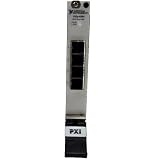
- Connect up to 8 PXI or PXIe chassis to a single host PC or controller using high-speed MXI-Express daisy-chaining architecture
- Enables large-scale PXI systems with synchronized communication across multiple chassis for expanded I/O and computing power
- Compatible with PXI controllers and PCs connected via remote control modules, supporting flexible system configurations
- Expand PXI systems with RAID arrays, SDR devices, and reconfigurable radio hardware for advanced test and RF applications
- Ideal for test, simulation, and high-channel-count systems needing scalable, high-throughput, low-latency PXI expansion
Mechanical and thermal components
Mechanical customization can include fans and fan trays, as well as the chassis itself. Power supplies and cooling should be considered together with the system’s expected thermal conditions and installation. A supplier may offer external chassis customization, but confirm what is available for the particular project.
Architecture modules
Depending on the design, architecture modules can include PCIe switches, PCIe-to-PCI bridges, clock modules, and chassis-management modules. These choices affect how the system’s components connect and operate; use them to meet a defined application need rather than treating them as default additions.
Measurement cards and system capability
Peripheral cards provide the test-and-measurement functions. PXI/PXIe modularity lets a team add or remove instruments and adjust system capabilities. Ganninger’s feature presents functional modules as a way to reduce the need for a complete redesign, but it does not quantify that benefit or guarantee that existing components will work in a changed configuration.
How to choose a configuration
- Define the test. List required measurement functions and the peripheral cards needed to perform them.
- Set installation constraints. Choose the chassis form factor and slot capacity to fit the intended location and planned modules.
- Specify bus and topology. Identify the PXI/PXIe generation and determine whether the architecture needs a PCIe switch, PCIe-to-PCI bridge, clock module, or chassis-management module.
- Plan power and cooling. Match supply options and cooling—including convection or forced air where applicable—to input-power needs and expected thermal conditions.
- Confirm the complete configuration. Ask the supplier to verify the controller, chassis and backplane, cards, software environment, power, cooling, and any required modules as a system.
- Agree on verification and support. Establish which engineering services apply to the design and what analysis or testing will be delivered.
What engineering support should a supplier offer?
The Electronic Design feature recommends access to engineering support and lists services that may be relevant to a custom PXI/PXIe project. Their current availability and scope should be confirmed directly with each supplier.
The Tool Desk
Outbyte PC Repair FREEClear out junk files and repair common Windows errorsFree Scan →Outbyte Driver Updater FREEFix the driver behind crashes, sound loss and screen glitchesFind Drivers →Rank #2
- Compatible with NI PXI-1044 14-slot chassis, providing secure and reliable rear rack mounting in standard 19-inch enclosures or cabinets.
- Engineered for stability and durability in both lab and industrial environments, ensuring long-term chassis support in racked systems.
- Simplifies integration of PXI-1044 systems into test benches, server racks, and automated test setups with a clean, professional install.
- Allows for optimized space management by enabling rear access and mounting flexibility without compromising chassis performance.
- Constructed with robust materials, this kit ensures vibration resistance and thermal airflow clearance during extended operation.
- Circuit design and analysis
- Electromagnetic compatibility (EMC) testing
- Thermal analysis and airflow measurements
- Prototyping
- Analysis of voltage drop, signal integrity, and loss effects
Ask which of these activities are included, which are optional, and how the results will be used to validate the proposed system. Support needs depend on the project; the feature does not prescribe a best configuration for a particular test, budget, software environment, or location.
Independent reader supportYour contribution helps us test, update, and keep practical guides available for everyone.What does the bandwidth figure mean?
Ganninger’s 2024 feature says, “Bandwidth jumps from 1 GB/s up to 24 GB/s in the third generation to support today’s most demanding test applications.” The feature does not identify an independent benchmark, test setup, or named organization behind that figure. Treat it as a claim in that article, not a universal or independently verified performance result. Confirm the relevant generation and current manufacturer specifications for the hardware under consideration.
What to verify before committing
- Current model specifications, availability, and compatibility for the chassis, controller, backplane, cards, and software
- Slot count, form factor, and architecture fit for the planned installation and test
- Power and cooling suitability for the intended configuration and operating conditions
- Supplier engineering access and the precise scope of any design, analysis, prototype, or test services
For broader test-and-measurement context, see Electronic Design’s “Special Report: Testing the Limits of Test and Measurement,” published April 4, 2024.
Quick Recap
Product prices and availability are accurate as of the date/time indicated and are subject to change. Any price and availability information displayed on Amazon at the time of purchase will apply.

