
Yes—some hard-drive-based iPod Video, Classic, and Photo models can be converted to flash storage, but the right adapter and usable capacity depend on the exact generation. Identify the iPod by its model number before buying parts; “iPod” alone is not enough to establish compatibility.
Which iPods can be upgraded to flash storage?
This conversion replaces the internal hard drive in a compatible iPod with solid-state flash storage, using an adapter between the iPod and the memory card. It is aimed at hard-drive-based iPod Video, Classic, and Photo models—not every product called an iPod. Apple lists iPod touch, nano, and shuffle as separate families, and they are not interchangeable upgrade candidates for these hard-drive adapters.
Start with Apple’s iPod model identification guide to find the model details, then check the selected adapter’s exact compatibility chart and product page. iFlash’s catalog includes multiple adapter types and cautions that model-specific limitations apply.
What parts does the conversion require?
There is no single universal board or card combination. Depending on the iPod generation and chosen route, the conversion may use an iFlash adapter, a converter, a compatible SD or CompactFlash card, and model-specific ribbon components. Compare the supported iPod generation, adapter type, card format and capacity, physical fit, and any required cable before ordering.
Free tools Windows power users keep installed
One-click scans. No signup required.
#1 Best Overall

- This card is used to convert microSD TF card as 40pin ZIF HDD to Upgrade iPod Classic iPod Video 5th 5.5th 6th 6.5th 7th 7.5th.
- Support: All 5th/5.5th Generation iPods (iPod Video 5th/5.5th Support capacity of 16GB - 1TB ) , All 6th/6.5th/7th Generation iPods (iPod Classic 6th 1.12/6.5th 2.01 Support capacity of 16GB - 128GB, 7th 2.04/2.05 Support capacity of 16GB - 1TB). Please check the models shown in the picture.
- Support Dual port micro SD card ,If only one Micro SD card will be used, be sure to insert it into slot 1, otherwise it will not be recognized. If dual micro SD card will be used, pls use same brand and same capacity. We recommended to use Lexar micro SD card.
- Dimension:2.5 x 4.8 cms
- Notice: 1.Pls remove original ZIF cable,install our card with attached cable only because original cable can't contact well with card. 2.Pls use same brand and same capacity,otherwise it will not show right capacity and work well. 3.Pls format new storage before recover from itunes.
For the 5th-generation iPod Video, iFixit documents a ZIF-to-CF converter with CF storage, or an SD-to-CF adapter as an alternative. Its guide specifically warns that not all SD-to-CF adapters work, so do not assume any SD card and adapter will function together. Consult the iFlash adapter catalog and its compatibility information for the specific board and iPod.
How much flash storage can an iPod take?
Capacity guidance differs by generation and setup. Yuuiko’s iPod Guide v2.1, a secondary enthusiast guide rather than a manufacturer specification, gives these stable-capacity recommendations:
Rank #2
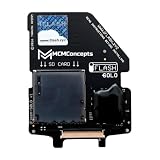
- SD, SDHC, SDXC, UHS-1, U1, U3 Card Compatible (it is important: use only original cards recommended by the manufacturer)
- If you are looking to upgrade your battery, we recommend the 2000mAh square battery for a nice fit. Others will not fit aside from a replacement original 650mAh battery.
- Before ordering (!) - make sure that your iPod model is compatible: This does NOT work with iPod 4th/Photo, it only works with iPod Video/Classic 5th gen to 7th gen.
| iPod generation | Capacity guidance | Qualification |
|---|---|---|
| 5th generation | Up to 512 GB | Stable-capacity guidance from Yuuiko’s iPod Guide v2.1; not a guarantee for every card and adapter combination. |
| 6th and 6.5th generations | 128 GB | Upgrade limit reported by Yuuiko’s iPod Guide v2.1. |
| 7th generation | Up to 1 TB | Stable-capacity guidance from Yuuiko’s iPod Guide v2.1; larger configurations may be buggy. |
Use these figures as a starting point, not universal guarantees. The guide does not establish that every card, adapter, and firmware combination will support the listed capacity. Verify the specific parts against the adapter vendor’s compatibility information before purchase.
What is involved in a 5th-generation conversion?
The 5th-generation iPod Video guide from iFixit is a model-specific example, not a procedure for every iPod. Opening the case can damage the display or delicate ribbon connections, so proceed only if you are comfortable with small, fragile components.
Rank #3

- Increase storage and make your old iPod faster.
- Compatible for the Classic iPod 3rd Generation, 4th generation, iPod Mini and iPod Photo (all clickwheel versions).
- Requires a CF drive or a CF to SD card adapter.
- Storage limit is up to 64GB for most models.
- Prepare the iPod: Move the hold switch to the locked position before opening the case.
- Open the enclosure: Use an opening tool to carefully release the case clips. Take care around the display.
- Disconnect the hard drive: Release the drive ribbon latch and disconnect the original drive. The battery and headphone ribbon connectors also have delicate latches.
- Connect the flash-storage route: Attach a ZIF-to-CF converter and CF storage, or a compatible SD-to-CF adapter. Not all SD-to-CF adapters work.
- Reassemble and restore: Close the iPod, then restore it with iTunes as directed by the guide.
See iFixit’s 5th-generation iPod Video storage replacement guide for the full disassembly and reconnection details.
How to choose parts without guessing
- Confirm the model: Use the model number and generation, not just the product name or appearance.
- Match the board to the generation: iFlash offers different adapter types; check the exact compatibility chart and product page rather than assuming one adapter fits all.
- Check the whole storage chain: Verify the adapter, any converter, card format, capacity, ribbon cable, and physical fit as a combination.
- Plan for careful repair work: The case clips and internal ribbons are vulnerable during opening and reconnection.
- Allow for a post-install restore: The 5th-generation iFixit procedure calls for restoring the iPod with iTunes after reassembly.
What this upgrade does—and does not—establish
The conversion changes the storage medium in compatible hard-drive iPods. The cited guides do not provide measured claims about resulting speed, battery life, reliability, or failure rates, so those outcomes should not be assumed from the storage swap alone.
Rank #4
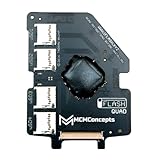
- Quad Mode Adapter – use 1 or 2 or 3 or 4 MicroSD cards to fit with your storage requirements
- SD / SDHC / SDXC / UHS-1 U1 & U3 Card Compatible
- Compatible: iPod 5g Video 30Gb, 60Gb iPod 5.5g Video 30Gb, 80Gb iPod 6g Classic 80Gb, 120Gb, 160Gb *Limit of 128Gb with SD cards iPod 7g Classic 160Gb (late 2009)
For additional generation-specific capacity context, see Yuuiko’s iPod Guide v2.1; treat its recommendations as enthusiast guidance rather than Apple specifications.
Quick Recap
Best Value
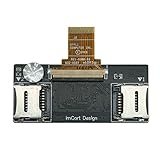
- Detailed Information: Dual Micro SD Card Adapter, which can convert the iPod Video (5th/5.5th generation) and iPod Classic (6th/6.5th/7th generation) from using a hard drive to dual Micro SD cards. Maximum supported capacity: 1TB.
- This product works in: All 5th/5.5th Generation iPods (iPod Video 5th/5.5th Support capacity of 16GB - 1TB ) , All 6th/6.5th/7th Generation iPods (iPod Classic 6th 1.12/6.5th 2.01 Support capacity of 16GB - 128GB, 7th 2.04/2.05 Support capacity of 16GB - 1TB). Please check the models shown in the picture
- Notice: If only one Micro SD card will be used, be sure to insert it into slot 1, otherwise it will not be recognized
- Product advantages: 1.Thin profile – thinner than the original HDD, 2.Zif Connector – Gold plated and perfectly matches the Apple HDD Ribbon, 3.Yamaichi micro sd Connectors – High quality Japanese made micro sd Connector, 4.micro sd U1 & U2Card Compatible, 5.With much lower power consumption than the original Hard drive, longer run times and quicker user interface.
- If the product is damaged, replace it with a new one directly. (Cables are not covered under warranty). If you have any questions, please feel free to contact us
Product prices and availability are accurate as of the date/time indicated and are subject to change. Any price and availability information displayed on Amazon at the time of purchase will apply.

