
Quick wins for a faster PC:
Repair Windows errors before they cause bigger problemsFix Now →Fix the driver behind crashes, sound loss and screen glitchesFind Drivers →Clear out junk files and repair common Windows errorsFree Scan →Before installing a mini PC in a tight or dusty spot, check the exact model’s manual for vent locations, required clearance, approved mounting orientations, operating-temperature limits, and power-adapter requirements. Keep vents and the adapter uncovered, prevent hot exhaust from feeding back into an intake, and leave room to inspect and service the unit. There is no universal clearance or temperature limit that applies to every mini PC.
1. Map the vents and the airflow path
Find the intake and exhaust vents in the manual for your exact mini PC; vent positions vary by model, so do not rely on photos of a similar-looking device. For example, the ASUS PN50/PN51 manual identifies separate intake and exhaust vents and warns users to keep them unobstructed. Lenovo describes the ThinkStation P330 Tiny’s fan drawing in fresh air and expelling hot air through vents. ASUS PN50/PN51 manual · Lenovo P330 Tiny air-circulation guidance
Assess the complete route, not just whether an object touches the case. A shelf above an exhaust, a nearby wall, or a cabinet that holds warm air can restrict flow or send hot exhaust back toward an intake. Intel’s Thin Mini-ITX design guide explains that vent location and orientation affect cooling; the system maker determines the implementation for its product. Intel Thin Mini-ITX design guide
2. Check model-specific clearance and mounting rules
Use the clearance and orientation specified for the particular unit and any manufacturer-approved mount. Lenovo says 51 mm (2 inches) of air space is usually sufficient around vents on the ThinkStation P330 Tiny. That is guidance for that model, not a general mini PC standard. The available guidance does not establish a universal minimum clearance or a mounting orientation that is safe for all mini PCs. Lenovo P330 Tiny air-circulation guidance
#1 Best Overall

- Effective Dust Protection for PC Longevity: This 400x300mm PVC mesh filter effectively blocks dust and debris from entering your computer case, protecting sensitive components like GPUs and CPUs from overheating. It is an essential accessory for maintaining a clean gaming PC or workstation.
- Flexible Magnetic Mounting System: Equipped with strong, flexible magnetic strips, this filter attaches securely to any steel or iron surface without the need for screws. It is perfect for modern PC cases with magnetic panels, allowing for quick installation and tool-free removal.
- Customizable DIY Design for Any Device: The 2-pack of large mesh sheets can be easily cut to size with household scissors, making it a versatile solution for custom SFF builds, speaker grills, game consoles, or even DIY electronics projects that require breathable dust protection.
- Optimized for High Airflow & Cooling: Designed with a fine mesh pattern, this filter balances superior dust filtration with minimal airflow restriction. It ensures your fans can still pull in cool air efficiently while keeping the internal environment of your case dust-free.
- Washable & Easy to Maintain: The durable PVC material is waterproof and easy to clean. Simply remove the magnetic filter, rinse it under water, and pat dry to restore its original performance, saving you time and money on compressed air cans.
Before choosing a shelf, cabinet, wall mount, or desk cavity, verify that the device can sit there in the intended orientation and still meet its documented clearance requirements. If the manual does not specify a configuration, do not assume that a cramped enclosure or a different orientation is acceptable; check with the manufacturer.
3. Compare the location’s temperature with the device limit
Check the operating-temperature specification for your mini PC and consider the air around the unit, especially inside a cabinet or desk cavity where heat can accumulate. Published figures are not interchangeable: Intel’s Thin Mini-ITX design guide gives 35°C as a recommended maximum operating room temperature outside the system for that design guidance, while Lenovo’s desktop ventilation guidance says airflow into its referenced computer should not exceed 35°C. Neither figure is a universal limit for unrelated mini PCs. Intel Thin Mini-ITX design guide, revision 1.2 · Lenovo heat and product ventilation guidance
Rank #2

- 【TOOL-FREE MAGNETIC INSTALLATION】The HFEIX 120mm dust filter features a full-perimeter magnetic frame that attaches instantly and securely to any steel or iron surface of your PC case, power supply, or AV cabinet. No screws, no disassembly required.
- 【OPTIMIZED 0.8MM AIRFLOW DESIGN】Engineered with a precision 0.8mm mesh diameter, this filter strikes the perfect balance between maximum airflow and dust rejection. It allows your cooling fans to breathe freely while trapping tiny particles, pet hair, and lint.
- 【PROTECTS HARDWARE & REDUCES NOISE】By preventing dust buildup on fan blades and internal heatsinks, the filter helps maintain lower system temperatures. This reduces fan RPM and annoying whine noise, effectively extending the lifespan of your CPU, GPU, and power supply.
- 【WASHABLE & REUSABLE PVC MESH】Crafted from durable PVC plastic, the mesh can be easily removed, rinsed under tap water, or brushed clean. It dries in seconds and reattaches magnetically, offering sustainable protection far superior to disposable foam pads.
- 【SPECIFICATIONS & PACKAGE】Filter Dimensions: 120 x 120 mm (4.72 x 4.72 inches). Mesh Aperture: 0.8 mm. Color: Black. Package Includes: 4 x HFEIX Magnetic Dust Filters. Note: Please ensure your case panel is magnetic before purchase.
4. Account for dust and plan inspection
Dust can obstruct fan inlets and reduce heat-sink performance, so a dusty or high-traffic location calls for more frequent inspection and cleaning. Lenovo advises owners of the desktops covered by its guidance to inspect for dust at least every three months, and more often in dusty or high-traffic areas. Treat that as Lenovo guidance for those systems, not a fixed schedule for every mini PC; follow your own model’s maintenance instructions. Lenovo heat and product ventilation guidance
Choose a position where you can safely reach the vents and remove the unit if inspection or service is needed. Shut the PC down and unplug it before inspecting or opening the case, following the manufacturer’s cleaning instructions. A filter is not automatically beneficial: Lenovo documented an optional removable dust shield for the ThinkCentre M600 Tiny, but that model-specific feature does not establish compatibility or safe airflow for third-party filters or other systems. Lenovo ThinkCentre M600 Tiny specifications
Rank #3
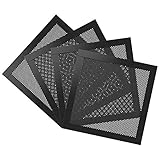
- Ultra Fine Mesh Cover: PVC mesh, which is exceptionally long-lasting and can be washed with water and soap if it becomes dirty over time.
- Magnetic Frame Design: Easy to install and remove. It can be easily placed anywhere on a metal chassis, no tools or screws needed.
- Fits: Any standard 140mm fan sizes. Washable and reusable. Gentle hand wash only. Do not bend, do not wash in a washing machine. Clean every couple of weeks or when dust appear.
- Fan Filter: In addition to being mounted on the casing, it can also be installed on the power supply. It can effectively reject the entry of dust when inhaling cold air, and effectively reduce noise. Provide efficient dust reduction properties and protect you computer from overheating.
- Parameter: Filter size: 5.51x5.51x0.08in/14x14x0.2cm, weight: 5.52oz/156.5g. Pacakage list: 4 x MoKo Dust Filter.
5. Keep the power adapter ventilated and accessible
Check the exact adapter rating and placement requirements in the mini PC’s documentation, and use the specified adapter. The ASUS PN50/PN51 manual says to use the supplied adapter to prevent damage and notes that it may become warm to hot during use. Keep it uncovered, with room for ventilation, and place it where you can reach it to disconnect power safely. ASUS PN50/PN51 manual
6. Make sure the location allows access and service
Confirm you can reach the ports, disconnect power without moving other equipment, and remove the mini PC for model-specific maintenance. Service steps differ across product families: Lenovo’s IdeaCentre Tiny Mini 5 replacement videos, for instance, cover fan and heat-sink service for that family rather than all mini PCs. Lenovo IdeaCentre Tiny Mini 5 replacement videos
Rank #4

- DIY Design: this PC dust filter is about 39.37 x 11.81 inches/ 1000 x 300 mm; You can cut out the appropriate size according to the size of the fan opening of your computer case, and stick the PC dust cover on the iron case with a magnetic strip
- Magnetic Strip: the package provides you 8 pieces of magnetic strips, and each measures about 15.75 x 0.39 inches/ 40 x 1 cm; The magnetic strips have decent magnetic attraction; There is no need to drill holes, just peel off the adhesive sticker on the back to magnetically attract the dust filter mesh to the iron shell
- Anti Dust Ventilation: mesh holes design of these air vent covers can not only prevent dust and hair from entering the case, but also do not restrict airflow to ensure adequate ventilation, keeping your computer and components clean, thus prolonging their lifespan
- Widely Use: this pc case dust filter computer mesh not only can be applied for dust protection of home PC fan mesh, speaker grille, vent cover and other electrical and electronic products, but also can be applied for dust cover of game console, etc
- What You Will Get: you will receive 2 piece of DIY pc case dust mesh filter, 8 pieces of magnetic strips, sufficient quantity and practical combination can satisfy your needs and replacements
Use this checklist to compare locations
- Are the model’s intake and exhaust vents identified, unobstructed, and facing a usable airflow path?
- Does the spot meet the manufacturer’s clearance and mounting-orientation instructions?
- Can hot exhaust escape without immediately recirculating into an intake?
- Will the air around the PC stay within its published operating-temperature limit?
- Can you inspect and clean the unit more often if the area is dusty?
- Are the adapter and PC uncovered, reachable, and easy to disconnect?
- Can you reach ports and remove the device for service?
A compact location is a poor fit if it blocks airflow, traps heat, or makes safe cleaning impractical. When choosing between two spots, prefer the one that satisfies the device’s documented requirements and remains easy to inspect and service.
Quick Recap
Best Value

- 400 x 300mm DIY Filter: This DIY PC case dust mesh filter provides you a wide range of size selection. Just cut the mesh after measuring the size of your computer case cooling port, and attach it to the iron shell through magnetic strip.
- 8 x 400mm Magnetic Strips: Come with 8 x 400mm magnetic strips, the magnetic fan filter mesh features strong magnetic suction with no need to drilling, just peel off the back of the 3M adhesive stick to the dust mesh can be magnetically attached to the iron shell, which is easy to disassemble and clean, saving your time.
- Dustproof and Ventilation: 1mm hole not only prevent dust and hair from case but also not restrict airflow to ensure enough ventilation, keeping your computer and some components clean, which can lengthen their working life.
- PVC Dust Filter For Multiple Usage: Made of PVC material, not only can be used for home pc computer chassis and fan dust filter,speaker grills and other electrical electronic products dust protection, but also can be dust cover for gaming consoles,Xbox Series and more.
- Package Included: 2x 400x300mm Magnetic fan dust filter and 8 x 400mm magnetic strips.
Product prices and availability are accurate as of the date/time indicated and are subject to change. Any price and availability information displayed on Amazon at the time of purchase will apply.

