
To estimate your next electricity bill after a rate change, use your own utility’s current rate schedule and the kWh and billing dates shown on your bill. Calculate usage charges under the tariff’s actual pricing structure, add fixed and other applicable charges, then subtract credits. A national average or a published sample rate cannot tell you what your household will owe.
Gather the details from your bill and rate notice
Start with the bill for the service address you want to estimate. Record its billing-period start and end dates, total kWh, and any daily, hourly, or time-band usage breakdown. Check whether the meter reading is marked estimated; an estimate may differ from the eventual measured consumption. The Australian Energy Regulator explains bill usage and estimated readings in its bill guidance.
Next, find the utility’s current tariff or rate notice for that address and plan. Record the effective date and the charges that apply: per-kWh rates, tiers or time bands, daily or monthly fixed charges, and any listed delivery, adjustment, tax, credit, or export-compensation rules. Rates can depend on location, plan, meter, and payment arrangement, so check the schedule itself rather than assuming another household’s rates apply. Ofgem’s bill-calculation guidance describes how tariffs and bill components feed into charges.
Calculate the energy charge for your tariff
Flat per-kWh rate
For a single rate, multiply the kWh used in the billing period by the rate that applies during that period:
Recommended Free Tools
#1 Best Overall

- SAFETY YOU CAN TRUST WITH UL CERTIFICATION: With Emporia Energy, your home energy monitoring is safe, reliable, and certified. The Emporia Vue is UL Listed, meaning it has met rigorous safety standards for electrical products in the U.S. and Canada. This certification ensures that every component has been thoroughly tested to prevent hazards, such as overheating, short-circuiting, or fire, offering you peace of mind as you manage your home’s energy consumption.
- INSTALLS IN CIRCUIT PANEL of most homes with clamp-on sensors. Supports Single phase, Single-split phase, and 2-wire systems. 3-wire systems; 3-phase, 4-wire Wye systems with earthed (TN or TT) neutral (no-Delta) are supported with an additional 200A sensor (sold separately).
- 24/7 ENERGY MANAGEMENT AND MONITORING: Automate, manage and control your home's real power anywhere, anytime to prevent costly repairs, conserve energy, and save costs. Monitor solar / net metering. PROTECTED BY A 1-YEAR WARRANTY.
- LOWER YOUR ELECTRIC BILL: Configure settings in the Emporia Energy App to automate energy management for time of use, peak demand, excess solar, and rewards programs. You can even see live reporting and invaluable savings opportunities instantly. Gauge real-time spending and get actionable notifications and automated energy management to help you reduce costs.
- REAL-TIME ENERGY DATA: REQUIRES 2.4 GHz WIFI WITH AN INTERNET CONNECTION to monitor energy use with iPhone / Android / Web app. Vue sensors collect energy data and are accurate from ±2%. The Vue is UL and CE Listed for your safety. 1 second data is only available in the app (when actively open) and retained 3 hours. Minute and hour data are retained in the cloud. 1 minute data is retained 7 days, 1 hour data is retained indefinitely. Export cloud data whenever you want in the app.
Energy charge = kWh used × applicable rate per kWh
Tiered rates
For a tiered tariff, allocate usage across the tariff’s thresholds, then calculate each tier separately:
Energy charge = sum of (kWh in each tier × that tier’s rate)
Rank #2

- ⚡ EASY INSTALLATION: Installs in circuit panel of most homes with clamp-on sensors. Supports single-phase up to 240VAC line-neutral; single, split-phase 120/240VAC; and three-phase up to 415Y/240VAC (no Delta). The branch lines can automatically match different phases and have no restrictions in terms of quantity and voltage.Panels with access only to busbars will need flexible sensors available from SEM-Meter.
- ⚡ ENERGY MONITORING ANYTIME, ANYWHERE: Monitor your home's real power anywhere, anytime to prevent costly repairs, conserve energy, and save costs. Monitor solar / net metering. Light commercial 3 phase option available as a separate bundle. Protected by a 1-year warranty.
- ⚡ VARIOUS ELECTRICAL APPLIANCE MONITORING: Comes with 16 50A sensors to accurately monitor your air conditioner, furnace, water heater, washer, dryer, range, etc.
- ⚡ LOWER YOUR ELECTRIC BILL: SEM-Meter measures real-time spending and gets actionable notifications to understand where savings can be made, both to lower your electric bill and to conserve energy and protect the planet’s resources. Be an environmentalist.
- ⚡ REAL-TIME ENERGY DATA: Connect SEM-Meter device via 2.4GHz WiFi to monitor energy usage, with an accuracy range of 1%. View usage in real time through Android/Apple software. Statistics of power usage in now/day/week/month/year format: the validity period of hourly exported data is 90 days, and the exported data of day/month/year data is permanent, available at any time Export from application.
Do not apply the highest tier’s rate to all usage unless the tariff specifically says to do so. Ontario’s regulator describes tiered pricing and how usage can cross a threshold in its electricity-bill guide.
Time-of-use rates
For time-of-use pricing, multiply the kWh consumed in each time band by that band’s rate, then add the results:
Energy charge = sum of (kWh in each time band × that band’s rate)
Rank #3

- Various Monitoring Parameters: The power meter plug can monitor the power (W), energy (kWh), volts, amps, hertz, power factor, cost, minimum and maximum power (W), cumulative days and time of your appliances. By switching 7 display modes, you can easily know the various parameters while the appliance is working. The home energy monitor can also calculate and display how much power your appliance uses and how much electricity bill it cost in cumulative time
- Upgraded LCD Display: With large screen size 2.36 inch x 1.85 inch, clearer monitor backlit, our electrical usage monitor can display the data clearer and more visible no matter day or night. 180°full wide viewing angles is great for reading and recording the data in any angles. No need to stand on the front of the display and bend over to read the numbers
- Adjustable Backlight Time: Our upgraded watt meter has 5 options of backlight time. The default backlight time duration is 10 minutes(bL-0). If you want to change the backlight time, you can press and hold "UP" and "DOWN" button at the same time to enter backlight time setting, then press "UP" and "DOWN" to select the backlight time (bL-0 =10 minutes, bL-1=1 hour, bL-2=4 hours, bL-3=8 hours, bL-4=always on), finally press the "COST" to save the backlight time settings
- Overload protection: When the power of the appliance exceeds the overload power, the LCD will display “OVERLOAD” to warn the user. All the buttons will quit working and can only be workable when you lower or remove the load power. The default overload power is 3680W and is adjustable from 0 to 3680W. In general, you need to set the overload power to 1800W before using. Just press the "function" button for more than 3 seconds to enter the setting
- Data Memory Function: The wattage meter will record your power consumption data when you remove it from socket, or remove appliances from the electricity monitor. You can directly see the last data when you use it next time. This function can also automatically save the data when there is a sudden power failure
The same monthly total can cost different amounts depending on when electricity was used. Use interval or band data from the bill or utility portal; a monthly total alone cannot show how much fell in each band. Dynamic tariffs may require interval-specific prices as well as interval usage. Ontario’s regulator explains its plan structures and rate timing in its bill guide, while the U.S. Department of Energy’s Federal Energy Management Program explains why load shape matters when evaluating rate options in its utility-rate guide.
Add fixed charges and other applicable bill lines
Keep charges that do not vary with kWh separate from the energy calculation. If the tariff specifies a daily standing or fixed charge, multiply it by the billable days; if it specifies a fixed monthly amount, use the stated amount and billing rule. The exact treatment belongs to the local tariff. Ofgem says, “The standing charge is a fee you pay each day, even if you do not use any energy on that day.”
Then account for other lines that actually apply to your bill, such as delivery or grid charges, adjustments, taxes, minimum-bill rules, demand charges, credits, or compensation for exported electricity. Do not add a fee just because a different utility charges it. Regulators describe different local structures: see the Australian Energy Regulator’s bill guidance, New Zealand’s Electricity Authority power-bill explainer, and the California Public Utilities Commission’s electric-rate overview.
Rank #4

- SAFETY YOU CAN TRUST WITH UL CERTIFICATION: With Emporia Energy, your home energy monitoring is safe, reliable, and certified. The Emporia Vue is UL Listed, meaning it has met rigorous safety standards for electrical products in the U.S. and Canada. This certification ensures that every component has been thoroughly tested to prevent hazards, such as overheating, short-circuiting, or fire, offering you peace of mind as you manage your home’s energy consumption.
- INSTALLS IN CIRCUIT PANEL of most homes with clamp-on sensors. Supports Single phase, Single-split phase, and 2-wire systems. 3-wire systems; 3-phase, 4-wire Wye systems with earthed (TN or TT) neutral (no-Delta) are supported with an additional 200A sensor (sold separately).
- 24/7 ENERGY MANAGEMENT AND MONITORING: Automate, manage and control your home's real power anywhere, anytime to prevent costly repairs, conserve energy, and save costs. Monitor solar / net metering. PROTECTED BY A 1-YEAR WARRANTY.
- LOWER YOUR ELECTRIC BILL: Configure settings in the Emporia Energy App to automate energy management for time of use, peak demand, excess solar, and rewards programs. You can even see live reporting and invaluable savings opportunities instantly. Gauge real-time spending and get actionable notifications and automated energy management to help you reduce costs.
- REAL-TIME ENERGY DATA: REQUIRES 2.4 GHz WIFI WITH AN INTERNET CONNECTION to monitor energy use with iPhone / Android / Web app. Vue sensors collect energy data and are accurate from ±2%. The Vue is UL and CE Listed for your safety. 1 second data is only available in the app (when actively open) and retained 3 hours. Minute and hour data are retained in the cloud. 1 minute data is retained 7 days, 1 hour data is retained indefinitely. Export cloud data whenever you want in the app.
For a simple flat-rate case, the structure is:
Estimated bill = (kWh × unit rate) + (billable days × daily fixed charge) + other applicable charges − credits
This is an estimate framework, not a universal bill formula. Apply the tariff’s rules for taxes, delivery, adjustments, minimums, demand charges, credits, and any other line items.
Independent reader supportYour contribution helps us test, update, and keep practical guides available for everyone.Account for a rate change during the billing period
If the new rate takes effect between the start and end dates on your bill, check how the utility says it handles that period. If the utility bills separate old-rate and new-rate usage, calculate each portion at its applicable rate. Do not assume that dividing total kWh evenly by the number of days produces the actual split: household use can vary by day, and the utility’s meter-reading or proration rules control.
Best Value
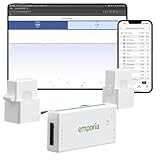
- SAFETY YOU CAN TRUST WITH UL CERTIFICATION: With Emporia Energy, your home energy monitoring is safe, reliable, and certified. The Emporia Vue is UL Listed, meaning it has met rigorous safety standards for electrical products in the U.S. and Canada. This certification ensures that every component has been thoroughly tested to prevent hazards, such as overheating, short-circuiting, or fire, offering you peace of mind as you manage your home’s energy consumption.
- INSTALLS IN CIRCUIT PANEL of most homes with clamp-on sensors. Supports Single phase, Single-split phase, and 2-wire systems. 3-wire systems; 3-phase, 4-wire Wye systems with earthed (TN or TT) neutral (no-Delta) are supported with an additional 200A sensor (sold separately).
- 24/7 ENERGY MANAGEMENT AND MONITORING: Automate, manage and control your home's real power anywhere, anytime to prevent costly repairs, conserve energy, and save costs. Monitor solar / net metering. PROTECTED BY A 1-YEAR WARRANTY.
- LOWER YOUR ELECTRIC BILL: Configure settings in the Emporia Energy App to automate energy management for time of use, peak demand, excess solar, and rewards programs. You can even see live reporting and invaluable savings opportunities instantly. Gauge real-time spending and get actionable notifications and automated energy management to help you reduce costs.
- REAL-TIME ENERGY DATA: REQUIRES 2.4 GHz WIFI WITH AN INTERNET CONNECTION to monitor energy use with iPhone / Android / Web app. Vue sensors collect energy data and are accurate from ±2%. The Vue is UL and CE Listed for your safety. 1 second data is only available in the app (when actively open) and retained 3 hours. Minute and hour data are retained in the cloud. 1 minute data is retained 7 days, 1 hour data is retained indefinitely. Export cloud data whenever you want in the app.
If the notice does not explain the treatment, consult the utility’s tariff or ask how the change is applied to a bill that crosses the effective date. There is no single mid-cycle method established across utilities; the Ontario Energy Board’s rate and bill guidance and Ofgem’s bill guidance concern their own jurisdictions, not a universal rule.
Check why the estimate differs from your previous bill
Compare like with like: line items, bill length, and usage period. A higher total despite similar kWh can reflect a rate change, a different number of billing days, fixed charges, or other bill components. A change in kWh can reflect weather-driven heating or cooling, other household use, or an estimated rather than actual meter reading. The bill and applicable schedule show which of these inputs changed; there is no single diagnostic calculation that explains every utility bill.
Compare plans using your household’s usage pattern
If you are considering another plan, compare its fixed charges, per-kWh rates, tier thresholds, time-band hours, effective dates, eligibility, and rules for billing periods that cross a rate change. Then use your household’s actual usage pattern, not just its monthly total. A home able to shift flexible use to cheaper hours may assess a time-of-use plan differently from one that uses most electricity during peak periods. Interval data, when available, makes that comparison more meaningful. The U.S. Department of Energy’s rate-evaluation guide discusses load magnitude, load shape, and bill structure.
Published figures are context, not inputs for an individual estimate. For example, Ofgem’s price-cap information lists £1,723 per year for 1 October through 31 December 2026: a Great Britain cap based on average electricity and gas unit rates and standing charges for direct-debit customers in England, Scotland, and Wales. It is not an electricity-only amount or a household-specific quote. Use your own utility’s current schedule and usage details for your calculation.
Windows Errors? Fix Them Before They Spread
Repair common Windows errors and clear accumulated junk for a smoother, more stable PC - no reinstall needed.Free scan · no reinstallOutdated Drivers Are Slowing You Down
One free scan finds every outdated or missing driver and matches the right update for your exact hardware.Free scan · exact hardware matchQuick Recap
Product prices and availability are accurate as of the date/time indicated and are subject to change. Any price and availability information displayed on Amazon at the time of purchase will apply.

