
If your Ryobi sander is leaving swirl marks, first check the sanding disc and pad, then reduce pressure, keep the sander flat and moving, and make sure dust is being collected. A worn or clogged disc, misaligned abrasive, uneven pad, trapped dust, or sanding technique can all contribute to a rough finish. Work through the checks below before assuming the tool itself is faulty.
Why a Ryobi sander can leave swirl marks
Random-orbit sanders are designed to help produce a smooth finish on broad, flat surfaces, but they do not guarantee a mark-free result. Abrasive condition, pad condition, dust, pressure, speed, and movement all affect the finish. RYOBI’s troubleshooting guidance specifically recommends suitable grit and speed, fresh paper, a sound pad, effective dust collection, a flat tool position, and overlapping passes.
A woodworking discussion describes marks after sanding maple with 120-grit paper using a cordless Ryobi random-orbit sander, but that is one user’s account—not evidence that a particular Ryobi model or grit routinely causes the problem. Isolated pigtail-like scratches can be consistent with a larger particle caught between the abrasive and the workpiece; treat that as a possibility to investigate, not a confirmed diagnosis.
Fix the problem in this order
- Switch off and isolate the sander. Disconnect it from power or remove the battery before inspecting or changing parts. Wear suitable eye and respiratory protection when sanding or maintaining the tool, and follow the manual for your specific model.
- Inspect the abrasive disc. Replace paper that is worn or clogged. Check that the disc is the correct size, sits evenly on the pad, and has its dust holes aligned. Press a hook-and-loop disc firmly into place.
- Check the pad. Look for damage, wear, or an uneven surface. RYOBI advises replacing a damaged or uneven pad; use a replacement specified for your model.
- Clean the workpiece and check dust collection. Remove dust from the surface and clear the sander’s collection system. If marks appear repeatedly or only in isolated spots, stop and inspect the paper and workpiece for debris.
- Match grit and speed to the sanding stage. Coarser paper removes material faster; finer paper is for a smoother finish. On models with adjustable speed, RYOBI recommends higher speeds for rough sanding and lower speeds for finishing. Do not apply that speed advice to a model without speed adjustment.
- Sand with a flat, moving tool. Set the whole pad on the workpiece before sanding. Use light, even pressure and steady, overlapping passes; on wood, follow the grain where practical. Avoid tilting the sander or lingering in one place. RYOBI Support Australia cautions: “Avoid pressing too hard, as this can cause the sander to skip and leave rough marks.”
- Remove existing scratches before moving finer. If marks remain, use fresh paper or return to an appropriate coarser grade to remove them. Then resume the original grade or continue finer once the previous scratches are gone. A RYOBI manual gives this sequence for its model; follow your own model’s manual if its instructions differ.
Choose replacement paper or a pad by model
RYOBI Tools US lists A21701 sanding paper and the A21BP01 backer pad for a supported 5-inch random-orbit sander. These listings do not establish compatibility with every Ryobi sander or products sold in every country. Before ordering, confirm your sander’s model, disc diameter, and dust-hole pattern; replace the pad only if inspection indicates it is damaged or uneven.
Windows Errors? Fix Them Before They Spread
Repair common Windows errors and clear accumulated junk for a smoother, more stable PC - no reinstall needed.Free scan · no reinstallCrashes, No Sound, or Screen Glitches?
Random freezes, missing sound and display glitches usually trace back to one bad driver. Find and replace yours safely.Free scan · under a minute#1 Best Overall

- 【Compatible Models】Orbital sander pad replacement parts OE# 030157001018, compatible with Ryobi PCL406 RS240 RS290 RS290g RS280 RS280VS RS281VS P411 P410 5 inch Random Orbit Sander
- 【Compatible Others】Sander backing pad replacement parts OE# 300527002, compatible with Ridgid R2600 R2601 R2501 R8606, Milwaukee 6021-21 6034-21, Craftsman ROS Model 315 Random Orbit Sander
- 【Specification Size】5 In hook and loop sander pad has 4 screw holes and 8 dust holes, Center round hole diameter is 1 inch (26 mm), Center-to-center distance of adjacent screw holes is 1-1/8 In (28.5 mm), please confirm the machine size before purchase
- 【Product Material】Replacement sander pad have thickened engineering plastic back plate and rubber layer, wear-resistant, high-temperature resistance, high-density hooks, strong stickiness, strong grasping sandpaper, and efficient completion of grinding work
- 【Save Mind and Effort】Sander pad can complete your polishing work better, no longer worry about the high temperature generated by friction melting your pad, and do not worry about the frequent replacement of the pad to bring you economic losses
When to try a different sanding approach
Choose the sanding approach for the surface and task: its size and shape, the amount of material to remove, the finish stage, and access to corners or edges. One RYOBI manual describes random-orbit action as helping prevent swirl marks on large flat surfaces, while identifying sheet and detail pads for other tasks. That is not a guarantee of a swirl-free finish; technique and abrasive condition still matter.
Quick Recap
Best Value

- Package Inclusion: YNZDRWA sanding discs set from rough to fine to satisfy almost all your general polishing requirements. You will get 70 total orbital sander pads of 9 different grades: 5pcs of 40 grit, 8pcs of 80/120/180/240/320/400/600 grit, 9pcs of 800 grit
- High-quality Sanding Discs: Our sanding pads for orbital sander are made from high-quality aluminum oxide abrasive, which is solid and anti-static, providing efficient and long-lasting sanding
- Firm Adhesion: Upgraded orbital sander pads, hook and loop design, which is easy to adhere to the random orbital sander, without worrying about it falling off
- Easy to Use: The sanding disc back has a hook and loop backing that adheres better to the adhesive pad of the orbital sander, making it easy for you to quickly change, effectively extending the lifespan of the sandpaper
- Wide Application: Our sandpaper set is widely used in grinding and polishing of metal and non-metallic materials of various complex surface rust, including woodworking, metal crafting, automotive repair, furniture making, and etc
Rank #4

- Genuine Ryobi replacement part.
- New, Bulk Packed.
- Genuine Ryobi Replacement Part.
- Consult owners manual for proper part number identification and proper installation.
- Please refer to list for compatibility.
Rank #3
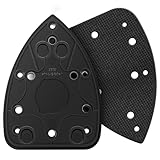
- Affordable Prices: You can get a pack of two mouse sander replacement pad compatible with Ryobi sander pads; From now on, you are able to replace the part and not have to trash the sander and buy another one
- Compatibility: Size 5.5"x3.75" with 5 screw hole. detail sander parts compatible with Ryobi Sander 039065005001 Backing Platen CFS1503K CFS1503 CFS1502 CFS1503G
- Material: The detail sander pad is made from PA6GF30 plastic (plastic platen adhesive with hoop and loop backing), which featured with high toughness, high heat resistance, no discoloration, no cracking, as well as good mechanical and electrical properties
- Easy to Install: Just remove the original screws remove the old plate and pop on this plate replace the old screws and you are back in business. It's that simple
- Notes: 1. Please confirm your sander model with above or make sure the hole of your sander is same with our detail sander adhesive pads. 2. To prolong the life of the replacement sanding pad try not to put to much pressure on the sander when sanding, excessive pressure creates heat build up in the sanding pad which will quickly breakdown or even melt the tiny plastic hooks on the pad
Rank #2

- The 5" Hook and Loop Sander Pad is compatible with RS290, RS241, RS240, RS280, RS280VS, RS281VS, P411 Random Orbit Sander. WHAT'S MORE, the universal sander pad can replace most common sander pads with 5” dia, 8 dust holes and 4 screw holes. Whatever brand it is, if your 5” original pad has the same pattern and the distance between screw holes center to center is 1-1/8”, it will fit definitely.
- 5 In orbital sander pad has 4 screw holes and 8 dust holes, Center round hole diameter is 1 inch/26 mm, Center-to-center distance of adjacent screw holes is 1-1/8 In (28.5 mm), please confirm the machine size before purchase
- Thickened engineering plastic back plate and high-quality rubber layer, wear-resistant, high-temperature resistance, high-density hooks, strong stickiness, strong grasping sandpaper, and efficient completion of grinding work
- When the replacement pad needs to be replaced, simply remove 4 screws that hold the pad to the sander, then replace it with a new. NOTICE: the screws are not included
- The sander pads wear out before the machine does, so replacing the pads is a cost effective option. Save your old sander from garbage can and extend their life.
Product prices and availability are accurate as of the date/time indicated and are subject to change. Any price and availability information displayed on Amazon at the time of purchase will apply.
Independent reader supportYour contribution helps us test, update, and keep practical guides available for everyone.
