
What’s actually slowing this PC down?
Pick the symptom - the matching free tool is one click away.
If your computer cannot control your amateur radio, check the connection in this order: confirm the radio and CAT protocol are supported, select the radio’s actual CAT port, match the radio and software baud rates, verify the remaining serial settings, then rule out another program using the port. A correct baud rate alone will not fix a wrong port, unsupported radio profile, or incompatible control-line setting.
What CAT control needs to work
CAT (computer-aided transceiver) control lets software communicate with a radio through a serial connection, which may be provided by a physical serial interface or by USB and a virtual COM port. The radio and application must use compatible control protocols and settings. As the microHAM MK manual puts it, “Although most modern radios implement some form of serial control, nearly every radio implementation is different.”
That is why menu names, available functions, port assignments, and valid serial settings depend on the radio, application, interface, and task. Use the radio’s manual and the software’s documentation together rather than applying settings from a different model.
Troubleshoot the connection in order
1. Confirm radio and protocol support
In the control application, choose the exact radio model when it is listed. If the software instead asks for a protocol, select the one documented for your radio. Check whether the application supports the functions you need: frequency and mode display, for example, may have different requirements from PTT, CW, or other control.
Recommended Free Tools
#1 Best Overall

- USB to 3.5MM AJ Programming Cable for Xiegu G90 X5105 G1M G106 HF Transceivers Firmware Upgrade USB TTL Serial Converter Cable for CAT Control .
- Original FT232RL Chip Import from UK, Support EEPROM, High Speed , More Stable. Driver Download : Go to google to search FT232RL Official WEBSITE to download it .
- System Support : Win7/8/10/11/XP/Android/Mac os/Linux/Vista/Wince/ etc
- Connector A : USB 2.0 A Male, Connector B: 3.5mm Stereo Plug AJ . Length: 6FT/180cm
- Application for Xiegu G90 X5105 G1M G106 HF Transceivers Firmware Upgrade and CAT Control
For radios with a configurable CAT or CI-V address, compare the radio’s address with the value entered in the software. A protocol or address mismatch can prevent communication even when the computer sees the interface.
2. Identify the CAT-control port
On Windows, connect and power on the radio or interface, then open Device Manager and expand Ports (COM & LPT). Note the COM port that appears. If no relevant port appears, check that the radio’s required USB driver is installed and that the cable and connection are suitable for that radio.
Rank #2
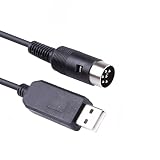
- USB to 6 Pin Radio CAT Serial Cable Remote Control for Kenwood TS440S Transceiver
- Compatible with kenwood TS-440 TS-450 TS-680 TS-690 TS-790 TS-850 TS-940 TS-950
- Length:1.8Mtr
- VIRTUAL COM PORT (VCP) Drivers are available for the following Operating Systems (OS): - Windows 11,10,8.1,8,Vista,7,XP
Some radios expose more than one virtual COM port. Do not assume that the first or lowest-numbered port carries CAT control: another may be intended for PTT, CW, FSK, or another function. Identify the CAT port using the radio manual and the application’s radio setup instructions. N1MM’s supported-radio documentation, for example, describes models where the Enhanced port is used for radio control and another port is assigned to other signaling.
3. Match baud rates at both ends
Set the application’s baud rate to the radio’s configured CAT, CI-V, or PC rate. Check the radio’s menu as well as the software settings: the two values must agree. A rate mentioned in a guide for another radio is not a universal default.
Rank #3
- USB to TTL Serial Cable for Xiegu G90 X5105 G1M G106 HF Transceivers Firmware Upgrade and CAT Control
- Chipset: FTDI FT232RNL
- Type: USB to Uart TTL Level
- Connector: 3.5MM Audio Jack
- Built with durability in mind, the cable features high-quality connectors and a robust outer jacket, making it suitable for use in demanding industrial environments. It is designed to withstand mechanical stress and ensure long-term reliability.
For instance, N1MM recommends 38400 baud for some Yaesu radios and specifies that the program rate must match the radio rate. World Radio League’s guide gives 38400 baud for the Yaesu FTdx101D/MP, FTdx10, and FT-710, but gives 9600 baud for its Icom IC-7300 USB CI-V example. These are model- and application-specific examples, not general CAT settings. See the World Radio League rig-control guide and the radio’s current documentation before changing a value.
4. Verify the rest of the serial configuration
With the port and speed confirmed, compare the application and radio settings for data bits, parity, stop bits, handshake, RTS/DTR, and any CAT or CI-V address. Also check radio menu options that enable or route computer control. The interface cable matters: it may not provide the RTS/DTR signaling wires that a particular setup expects.
Rank #4

- !!Please NOTE: this is MALE RS232 to DB9 SERIAL CABLE ,Not VGA!!!It is 9 pin, NOT 15 pin!! Look carefully of the Pin is match with your device. Before ordering , please confirm the interface gender is waht you need. After receiving ,please read user manual /instruction at first and download the Driver at first from FT232 Official website or Cisco website . Customer service always online.
- Wide range of applications: USB to RS232 DB9 male serial adapter can work with your Windows (10 / 8.1 / 8 / 7 / Vista / XP), MAC or Linux system and other platforms. USB adapter is designed to connect to serial devices, such as serial modem with DB9, ISDN terminal adapter, digital camera, label writer, palm computer, barcode scanner, PDA, cash register, CNC, PLC controller, tax printer, POS, bar code scanner, label printer, etc
- High quality: ftdi usb serial,the latest ftdi chip set ensures more reliable and faster operation. USB 2.0 to RS232 male DB9 console cable will support 1Mbps date transfer rate.
- Most convenient: rs232 to usb simple installation, plug and play, COM port creation, baud rate can be changed to the required settings. USB power supply - no external power supply required.
- Exquisite design: usb-to-serial,Gold Plated USB RS232 connector and PVC cable ensure high performance and extra durability. Powered by USB port, this USB to DB9 series RS232 adapter cable is designed to fit easily into your handbag.
Values such as 4800 baud, 8 data bits, no parity, and two stop bits appear in the microHAM MK manual as an example configuration, not as a general default. Follow the instructions for your exact radio, interface, and application.
Keep use-case differences in mind. A separate POTACAT IC-7300 guide recommends a fixed 19200 baud rate for certain functions, while World Radio League’s IC-7300 example uses 9600 baud for USB CI-V. Do not combine settings from those guides or assume one rate is right for every application task; use the instructions that match your radio and intended use.
Quick wins for a faster PC:
Clear out junk files and repair common Windows errorsFree Scan →Scan for outdated or missing drivers - takes under a minuteDriver Scan →Repair Windows errors before they cause bigger problemsFix Now →Best Value
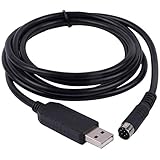
- New Geniune FT232RL Chip import from UK . upport Windows7/8/10/XP/Android/Mac/Linux/Vista/Mas OS
- Length: 6ft/180cm, Connector : USB to Mini 8 Din Serial Port .
- Works for Yaesu FT-100 FT817 FT-857 FT-897 FT8-817ND FT-857D FT897D radio programming cable CT-62 CAT
- FTDI USB Programming Cable for Yaesu Radio , With Injection molding 8 Din, it is easy use in daily life (prevent soldering point fell apart).
5. Check for another application holding the port
Close other logging, programming, or rig-control programs, then retry CAT control. An application that has opened the physical serial port can prevent another from using it directly. CAT4OM’s documentation advises against multiple unrelated applications opening the same physical port.
If several programs need radio access at once, use a serial-sharing server or virtual-port arrangement supported by your chosen software. The secondary troubleshooting guide discusses tools such as rigctld and virtual COM splitters, but compatibility depends on the radio, operating system, and applications. Confirm that the sharing method supports your setup before configuring it.
6. Retest one change at a time
After each change, check whether the application receives frequency or mode data, or whether its documented test command succeeds. Change one setting at a time and note the result; otherwise it is difficult to tell which adjustment restored communication. If the failure remains, record the exact error or behavior before changing more settings.
Independent reader supportYour contribution helps us test, update, and keep practical guides available for everyone.When a cable or interface may be the problem
A compatible USB-to-serial CAT interface or radio CAT cable may be required to connect the computer and radio, but buying a generic adapter is not a guaranteed fix. Before choosing one, verify the radio connector, interface type, required control-line signaling, and driver support for your operating system. The cable must expose the signals your radio and software configuration actually use.
Outdated Drivers Are Slowing You Down
One free scan finds every outdated or missing driver and matches the right update for your exact hardware.Free scan · exact hardware matchWindows Errors? Fix Them Before They Spread
Repair common Windows errors and clear accumulated junk for a smoother, more stable PC - no reinstall needed.Free scan · no reinstallFor a specific diagnosis, the useful details are the radio model and firmware, operating system, cable or interface, port shown by the OS, selected application and radio profile, radio-side CAT settings, application serial settings, and exact error or observed behavior. Without those details, the sequence above can narrow the cause but cannot identify an individual station’s fault.
Quick Recap
Product prices and availability are accurate as of the date/time indicated and are subject to change. Any price and availability information displayed on Amazon at the time of purchase will apply.

