
A useful shared handover board tells the next person, at a glance, what is open, who owns it, what to do next, when it matters, and where to find the supporting details. Start with a small set of clear workflow stages, give every task an owner and next action, and make updating the board part of the handover routine.
Choose a simple workflow everyone can read
Begin with four stages: Incoming, In progress, Waiting, and Done. Incoming work needs review or an owner; In progress work is being handled; Waiting work cannot move until someone or something responds; Done work is finished. Rename the stages to match your team, but keep the order and meanings obvious. Avoid columns for every team or subject if they make it hard to tell a task’s current state.
A board should show the work’s state, not become a filing system. If your tool supports it, use a separate grouping or labels for useful distinctions such as priority, due date, or work type. Microsoft says Planner board views can be grouped by buckets, progress, due date, priority, or labels; view and feature availability can vary by license and environment. See Microsoft’s Planner in Teams guidance for its documented plan and board capabilities.
Put the next person’s essentials on every task
Write task titles as actions or outcomes, such as “Confirm replacement shipment date” rather than “Shipment.” A task should make its next step clear without forcing the incoming person to reconstruct the story from scattered messages.
Free tools Windows power users keep installed
One-click scans. No signup required.
#1 Best Overall
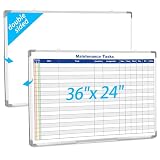
- Double sided: One side is a blank whiteboard, the other side is a maintenance task schedule. The front side is printed with the maintenance task schedule, a professional planning tool that can be use to list specific units, tasks, locations, assigned personnel, dates, etc., making it convenient for managers and team members to quickly view everyone's work progress. The other side is blank and can be applied as an educational whiteboard, ideal for home/school teaching or drawing
- Product Size: The overall size of the whiteboard is 36 x 24 inches. The usable writing area is slightly smaller than the overall size. This magnetic whiteboard has a smooth magnetic writing surface and can be applied wet or dry. One side of the maintenance task whiteboard uses the latest printing technology, the surface is stain resistant and the image is clear and durable, and will not fade even with vigorous rubbing. It is a sturdy and durable storage tool for schools, homes, and offices
- Product Material: The whiteboard frame is made of sturdy and durable silver aluminum alloy. Includes a detachable pen holder, as well as hanging rings, pegs, and concealed peg accessories for installation; Please note that this whiteboard does not include pens and an eraser
- Design Features: This task list whiteboard tool has 18 rows, ideal for organizing multiple tasks. It can help you reduce workload and improve work efficiency. It provides a visual task organization tool, clarifies work goals, and facilitates quick and easy communication
- Ideal Choice: Whether you are a professional responsible for scheduling complex projects, a parent managing household chores, or a teacher seeking a clear teaching tool, this large, erasable task whiteboard is ideal. It helps you transform chaotic schedules into well-organized daily processes, making each goal clear, specific, and achievable
- One accountable owner: Name the person responsible for moving the task forward. List contributors separately where the tool permits it.
- Current state and next action: Say what has happened and what the owner should do next.
- Timing and priority: Add a due date or time-sensitive note when one exists. Use priority only when it changes what should be handled first.
- Brief context: Record what happened, what has already been tried, relevant constraints, and any decision still pending.
- Direct context link: Link to the approved ticket, file, source document, or conversation. Keep supporting material near the task rather than relying on memory.
- Handover note: State what the incoming person needs to confirm, watch for, or acknowledge.
Planner supports task comments and attachments, as well as plan-level calendar and notebook collaboration. Microsoft also describes Office files stored in the plan’s associated SharePoint document library. These features can keep context close to work, but the team still needs to link to the specific item the next person should open. Details are in Microsoft’s Planner collaboration guidance. Trello’s product page describes advanced checklist items that can have assignees and due dates: Trello shared task management.
Use a repeatable outgoing and incoming review
Outgoing person: make the state trustworthy
- Review each open task before the shift or responsibility changes.
- Update its state, next action, accountable owner, urgency, blocker, and context link.
- Mark only genuinely finished work as Done. Move unresolved work to In progress or Waiting as appropriate.
- Flag exceptions that need acknowledgment under the team’s existing process.
Incoming person: establish a safe next step
- Review urgent and Waiting tasks first.
- Confirm the owner and next action, then open the linked context.
- Ask for clarification if the task does not support a safe or clear next step.
- Acknowledge high-risk items according to the team’s established process.
Team lead or board steward: keep the board usable
- Periodically remove duplicates, stale cards, orphaned tasks, and completed work that no longer belongs in the active view.
- Agree who can create columns, change status definitions, and edit access.
- Make board updates part of the handover itself; a board that is not maintained is not a reliable record of what needs handing over.
Protect context with the right access controls
A shared board does not mean every detail belongs on it. Do not copy sensitive or long-lived reference material into a broadly accessible workspace unless that access is appropriate. Link to the approved source when permissions should remain restricted, and make sure the incoming person can reach it.
Rank #2

- Multifunctional list board - This set includes four 4"x12" List Boards with 24 rows in total. Seamlessly transitions between a daily to-do list, a shared grocery tracker, or a family menu board.
- Stay organized with ease – Simplify your daily routine with this handy list board. Simply snap it onto your fridge to start planning your day, tracking tasks, and staying ahead of your schedule.
- Fine-point markers included – We also provide 6 extra-fine point markers with different colors, so you may use your own color coding. These magnetic markers stay conveniently attached to your fridge.
- Erases easily - Our calendars use premium nano erase film, making it incredibly easy to wipe off notes, even those that have been written for a long time. No residue, no fuss.
- At your service - We stand behind the quality of our products. If you experience any issues, please feel free to let us know and we’ll do everything to solve your problem.
Check what happens when membership changes. Microsoft notes that removing a person from a basic Planner plan does not automatically remove their access to tasks already assigned to them; those tasks must also be unassigned to restrict access. Review the access note in Microsoft’s Planner in Teams guidance when changing access.
Decide whether tasks need completion gates
For ordinary work, a clear status and owner may be enough. If a task must not be marked complete until evidence or approval exists, consider a process that requires checklist, form, or approval steps. Microsoft documents completion requirements for task lists in its task-completion requirements guidance. Availability depends on the organization enabling the feature, so verify it in your environment before designing a workflow around it.
The Tool Desk
Outbyte PC Repair FREEClear out junk files and repair common Windows errorsFree Scan →Outbyte Driver Updater FREEScan for outdated or missing drivers - takes under a minuteDriver Scan →Rank #3

- Multi-Use Calendar Dry Erase Board: Our magnetic monthly whiteboard can put your life in order and plan ahead. You can write down your weekly schedule, and this whiteboard planner is perfect to plan ahead any activities, reminders, appointments, tasks. The magnetic double-sided whiteboard allows you to have two projects going. The other sided is blank. It is the best tool for home teaching or memo. It can hang on wall to remind you not forget the important thing.
- Weekly Planner & Whiteboard: This whiteboard provides double side, white board and dry erase calendar board. Dry erase weekly calendar for busy people to keep in track of event, dates, or use as to-do list, aid to daily tasks. The movable hanging hooks allow you to adjust the hanging distance easily. Small Portable white board can be hung horizontally and vertically as you like. This whiteboard is great for distance learning, daily reminder, grocery list, to do list, meal plans.
- Never Miss the Important Thing: The board is printed with an undated Week Calendar grid. Our portable dry erase board is cool for the kitchen, dorm, bedroom and office. The whiteboard is a great classroom learning board that help students lesson plans go smoothly. Perfect vision board organizer for planning weekly schedule, to do list tasks and family chores organization. The weekly board is the perfect visual tool for clear communication.
- Super Value Pack of Small Whiteboard: The 16 X 12 inches double-sided weekly planner dry erase board set comes with 10 pack magnetic dry erase markers (include 8 color), 4 pack magnetic piece, 1 pack dry eraser. This big dry erase whiteboard is great size for wall, office desktop, study table, bedside table, class podium and kitchen counter. Double sided wall portable small magnet dry erase whiteboard easel with solidly built but light weight which makes it suitable for handheld as well.
- Smoothly Writing & Easy to Clean: Magnetic white board comes with a smooth and sturdy writing surface. It's easy to write on and easy to wipe clean without stain. The value of getting organized and always be on time. Our magnetic dry erase calendar makes it easy to always be a step ahead of your schedule. The dry erase board is specially made for home, kitchen, teacher, office or anywhere you want. Perfect for reading, learning, memo, to do list.
Choose a tool by the work, not the brand
Planner and Trello are examples, not requirements. Compare the tools your team can actually access against the handover job:
| What to compare | Question to ask |
|---|---|
| Shared access | Can outgoing and incoming people reach the same board, and can administrators manage membership clearly? |
| Workflow visibility | Can it show the stages your team uses and group tasks by useful fields? |
| Ownership | Can one accountable person be assigned and reassigned clearly? |
| Context beside work | Can comments, checklists, files, or direct links stay with the task? |
| Completion control | Does the process require checklist, form, or approval evidence before completion? |
| Plan and environment fit | Are the views, controls, permissions, and integrations you need available under your organization’s current plan? |
Microsoft’s support pages describe shared plans, board views, assignments, comments, attachments, and calendar and notebook collaboration in Planner; Trello’s product page describes shared task cards and advanced checklist items with assignees and due dates. Verify current product terms, interfaces, licensing, and availability in your organization, because these can change.
Rank #4

- 7 MAGNETIC DRY ERASE BOARDS FOR FRIDGE: You will receive 7 dry erase to do list white board that we have prepared for you, each one is 4“x 11”, the size is suitable, and won't take up too much space. Each weekly dry erase board has 24 lines, enough writing space for you to plan your daily tasks, you can turn it into to do list notepad, menus, shopping lists, weekly planners, wish lists, message boards, and so on according to your needs. (Warm tips: Erasable pens not included.)
- HIGH-QUALITY SURFACE FILM: Each dry erase planner is coated with high-quality PET soft film, which is not easily damaged by layering and has a smooth surface that can be washed with water. You can use a multi-color erasable pen for marking and writing, erasable properties mean that you can delete content at will without leaving a trace(Tips: it is not recommended to use oily markers for writing, it is not easy to erase, if this happens, please use alcohol tablets or spray alcohol for wiping).
- STRONG MAGNETIC BOARD WILL NOT FALL OFF: Every weekly dry erase board has magnetism on the back, which can be firmly adsorbed on the surface of any metal product, our weekly planner white board magnetism is actually tested, you don't have to worry about the small suction force leading to the problem of the dry erase board falling off. The four corners of the whiteboard dry-erase are circular so that the dry-erase board does not scratch your hand.
- MULTIFUNCTIONAL USE: Having a weekly dry erase board on hand is a necessity. A multifunctional dry-erase to-do list whiteboard, you can use it to make chore lists, study plans, recipes, to-do lists, time planners, weekly planners, shopping lists, storage lists, grocery lists, meal plans, memo pads, notepads, etc. Put it in a conspicuous place in the dining room, bedroom, kitchen, living room, study room, and stop worrying about forgetting.
- LIFE ORGANIZED: Whether it's work or life, a simple, handy tool--magnetic notepads for refrigerator, can keep your life organized. Displaying to-do's, plans, tasks, shopping, and gifts before you do something helps you get better at it. Use a weekly dry erase board for fridge to jot down important notes, appointments, reminders, chore charts, or special days, and you won't forget anything important.
Keep expectations realistic
Product documentation establishes that these tools offer task and collaboration features; it does not establish a measured reduction in missed handovers, faster work, or a specific productivity gain. The value of a board depends on whether the team keeps ownership, status, next steps, and context current.
Quick Recap
Best Value

- 👜𝐏𝐑𝐎𝐃𝐔𝐂𝐓 𝐈𝐍𝐂𝐋𝐔𝐃𝐄𝐒 - 1 magnetic monthly calendar planner board (14x11 inches) + 1 magnetic weekly planner board (14x11 inches) + 1 magnetic daily board (5x7 inches) + 4 magnetic dry erase marker pens with highlight color (each pen has a small eraser on the top) + 1 magnetic bone shaped board eraser. All parts are magnetic and can attach to the refrigerator or metal surface freely and firmly.
- ⚫𝐅𝐔𝐋𝐋-𝐌𝐀𝐆𝐍𝐄𝐓 𝐁𝐀𝐂𝐊 𝐃𝐄𝐒𝐈𝐆𝐍 - Ensure strong and stable attachment to any metal surface with each board's thick full-magnetic back, providing secure and convenient placement on your kitchen refrigerator, door or any other metal surface.
- 🪟𝐄𝐀𝐒𝐘 𝐓𝐎 𝐂𝐋𝐄𝐀𝐍 - The surface of these white boards is made of advanced PET laminating technology, smooth and easy to clean. Even after 30 days of writing on the magnetic whiteboard with markers, the writing can be easily dry erased. Sometimes there are stubborn marks, and a wet washcloth can make quick work of removing them.
- 🖍️𝐋𝐀𝐑𝐆𝐄 𝐁𝐋𝐀𝐍𝐊 𝐀𝐑𝐄𝐑 𝐀𝐓 𝐓𝐎𝐏 𝐅𝐎𝐑 𝐂𝐔𝐒𝐓𝐎𝐌𝐈𝐙𝐀𝐁𝐋𝐄 𝐓𝐈𝐓𝐋𝐄 - The top of the planner board is blank except for the pre-printed text The blank area is perfect for the date, monthly tasks, goals, moods, important reminders or creative patterns to make their important plans and expressions eye-catching.
- 🏠𝐊𝐄𝐄𝐏 𝐄𝐕𝐄𝐑𝐘𝐓𝐇𝐈𝐍𝐆 𝐏𝐋𝐀𝐍𝐍𝐄𝐃 & 𝐎𝐑𝐆𝐀𝐍𝐈𝐙𝐄𝐃 - The perfect home family schedule planner combination, you can always record and plan family or personal chores and never forget them again. You can keep track of activities, reminders, appointments, tasks, parties, weather conditions and more; to-do lists, schedules, sticky notes, shopping lists, grocery lists, menus, meal lists, chore lists, reminders of important information and more.
Product prices and availability are accurate as of the date/time indicated and are subject to change. Any price and availability information displayed on Amazon at the time of purchase will apply.
Do these 3 things before closing this tab:
1Clear out junk files and repair common Windows errors2Fix the driver behind crashes, sound loss and screen glitches3Repair Windows errors before they cause bigger problems
