
To run ham radio CAT control software, you need a computer and an application that support your transceiver, a compatible connection between the computer and radio, and the correct radio-specific settings. The connection may use a built-in USB or serial port, a compatible interface cable or adapter, or a network interface supported by the radio.
What CAT control does
CAT stands for Computer Aided Transceiver control. It lets compatible software communicate with a radio and control supported functions. The WSJT-X User Guide describes CAT control as applying to relevant features of most modern transceivers; that does not mean every radio or every feature is supported. Hamlib provides a consistent software interface for radios it supports, which can help applications communicate with different models through a common layer: Hamlib.
What you need to make it work
A compatible computer and control application
The computer must run an application that supports both your operating system and transceiver. Requirements differ by program and version, so check the application’s documentation rather than assuming one program’s hardware or operating-system requirements apply to all CAT software.
A transceiver with a supported control interface
Check the radio’s manual to confirm that it supports computer control and to identify the appropriate control port or network interface. Hamlib notes that radios may provide serial connections—including RS-232 or USB—or network and other interfaces such as Ethernet, Wi-Fi, or Bluetooth. Availability depends on the radio model.
The Tool Desk
Outbyte Driver Updater FREEScan for outdated or missing drivers - takes under a minuteDriver Scan →Outbyte PC Repair FREERepair Windows errors before they cause bigger problemsFix Now →#1 Best Overall
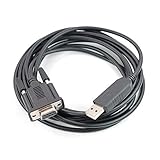
- Machine molded plug, fully shielded cable.
- work with HAM radio software Ham Radio Deluxe, Fldigi, Echolink, MixW, Digipan etc, compatible windows 7 &10,11.
- work with model: FT-991A FT-1000MPmkVField FT-1000MP FT-450D FT-450AT FT-450 FT-950 FT-2000D FT-2000 FTDX-9000 Contest FTDX-5000D FTDX-3000 FTDX-9000 FTDX-9000D FTDX-9000MP FTDX-1200
- Work with model: TS-2000, TS-2000X, TS-B2000, TS-2000E TS-570S, TS-570D, TS-570DG, TS-570SG TS-590SG, TS-590s, TS-990s TS-870S, TS-890s TM-D700A, TM-D700E TS-480, TS-480HX, TS-480SAT
- Cable length: 6', package included: 1x USB CAT interface cable
A compatible physical or network connection
Some radios connect directly to a computer through a built-in USB or serial interface. Others need a radio-compatible CAT cable or adapter. The right choice depends on the radio’s connector and interface; a cable that fits physically is not necessarily suitable for CAT control. The cited general documentation does not establish compatibility for any particular radio model.
Correct control settings
For a serial connection, the software may ask for the port, baud rate, data bits, stop bits, and handshake method. Set these to the values specified in the transceiver’s manual. The WSJT-X User Guide warns that an incorrect handshake setting can leave CAT unresponsive; some configurations also require appropriate RTS or DTR control-line states.
Rank #2
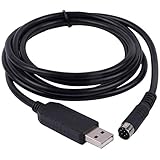
- New Geniune FT232RL Chip import from UK . upport Windows7/8/10/XP/Android/Mac/Linux/Vista/Mas OS
- Length: 6ft/180cm, Connector : USB to Mini 8 Din Serial Port .
- Works for Yaesu FT-100 FT817 FT-857 FT-897 FT8-817ND FT-857D FT897D radio programming cable CT-62 CAT
- FTDI USB Programming Cable for Yaesu Radio , With Injection molding 8 Din, it is easy use in daily life (prevent soldering point fell apart).
A control path that is not already occupied
If another application is using the radio’s serial port, a second program may not be able to open it directly. Depending on the software, you may be able to connect through the first program’s rig-control server instead. WSJT-X lists Hamlib NET rigctl, Flrig, DX Lab Suite Commander, Ham Radio Deluxe, and Omni-Rig among the options in its rig-control settings. Support for these paths depends on the programs and configuration involved.
Independent reader supportYour contribution helps us test, update, and keep practical guides available for everyone.How to choose a CAT cable or adapter
There is no universal CAT cable. Before buying, check the radio manual and the cable or adapter manufacturer’s compatibility information for your exact transceiver model.
Rank #3
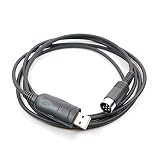
- Build in CT-62 FIF-232c interface, no other interface required, direct connect radio and PC.
- Work with HAM radio software Ham Radio Deluxe, Fldigi, Echolink, MixW, Digipan etc, compatible windows 7 &10, windows 11.
- work with model: FT-747GX, FT-747SX, FT-767GX, FT-767SX, FT-1000D, FT-1011, FT-1021 FT-3800, FT-3800H FT-736R, FT-980, FT-990 FRG-100, FRG-8800, FRG-9600, FRG-965
- Cable length: 3', package included: 1x USB CAT control cable
- Confirm the radio-side connector and whether the radio uses USB, serial, or another control interface.
- Check the computer-side connector and whether the interface is supported by your operating system.
- Verify that the cable or adapter supports CAT control, not only audio or another function.
- Look for any stated driver or configuration requirements.
Do not choose an adapter based only on connector shape. The general guidance on Hamlib’s supported interfaces describes common connection types, not model-by-model cable compatibility.
Quick Recap
Best Value

- Combines audio codec, CAT control and PTT switch while using a single USB connection to computer
- Works for HF, VHF, UHF. Use it with FT8, FT4, JS8Call, RTTY, SSTV, WinLink, APRS, VaraHF, VaraFM, Soundmodem
- Allows fully featured CAT control in capable transceivers and reliable adjustments free PTT with HTs and basic mobile radios
- Pre-made transceiver cables are available for popular Yaesu, ICOM, Kenwood, Elecraft, Baofeng, Xiegu, Lab599 and other brands. Trivial homebrew cable build with instructions in the community forum.
- The interface works with all major OS flavors: Windows, MacOS and Linux. Driver update may be needed in some systems - see instructions for the link.
Rank #4

- COMPATIBLE WITH POPULAR YAESU TRANSCEIVERS: Specifically designed for FT-857, FT-857D, FT-897, FT-897D, FT-817, FT-817ND, FT-818, FT-818ND, FT-100, and FT-100D. Enables CAT control, memory programming, and firmware updates via the 8-pin Mini Din DATA port.
- ORIGINAL FT232RL CHIPSET: Built with authentic FT232RL USB-to-serial controller with TTL 5V logic level output. Provides superior driver stability, broad OS compatibility, and reliable communication for ham radio applications.
- CT-62 REPLACEMENT CABLE: Serves as a direct replacement for Yaesu CT-62 interface cable. Features USB 2.0 Type A Male on one end and 8-pin Mini Din Male on the other — eliminates the need for separate USB-to-serial adapters.
- TTL 5V Logic Level for Accurate Signal Transmission Operates at a TTL 5V logic level, providing accurate signal transmission and reliable data communication essential for programming and controlling Yaesu transceivers.
- MULTIPLE LENGTH OPTIONS: Available in 1.0M (3.3FT), 1.8M (6FT), and 3.0M (10FT) lengths. 26AWG*3C bare copper conductors with PVC jacket for reliable signal integrity.
How to check a CAT connection
- Identify the radio’s control interface. Use the transceiver manual to find the correct port, connection type, and serial settings.
- Connect the radio. Use its built-in interface or a compatible cable or adapter, then identify the serial port created by the radio or interface if the connection is serial.
- Configure the application. Select the correct transceiver model and port, then enter the baud rate, data bits, stop bits, and handshake values specified by the manual. Set RTS or DTR as required by the interface.
- Resolve any competing connection. Close software that is already controlling the radio, or configure your application to use a supported rig-control server if that setup is available.
- Run the application’s CAT test, if offered. WSJT-X includes a Test CAT function that reports whether communication has been established.
If CAT control does not connect
- The selected port may be wrong. Check that it is the port created by the radio or interface, rather than another serial device.
- The serial values may not match. Recheck baud rate, data bits, stop bits, and handshake against the radio manual.
- A control line may be misconfigured. Check whether the setup requires particular RTS or DTR states.
- Another application may hold the connection. Close the competing program or use its rig-control server if the CAT application supports that route.
- The cable may not support CAT for that radio. Reconfirm the exact model compatibility and the cable’s stated CAT function; a working audio connection alone does not establish CAT compatibility.
Product prices and availability are accurate as of the date/time indicated and are subject to change. Any price and availability information displayed on Amazon at the time of purchase will apply.

