
Free tools Windows power users keep installed
One-click scans. No signup required.
In Windows 11, set Primary mouse button to Left and choose your scroll behavior separately. Changing the primary button does not require changing the wheel direction.
Set the primary mouse button to Left
- Open Settings with Windows key + I, or open it from the Start menu.
- Go to Bluetooth & devices > Mouse.
- Under Primary mouse button, select Left. Microsoft Support’s instruction is to “Use the drop-down menu next to Primary mouse button to select either Left or Right.” Microsoft’s Change mouse settings guide documents this control.
Keep the scroll direction you prefer
On the same Mouse settings page, find Scrolling direction in the Scrolling section. If you want the conventional behavior where moving the wheel down moves the page down, select Down motion scrolls down. If you already prefer the other direction, leave that option selected. The primary-button and scrolling controls are separate, so you can set them independently.
Check both settings
Open a window with scrollable content and try a primary click and the mouse wheel. Confirm that the primary click is on the left button and that scrolling matches your preference. If the wheel feels reversed, return to Settings > Bluetooth & devices > Mouse and review Scrolling direction rather than changing the primary-button setting.
Do you need a left-handed mouse?
No. Windows’ primary-button setting can switch which button acts as primary, so you can configure a left-handed setup with your current mouse. A mouse designed for left-handed use is an optional hardware choice if the shape or placement of your current mouse is uncomfortable; it is not required for this software change. Microsoft also describes mouse and other input-device accessibility settings in its input-device accessibility guide.
#1 Best Overall

- 【ERGONOMIC PROWESS】 BTM008 Wireless Mouse for Laptop Emphasize the comfort and grip provided by the ergonomic vertical design, it reduces hand strain during extended use. Mention the precision engineering that went into crafting the mouse, ensuring that it fits the hand perfectly for a comfortable user experience.
- 【MULTIFACETED CONNECTIVITY】Wireless Mouse for Laptop highlights the convenience of seamless transitions between devices, saving time and effort for users who work across multiple platforms. Featuring both 2.4G wireless and dual Bluetooth connectivity options, empowering with unparalleled flexibility in diverse technological environments.
- 【PRECISION PERFECTED】 Unleash the epitome of precision with our mouse's four adjustable DPI settings, ranging from 800-1200-1600-2400. Explain how the customizable DPI settings cater to different preferences, whether we prefer fast-paced action or precise control in their workflows.
- 【ENHANCED EFFICIENCY】 Championing sustainable productivity, our Wireless Mouse for Laptop is equipped with a USB-C rechargeable, affording 2-3 months of uninterrupted usage on a single charge. Mention the power-saving sleep mode as a feature that not only saves energy but also extends the lifespan of the battery, enhancing overall durability and sustainability.
- 【EFFORTLESS CONNECTIVITY, TIMELESS AESTHETICS】 Seamless integration of the mouse into various work environments, emphasizing its versatility and compatibility with different devices. Highlight the sleek and professional design of the mouse, making it suitable for both corporate and home office settings. Compatible with computers, laptops, Macs, tablets, and smartphones, it's the ultimate portable productivity companion.
These paths and English control names reflect Microsoft’s Windows 11 guidance. Labels may vary slightly with localization or Windows updates.
Quick Recap
Rank #4

- OPTICAL TRACKING TECHNOLOGY: The ELECOM EX-G series trackball provides precise cursor movement for superior accuracy so you can get where you want on the screen quickly with less hand movement, improving productivity and efficiency. This mouse is designed for a LEFT-HANDED person
- FUNCTIONAL 6 BUTTONS: You can assign favorite function to each button by using ELECOM Mouse Assistant Software which will be available to download from ELECOM NET website
- DPI CURSOR: Designed with a high-performance gaming optics system sensor and lens. The DPI button can easily change between 750(LOW) and 1500(HIGH) DPI, making the movements of your cursor faster or slower
- RED BALL FOR OPTICAL TRACKING: For the tracking accuracy and the best sensor, this item uses a RED BALL. RED COLOR sensing provides more accuracy for current optical tracking technology, a must for high-performance gaming optics system sensors. You will enjoy the results of trackball high performance optical sensors for all movement
- PRODUCT DETAILS: System requirements: Windows Vista, Windows 7, Windows 8, Windows 10 or later (Horizontal scrolling function is not working in Windows RT8.1), macOS 10.10 later, Size: W3.7 inches (94.7mm) X L4.9 inches (124.4mm) X H1.9 inches (47.9mm), Weight: 4.5oz (without battery), DPI: 750/1500 count (switchable), Connectivity: wireless, 1 X AA battery (Included) - Battery Remaining Light Lamp equipped
Rank #3

- 【Ergonomic Vertical Mouse】BTM010 featuring a vertical design, this mouse helps reduce wrist and forearm fatigue and promotes a more natural grip. This design allows your hand to maintain a more relaxed position, thereby alleviating discomfort during extended use and enhancing comfort. This mouse is best suited for users with medium to large hands; users with smaller hands are advised to check the dimensions (4.3 x 3.1 x 2.8 inches, 0.24 pounds) before purchasing to ensure a comfortable grip.
- 【Versatile Connectivity and Caompatibility】This mouse supports dual Bluetooth and 2.4 GHz wireless connections, offering flexible options for various usage scenarios. It is compatible with a variety of operating systems, including Windows XP/Vista/7/8/10/11/Server 2003/2000, macOS 10.10 and later, and Linux, meeting the needs of a wider range of users. To improve connection stability—especially in environments with multiple wireless signals—we recommend using a Bluetooth connection.
- 【RGB Lighting and Rechargeable】This mouse features RGB lighting with a variety of color and effect options, allowing you to choose the look that best suits your personal preferences. It is powered by a built-in rechargeable battery, eliminating the need for disposable batteries and helping to reduce waste. With the lights turned off, the battery life can last up to 2 months; with the lights turned on, it lasts approximately 1 month. Actual battery life may vary depending on usage habits and connection type (Bluetooth or 2.4 GHz).
- 【DPI Settings & Navigation Buttons】This mouse offers four adjustable DPI levels—1200, 1600, 2400, and 3200—allowing you to flexibly adjust the cursor speed for different activities, such as gaming, graphic design, or other detail-oriented tasks. In addition, it features conveniently located forward and back buttons to help you navigate web pages, documents, and other content more easily. Please note that the Safari browser does not support these navigation buttons.
- 【Scroll Wheel & Durable Build】The BTM010 Vertical Mouse features a smooth scroll wheel that makes it easier to navigate long documents and web pages. It is constructed from durable materials and designed to withstand long-term, daily use. The smooth, streamlined exterior allows the mouse to glide effortlessly across your desk. However, users who frequently lift the mouse while working may find that the surface offers slightly less grip compared to a textured design.
Rank #2
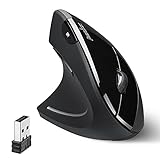
- LEFT-HANDED ERGO MOUSE: Natural ergonomic vertical with left-handed design. 6-button mouse to increase your productivity; Recommended for users with muscle strains and particularly for those who works long periods on the computer
- Quiet Click Buttons: Silent left and right mouse buttons minimize noise and help you stay focused. Note: scroll wheel and back/forward buttons are not silent.
- Natural Learning Curve: Due to the ergonomic shape, first-time users may need a short adjustment period. Most users adapt within 1–2 weeks and experience improved comfort and reduced wrist pressure with continued use.
- Adjustable DPI & Easy Navigation: Adjustable DPI settings (1000 / 1600) provide precise optical tracking. Includes back and forward buttons for convenient web browsing. Buttons are not programmable; back/forward buttons are not supported on macOS.
- Comfort-Focused Build: Soft rubber-coated surface offers a secure, comfortable grip for extended use. Dimensions: 4.92 × 2.44 × 3.03 inches; Weight: 0.35 lb. Smooth-scroll wheel with no tactile steps or adjustable resistance.
Product prices and availability are accurate as of the date/time indicated and are subject to change. Any price and availability information displayed on Amazon at the time of purchase will apply.
Independent reader supportYour contribution helps us test, update, and keep practical guides available for everyone.
