
For the International Space Station (ISS), NASA’s Spot the Station is the simplest way to see where it is and find upcoming viewing opportunities for your location. For other objects orbiting Earth, use a tracker or orbital-data source that shows how current its data is. For selected spacecraft beyond Earth orbit, use JPL Horizons; its trajectories are calculated ephemeris data, not a live GPS-style feed.
How do I track a satellite in real time?
Choose the service based on what you want to track and what you need to know: a map position, a visible pass from your location, orbital data to download, or coordinates for a spacecraft beyond Earth. “Real time” often describes a position calculated and displayed using available data; it does not mean the satellite is broadcasting its position live to the app.
| What you want to track | Best starting point | Useful for |
|---|---|---|
| International Space Station | NASA Spot the Station | ISS location, local viewing schedules, and alerts |
| Other Earth-orbiting objects | CelesTrak GP data or a tracker that identifies its orbital-data source and age | Orbital elements and calculated positions for cataloged objects |
| Selected spacecraft beyond Earth orbit | JPL Horizons | Ephemerides, viewing coordinates, vectors, or orbital elements for supported targets |
How can I see when the ISS will pass over my house?
- Open NASA’s Spot the Station website or app.
- Enter or select your observing location to see upcoming viewing opportunities and, where available, set alerts.
- Check the listed pass details and local conditions before going outside. A predicted pass does not guarantee the ISS will be visible from your exact spot; clouds, daylight, obstructions, and the pass geometry matter.
NASA says the ISS completes about 16 orbits each day and has a 51.6° orbital inclination. Those describe its orbit, not whether a particular pass will be visible from your location.
How do I track another satellite orbiting Earth?
Find the object and check its orbital data
Identify the satellite by name or catalog number in a tracker or orbital catalog. If you are using a tracker, look for the data source and the age or epoch of the orbital elements behind its position. CelesTrak publishes general perturbations (GP) element sets in several formats and provides data-age information on its Space Stations page. NASA’s Open APIs TLE API page says its records are updated daily from CelesTrak.
Do these 3 things before closing this tab:
1Scan for outdated or missing drivers - takes under a minute2Repair Windows errors before they cause bigger problems3Fix the driver behind crashes, sound loss and screen glitches#1 Best Overall

- Stable Signal Reception: Designed to Compatible with Sirius XM satellite radio systems, this external antenna helps improve signal strength and reduce dropouts caused by weak or obstructed reception during driving
- Magnetic Mount with Secure Installation: Features a magnetic base for mounting on metal surfaces such as vehicle roofs or trunks, with an additional adhesive pad to help keep the antenna firmly in place at high speeds and in all weather conditions
- 23FT Long Cable with SMB Connector: Includes a 23FT (7m) cable that allows flexible routing from the antenna to your receiver, making it suitable for cars, trucks, SUVs, and RVs; SMB connector and 2320-2345MHz frequency ensure proper compatibility
- Easy, Damage Free Installation: Comes with a trim removal tool to help route the cable cleanly through door seals and interior panels without scratching or damaging your vehicle's interior
- Ideal Replacement or Upgrade Antenna: A practical replacement for broken or poorly performing factory antennas, Compatible with Sirius XM radio reception or upgrading aftermarket satellite radio setups
Choose a compatible data format
Do not assume every tracker supports every object or data format. CelesTrak warns that the USSF catalog exceeded the five-digit range in July 2026; new six-digit catalog numbers cannot be represented in legacy TLE format. Its GP data page points users to formats without that limit, including OMM variants. Check the current GP Element Sets page when choosing data for a newer object.
Can I track a spacecraft outside Earth orbit?
For a supported spacecraft, search for its target in JPL Horizons. Select the output that fits the task: observer output for viewing coordinates, vectors for state data, or orbital elements when those are what your application needs. Check the object’s trajectory revision date and comments, along with the usable time span, before relying on the result. JPL’s Horizons Manual explains that spacecraft trajectories are not relayed in real time and may need attention if updates have stopped.
Rank #2

- This small Iridium patch antenna is meant for size-sensitive and portable applications. It is only 82mm x 80mm (3.25" x 3.10") and weighs just 25g (0.9oz)!
- The antenna has 3.1dBi of gain, a center frequency of 1620MHz, and a bandwidth of about 80MHz
- As this is a passive antenna, for most applications you will want to pair this with a quality LNA such as our SAWbird IR and SAWbird+ IR LNA modules (available on Amazon separately, product IDs B07K1KD4T9 and B07K1LW983 respectively)
- Full 2 year warranty directly through Nooelec
Is satellite tracking actually real time?
Usually, no—not in the sense of a live position transmission from the spacecraft. In the JPL Horizons Manual, version 4.98e dated 2026-08-25, NASA’s Jet Propulsion Laboratory says: “Spacecraft trajectory data is not being relayed in ‘real-time’, and is not like a reading off a GPS display.” A tracker can show a position calculated at the present time from the latest available orbital data, while the data itself may have been generated or updated earlier.
For Earth-orbiting objects, positions are commonly calculated from orbital element sets. Their age matters: a fresh-looking map display cannot make stale input data current. This is especially important for low Earth orbit (LEO). JPL warns that forecasts more than a few days ahead may be wrong by tens or hundreds of kilometers, particularly when a TLE-based prediction does not account for maneuvers.
Free tools Windows power users keep installed
One-click scans. No signup required.
Rank #3
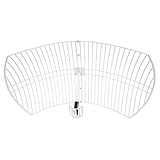
- This 21dB antenna is designed to be used in conjuntion with an RF system (SDR, filter & LNA) to provide detailed, high-resolution, near real-time images from orbiting weather satellites. Applications include GOES (HRIT & LRIT), NOAA HRPT, Meteor M2 HRPT, Metop, FengYun and other satellites that operate near 1.6GHz-1.8GHz
- Can be deployed for both linearly and circularly polarized signals (RHCP and LHCP)
- Software is required for the decoding of images. The recommended option is SatDump, which is cross-platform and available for Windows, Linux, MacOS and Android. There are also other free Linux-based decoders, or the paid version of XRIT Decoder for Windows (license not included with purchase)
- Full support and service directly through Nooelec! Additional information and assembly instructions: support.nooelec.com/hc/en-us/articles/360058812593
How to choose a tracker
Before relying on a service, check these details:
- Target coverage: Does it support only the ISS, a selection of satellites, a broad Earth-orbit catalog, or the spacecraft you want beyond Earth?
- Task: Do you need a live-style map, a next visible pass, alerts, sky coordinates, downloadable orbital data, or programmatic ephemerides?
- Location: Can you enter your observing location and get local pass opportunities?
- Data provenance and age: Does the service identify the source, element-set epoch, trajectory revision date, or update cadence?
- Format and effort: Is a simple app or website enough, or do you need to work with orbital data or an API?
For ISS viewing, start with NASA Spot the Station. For Earth-orbit data, CelesTrak is a source of GP elements and format information. For supported solar-system objects and spacecraft, JPL Horizons provides ephemeris access through multiple interfaces described on its overview page.
Quick Recap
Rank #4

- Easy to Use: The TV antenna strength meter is designed for simplicity and efficiency, making it incredibly easy to apply for both beginners and professionals. With its intuitive interface and clear LCD display, you can quickly align any satellite dish in just a few minutes, saving time and effort. The device provides real-time signal feedback, ensuring accurate adjustments without the need for complex setups or technical expertise.
- Highly Sensitive Detection: This digital finder features an ultra-sensitive meter that detects even the slightest changes in signal strength, allowing for precise alignment of your satellite dish or TV antenna. The advanced sensitivity ensures optimal signal reception, minimizing disruptions and enhancing your viewing experience with crystal-clear picture quality.
- Night-Time Visibility: The tele antenna strength meter comes equipped with an illuminated LCD display, providing clear visibility in low-light or nighttime conditions. Whether you're adjusting your dish early in the morning or late at night, the backlit screen ensures you can read signal strength measurements effortlessly, making installations and adjustments hassle- at any hour.
- Versatile Compatibility: Designed for both satellite dishes and TV antennas, this digital meter finder is a versatile tool for various signal detection needs. Whether you're setting up a new dish or fine-tuning an existing antenna, the device delivers reliable performance across different signal types, ensuring broad compatibility and consistent results.
- Portable and Durable: Compact and lightweight, this signal strength meter is built for portability and durability, making it ideal for on-the-go use. The sturdy construction ensures long-lasting performance, while the ergonomic design allows for comfortable handling during extended use. for technicians, hobbyists, or anyone needing a reliable tool for satellite and antenna alignment.
Product prices and availability are accurate as of the date/time indicated and are subject to change. Any price and availability information displayed on Amazon at the time of purchase will apply.

