
Quick wins for a faster PC:
Clear out junk files and repair common Windows errorsFree Scan →Scan for outdated or missing drivers - takes under a minuteDriver Scan →Repair Windows errors before they cause bigger problemsFix Now →To convert a WebP image to JPG from the command line, use ImageMagick: magick input.webp output.jpg. The installed ImageMagick build must support WebP. If the source has transparent areas, choose how they should appear in JPG, which does not preserve transparency, then open and check the result before sharing or deleting the original.
Convert WebP to JPG with ImageMagick
ImageMagick’s magick command can convert between image formats when its build includes the required format support. Replace the example names with your file paths:
magick input.webp output.jpgFor example, to convert a file in the current folder, use its actual name:
magick photo.webp photo.jpgKeep the WebP file until you have opened the JPG and confirmed it looks right. JPG is a lossy format, so the converted image may not retain all the source’s image data.
#1 Best Overall

- AUDIO ALL-ROUNDER – convert your audio or video files into almost any audio format - edit, trim, merge, adjust sample and bit rate, extract audio from videos
- Supported input formats - MP3, MP2, AAC, AC3, WAV, WMA, M4A, RM, RAM, OGG, AU, AIF, AIFF, PG, MPEG, MPEG 2, MP4, M4V, MJPG, MJPEG, HD TS, HD MTS, HD M2TS, HD MPG, HD MPEG, HD MP4, HD WMV, QuickTime HD MOV and others
- Supported output formats - AAC, AC3, AIFF, AMR, AU, FLAC, M4A, MKA, MP2, MP3, OGG, WAV, WMA
- EASY TO INSTALL AND USE - user-friendly and intuitive interface, free tech support whenever you need assistance
- compatible with Windows 10, 8 and 7 (32 and 64-bit versions) - single user license
Make transparent areas look right
WebP can contain transparent areas, but JPG cannot preserve transparency. Before sharing the JPG, inspect how those areas appear against the output background. If the result is not suitable, use an image editor or converter that lets you set a background, then check the exported file.
Use Google’s dwebp decoder as a two-step alternative
Google distributes its WebP command-line utilities for Windows, Linux, and macOS. The dwebp utility decodes WebP to formats such as PNG, PAM, PPM, or PGM; its documented outputs do not include JPG. To get a JPG, decode to PNG first and then convert that PNG with ImageMagick:
Rank #2
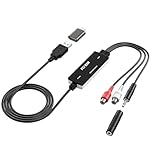
- Versatile Users: This analog to mp3 converter fits every audio preservation need: Music lovers use it as a vinyl to mp3 converter to save vintage records; families digitize old cassettes with this cassette audio converter; content creators capture live mixes; educators save lectures. It turns analog memories into digital files playable on phones, computers, or cars—for everyone, not just experts
- Core Conversion: As a top usb audio grabber, it converts analog signals (from cassettes, vinyl, radios) to MP3/WAV with clarity. The added USB A to C adapter lets you connect to both USB-A and USB-C devices—no extra cords needed. Plug-and-play design means instant use: connect your gear, open software like Audacity, and start recording. Reliable for everyday archiving, not pro studios
- Practical Design: Dual inputs: R/L RCA (for rca to usb conversion, great for mixers/turntables with line output) and 3.5mm (for mics/cassette players). Note: Inputs can’t be used at once. Includes USB-C adapter for modern devices. Traditional turntables (phono-level) need an external preamp; modern ones (line-level) work directly. Always connect the device first, then open software (e.g., Audacity) for detection
- Wide Compatibility: This audio capture card works with PC (Windows), Mac, and Linux—no drivers required. Supports software like Audacity (recommended), OBS, and QuickTime for easy recording. The USB-C adapter ensures compatibility with newer laptops/tablets. Not compatible with professional studio setups needing high sampling rates
- Trusted Assurance: Backed by a 12-month warranty and 24/7 customer support. Whether you need help with setup, compatibility, or using this vinyl to usb converter, we respond fast. This usb capture card combines durability with reliable after-sales care—buy with confidence, knowing your investment is protected
dwebp input.webp -o intermediate.png
magick intermediate.png output.jpg
The PNG is an intermediate conversion step. You do not need it if ImageMagick is installed and can read WebP directly.
Check the converted file
- Confirm the output file exists and opens in an image viewer.
- Look closely at transparent areas and other details that matter in the image.
- Keep the original WebP until you are satisfied with the JPG.
Troubleshoot conversion errors
ImageMagick cannot read the WebP file
Your installed ImageMagick build may not include the WebP delegate library. Check the build’s supported formats and install a build with WebP support if needed.
Rank #3
![Roxio Easy VHS to DVD for Mac | VHS, Hi8, V8 Video to DVD or Digital Converter [Mac Disc]](https://m.media-amazon.com/images/I/51YN0EXXTFL._SL160_.jpg)
- Capture video from analog sources and preserve it by converting to digital formats to burn to disc
- Transfer your footage from your VCR and analog camcorders including Hi8 and Video8 to DVD in just a few clicks
- Create your own movies by importing into iMovie to edit your video and add effects, titles, and transitions
- Save your video to popular digital formats to easily share online or upload directly to YouTube
- Burn to disc with custom chapters and menus using Roxio MyDVD
The JPG looks wrong where the image was transparent
JPG has no transparency channel, so those areas need to appear against a background. Choose a suitable background in an image editor or converter and inspect the exported file again.
Independent reader supportYour contribution helps us test, update, and keep practical guides available for everyone.Or skip the browser setup
ScreenshotNeo is a website screenshot API and MCP server, not a general-purpose local image converter. For a web page, one request can return a screenshot as PNG, JPEG, or WebP, or a PDF. Its capture flow can accept cookie banners and remove known consent banners, newsletter popups, and chat widgets before taking a shot.
For example, request a JPEG screenshot of a web page with cURL:
Rank #4

- Effortless VHS Conversion: VHS converter to digital is designed for beginners and professionals alike, this upgraded USB 2.0 video capture device makes it easy to convert VHS to digital with stable 30fps recording and clear analog signal processing. Simply connect your analog video source and transfer footage to Mac or PC with smooth, noise-reduced output for long-term preservation
- True Plug and Play Setup: No external power is needed. Just plug the Hi8 or VCR signal into the USB interface and your computer will automatically detect the system, supporting compatible with MacOS and Windows. This vcr to digital converter ensures a fast, frustration-free setup for home archiving or quick editing tasks
- Universal RCA to USB Conversion: Engineered with an H.264 hardware encoder, this vhs to digital converter provides stable digital output in formats such as MP4, AVI, MPEG2, and MPEG4, while also supporting MP3 audio extraction. Capture analog sources at up to 720x480 NTSC or 720x576 PAL resolution for crisp digital preservation using this powerful vhs converter to digital solution
- Enhanced Analog Video Processing: Digitize tapes from VCR, Hi8, or camcorders with auto-adjustments for brightness, contrast, hue, and saturation to restore old footage with balanced color and clarity. Guided software walks you step-by-step through the process, ensuring accurate signal capture and minimal frame loss for a dependable video capture device workflow
- Complete Kit Included: Package contains 1 USB 2.0 capture card, 1 RCA cable, 2 software disc, and a detailed user manual. Fully compatible with major capture programs including OBS Studio and PotPlayer, helping you quickly convert VHS to digital and archive family videos directly to your computer with dependable performance every time
curl -G "https://api.screenshotneo.com/v1/shot" -d access_key=YOUR_API_KEY --data-urlencode url=https://stripe.com -o shot.jpgSee the ScreenshotNeo API documentation for request options. Bot checks, blank pages, timeouts, and failed loads are not billed; cache hits are also free, and response headers identify the page verdict and billing status. Its MCP server lets AI agents use take_screenshot, get_page_info, and capture_pdf. The free plan includes 1,000 screenshots per month with no card; paid plans start at $5 for 3,000 shots. Learn more at ScreenshotNeo, or sign up for 1,000 free screenshots a month, with no card.
Quick Recap
Best Value

- AUDIO CAPTURE CARD DEVICE: Farewell to the old cassette, make the memory alive and become forever. With 3.5mm and R/L audio connector input, easily record live audio on PC and transfer analog to be digital formats such as MP3, WAV. User can save&listen music on MP3 player, computer, portable CD player, or car stereo or home stereo system.
- USB AUDIO GRABBER With LED: Plug and play. The cassette to mp3 converter easy to record audio from old cassette tapes, LPs, FM radio, boombox, Mini-disc and more devices. The work light will come on
- PROFESSIONAL CAPTURE & EDIT SOFTWARE: Audacity included or updated on official website. DIY your own music, save your precious memories. (ATTENTION: 64-bit MAC users, please use Audacity 2.3.1+ version and update the 64-bit Lame accordingly.)
- AUDIO SAMPLE RATES: 44.1 and 48kHz @ 16-bit for YouTube MP3 making. This analog cassette tape to digital converter is simple and fast
- NOTE: Audio capture card Compatible with Windows 11/10/8/7, and macOS 15. Backed By a DriverGenius 2-Year After-Service (Note - Windows 12 is currently not supported. Please proceed with caution when making a purchase.)
Product prices and availability are accurate as of the date/time indicated and are subject to change. Any price and availability information displayed on Amazon at the time of purchase will apply.

