
Free tools Windows power users keep installed
One-click scans. No signup required.
If your Samsung Galaxy A51 says “SIM card is not detected” or “No SIM card detected,” start by checking SIM status, then confirm the line is active with your carrier. Next, reset mobile network settings and carefully reseat or cross-test the Nano-SIM. If a verified, active SIM works in another phone but the A51 cannot detect multiple active SIMs, run Samsung Members diagnostics and contact Samsung service. A detection message alone does not prove the phone is broken.
Check whether the A51 detects a SIM
On many Galaxy software versions, open Settings > About phone > Status information > SIM card status and look for a carrier name under Network. Menu labels and locations can differ by A51 variant, carrier software, and Android version.
If a carrier name appears but calls or mobile data do not work, the phone may recognize the SIM even though service is unavailable. Detection and network service are related, but they are not the same problem. Check the carrier account and network settings before assuming the SIM reader has failed.
Confirm the line and SIM are active
If this SIM or carrier is new to the A51, contact your carrier and ask it to confirm that the line and SIM are active and that no SIM-protection service is blocking activation on the new device. The carrier controls these account-side checks. Samsung also lists carrier-related settings, temporary software issues, and SIM damage or incorrect insertion among possible reasons a SIM is not detected.
What’s actually slowing this PC down?
Pick the symptom - the matching free tool is one click away.
#1 Best Overall

- Replacement Sim Card Tray for Samsung Galaxy A51 5G version (model# SM-A516U, A516U1), Verizon A51 5G UW (SM-A516V)
- It will not be compatible with Non-5G version Galaxy A51. To ensure it's the correct part for your phone, before making the purchase, please check your phone model at: Settings --> About Phone
- Brand new. Repair replacement parts. Color: Black
- Compatible with Single Sim Card version Samsung Galaxy A51 5G phones
- Content: 1 x sim card tray; 1 x eject pin
Reset mobile network settings
If the issue may involve saved network configuration, use Samsung’s mobile-network reset rather than a factory reset. On many Galaxy versions, go to Settings > General management > Reset > Reset mobile network settings, then confirm the on-screen reset. This removes saved mobile-network configuration and reconnects using default settings; it is not the same as erasing the whole phone. Menu labels may vary. Verizon also documents a network-settings reset for the Galaxy A51, but its instructions may reflect Verizon-specific software or configuration: Verizon Galaxy A51 network settings reset.
Restart the phone
Use the power menu to restart the A51. If the screen is unresponsive, Samsung’s general Galaxy instructions say to hold the Side and Volume Down buttons together for more than seven seconds until the phone restarts. Button behavior can vary by device and configuration, so do not force the buttons if the combination does not match your phone’s controls.
Rank #2
![[2pcs Pack] Galaxy A51 5G Replacement SIM Card Tray Holder Parts for Samsung Galaxy A51 (5G) SM-A516U SM-A516N SM-A516B -Black Color (Not fit for A51 4G A515)](https://m.media-amazon.com/images/I/41sYZ0o-OQL._SL160_.jpg)
- [Compatiable Model] Single SIM Tray Replacement Parts for Samsung Galaxy A51 (5G) SM-A516U SM-A516N SM-A516B -Black Color
- [Attention] not fit for Galaxy a51 4G A515 SIM version,you can find you phone version through: Setting-About phone-Model.
- [Need to Know] No Include Install Guild Paper,install need sure the Card Direction and suggest restart the phone after success install.
- [Package Include] 2pcs *SIM Card Tray Holder Replacement Parts (another for storage Purpose) + 1* Free Universal Usage Type Eject pin
- [Quality] Produced from a third party factory,Apperance/Color/Size being Check Strictly before Delivery
Reseat and cross-test the Nano-SIM
- Power the phone off before removing the SIM tray.
- Use the included SIM eject pin, if available. Insert it straight into the tray hole; do not bend or force the pin or tray.
- Check that the Nano-SIM is correctly oriented for your tray, with its contacts positioned as shown for the device, and seat it fully. Do not force a SIM that does not fit.
- If the SIM contacts look dirty, gently wipe them with a soft, dry cloth. Do not touch them with metal.
- Reinsert the tray and turn the phone on. If possible, test another active SIM that is compatible with the A51.
If another active SIM is detected, ask your carrier to check the original SIM and account, and request a replacement Nano-SIM if needed. If the original SIM also fails in another compatible phone, that supports a SIM- or account-side problem; ask the carrier to confirm activation before concluding the SIM itself is damaged.
Use the results to choose the next step
| What you observe | Next step | What it suggests |
|---|---|---|
| A second active SIM is detected by the A51 | Ask your carrier to check the original SIM and account; replace the SIM if appropriate. | Points toward the original SIM or its account, but does not by itself prove physical damage. |
| The original SIM also fails in another compatible phone | Ask the carrier to confirm activation and replace the SIM if needed. | Supports a SIM- or account-side issue. |
| The SIM is active and works elsewhere, but multiple active SIMs are not detected by the A51 | Run Samsung Members SIM diagnostics, then contact Samsung service if the problem persists. | Raises concern about the phone or tray; it does not identify a specific failed component. |
| SIM status shows a carrier, but calls or data still fail | Check carrier account, coverage, and network settings; try the mobile-network-settings reset. | The phone may detect the SIM even though service is unavailable. |
These are troubleshooting inferences from Samsung’s cross-testing and service guidance, not results from a hands-on test of every Galaxy A51 variant.
The Tool Desk
Outbyte PC Repair FREERepair Windows errors before they cause bigger problemsFix Now →Outbyte Driver Updater FREEScan for outdated or missing drivers - takes under a minuteDriver Scan →Rank #3
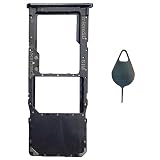
- Tips : NOT for Samsung Galaxy A51 5G UW A516V , NOT for Samsung Galaxy A51 5G A516 2020 , NOT for Samsung Galaxy A71 5G A716 ; NOT for Samsung Galaxy A51 4G Dual-Sim Version , NOT for Samsung Galaxy A71 4G Dual-Sim Version .
- Compatible with : Samsung Galaxy A51 4G 2019 Single-Sim Version : SM-A515F, SM-A515U , SM-A515U1, SM-A515W ; Samsung Galaxy A71 4G 2020 Single-Sim Version : SM-A715F , SM-A715U , SM-A715U1, SM-A715W .
- The item only fits for Galaxy A51 4G(or A71 4G) Single-Sim Version ; Please see carefully before ordering ; It is very very important, make sure what your device is .
- We will not be responsible for any damages to your device that you may cause during the changing of replacement parts .
- Package Content : 1 x Samsung Galaxy A51 4G Single SIM Card Tray Holder (like the Picture showing that) , 1 x Eject Pin .
Run Samsung Members diagnostics and seek service if needed
If Samsung Members is installed and offers Phone diagnostics, open Samsung Members > Support, start diagnostics, and select SIM. Treat the result as a clue, not proof that every hardware component is working.
If the SIM is confirmed active and works in another compatible phone but the A51 still does not detect it, contact Samsung to arrange service. A remote symptom check cannot identify a failed component, so do not assume the SIM reader needs replacement or try to disassemble the phone yourself. Samsung’s SIM troubleshooting guidance includes carrier checks, SIM handling, diagnostics, and service escalation: Samsung: What to do if your Galaxy phone is not detecting a SIM card.
Quick Recap
Best Value

- Tips : NOT for Samsung Galaxy A51 4G 2019 Dual-Sim Version ; NOT for Samsung Galaxy A51 4G 2019 Single-Sim Version ; NOT for Samsung Galaxy A51 5G 2020 Dual-Sim Version .
- Compatible with : Samsung Galaxy A51 5G 2020 Single-Sim Version : SM-A516F , SM-A516U , SM-A516U1 , SM-A516W , SM-A516N ; Samsung Galaxy A51 5G UW SM-A516V (Verizon) .
- The item only fits for Galaxy A51 5G Single-Sim Version ; Please see carefully before ordering ; It is very very important, make sure what your device is .
- We will not be responsible for any damages to your device that you may cause during the changing of replacement parts .
- Package Content : 1 x Samsung Galaxy A51 5G A516 Single SIM Card Tray Holder (like the Picture showing that) , 1 x Eject Pin .
Rank #4
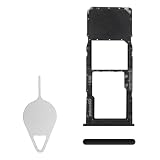
- Compatibility: Suitable for Samsung A51, the SIM card tray holder Replacement (Single SIM Version) fits models A51 SM-A515F (A515F A515FN/DS A515U). Please ensure your device model is compatible with this product. You can verify your phone model in the settings: Settings -> About Phone -> Model name/Model number.
- Easy to Replace: The SIM card tray replacement for Samsung Galaxy A51 is a simple process. Just use the SIM card removal tool to replace the tray. There's no need for professional help, and the procedure is not complicated.
- Carefully Designed: Designed with precision, the SIM card slot for Samsung Galaxy A51 ensures a proper fit with your phone's SIM card tray holder. It has undergone rigorous testing for quality and size to meet the specifications of your device.
- Replace Damaged SIM Card Tray: Should your for Samsung A51 SIM card tray be damaged or not functioning properly, our product is a reliable option. Constructed with long-lasting materials, it offers extended use. The careful design ensures that the card holder stays firmly connected to the SIM card, reducing the risk of loosening or falling out.
- Package Includes: The bundle includes a SIM card tray and an ejector tool, making the task of changing your SIM card tray more convenient.
Product prices and availability are accurate as of the date/time indicated and are subject to change. Any price and availability information displayed on Amazon at the time of purchase will apply.

