
The Realtek PCIe GbE Family Controller is a wired Ethernet adapter, not a Wi-Fi device. If it stops working, first check the cable, router and whether other devices can connect; then troubleshoot Windows and, if needed, recover the driver for your exact PC model. A missing adapter, a device error such as “Code 43,” and an adapter that appears normal but has no internet access are different symptoms, so note what Device Manager and Windows show before changing anything.
First identify what is failing
Check Settings > Network & internet and open Device Manager (right-click Start and choose Device Manager). Under Network adapters, see whether the Realtek adapter is absent, listed with a warning or error, or present without a device error. Record the exact message, including any code. “Windows has stopped this device” or “Code 43” describes what Windows reports; it does not, by itself, establish the cause or a specific fix.
- If Ethernet fails only on this PC, focus on its cable connection, settings, driver or hardware.
- If other devices also cannot use the same network, investigate the router, modem or internet service before reinstalling a PC driver.
- If Wi-Fi is available, connect the PC to it temporarily. This can restore internet access for troubleshooting and help distinguish a wired-only problem from a broader connection issue.
For Windows 11, Microsoft recommends starting with the Network and Internet troubleshooter in Get Help. Microsoft’s Ethernet guide also covers Windows 10.
Check the cable, ports and router
These checks are quick and reversible, and do not require a driver download.
Quick wins for a faster PC:
Fix the driver behind crashes, sound loss and screen glitchesFind Drivers →Repair Windows errors before they cause bigger problemsFix Now →#1 Best Overall

- 🚀 Ultra-Fast 2.5G Network Speeds – Upgrade your desktop PC with this 2.5G network card, delivering 2.5Gbps high-speed connectivity, 2.5x faster than traditional Gigabit Ethernet. Ideal for gaming, 4K streaming, large file transfers, and cloud computing, ensuring ultra-low latency and seamless performance.
- 🔄 Universal Compatibility & Easy Setup – This 2.5Gb PCIe network card supports Windows 11/10/8.1/8/7, Linux, and Mac OS. Plug-and-play on Windows 10, with an easy driver download for other systems. Perfect for workstations, gaming rigs, servers, and home networking.
- 🔧 Flexible Installation with Dual Brackets – Designed for various PC setups, this PCIe 2.5Gb network card includes both standard and low-profile brackets, making it compatible with full-size desktops, mini PCs, workstations, and small form-factor computers. Works with PCIe x1, x4, x8, and x16 slots for seamless integration.
- 🔥 Stable & Reliable Performance – Built with an advanced Realtek RTL8125B chip, this 2.5G PCIe Ethernet card ensures efficient data transfer, reduced latency, and a stable network connection. The integrated heat sink improves heat dissipation, ensuring long-lasting durability and uninterrupted performance. Supports Wake on LAN, PXE Boot, and VLAN tagging for advanced networking.
- 💡 Professional Customer Support & Warranty – We offer lifetime technical support to help you with setup, troubleshooting, and performance optimization. If you have any issues, our team will respond within 24 hours to ensure a smooth and reliable networking experience. Enjoy high-speed connectivity with confidence!
- Make sure the Ethernet cable is firmly connected at both the PC and the router.
- Check that the router end is in an Ethernet or LAN port, not the Internet port used for the router’s modem connection.
- If another cable is already available, try it. This helps rule out a cable fault without changing Windows settings.
- If appropriate, restart the modem and router: unplug their power, wait about 30 seconds, reconnect the modem first, and wait for it to settle before reconnecting the router. Restarting shared equipment briefly disconnects everyone using that network.
Afterward, check whether Windows shows an Ethernet connection and whether a second device can connect to the same network. A second-device test is a clue, not proof: if it also fails, the shared network or internet service becomes more likely; if it works, the affected PC or its connection becomes more likely.
Run Windows troubleshooting and reset network components
If the physical connection looks sound, use the Windows troubleshooter first. Microsoft also lists the following commands for Ethernet problems. Run them in an administrator Command Prompt, in this order, then check the connection again:
Rank #2

- ⭐【Next-Gen 10Gbe Performance】:Adopting the latest Realtek RTL8127 controller, this 10Gb PCIe network card delivers blazing-fast speeds up to 10Gbps. It provides extreme stability for local data transmission and internet access, effectively preventing packet loss. Perfect for NAS storage, home labs, gaming, and 4K video editing. Supports Wake-on-LAN (WOL).
- ⭐【Multi-Gig Auto-Negotiation】:Seamlessly backward compatible with 10Gbps, 5Gbps, 2.5Gbps, 1Gbps, and 100Mbps. It automatically negotiates the optimal speed to match your routers, switches, or NAS systems. Supports standard Cat6a/Cat7 or high-quality Cat6 cabling for cost-effective 10GbE network upgrades.
- ⭐【PCIe 4.0 x1 for Compact Systems】:Features a high-bandwidth PCIe 4.0 x1 interface that easily converts a standard x1 slot into a 10G RJ45 Ethernet port. Universally fits into PCIe x1, x4, x8, and x16 slots without occupying your GPU's lanes, making it ideal for Mini PCs, ITX builds, and compact workstations (Note: Not for PCI slots).
- ⭐【Broad OS & Advanced Linux Support】:Fully compatible with Windows 11/10 and Windows Server 2019/2022. Native plug-and-play for modern Linux distributions with Kernel 6.x and above (Ubuntu, Debian, Fedora), while older kernels (5.x) can be easily driven via Realtek official source code. Ready for mainstream virtualization and DIY NAS platforms.
- ⭐【Cool Running & Easy Installation】:Thanks to the ultra-efficient Realtek RTL8127 chipset, this 10G NIC consumes minimal power and generates significantly less heat than older 10G chips, ensuring non-stop stability. Includes both standard full-height and low-profile brackets to perfectly fit into slim or full-size desktop towers.
- Open Start, type Command Prompt, right-click it and choose Run as administrator.
- Enter each command and press Enter before entering the next:
netsh winsock reset
netsh int ip reset
ipconfig /release
ipconfig /renew
ipconfig /flushdns
The commands reset Winsock and TCP/IP, release and renew the PC’s IP address, and clear the DNS resolver cache. They can address network-configuration problems; they do not establish that the Realtek adapter itself is defective.
Recover the driver for your exact PC
A driver problem is one possibility, especially if the connection stopped after a Windows update, but the family name alone does not identify a universal driver package. The right driver may depend on the computer manufacturer and model. Get the Ethernet or network driver from the PC manufacturer’s support page for the exact model—not a generic driver-download site.
The Tool Desk
Outbyte PC Repair FREERepair Windows errors before they cause bigger problemsFix Now →Outbyte Driver Updater FREEFix the driver behind crashes, sound loss and screen glitchesFind Drivers →Rank #3

- [Super-fast 2.5Gbps Networking] High up to 2.5x-speed with Realtek RTL8125B chip, much faster data-transfer speeds for gaming, living broadcasts and downloads in bandwidth-demanding tasks.
- [Complete Compatibility] Seamless backward compatibility for 2.5Gbps/1Gbps/100Mbps, Support Windows11/10/8.1/8/7, MAC OS and Linux, no dirver needed on Windows10, easily download the driver in Realtek official website for other OS.
- [PCIe to 2.5G RJ45] This 2.5GBASE-T PCIe Network Adater convers a PCIe slot(X1/X4/X8/16) into a 2.5G RJ45 Ethernet Port. Note: Only work with PCIe slot, not for PCI slot.
- [Widely Use with Heat Sink]Comes with standard bracket and low-profile-bracket to meet the needs of different cases such as desktop, workstation, server, mini tower computer and so on. Excellent heat dissipation can reduce the temperature quickly and maintain the stability of network transmission.
- [Customer Service]Friendly service for lifetime technical supporte. If you encounter any problems, please contact us, our customer team will slove the problem for you within 24 hours.
- Find the PC maker and exact model. On a desktop with a separate motherboard, use the manufacturer’s model-specific support guidance.
- Before uninstalling anything, download and save the OEM network driver. If the affected PC is offline, download it on another computer and transfer it on a USB flash drive.
- Open Device Manager, expand Network adapters, right-click the Ethernet adapter and choose Uninstall device.
- Restart the PC. Windows will look for and install a driver, but it may not reinstall the correct one automatically.
- If the adapter still does not work, install the OEM driver you saved, following the manufacturer’s instructions.
If the adapter is absent from Device Manager even after these steps, or it remains in error after the correct OEM driver is installed, consult the PC or motherboard maker’s model-specific support. Microsoft’s general Ethernet guidance does not determine whether a particular machine has a BIOS setting, motherboard fault or other hardware issue.
Use Network reset only as a last step
Microsoft says, “Using network reset should be the last step you try.” Network reset removes network adapters and their settings; after restart, Windows reinstalls adapters and restores default settings. Saved network profiles may change to Public, and VPN software or Hyper-V virtual switches may need to be reinstalled or reconfigured.
Rank #4

- 【Ultra-Fast 10Gbps Network Performance】Upgrade your desktop, workstation, or NAS with blazing-fast 10Gb Ethernet speeds. This PCIe 10G network card supports auto-negotiation at 10G/5G/2.5G/1G/100Mbps, delivering smooth large-file transfers, ultra-fast backups, low-latency gaming, and high-bandwidth streaming.
- 【Realtek RTL8127AT Controller for Stable High-Speed Networking】Powered by the advanced Realtek RTL8127AT chipset, this 10Gb RJ45 Ethernet adapter provides reliable and efficient network performance with hardware checksum offload and reduced CPU usage for improved system responsiveness.
- 【PCIe 4.0 x1 Interface – Broad Compatibility】Built on the Realtek RTL8127 10G controller, this network card features a PCIe 4.0 x1 interface and is backward compatible with PCIe 3.0 x4/x8/x16 slots. It delivers efficient bandwidth and low latency, ensuring stable full-speed 10Gbps performance for NAS, gaming PCs, and high-performance workloads.
- 【Supports Existing Ethernet Cabling】Compatible with Cat5e/Cat6/Cat6A/Cat7 Ethernet cables and supports transmission distances up to 100 meters. Easily upgrade your network without replacing your existing cabling infrastructure.
- 【Low Profile & Full Height Brackets Included】Includes both standard and low-profile brackets for flexible installation in full-size desktops, compact PCs, servers, and rackmount systems. Supports Windows 11 and Linux kernel up to 6.12, with Wake-on-LAN (WOL) functionality for remote wake-up capability.
Use it only after the cable and network checks, Windows troubleshooting, commands and appropriate driver recovery have failed. In Windows, open Settings > Network & internet > Advanced network settings > Network reset, then follow the prompts and restart if asked.
Independent reader supportYour contribution helps us test, update, and keep practical guides available for everyone.When another Ethernet adapter can help
A USB-to-Ethernet adapter can be a temporary workaround if the PC’s Ethernet port is unavailable, or a diagnostic aid for testing the same network from another computer. If another computer connects using it, that suggests the shared network is working, but does not prove the onboard Realtek controller is the cause. It does not repair the Realtek adapter.
Best Value
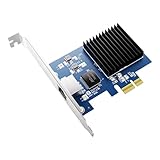
- RUNS IN A PCIe x1 SLOT, MOST 10G CARDS NEED x4 OR x8 - Uses one PCIe 4.0 lane at 16 GT/s, so it fits the short x1 slot on your board and leaves x16 free for a GPU. Also seats in x4, x8, x16.
- 10 GIGABIT OVER COPPER, SIX SPEEDS, 100 METRES - Realtek RTL8127 auto-negotiates 10G, 5G, 2.5G, 1G, 100M and 10M. IEEE 802.3an and NBASE-T compliant. Use Cat 6a cable for 10G at 100m.
- INSTALL THE DRIVER FIRST, ORANGE LED CONFIRMS 10G - Windows 11 and 10 show 1Gbps until the Realtek 10G driver is installed. Green LED for activity, orange only on a live 10G link.
- FOR NAS, HOME LABS, ROUTERS AND VIDEO EDITING - Moves a 50GB project in about a minute. Linux 6.16+ built in, FreeBSD driver available. PXE boot, 16K jumbo frames, 802.1Q and 802.1ad VLAN.
- BOTH BRACKETS INCLUDED, FULL-HEIGHT AND LOW-PROFILE - Fits ATX towers and 1U, 2U and SFF chassis with no extra purchase. Under 4W, fanless, IEEE 802.3az. Rated 5C to 50C for 24/7 use.
Windows 10 support status
Windows 10 support ended on October 14, 2025. Microsoft says that after this date it no longer provides free Windows Update software updates, technical assistance or security fixes for Windows 10; Windows 10 PCs continue to work, and Microsoft recommends moving to Windows 11. This status does not identify the cause of an Ethernet fault, but it matters when deciding how to keep the PC supported.
Quick Recap
Product prices and availability are accurate as of the date/time indicated and are subject to change. Any price and availability information displayed on Amazon at the time of purchase will apply.

