
There is no single best setting for every Logitech speaker. The available controls differ by model: the G560 has a customizable equalizer and per-application profiles, the Z407 has an adjustable bass dial, and the Z906 offers simulated-surround modes and individual channel levels. Identify your model first, then use the relevant controls as listening starting points—not as manufacturer-prescribed presets.
Start with your speaker model
Check the model name before looking for an equalizer or surround option. Logitech’s instructions describe different controls for the G560, Z407, and Z906; a setting or menu available on one should not be assumed to exist on another.
| Model | Documented controls | Best suited to |
|---|---|---|
| G560 | Custom frequency equalizer settings and per-application profiles in Logitech Gaming Software. | Listeners who want to adjust frequencies or keep separate settings for different applications. |
| Z407 | A wireless control dial for adjusting bass level. | Listeners who want to raise or lower bass; Logitech’s instructions do not establish a multi-band equalizer for this model. |
| Z906 | 2.1, 4.1, and 3D modes for stereo content, plus individual channel-level adjustments. | Listeners choosing how stereo audio is distributed or balancing the speaker channels. |
These controls are documented in Logitech Support’s pages for the G560 equalizer, Z407 bass level, Z906 surround modes, and Z906 channel levels.
Settings to try for clear dialogue
When voices sound hard to understand, try reducing excessive bass slightly. Strong bass can mask voices, so make small changes and listen to the same dialogue at a comfortable, consistent volume. This is a practical starting point, not a Logitech-validated EQ curve.
Quick wins for a faster PC:
Scan for outdated or missing drivers - takes under a minuteDriver Scan →Clear out junk files and repair common Windows errorsFree Scan →Fix the driver behind crashes, sound loss and screen glitchesFind Drivers →#1 Best Overall

- Versatile setup with speakers that connect easily to computers and other devices via Bluetooth wireless or 3.5mm cable
- Logitech Easy-Switch technology lets you seamlessly switch between audio devices Just by pausing the Audio on one device and pressing play on the other
- Each speaker has one active/powered driver that delivers full range Audio and ONE passive radiator that provides bass extension.
- On-speaker headphone jack Plus convenient controls for easy access to Bluetooth wireless pairing, power and Volume adjustments, Bluetooth version: 4.2
- Works with Bluetooth enabled devices and any device with a 3.5mm input including a computer, television, smartphone, tablet and music player
On the G560
In Logitech Gaming Software, select the G560 and open its mixing board, then go to the equalizer page. Adjust frequencies gradually and save the result to an application profile if you want it to apply to a particular program. Logitech documents the custom EQ and profile controls, but does not prescribe frequency values for dialogue.
On the Z407
Use the wireless control dial to reduce bass a little at a time. Logitech suggests turning the dial to its maximum and minimum to hear the endpoint tones, then setting the level to preference. The dial adjusts bass level; it is not a documented multi-band dialogue equalizer.
Rank #2

- Convenient Control Pod
- 25 Watts (RMS) Output
- Compact Subwoofer
Settings to try for music
Start from a balanced bass level and listen for whether bass overwhelms vocals or other parts of the track. On a Z407, adjust bass gradually with the dial. On a G560, make small equalizer changes and compare them with the original setting. No specific Logitech music curve is established by the manufacturer’s instructions, so treat your preferred balance as personal rather than universal.
Settings to try for gaming
G560: use an application profile
If you want a gaming-specific balance, the G560’s per-profile equalizer mode can assign a setting to an application. Adjust the EQ for the game you play and keep a separate profile for other listening if that suits your setup. Logitech documents the profile feature, not a universal gaming EQ.
Outdated Drivers Are Slowing You Down
One free scan finds every outdated or missing driver and matches the right update for your exact hardware.Free scan · exact hardware matchPC Slower Than It Used to Be?
A free scan shows the junk files, broken settings and background clutter dragging Windows down - then fixes them in one click.Free scan · Windows 10 & 11Rank #3

- Balanced audio sound with depth - 2 Watts Peak/ 1.2 Watts RMS power produces immersive and crystal clear sound.
- Simple and quick USB connection. Just plug the speakers into your computer USB-A port. An orange LED stays lit when your speakers are on. Disconnect the USB-A cable to power off.
- Easy controls. You can easily control the volume or mute on the front of the right speaker to get great audio experience.
- They are slim, lightweight and easy to move around so you can accommodate your setup and get perfect sound wherever you are.
- Your long lasting product set with a solid build quality.
Z906: choose a mode based on the game’s output
For stereo content, the Z906 offers three modes: 2.1 plays through the front speakers and subwoofer; 4.1 duplicates the front left and right channels to the rear speakers and has no center channel; and 3D simulates a 5.1 experience with independent content across speakers. Choose according to the game’s audio output and your preference. Logitech cautions that games, streaming services, TV, and DVD content may be stereo rather than native surround, so a surround mode may be processing stereo rather than reproducing a discrete multichannel mix.
Balance Z906 channels and surround modes
The Z906 console can adjust individual channel levels. Use those controls to address an imbalance in your listening setup rather than assuming that every channel should be changed for a particular genre. The available surround mode changes how stereo content is distributed; channel levels control relative output. For instructions, see Logitech’s guide to setting individual Z906 channel levels.
Rank #4

- IMMERSIVE SOUND – Expertly tuned speaker system features 80W Peak power / 40W RMS. Experience immersive, lifelike sound—from crisp high notes to powerful mid, low-range notes—with no compromises on the rich, deep bass.Waterproof : No
- STRONG BASS WITH CLARITY – 20-watt bass with digital signal processing produces deep yet clear bass and superior sound performance. The ported, down-firing subwoofer adds “boom” to music, movies, and gaming.
- ONE DIAL FOR TOTAL WIRELESS CONTROL – With a 30 m line of sight range, dial in and control your sound wirelessly with virtually no delays from across the room. Tap it and spin it to play, pause, control volume and bass.
- DUAL-POSITION SPEAKERS – Sleek, oval-shaped satellite speakers come in a refined graphite gray. Lay them vertically or horizontally. Move and curate to fit your aesthetic preference.
- MULTIPLE WAYS TO CONNECT AND SWITCH – You’ve got options. Connect up to three devices via Bluetooth, micro USB, and the 3.5 mm input. Switch between wired and wireless connections with the wired input button and Bluetooth button.
Do not assume G HUB headset controls apply to speakers
Logitech’s G HUB surround instructions describe Logitech G audio-device controls and specifically discuss headset surround, including DTS Headphone:X 2.0 for Windows. That page is not evidence that every Logitech speaker has the same surround controls. Use the instructions for your exact speaker model.
Independent reader supportYour contribution helps us test, update, and keep practical guides available for everyone.When to reset a Z407
If you want to return the Z407 to its factory state, Logitech says a factory reset restores volume, EQ/bass level, and the Bluetooth connected list to factory settings. Follow Logitech’s Z407 factory-reset instructions before treating a reset as a fix for a specific audio problem; resetting also clears the connected Bluetooth list.
Best Value
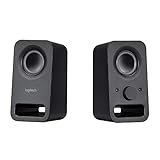
- Rich stereo sound: Two 2-"drivers deliver 6 watts of peak power for clear, loud stereo sound
- Connect two devices at the same time: Simultaneously connect your smartphone plus tablet or laptop via a 3; 5mm audio input plus auxiliary line
- Convenient controls: Front panel volume and power are combined into one easy-access control knob
- Handy headphone jack: Listen to music, movies and games in total privacy
- Durable, compact design: Built to last with high-quality acoustics, tested and tuned at Logitech's state-of-the art audio labs
A practical way to choose settings
- Identify the model. Confirm whether you have a G560, Z407, Z906, or another speaker before searching for controls.
- Match the adjustment to the control. Use the G560 EQ for frequency changes, the Z407 dial for bass level, and the Z906 modes or channel levels for stereo distribution and speaker balance.
- Check the content format. For Z906 surround choices, distinguish stereo content from a native multichannel game or recording.
- Change one thing at a time. Make small adjustments and compare using familiar audio at a consistent volume. Keep the setting that works for your room, placement, and preference.
Logitech’s cited support instructions establish the controls available, not numeric EQ targets or one best setting for dialogue, music, or gaming. A recommendation for one model should not be applied to another without checking its controls.
Quick Recap
Product prices and availability are accurate as of the date/time indicated and are subject to change. Any price and availability information displayed on Amazon at the time of purchase will apply.

