
Windows Errors? Fix Them Before They Spread
Repair common Windows errors and clear accumulated junk for a smoother, more stable PC - no reinstall needed.Free scan · no reinstallCrashes, No Sound, or Screen Glitches?
Random freezes, missing sound and display glitches usually trace back to one bad driver. Find and replace yours safely.Free scan · under a minuteMicrosoft removed Windows To Go in Windows 10 version 2004, and Windows 11 does not bring back Microsoft’s built-in feature. You can still create a portable Windows workspace with third-party tools such as Hasleo WinToUSB, but that is a workaround—not a Microsoft-supported Windows To Go deployment. First decide whether you need a persistent Windows desktop, an installer, or recovery media: those are different kinds of USB drives.
What “running Windows from a USB drive” can mean
Microsoft defined its former Windows To Go feature as a way for Windows 10 Enterprise and Education users to boot a full Windows version from external USB storage on a host PC. Microsoft removed the feature in Windows 10 version 2004 and later. Its old requirements and behavior describe that discontinued implementation, not every current third-party tool. Microsoft’s Windows To Go FAQ
| What you want to start | Best-fit option | What it does |
|---|---|---|
| A persistent Windows desktop that boots directly from external storage | Third-party portable Windows tool, such as Hasleo WinToUSB | Creates a Windows workspace on an external drive; compatibility and support depend on the tool, Windows image, drive, and host. |
| Windows Setup to install or reinstall Windows on a PC | Windows installation media, created with Microsoft’s tool or another bootable-media utility | Starts setup; it is not a persistent desktop you carry between computers. |
| Tools to restore a device | Windows Recovery Drive | Starts recovery tools to help restore the device; it is not a portable Windows workstation. |
| Windows running inside another operating system | Virtual machine (VM) | Runs Windows within a host OS rather than booting the computer directly from the external drive. Check current hypervisor requirements and Windows licensing. |
Third-party tools for a portable Windows workspace
Hasleo WinToUSB
Hasleo says WinToUSB can create a Windows To Go workspace from image files including ISO, WIM, ESD, SWM, and VHD-family formats. Its documented workflow is to select a Windows image, choose a destination drive and partitions, and run the installation process. Those are the vendor’s product claims, not confirmation that every image, Windows edition, external drive, or PC will work. Check Hasleo’s current WinToUSB information and Microsoft’s licensing terms for your intended setup.
Rufus
Rufus is a utility for formatting USB drives and creating bootable media, including Windows installation media. Its FAQ explains that the Windows To Go option is not available with every Windows image, including some images created with Microsoft’s Media Creation Tool. Treat Rufus as a tool for making bootable USB media, not a guarantee that any image can become a portable Windows system. Rufus project site · Rufus FAQ
Recommended Free Tools
#1 Best Overall

- PEAK PERFORMANCE. Up to 1,000MB/s(2) read and 900MB/s(2) write speeds help ensure you meet your deadlines with time to spare.
- ROOM TO GROW. Easily store, access, and share your creative projects and critical documents with up to 2TB(1) capacity.
- PREMIUM BUILD. Engineered for resilience with a sophisticated metal design, this dual drive not only performs; it endures — so you can take your files anywhere.
- DATA ENCRYPTION. Live confidently knowing SanDisk helps protect your data with encryption technology(4).
- UNIVERSAL CONNECTIVITY. Transfer files between your USB Type-C and USB Type-A laptop, tablet, and Android smartphone(6).
Choose storage that can handle Windows workloads
A regular USB flash drive may be slow as a system drive. Microsoft’s historical Windows To Go overview says certified drives were designed for the high random read/write activity of normal Windows use; that legacy certification list is not a current product recommendation. Hasleo also cautions that common flash drives can be slow and recommends external or high-performance USB storage. A portable external SSD is a reasonable category to consider, but no specific modern drive is established here as tested or certified for portable Windows. Microsoft’s historical Windows To Go overview · Hasleo WinToUSB
Check the host PC before relying on external boot
A portable workspace must boot on the computer you plan to use. Microsoft’s legacy requirements included USB boot capability, direct connection to a USB port, and an image architecture matching the processor. The old FAQ notes that many systems did not support booting through a USB hub or add-on card. On a current PC, firmware settings and USB boot restrictions vary, so check the computer maker’s documentation and firmware settings. Use its instructions to open the boot menu and select the external drive. Microsoft’s Windows To Go FAQ
Rank #2

- Performance: Advanced read speeds of up to 130MB/s for everyday data storage & transfers²
- Speed: Transfer speeds up to 10x faster than standard USB 2.0 flash drives²
- Durability: Sturdy, light-weight design with convenient and modern sliding collar cap design protects content when not in use
- Reliability: Essential mobile storage solution ideal for transferring large files such as movies, videos, photos, music & documents
- Compatibility: Compatible with most Type-A USB 3.2 Gen 1/USB 3.0 PC and Mac laptop and desktop computers, backwards compatible with USB 2.0
- Try direct connection: connect the drive to a built-in USB port rather than through a hub.
- Check boot settings: confirm USB boot is enabled and that the drive can be selected in the boot menu.
- Match architecture: the legacy Windows To Go guidance required the image architecture to match the processor; do not assume every image boots on every host.
- Plan for differences: drivers and hardware vary between computers, so portability does not guarantee an identical or trouble-free experience on each one.
Protect the drive, your data, and your security
Back up anything important on the destination drive before provisioning it. Creating bootable media or writing a portable Windows installation can erase or repartition the selected storage; follow the chosen tool’s prompts carefully and verify the target drive before proceeding.
Microsoft’s legacy Windows To Go implementation disabled hibernation by default for roaming use and kept host internal disks offline by default to reduce accidental data disclosure. Those protections do not make an unknown computer safe: Microsoft warned that an untrusted host or its firmware could compromise the drive. Avoid entering sensitive credentials on computers you do not trust. The legacy implementation also did not support in-place upgrades, Windows Recovery Environment recovery, or reset/refresh; Microsoft described reprovisioning with a fresh image as its recovery approach. These legacy limitations should not be assumed to apply identically to third-party products. Microsoft’s Windows To Go FAQ · Microsoft’s Windows To Go overview
Free tools Windows power users keep installed
One-click scans. No signup required.
Rank #3

- Large Data Storage Capacity: Flash Drive with 128GB capacity, meet your needs of daily use on work, school, home and travelling for photos, music, videos, files storage and transfer
- Easy to use: The thumb drive is plug and play without any software installation; Supports Windows 7/8/10 / Vista / XP / Unix / 2000 / ME / NT Linux and Mac OS, also compatible with USB 2.0 and 1.1 ports; Storage is fast, safe and stable
- Wide Compatibility: USB flash drive support TV, desktop, notebook computer, car, audio and other device; It is your great data storage and transfer companion with traveling and working
- Retractable Desgin: The usb drive's retractable design can effectively protect the USB interface; The capless design can avoid losing of cap; Weight: 7g, Size: 2.6 × 0.8 × 0.4 inch. Portable to take your digital world anywhere
- What You Get: 1 x 128GB USB Flash Drive Thumb Drive, All of usb drives have been rigorously tested and formatted before leaving the factory; The default format of the USB stick is exFAT
Use installation media when you need to install Windows
Microsoft’s installation-media instructions cover creating a USB drive or ISO to install a new Windows copy, perform a clean installation, or reinstall Windows. The page specifies a blank USB drive with at least 8 GB for its USB-media procedure and warns that its contents will be deleted. That capacity requirement is for installation media, not a portable Windows workspace. Microsoft states that Windows 10 support ended October 14, 2025; check Microsoft’s current guidance for the Windows version you intend to install. Microsoft: Create installation media for Windows
Independent reader supportYour contribution helps us test, update, and keep practical guides available for everyone.Use a Recovery Drive to restore a device
Windows Recovery Drive creates USB recovery media to help restore a device to its factory state, including after a drive replacement or wipe. Microsoft warns that creating it erases the USB drive. It is a recovery tool, not a portable Windows desktop. Microsoft: Create a recovery drive
Quick Recap
Best Value
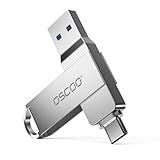
- Dual USB-A & USB-C Interface: Featuring both USB-A and USB-C connectors, this flash drive supports USB 3.2 Gen 2x2, USB 3.2 Gen 2, USB 3.0, and USB 2.0 for versatile connectivity across different USB generations. Compatible with a wide range of devices, including smartphones, tablets, laptops, desktops, and other compatible USB-enabled devices. Note: For detailed setup and usage instructions, please refer to the product video on the Amazon listing.
- Fast Data Transfer Speeds: Offers read speeds up to 150MB/s and write speeds up to 60MB/s, allowing quick transfer of 4K videos, photos, and large files, saving your valuable time
- Compact & Portable Design: Measuring just 63.67×13.79×9.22mm, this sleek flash drive easily fits in your pocket or bag, making it ideal for on-the-go data storage and transfer
- Durable & Reliable Build: Constructed with sturdy zinc alloy to withstand everyday shocks and drops, ensuring your data stays safe and secure during use
- Plug & Play Convenience: No drivers or software needed. Compatible with Windows, macOS, Linux, Android, and more. Simply plug in and start transferring data instantly
Rank #4

- High-speed USB 3.0 performance of up to 150MB/s(1) [(1) Write to drive up to 15x faster than standard USB 2.0 drives (4MB/s); varies by drive capacity. Up to 150MB/s read speed. USB 3.0 port required. Based on internal testing; performance may be lower depending on host device, usage conditions, and other factors; 1MB=1,000,000 bytes]
- Transfer a full-length movie in less than 30 seconds(2) [(2) Based on 1.2GB MPEG-4 video transfer with USB 3.0 host device. Results may vary based on host device, file attributes and other factors]
- Transfer to drive up to 15 times faster than standard USB 2.0 drives(1)
- Sleek, durable metal casing
- Easy-to-use password protection for your private files(3) [(3)Password protection uses 128-bit AES encryption and is supported by Windows 7, Windows 8, Windows 10, and Mac OS X v10.9 plus; Software download required for Mac, visit the SanDisk SecureAccess support page]
Which alternative should you choose?
- You need a persistent Windows environment and can boot from USB: consider a third-party portable Windows tool, after checking its current compatibility information, Windows licensing, host requirements, and storage needs.
- You need to install or reinstall Windows on a computer: create Windows installation media; it launches setup rather than a carry-around desktop.
- You need to restore a device: create a Windows Recovery Drive and keep it for recovery rather than everyday computing.
- Your host OS can stay running: a VM on external storage may suit you, but verify the hypervisor’s current workflow and requirements as well as Windows licensing before setting it up.
Product prices and availability are accurate as of the date/time indicated and are subject to change. Any price and availability information displayed on Amazon at the time of purchase will apply.

