
The right controller depends on which Ape Escape game you mean. For the original game converted for PS4 and PS5, Sony lists the DualSense for PS5 and DUALSHOCK 4 for PS4. That conversion does not support the consoles’ original peripherals, so a PlayStation Move controller is not the choice for it. The separate PS3 Move experience uses a Move motion controller and PlayStation Eye camera.
Choose by game and console
| What you’re playing | Controller or setup | What to know |
|---|---|---|
| Original Ape Escape conversion on PS5 | DualSense wireless controller | Sony’s US PlayStation Store listing names DualSense as playable for this PS4/PS5 conversion. See the PlayStation Store listing. |
| Original Ape Escape conversion on PS4 | DUALSHOCK 4 wireless controller | The same listing names DUALSHOCK 4 as playable. It also says the conversion does not support the console’s original peripherals. |
| Separate PS3 PlayStation Move Ape Escape experience | PlayStation Move motion controller and PlayStation Eye; optional secondary navigation input | This is a different game and hardware setup. Sony’s documentation explains the Move system, but does not establish a complete compatibility matrix for every regional release. |
The Store entry refers to the original PlayStation game converted for PS4 and PS5; its controller information should not be generalized to every Ape Escape release. Sony’s 2009 Move announcement named an Ape Escape working title among announced Move games, supporting the distinction between that experience and the later Store conversion. Sony’s 2009 announcement.
How the PS3 Move controls work
Move motion input is not simply a controller with a stick. The PS3 and PlayStation Eye camera work together to detect the Move controller’s movement, angle, and position. The controller also has internal motion sensors, while its colored sphere gives the camera a point to track. Sony’s Move system overview.
The Navigation Controller is an optional secondary input device, not a replacement for the motion controller. Its left stick and directional buttons handle navigation; compatible games can instead use a DUALSHOCK 3 or SIXAXIS for that secondary role. Sony says the Navigation Controller itself does not include SIXAXIS motion sensing. PlayStation Move FAQ and Navigation Controller manual.
The Tool Desk
Outbyte Driver Updater FREEFix the driver behind crashes, sound loss and screen glitchesFind Drivers →Outbyte PC Repair FREERepair Windows errors before they cause bigger problemsFix Now →#1 Best Overall
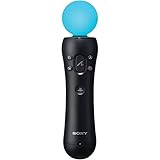
- This Certified Refurbished product is tested and certified to look and work like new. The refurbishing process includes functionality testing, basic cleaning, inspection, and repackaging. The product ships with all relevant accessories, a minimum 90-day warranty, and may arrive in a generic box. Only select sellers who maintain a high performance bar may offer Certified Refurbished products on Amazon.com
- Sony PlayStation 3 Move Motion Controller
What to check before choosing Move hardware
- Confirm the exact game and console. A console recognizing a Move accessory does not prove that a particular game supports it.
- Check the camera requirement. The PS3 Move setup uses PlayStation Eye tracking. For PS5 use of a PlayStation Camera, Sony says the Camera adapter is required.
- Expect game-specific controls and calibration. Sony’s support guidance says Move controls and calibration vary by game. Its FAQ also notes that developers determine how much motion control a game implements; some may not provide full 1:1 motion.
- Check the Navigation Controller’s role. It provides secondary navigation, not Move motion sensing. The manual specifies PS3 system software version 3.40 or later for the Navigation Controller.
- Verify the release and accessories before buying. Official documentation explains the Move platform generally, but does not settle compatibility for every regional PS3 release or every original PlayStation setup.
Sony lists PlayStation Move controllers as compatible with PS3, PS4, and PS5, but that is accessory/platform compatibility rather than confirmation that a given game supports Move. PlayStation Move compatibility and support.
Independent reader supportYour contribution helps us test, update, and keep practical guides available for everyone.What about playing the original PlayStation version?
Do not assume an original PlayStation controller, a modern controller, or an adapter will work in every version or setup. The current PS4/PS5 Store conversion names its supported controllers explicitly, but the official information here does not provide a full compatibility chart for original PlayStation releases and adapters. Check the exact platform and game edition before relying on a different controller.
Quick Recap
Best Value

- Ergonomic, intuitive design thanks to a lightweight design, built-in vibration function and sphere that's tracked by the PlayStationCamera as you move, the controller acts and feels like an extension of your own hand, allowing you to intuitively interact with a game's virtual environment
Rank #4

- Charges two PlayStation Move Motion Controllers
- Compact design for storage with four non-slip feet
- AC Power adapter plugs into any wall outlet
Rank #3

- Advanced motion sensing and light tracking technology
- Easily accessible trigger and face buttons
- Immersive vibration feedback
- Rechargeable batteries provide long hours of play
Rank #2

- This Certified Refurbished product is tested and certified to look and work like new. The refurbishing process includes functionality testing, basic cleaning, inspection, and repackaging. The product ships with all relevant accessories, a minimum 90-day warranty, and may arrive in a generic box. Only select sellers who maintain a high performance bar may offer Certified Refurbished products on Amazon.com
- Charge the controller and automatically pair with the PS3 system via a USB cable
- 1 Move Controller and 1 USB Cable
Product prices and availability are accurate as of the date/time indicated and are subject to change. Any price and availability information displayed on Amazon at the time of purchase will apply.

