
If your POCO C95 Pro charges slowly, first check the charger, cable, connections and what the phone is doing while plugged in. For rapid battery drain, check which apps or features are using power before changing settings. The C95 Pro has a 7,500 mAh typical-capacity battery and supports 45W turbo charging; POCO recommends a Xiaomi 45W adapter, which is not included in the box. These checks can help identify everyday causes, but persistent problems may need authorized service.
What the C95 Pro’s charging specifications mean
POCO lists the C95 Pro with a 7,500 mAh typical-capacity battery and 45W turbo charging. It recommends a Xiaomi 45W adapter, sold separately. If you need to replace an adapter, check the current regional listing, plug type and compatibility rather than assuming any charger advertised as 45W will deliver the phone’s supported charging behavior. See POCO’s C95 Pro specifications.
POCO also advertises 35 minutes for “all-day power” and 96 minutes to reach 100%, based on its stated laboratory testing. Those figures are not guaranteed charging times for every phone: temperature, the charging source, phone use and other conditions affect results. Treat them as manufacturer test claims, not a pass-or-fail threshold for your device. POCO’s product page explains its test claims.
If your POCO C95 Pro charges slowly
1. Check charging time consistently
To judge whether charging has changed, note the starting and ending battery percentages over a consistent interval. Compare like with like: use the same charger and cable, avoid heavy use during the check, and note whether the phone is unusually warm. A computer USB port or power bank is not a like-for-like comparison with a compatible wall adapter.
Do these 3 things before closing this tab:
1Clear out junk files and repair common Windows errors2Fix the driver behind crashes, sound loss and screen glitches3Repair Windows errors before they cause bigger problems#1 Best Overall

- Exclusive for Xiaomi Cable: This for xiaomi charging cable has 5 connection pins on USB-A interface, the extra special pin can trigger xiaomi fast charging protocol. This for xiaomi cord supports Hyperchage/Turbo Charge and delivers 120 watts max according to the output of xiaomi charger box.
- 6-Core Big Power Design: This for redmi cable type c has a 6-core copper wires design which makes it possible to reach 6A current max and keep charging stable without heating.
- Smart Processing Chips: This for xiaomi cord has built-in smart chips on USB-C end which can identify all xiaomi phones well and deliver proper current. The built-in 56K ohm pull-up resistor provides stable and safe charging for your devices.
- 3.3ft+6.6ft for Most Occasions&Devices: This two size combo can meet the needs of daliy use for indoor and outdoor. Please note that this for xiaomi 13 pro cable will only deliver 2A to 3A for other cell phones.
- What You Get:1x3.3ft+1x6.6ft USB-A to USB-C fast charging cords. 7*24 hours worry-free service.
2. Check the charger, cable and connections
Use a sound, compatible wall adapter and cable. Look for visible damage, then confirm the adapter is firmly seated in the outlet, the cable is secure at the adapter, and the phone-side connector is fully inserted. A poor connection at the phone can result in slower USB charging, according to Xiaomi’s general charging guidance. If you have access to a known-good compatible adapter and cable, try them to help isolate a faulty accessory. For the model-specific adapter recommendation, use POCO’s specifications above; verify the exact model and regional plug before buying.
3. Reduce activity while charging
Gaming, video playback and other intensive tasks use power while the battery is charging, which can make the percentage rise more slowly. Stop high-power activity, close apps you do not need, and check whether charging improves. Xiaomi’s general slow-charging guidance also recommends checking the charging source, connection, usage and software updates.
Rank #2

- Quick Charge 6A Cable Compatible with Xiaomi and Redmi 120W - 90W (Ultra Charging): Compatible with Xiaomi 17 Ultra/Pro, 15 Ultra, 14 Ultra/Pro, 13 Ultra, 13T Pro, 12 Pro, 11T Pro; Redmi Note 15 Pro+ 5G, 12 Pro+; POCO F8 Pro, F7 Ultra, F5 Pro. 67W (Turbo Charging): Compatible with Xiaomi 17, 15, 14/14T, 13/13T, 12/12T, 11T; Redmi Note 15 Pro, 14 Pro, 13 Pro (5G), 12 Pro, 11 Pro; POCO X8 Pro, X7 Pro, X5 Pro, F4. 33W - 18W and Tablets: Compatible with Redmi Note 15, 14, 13, 12, 11S, 10 Pro; Redmi 15, 13C; POCO X5, F3, M5S; Xiaomi Pad 8, 7, 6, 5; Redmi Pad Pro.
- ▶【Data Transfer Function】This USB C fast charging cable supports a data transfer rate of up to 480Mbps, transferring movies, TV dramas, songs, etc. in seconds.
- ▶ 【Durable USB Type C Cable】Made with premium TPE material for exceptional durability and flexibility, 10000+ bends and extensive lifespan testing for long-lasting durability. The 1m cable is perfect for use in office, bedroom, travel, car and is the perfect length for your daily life.
- Please note that this cable is designed for Xiaomi phones. Turbo and Hyper charging speed will be achieved with Xiaomi Turbo or Hyper wall charger. The cable works with Xiaomi/Redmi phones, which have a special design for super fast charging speed. For phones of other brands, it will offer fast charging (Quick Charge), but not Xiaomi's exclusive Turbo or Hyper charging speed.
- P37 Fast Charging Cable for Xiaomi 120W Max. USB Cable 6A Fast Charging 65W Max, USB C Turbo Charge Cable for Xiaomi, Android Auto. USB C Cable 65W 6A for Mi 11 Ultra, Xiaomi/Redmi POCO Black Shark
4. Check for a system update
Check the phone’s system settings for an available update and install it if appropriate. Menu labels and paths can vary by software version. If slow charging persists with a known-good compatible charger and cable, contact an authorized service center rather than assuming a new adapter will fix a phone-side fault.
Independent reader supportYour contribution helps us test, update, and keep practical guides available for everyone.If the battery drains quickly
1. Find what is using battery power
Open the phone’s battery or power-consumption settings and review the app and feature usage ranking. Menu names vary by system version. Look for an app consuming more power than expected for how much you used it, then close it or restrict background activity if you do not need it running. Xiaomi’s battery-use guidance recommends checking power consumption and background apps.
Windows Errors? Fix Them Before They Spread
Repair common Windows errors and clear accumulated junk for a smoother, more stable PC - no reinstall needed.Free scan · no reinstallCrashes, No Sound, or Screen Glitches?
Random freezes, missing sound and display glitches usually trace back to one bad driver. Find and replace yours safely.Free scan · under a minuteRank #3
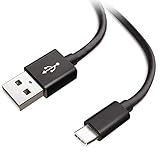
- Extensive Compatibility This Type C USB Cable Support Fast Charging compatible with Xiaomi Redmi Note 8 Pro, Redmi Note 9 Pro, Redmi Note 9S, Redmi 9, Redmi Note 8, Redmi 8A, Redmi 9A, Poco F2 Pro, Mi 10 Unlocked Smartphone.
- Fast Charging and Sync Fast Charging Speed Up to 3A Maximum, Transfer Speed Up to 480Mbps. Data Trafer and Power Fast Charging 2 in 1 USB C Cable. Quick Connecct Your Device with This Type C USB Cable Cable for Charging or sycn.
- Tangle Free Durable and Flexible USB Type C Charging Cable Reinforced Reversibleconnector Bear Up to 10000+ Bend Lifespan, Durable and Longer Using Life Than Other Cable.
- What You Got 1-Pack 5Ft Premium Type C USB Cable Cable with Worry-Free 24 Months . Note: If You Have Any Problems About Product, Please Contact Us First, and We Will Try Our Best to Solve Your Problems.
2. Reduce display and feature use where practical
Lower screen brightness and consider a lower refresh rate if the smoother display is not important for your current use. Disable energy-intensive display options and haptics when you do not need them. These are trade-offs: lower brightness, refresh rate or haptic feedback may reduce power use, but they also change how the phone looks or feels.
3. Update and compare ordinary usage
Check for an appropriate system update, then observe battery use over a comparable period under ordinary conditions. POCO’s product page lists “up to” figures of two days of battery life, 28 hours of video playback, 12 hours of video recording, 91 hours of music playback and 46 hours of calling. The page describes simulated battery life under moderate daily use; these are manufacturer claims, not expected results for every owner or every usage pattern. It also claims the battery retains over 80% of its original capacity after 1,000 full charging cycles; that is a POCO claim, not an independently established C95 Pro durability test.
Rank #4

- ▶⚡【6A Turbo Charging Cable】This 6A USB C Turbo Charging Cable is designed for Xiaomi, supports 120W MAX charging for Xiaomi 13T/13 Pro/12T/12T Pro/12 Pro/11T Pro,support turbo charging for Xiaomi Pad 6/5/13 Ultra/13/13 Lite/12S Ultra/12 Lite/12/1212X/11T,support fast charging for Mi 11 Ultra/Mi 11 Lite/Mi 10 Pro/Mi 10T
- ▶ ️【Fast Charging & Data Transfer】Built-in superconductivity copper cores of this USB C cable allow safe and max 6A output to charge your device at a super fast speed. This USB C fast charging cable supports fast data transfer of up to 480Mbps, transfer tons of movies, files, songs etc.Note:This cable is only compatible
- ▶【Safer Charger & Durability】 Built-in USB C charging cable in the 56KΩ pull-up resistor ensures the stability of charging voltage and current during fast charging. TPE coated USB-C connector to conveniently connect and withstand wear, passed over 5,000+ bending and over 5,000 lifespan connection and disconnect tests, durable for use
- ✔️【3.3FT USB C Charging Cable】With the length of 1M, you can lie on the sofa or sofa and use your devices while charging at the same time. And you can freely use in your bedroom, office and even in the back seat of your car, extra long cable convenient for daily life
- ✔️【Safe Charging】This USB C cable fully complies with QC4.0 protocol for fast charging and includes an upgraded smart chip that monitors voltage and current, ensuring safe use without damaging your devices. The oxygen-free connector ensures reliable charging and stable data transmission at 480 mbps.
If unusually fast drain continues despite ordinary use and basic app and setting checks, arrange an authorized inspection. Repeated battery drain after overheating is a particular reason to seek after-sales evaluation rather than relying only on settings changes. Xiaomi’s battery and charging FAQ offers general troubleshooting guidance, not evidence of a known C95 Pro defect.
Quick Recap
Best Value
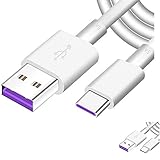
- Super Fast Charge: The Fast Charge Type-C Cable is Designed with advanced charge power up to 5A, Charging Speed up to 4X faster than other traditional chargers
- Premium Built-in Quality: Tin Plated Copper Core, Double Shield for data transmission,Build in Smart Chip to monitor the voltage and current for safety usage of your Device.
- Super Charge Compatibility: The Huawei Supercharge Type-C Cable Takes supper charge for Huawei P20 Pro/ P20, Huawei P10 Plus/ P10, Huawei Mate Mate 20 X/ 20, Huawei Mate 10 Pro/ mate10, Huawei Mate 9 Pro/ Mate9,Honor View 10/ 10. Note:Only Normal Charging 5V/2A for other Type C Devices.
- Durable Super Charger Cable: The type c Cable is made of Environmentally-friendly TPE housing and it is compact in design ,no wrinkle.And it is sturdy and durable for everyday use and wearing.
- Packing: 2 x For Huawei SuperCharge 5A Fast Charge Type C USB cables
When to stop troubleshooting and get help
- If the phone becomes hot while connected and not in use, stop charging and seek authorized evaluation.
- Do not charge a wet device. Xiaomi’s general safety information gives an operating temperature range of 0°C to 40°C; avoid charging outside suitable conditions. See Xiaomi’s support guidance.
- Do not attempt to replace the built-in battery yourself. Contact an authorized service provider for suspected battery, port or other hardware faults. See Xiaomi’s safety and service guidance.
- Back up important data before a factory reset or service process where possible. A reset is not a first step for a charging accessory or connection problem.
Product prices and availability are accurate as of the date/time indicated and are subject to change. Any price and availability information displayed on Amazon at the time of purchase will apply.
The Tool Desk
Outbyte PC Repair FREEClear out junk files and repair common Windows errorsFree Scan →Outbyte Driver Updater FREEScan for outdated or missing drivers - takes under a minuteDriver Scan →
