
To track UPI spending across apps, check the transaction history in every UPI app you use, then compare those entries with the linked bank account’s transaction record and SMS alerts. A matching amount alone does not prove you paid twice: check the recipient, status and transaction reference before treating two entries as duplicate debits.
How to track UPI spending across apps
Each UPI app keeps its own view of your activity, so one app’s history may not show payments made through another. Start by listing the apps and linked bank accounts you want to review, along with the period you want to check.

- Open each app’s transaction history. NPCI’s UPI FAQ says: “Go to Home Screen ->Transaction History, to view all your past and pending transactions.” Menu names and locations can vary by app.
- Make a single log for the period. For each transaction, note the date and time, amount, payee or merchant, linked bank account, app used, status and transaction or reference number if available. This combined log is a practical way to compare entries; NPCI does not prescribe this format.
- Check the bank’s records. Compare the log with the bank account’s transaction history or statement and the bank’s SMS confirmations. App history helps identify what was initiated; bank records help establish whether money was actually debited. NPCI says a successful transaction should show as successful in BHIM and that a bank SMS should arrive, while noting that confirmation can sometimes take longer.
Choose a recordkeeping method
| Approach | Coverage | Verification | Auditability | Effort |
|---|---|---|---|---|
| Review each app separately | Covers activity only when you check every app used. | Requires a separate comparison with bank records. | Details remain in each app; record reference IDs and statuses when needed. | Repeated checks across apps. |
| Keep a consolidated manual log | Can bring entries from all the apps and accounts you include into one place. | Lets you compare app entries directly with bank-posted debits. | Can retain reference IDs, statuses and account details together. | Requires entering and updating the records. |
The official sources cited here describe app histories and bank checks, not a universal automatic service that combines every UPI app’s activity. Do not assume a single app or log will capture transactions you have not added or checked.
How to check if you paid twice on UPI
Look for a possible duplicate, then verify it against the bank record. Two entries with the same amount and close timestamps are a lead to investigate, not proof: they may have different recipients, statuses or outcomes.
Recommended Free Tools
#1 Best Overall

- Spending Tracker Inserts for Simple Expense Records: Designed for writing down everyday purchases, bills, and personal spending details. Each page includes fields for month, date, description, amount, cash, and card entries to help keep monthly expenses organized
- 50 Sheets with Double-Sided Printing: This pack includes 50 white paper sheets printed on both sides, giving you 100 usable printed sides. These are refill insert pages only, not a bound notebook, ledger book, or complete budget planner
- 7 x 9.25 Inch 9-Hole Refill Pages: Each sheet measures 7 x 9.25 inches and comes pre-punched with a mushroom-style 9-hole layout. No extra punching is required before placing the pages into a compatible planner
- Undated Monthly Spending Layout: The blank month field lets you start tracking anytime. Use the simple cash and card checkboxes to separate payment methods while recording daily spending, household expenses, or budget notes
- Inserts Only, Binder Not Included: This product includes spending tracker refill pages only. Binder, cover, backboard, tabs, pens, and other accessories are not included. Please check your planner size and hole style before purchase
- Compare the date and time, amount, payee or merchant, and linked bank account.
- Compare the transaction or reference IDs where the apps provide them.
- Check the status of both entries. Confirm whether both show completed debits in the bank’s transaction record; do not count a pending or failed entry as a second completed payment.
NPCI’s UPI HELP guidance recognizes “Duplicate / Multiple Transaction” as a reason to raise an issue. Use that category when it fits, but verify the records before describing a payment as duplicated.
What pending or failed UPI entries mean
A pending or failed entry can create the appearance of a repeat while a payment is still being resolved. NPCI’s FAQ says failed UPI debits are to be refunded and advises contacting the bank if the refund has not arrived within one hour. It separately describes a pending remittance that may be delayed at the beneficiary bank, with a possible 48-hour credit interval. These are FAQ guidance, not a guarantee that every case will resolve on those exact timelines; check the bank’s current transaction status and the rules that apply to your payment.
Rank #2

- PERFECT LEDGER BOOK FOR SMALL BUSINESSES: This accounting ledger book for small businesses will help you organize finances, sort and summarize transactions, create balance summaries and set you up for financial success.
- SWITCH TO EFFICIENT & STRESS-FREE ACCOUNTING: This accounting book is undated and lasts a whole year and has 113 pages, including 53 weekly views, an annual summary, empty note pages, and, at the back, a spacious pocket for receipts.
- TAKE CONTROL OF YOUR FINANCES & SUCCEED: With this detailed record of all transactions and totals, you will be able to easily analyze your finances and quickly prepare accurate financial statements.
- COMPACT A5 FORMAT & DURABLE DESIGN: This bookkeeping record book comes in A5 format (5.8 by 8.3 inches) and has an eco-leather hardcover, 120gsm no-bleed paper, elastic, pen loop, bookmark, pocket for notes, and a user guide.
- 60-DAY MONEY-BACK GUARANTEE: We will exchange or refund your receipt book for small business if you aren’t satisfied with your expense tracker notebook for any reason. Reach out to us via message to refund your small business supplies.
The RBI’s September 20, 2019 circular on turnaround time and customer compensation for failed transactions covers UPI among specified domestic payment systems. It establishes a framework for cases where execution is incomplete for reasons not attributable to the customer. The applicable turnaround time depends on the transaction type, so the circular should not be read as one universal deadline for every UPI issue.
Quick Recap
Best Value

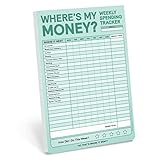
- Spend Smart & Save More –– Tired of wondering where all your hard-earned money is going? Take control of your personal finances with this account tracker. Encourage yourself to build better habits with a daily expense planner that helps you make a plan and stick to it
- Don't Miss a Detail –– Credit cards are like a hungry black hole. Understand your spending trends by using a finance journal with space to categorize every debit and credit comprehensively. Total your spending with ease with a money tracker notebook that has alternating colored rows
- Anywhere & Anytime –– Morning coffee? Check. Supermarket trip? Check. For real-time tracking, take this expense and budget organizer absolutely everywhere. The expense book has a sturdy cover that holds up in backpacks and briefcases, and a sash to instantly find your place while on the go
- Professional Appeal, Practical Design –– Pick up a polished business expense tracker notebook that features an elegant mint-colored cover with gold foil print. The lay-flat spiral coil allows for effortless opening to reveal a cleverly placed pocket to stash your receipts and bills
- Capture Every Expense –– Discover a finance tracker notebook that has 160 pages of thick 100gsm paper that prevents ink from bleeding through. Record your personal spending, or use it as a check register to track the spending of your small business
How to report a duplicate or disputed transaction
- Raise the issue in the UPI app or with your bank. NPCI says transaction-status checks and grievances can be made through participating banks’ UPI apps. BHIM also provides transaction history and reporting for declined transactions; see NPCI’s BHIM UPI app information.
- Use NPCI’s complaint portal when appropriate. NPCI’s Register a Complaint portal can route eligible matters to the relevant member bank or institution. It supports status follow-up using transaction details or a complaint reference.
- Contact your bank promptly for fraud or an unauthorised payment. NPCI directs these reports to the respective bank. Never share your UPI PIN: NPCI says bank customer support will never ask for it.
Product prices and availability are accurate as of the date/time indicated and are subject to change. Any price and availability information displayed on Amazon at the time of purchase will apply.
Do these 3 things before closing this tab:
1Fix the driver behind crashes, sound loss and screen glitches2Repair Windows errors before they cause bigger problems3Scan for outdated or missing drivers - takes under a minute
