
What’s actually slowing this PC down?
Pick the symptom - the matching free tool is one click away.
Use Playwright to set a browser context’s geolocation, grant that context permission to access it, and capture each page in a batch. Group URLs by location: geolocation applies to every page in a context, so use separate contexts when different location groups need to run at the same time. This controls the browser’s geolocation signal; a site may also use IP address, account settings, or stored state to decide what to show.
How the bulk workflow works
Prepare a list of URLs and named latitude/longitude pairs. For each location, create a browser context configured with those coordinates and the geolocation permission, then visit that location’s URLs and save an image for each one. Playwright documents that changing geolocation affects all pages in the context, which is why pages that need different locations should not share one active context (Playwright Emulation).
The example below uses Playwright’s JavaScript API with Chromium. It reuses one context for each location, processes that location’s URLs sequentially, saves full-page PNGs, and writes a JSON manifest. Install Playwright and its Chromium browser in your project before running it; the code uses Node.js ES modules.
Run a bulk capture with Playwright
1. Create the project and install Playwright
-
In a new project directory, run
npm init -y. -
Install Playwright with
npm install playwright. -
Install its Chromium browser with
npx playwright install chromium.The Tool Desk
Outbyte Driver Updater FREEFix the driver behind crashes, sound loss and screen glitchesFind Drivers →Outbyte PC Repair FREEClear out junk files and repair common Windows errorsFree Scan →Special offer. See more information about Outbyte and uninstall instructions. Please review EULA and Privacy policy.#1 Best Overall
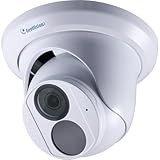 Geovision GV-EBD4704 4MP H.265 Super Low Lux WDR Pro IR Eyeball Dome IP Camera with 2.8mm Lens, Built-in Microphone
- [Overview]: GV-EBD4704 is an outdoor, network camera equipped with an automatic IR-cut filter and an IR LED for day and night surveillance. The camera adheres to IP67 standards. The camera supports H.265 video codec to achieve better compression ratio while maintaining high quality pictures at reduced network bandwidths.
- [Specs]: Sensor:1/3" progressive scan low lux CMOS sensor- Resolution: Up to 30 fps at 2688 x 1520, Lens: 2.8mm lens - Camera Angle Adjustment: Pan 0° ~ 360° Tilt 0° ~ 75°, Built-in microphone, IR distance up to 30 m (100 ft) - 1 IR LED, Day and Night function (with removable IR-cut filter).
- [Weatherproof]: This camera features heavy-duty metal weatherproof IP67 housing & IK10 Vandal Resistant.
- [Smart Security]: Wide Dynamic Range Pro (WDR Pro) - Defog - 3D noise reduction - Motion detection. The camera supported by smart motion detection technology, senses humans & vehicles, receive intelligent alerts via the Geovision app anytime motion is detected.
- [Easy Installation]: This PoE camera uses a single Ethernet cable to transmit both data and power. Simplified wiring means easier and clean installation.
-
Save the script below as
bulk-geoscreenshots.mjs, then runnode bulk-geoscreenshots.mjs.
2. Use this script
import { chromium } from 'playwright';
import { mkdir, writeFile } from 'node:fs/promises';
import path from 'node:path';

const locations = [
  {
    label: 'new-york',
    latitude: 40.7128,
    longitude: -74.006,
    urls: [
      'https://example.com/',
      'https://example.org/'
    ]
  },
  {
    label: 'london',
    latitude: 51.5072,
    longitude: -0.1276,
    urls: [
      'https://example.com/'
    ]
  }
];

const outputDir = path.resolve('screenshots');
const manifest = [];
const browser = await chromium.launch({ headless: true });

function safeName(value) {
  return value.replace(/[^a-zA-Z0-9_-]+/g, '-').replace(/^-+|-+$/g, '') || 'page';
}

try {
  await mkdir(outputDir, { recursive: true });

  for (const location of locations) {
    const context = await browser.newContext({
      geolocation: {
        latitude: location.latitude,
        longitude: location.longitude
      },
      permissions: ['geolocation'],
      viewport: { width: 1440, height: 900 }
    });

    try {
      for (let index = 0; index < location.urls.length; index += 1) {
        const url = location.urls[index];
        const page = await context.newPage();
        const startedAt = new Date().toISOString();
        const pageId = safeName(new URL(url).hostname + '-' + (index + 1));
        const file = path.join(outputDir, `${safeName(location.label)}-${pageId}.png`);

        try {
          const response = await page.goto(url, {
            waitUntil: 'domcontentloaded',
            timeout: 45000
          });

          // Replace this with a selector meaningful to the target site's
          // location-sensitive interface when one is available.
          await page.waitForTimeout(1500);
          await page.screenshot({ path: file, fullPage: true, type: 'png' });

          manifest.push({
            url,
            location: location.label,
            latitude: location.latitude,
            longitude: location.longitude,
            capturedAt: startedAt,
            status: response?.status() ?? null,
            screenshot: file
          });
          console.log(`Saved ${file} (HTTP ${response?.status() ?? 'no response'})`);
        } catch (error) {
          manifest.push({
            url,
            location: location.label,
            latitude: location.latitude,
            longitude: location.longitude,
            capturedAt: startedAt,
            error: error instanceof Error ? error.message : String(error)
          });
          console.error(`Failed ${url} at ${location.label}:`, error);
        } finally {
          await page.close();
        }
      }
    } finally {
      await context.close();
    }
  }
} finally {
  await browser.close();
  await writeFile(path.join(outputDir, 'manifest.json'), JSON.stringify(manifest, null, 2));
}
Replace the example URLs and coordinates with your target pages and locations. The location coordinates are decimal degrees. The screenshot API accepts a path and a fullPage option; full-page images include scrollable content and may be much taller than the viewport. To capture only what is visible, change fullPage: true to fullPage: false. See the Playwright Page API for screenshot options.
3. Wait for the right content before saving
domcontentloaded means the initial document has been parsed, not that a location-dependent component has finished updating. The example includes a short delay as a fallback, not a guarantee. Prefer waiting for a site-specific element that appears after its location result is rendered. For example, after navigation, use await page.getByText('Your local store').waitFor({ state: 'visible', timeout: 15000 }); only if that text is a reliable signal on the actual target site. If the content loads after a user action, automate that action before the screenshot.
Each manifest entry records the URL, coordinate label and values, capture start time, HTTP status when available, and output path (or an error). Keep this file with the images when you need to reproduce or audit a batch.
Windows Errors? Fix Them Before They Spread
Repair common Windows errors and clear accumulated junk for a smoother, more stable PC - no reinstall needed.Free scan · no reinstallOutdated Drivers Are Slowing You Down
One free scan finds every outdated or missing driver and matches the right update for your exact hardware.Free scan · exact hardware matchChoose contexts and screenshot dimensions
Pages sharing one location
Use one context for all pages that should see the same coordinates. This allows browser state such as cookies to be shared within that location group, while keeping the location configuration consistent. Close the context when the group is complete.
Pages using different locations
The script creates one context per location. That is the straightforward choice for concurrent work too: separate contexts keep the different geolocation settings from applying to the wrong pages. Playwright explicitly notes that geolocation can only be changed for all pages in a context (Emulation documentation).
Rank #2

- Sony STARVIS 2 Image Sensor: This sensor provides 2K QHD 1440P resolution at 60fps, delivering high-quality images with enhanced low-light performance and a wide dynamic range.
- Infrared LEDs for Night Vision: Equipped with four infrared LEDs that activate in low-light conditions, the camera ensures clear recording even in complete darkness.
- Rugged and Durable Design: With an IP68 rating for water and dust resistance and compliance with U.S. military drop-test standards, the DrivePro Body 40 is built to withstand harsh environments.
- Extended Battery Life: The built-in high-capacity lithium battery allows for up to 11 hours of continuous recording on a single charge, ensuring comprehensive coverage during long shifts. 【Note: Recording time may differ based on environmental conditions and operation settings (eg. enabling infrared during night recording consumes more power, resulting in a shorter recording duration).】
- Built-in GPS/GLONASS Receiver: This feature tags videos and photos with geolocation data, enabling precise tracking of routes and event locations.
You can also change the location between batches in one context, but do not capture pages expecting different locations concurrently in that context. Close or finish the first batch before changing its context geolocation and beginning the next.
Viewport or full page
A viewport screenshot is appropriate when the target is a visible component or a fixed-size page view. A full-page screenshot is useful for a page audit or archive, but long pages can create very large images and take more memory to encode and store. Playwright also documents screenshot modes and filename/format choices in its Screenshots & PDF command reference.
Do these 3 things before closing this tab:
1Fix the driver behind crashes, sound loss and screen glitches2Clear out junk files and repair common Windows errors3Scan for outdated or missing drivers - takes under a minuteMake captures comparable
-
Keep viewport dimensions, screenshot scale, browser, and wait condition consistent across location groups.
-
Use a stable location label and page identifier in filenames; avoid filenames based on raw URLs, which can contain characters awkward for filesystems.
-
Record the coordinates, timestamp, viewport, URL, and resulting file path in a manifest.
-
Choose full-page capture only when below-the-fold content matters. Use viewport capture for smaller files and direct side-by-side comparisons of the initial view.
Free tools Windows power users keep installed
One-click scans. No signup required.
Special offer. See more information about Outbyte and uninstall instructions. Please review EULA and Privacy policy.Rank #3
 Pelsee S1 Pro Native 4K + 4K Dash Cam Front and Rear, 128GB Card Included
- 【True 4K Front + 4K Rear Recording】Dual-channel native True 4K UHD simultaneous recording with HDR wide dynamic range processing. Equipped with 170°wide angle front & 150° rear lenses to eliminate road blind spots, delivering crisp 3840x2160P @30fps ultra-high-definition footage. 8MP HDR technology balances overexposed headlights, tunnel backlight and shadowed areas, capturing legible license plates & road markers under all ambient light without interpolated upscaling.
- 【Built-in GPS & Ultra-Fast WiFi 6】Integrated high-precision GPS module embeds real-time speed, geolocation and timestamp metadata onto recorded footage for official accident evidence. Dual-band WiFi 6 supports both 2.4GHz and 5.8GHz connections, delivering blazing-fast transfer speed up to 30MB/s. Access instant live preview, one-tap footage download, playback, share, convenient over-the-air firmware updates anytime.
- 【Full-Color Night Vision】Equipped with GalaxyCore high-sensitivity CMOS low-light image sensor, F1.5 large aperture lens and hybrid glass lens to deliver premium full-color starlight night vision. Advanced multi-frame noise reduction eliminates grainy distortion in dim underground parking garages and unlit roadways, preserving vivid colors and crisp clear details without washed-out monochrome footage at night.
- 【Smart AI Voice Control】Hands-free AI voice control supports full voice operation without tapping buttons. Available voice commands include switching front/rear camera view, turning the screen/audio on & off, capturing snapshots, and locking critical footage. You can effortlessly take photos to capture gorgeous roadside scenery during road trips, with clear audio feedback to confirm every voice command.
- 【24H Vehicle Protection System】All-in-one 24-hour parking surveillancefeatures time-lapse recording and G-sensor collision lock. Its built-in tri-axis gravity sensor detects bumps and hit-and-run impacts while your car is parked. The dash cam locks impact footage to a separate folder to avoid overwriting, and time-lapse mode records continuous condensed footage for full all-day vehicle safety. (Hardwire kit required:B0C7QY4KB9)
What browser geolocation does—and does not—control
Playwright emulates the browser’s geolocation and grants permission for pages in the configured context. It does not establish that every site will use that signal as its only location source. A site may instead or additionally use IP-derived location, an account profile, a selected store saved in browser storage, or its own permission and consent flow. If the page does not change as expected, verify the site’s own behavior rather than assuming the coordinates were ignored.
For repeatable comparisons, use a fresh context per location when stored cookies or local storage could affect results. If authentication is required, provide the same intended account state to each context using your normal secure setup; do not put credentials directly in a script committed to source control.
Troubleshooting
The page shows the wrong region
-
Check that the location’s latitude and longitude are not reversed and that the context is created with the intended values.
-
Confirm that
permissions: ['geolocation']is set for the context and that the page is using browser geolocation rather than another location signal.Recommended Free Tools
Special offer. See more information about Outbyte and uninstall instructions. Please review EULA and Privacy policy. -
Check whether the site uses IP location, account settings, a saved location, or a site-specific selector. Browser geolocation emulation does not override those independent inputs.
-
Use a fresh context to rule out prior cookies or local storage, then wait for a location-specific result before capturing.
Rank #4
 GeoVison GV-EBD8800 8MP WDR PoE IR Eyeball Network Outdoor Dome Camera with 2.8mm Lens RJ45 Connection
- [Overview]: This Bullet IP Camera is an outdoor, network camera equipped with an automatic IR-cut filter, one IR LED and two warm LEDs for day and night surveillance. The camera supports H.265 video codec to achieve better compression ratio while maintaining high quality pictures at reduced network bandwidths.
- [Specs]: Sensor: 1/2.7" progressive scan low lux CMOS sensor- Resolution: Up to 20 fps at 3840 x 2160, Lens: 2.8mm lens - Camera Angle Adjustment: Pan 0° ~ 360° Tilt 0° ~ 75°, IR distance up to 30 m (100 ft) - 1 IR LED, Day and Night function (with removable IR-cut filter), 3-axis mechanism (pan / tilt / rotate), built-in micro SD card slot (SD/SDHC/SDXC/UHS-I, Class 10) for local storage.
- [Weatherproof]: This camera features heavy-duty metal weatherproof IP67 housing & IK10 Vandal Resistant.
- [Smart Security]: Empowered by deep learning algorithms, AI technology distinguishes human and vehicles from other moving objects. Integrated with GeoVision Video Management Software (VMS), it supports AI perimeter protection, real time alert, events playback and more.
- [Easy Installation]: This PoE camera uses a single Ethernet cable to transmit both data and power. Simplified wiring means easier and clean installation.
The screenshot is blank, incomplete, or still loading
-
Replace the generic delay with a wait for the page’s actual location-dependent element or a stable loading indicator to disappear.
-
Check the page’s HTTP status and console or navigation errors. A screenshot can still be produced after an error response, so the manifest status is useful diagnostic context.
Special offer. See more information about Outbyte and uninstall instructions. Please review EULA and Privacy policy. -
If images or content appear only while scrolling, test full-page capture and confirm that the page’s lazy-loaded content has been triggered before taking the image.
Navigation times out or a site blocks automation
-
Increase the navigation timeout only if the target legitimately needs longer; a longer timeout makes the batch slower and does not repair a failed site response.
-
Try a different readiness condition when the site never reaches a network-idle state because it maintains background connections. The sample uses
domcontentloadedand then waits for content separately. -
Respect the target site’s access rules. Do not treat retries as a way to bypass a bot check or access restriction.
DriversCrashes, No Sound, or Screen Glitches?PerformanceWindows Errors? Fix Them Before They SpreadDriversOutdated Drivers Are Slowing You DownSpecial offer. See more information about Outbyte and uninstall instructions. Please review EULA and Privacy policy.Best Value
 Geovision GV-TBL8804 8MP H.265 Super Low Lux WDR Pro Full Color Warm LED IR Bullet IP Camera, AI deep Learning
- 1/2.7" progressive scan super low lux CMOS
- Day and Night function (with removable IR-cut filter)
- Built-in micro SD card slot (SD / SDHC / SDXC / UHS-I, Class 10) for local storage
- AI deep learning: AI Perimeter Protection & Classification (Human, Vehicle)
- IP67. Two-way audio. Alarm sound and warm LED light triggered on AI detection events
No image file appears
-
Confirm the process can write to the
screenshotsdirectory and that the URL is valid. -
Check the terminal output and
manifest.jsonfor the page-specific error. A navigation or screenshot exception is recorded per URL so later entries can still be attempted. -
Ensure Playwright’s Chromium installation completed for the environment in which the script is running.
Performance, reliability, and cost
This script processes pages sequentially within each location. That is slower than parallel capture but limits browser load and makes failures easier to trace. If you parallelize, use a bounded number of pages and keep separate contexts for separate locations; launching one page per URL without a concurrency limit can consume substantial memory, especially for full-page screenshots.
For recurring batches, use stable inputs and retain the manifest, but expect websites to change: geolocation APIs, page layouts, consent dialogs, and network conditions can all affect the result. The supplied Playwright documentation describes the API behavior; it does not promise a capture success rate or performance figure. Browser automation has no per-screenshot fee from Playwright itself, but your runtime, browser infrastructure, storage, and target-site access may have costs.
Or skip the browser setup
For a standard screenshot that does not need a geolocation-specific browser signal, ScreenshotNeo can return an image or PDF from one GET request. Its API’s documented facts here do not establish a geolocation override, so use the Playwright workflow above when the page must see emulated coordinates.
cURL example, with the target URL adapted to a page you want to capture:
curl -G "https://api.screenshotneo.com/v1/shot" -d access_key=YOUR_API_KEY --data-urlencode url=https://stripe.com -o shot.webpSee the ScreenshotNeo API documentation for request options. ScreenshotNeo removes cookie banners, popups, and chat widgets before the shot; bot checks, blank pages, and failed loads are not billed; its MCP server lets AI agents take screenshots; and the Free plan includes 1,000 screenshots a month with no card, while paid plans start at $5 for 3,000. Learn about ScreenshotNeo or sign up free.
Frequently Asked Questions
Can I use the same browser context for several pages at one location?
Yes. A context is suitable for a batch of pages sharing the same coordinates; pages in that context share its geolocation setting.
Does browser geolocation change a website’s IP-based location?
No. Browser geolocation emulation does not itself change the network IP address.
Quick Recap
Product prices and availability are accurate as of the date/time indicated and are subject to change. Any price and availability information displayed on Amazon at the time of purchase will apply.

