
Playwright usually appears to lose login cookies because each screenshot run creates a new, isolated browser context. A fresh browser.newContext() does not automatically reuse the cookies from an earlier context or save them to disk. Save the authenticated context’s storage state after login, then load that state when creating the next context. If authentication still fails, check that login has finished and whether the app relies on IndexedDB or session storage.
Why a new screenshot run starts logged out
A Playwright page belongs to a browser context, and cookies are scoped to that context. A new context is isolated from earlier contexts and is non-persistent by default; closing it does not preserve its browsing data for a later run. That is useful for clean, independent tests, but it means a later screenshot run needs authentication state supplied explicitly. See Playwright’s Browser API documentation.

So the key diagnostic question is not simply whether the browser has cookies, but whether the context used for this screenshot was initialized with the authenticated state. A saved state file is not automatically applied to every context.
Reuse a saved storage state in fresh contexts
For repeatable automation, Playwright’s documented approach is to save authentication state once and load it into each new context. The official guide covers the pattern in Playwright’s authentication documentation.
Crashes, No Sound, or Screen Glitches?
Random freezes, missing sound and display glitches usually trace back to one bad driver. Find and replace yours safely.Free scan · under a minuteWindows Errors? Fix Them Before They Spread
Repair common Windows errors and clear accumulated junk for a smoother, more stable PC - no reinstall needed.Free scan · no reinstall#1 Best Overall

- Secure & Scratch-Free Protection - Rubber cradle pads protect your mouse from scratches while holding it securely in place.
- Non-Slip Stability - Integrated rubber feet prevent the stand from sliding or shifting on your desk.
- Slim, Space-Saving Profile - Low-profile design keeps your workspace clean and clutter-free—perfect for compact desks and minimalist setups.
- Durable 3D-Printed Construction - Made from strong PLA plastic with rubber components for long-lasting everyday use.
- Multiple Color Options - Available in Black, White, Grey, Pink, Ice Blue, Blue, Matcha, Dandelion, Red, Purple, Coffee, and Orange to match any setup or gaming aesthetic.
1. Save state only after login completes
In a setup script, log in, wait for a reliable signal that authentication succeeded, and then write the context’s storage state. For a redirect-based flow, wait for the final URL; alternatively, wait for an element that appears only for signed-in users.
import { chromium } from '@playwright/test';

const browser = await chromium.launch();
const page = await browser.newPage();

await page.goto('https://example.com/login');
await page.getByLabel('Email').fill(process.env.TEST_EMAIL!);
await page.getByLabel('Password').fill(process.env.TEST_PASSWORD!);
await page.getByRole('button', { name: 'Sign in' }).click();

// Replace this with the URL or signed-in UI signal your app guarantees.
await page.waitForURL('**/dashboard');
await page.context().storageState({ path: 'playwright/.auth/user.json' });

await browser.close();
Replace the example URL, selectors, and credentials with your application’s login flow. Do not snapshot immediately after clicking Sign in: a redirect, token exchange, or client-side update may still be in progress. The saved state should represent a completed authenticated session.
Rank #2

- SECURE & STABLE HOLD – Non-slip rubber feet and an integrated protective rubber strip keep your mouse firmly in place while preventing scratches and unwanted movement.
- UNIVERSAL COMPATIBILITY – Designed to fit most popular gaming and computer mice, making it ideal for daily use, quick device swaps, or clean desk organization.
- DURABLE 3D-PRINTED BUILD – Crafted from high-quality PLA plastic for a strong, lightweight, and long-lasting stand that holds up to everyday use.
- PERFECT FOR GAMERS & COLLECTORS – Display your favorite mouse, showcase your collection, or keep multiple mice easily accessible without desk clutter.
- DESIGNED BY DESK COOKIES – Purpose-built for clean setups and functional displays. Great for gaming desks, streaming setups, and office workstations.
2. Load that file into the screenshot context
Pass the same path when creating the context used for the screenshot. For example, with the Playwright test runner:
import { test } from '@playwright/test';

test.use({ storageState: 'playwright/.auth/user.json' });

test('capture a signed-in page', async ({ page }) => {
  await page.goto('https://example.com/dashboard');
  await page.screenshot({ path: 'dashboard.png', fullPage: true });
});
If your screenshot script creates contexts directly rather than using the test runner, apply the state there instead:
Quick wins for a faster PC:
Clear out junk files and repair common Windows errorsFree Scan →Scan for outdated or missing drivers - takes under a minuteDriver Scan →Rank #3

- SECURE & STABLE HOLD – Non-slip rubber feet and an integrated protective rubber strip keep your mouse firmly in place while preventing scratches and unwanted movement.
- UNIVERSAL COMPATIBILITY – Designed to fit most popular gaming and computer mice, making it ideal for daily use, quick device swaps, or clean desk organization.
- DURABLE 3D-PRINTED BUILD – Crafted from high-quality PLA plastic for a strong, lightweight, and long-lasting stand that holds up to everyday use.
- PERFECT FOR GAMERS & COLLECTORS – Display your favorite mouse, showcase your collection, or keep multiple mice easily accessible without desk clutter.
- DESIGNED BY DESK COOKIES – Purpose-built for clean setups and functional displays. Great for gaming desks, streaming setups, and office workstations.
const context = await browser.newContext({
  storageState: 'playwright/.auth/user.json',
});
const page = await context.newPage();

await page.goto('https://example.com/dashboard');
await page.screenshot({ path: 'dashboard.png', fullPage: true });
The setup and screenshot processes must point to the same state file. A relative path is resolved from the process’s working directory, which may differ between local runs, CI jobs, or separate scripts. Use a deliberate path and verify that the file exists where the screenshot process expects it. The authentication guide also describes loading state through test configuration.
Check whether the app stores authentication outside cookies
“Login cookies” is often shorthand for all browser-side authentication data. A saved cookie may not be enough if the application also stores tokens in another browser storage mechanism.
Rank #4
IndexedDB
Some applications keep authentication tokens in IndexedDB. Playwright’s current BrowserContext API documents an option to include IndexedDB when creating a storage-state snapshot; enable it when the installed Playwright version supports it and the application needs it. See the storageState API reference.
Session storage
Playwright does not include session storage in ordinary storage-state persistence. Its authentication guide documents a manual approach: capture the relevant session-storage values and restore them with an initialization script before the application code runs. Consult the session-storage section of the guide and adapt the example to the application’s origin and keys.
Best Value
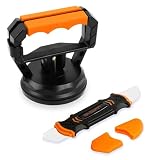
- Stronger Suction: Designed for screen opening during phone repair, it provides up to 10kg of suction power, double that of a regular type. It is easy to disassemble your phone when replacing the screen, cleaning, changing the battery, or upgrading components. Additionally, it is also suitable for iPad tablets and other electronic devices.
- No Slipping: The suction cup is made of denser high-quality rubber instead of ordinary, and five times that of a regular one. This maintains good airtightness, reducing the risk of slippage that could damage your phone during disassemble.
- Beginner Friendly: Use with Illustrated Instructions. Just attach to the screen and press down slightly then close the handle. This eliminates the cumbersome process of repeatedly pressing to expel air when using a regular cell phone screen opener.
- Spudger: The spudger features two differently shaped and flexible metal tips that can reach into any crevice of electronic devices to assist with disassembly without scratching them. Suitable for various mobile phones, including iPhone, Samsung, Motorola, TCL, and more.
- Compact Size: The suction cup set is easy to store and takes up as much space as a lemon. Whether you keep it at home or carry it out, it won't be a burden. Please enjoy the joy of simple repair!
This distinction matters: repeatedly saving and reloading a storage-state file will not fix a missing session-storage token unless the script separately restores it.
Independent reader supportYour contribution helps us test, update, and keep practical guides available for everyone.Choose between saved state and a persistent browser profile
| Approach | Best suited to | What to account for |
|---|---|---|
| Fresh context initialized from a saved storage-state file | Repeatable test and screenshot runs that should start from known authentication state. | Save after login, load the intended file every time, and include the storage types the application requires. Each run still gets an isolated context. |
| Persistent context with a user data directory | Workflows that need browser-profile data to persist between launches. | The profile directory becomes the persistence boundary. Do not try to launch simultaneous browser instances against the same user data directory. |
Playwright documents persistent contexts as a separate BrowserType option. See launchPersistentContext. For most repeatable test runs, the authentication guide’s saved-state pattern is the more explicit way to give a fresh context a known starting point; use a persistent profile when retaining a browser profile is genuinely part of the workflow.
Troubleshoot a screenshot that is still logged out
- Confirm the context creation path. Log or inspect which code creates the screenshot context. Check that it receives the intended
storageStateoption rather than silently creating a default, empty context. - Verify the state file path. Confirm the screenshot process can read the same file written by the login setup. Check the working directory, filename, and project configuration, especially in CI or when scripts run from different directories.
- Wait for authentication to finish before saving. Wait for the final redirect or a stable signed-in UI signal, then save state. If the snapshot is taken during login, it may capture an unauthenticated or incomplete session.
- Check the expected origin and cookie names locally. Inspect the state file without printing cookie values to logs or sharing it as an artifact. Authentication state can include cookies and headers that allow someone to impersonate an account.
- Identify the storage mechanism the app actually uses. If the required token is in IndexedDB, enable IndexedDB capture where supported by your installed Playwright version. If it is in session storage, add the documented manual save-and-restore approach.
- Use a persistent profile only when needed. If the workflow depends on profile persistence, use
launchPersistentContext(userDataDir)and avoid simultaneous browser launches against that same directory.
Or skip the browser setup
If the goal is simply to capture a page rather than automate a signed-in session, ScreenshotNeo provides a screenshot API. It accepts a URL in one GET request and returns an image or PDF. See the ScreenshotNeo documentation for request options.
curl -G "https://api.screenshotneo.com/v1/shot" -d access_key=YOUR_API_KEY --data-urlencode url=https://example.com -o shot.webpScreenshotNeo removes cookie/consent banners, newsletter popups, and chat widgets before capture. Bot checks, blank pages, failed loads, timeouts, and cache hits are not billed. Its MCP server provides screenshot tools for AI agents, and the Free plan includes 1,000 screenshots per month with no card; paid plans start at $5 for 3,000. This is an alternative for URL-based captures, not a replacement for Playwright when you need to interact with an authenticated browser session or run browser automation.
What’s actually slowing this PC down?
Pick the symptom - the matching free tool is one click away.
Sign up for ScreenshotNeo’s free plan: 1,000 screenshots a month, no card required.
Quick Recap
Product prices and availability are accurate as of the date/time indicated and are subject to change. Any price and availability information displayed on Amazon at the time of purchase will apply.

