
Free tools Windows power users keep installed
One-click scans. No signup required.
Choose OBS Studio’s VLC Video source if you want to arrange and loop prerecorded files in a graphical interface. Choose FFmpeg’s concat demuxer if you need a text-based, scriptable sequence and your files have compatible streams and timing. Neither playlist is the YouTube stream by itself: you still need to connect an encoder to a YouTube Live stream using its server URL and stream key.
Which playlist method should you use?
| What matters | FFmpeg concat demuxer | OBS VLC Video |
|---|---|---|
| Playlist setup | A text script listing files and directives; suited to command-line workflows and repeatable automation. FFmpeg concat demuxer documentation | A playlist configured in OBS’s graphical interface. OBS Media Sources guide |
| Looping | The demuxer sequences files, but the cited documentation does not establish a universal command for looping the list directly to YouTube. | VLC Video has a Loop Playlist property, on by default; it also offers shuffle controls. |
| Important dependency or constraint | Inputs must have the same streams, including codecs and time base. File durations affect timestamps and can cause gaps or artifacts if inaccurate. | VLC must be installed for the VLC Video source to appear in OBS. Playback compatibility depends on the media and system. |
| Good fit | Operators comfortable validating media and maintaining a command-line workflow. | Operators who prefer a visible, GUI-based playlist setup. |
| YouTube connection | Both workflows need an encoder connection configured with YouTube’s Live server URL and stream key. YouTube encoder setup | |
This is a choice between control surfaces, not a guarantee of identical playback or uninterrupted transmission. If you need a YouTube stream to continue unattended without keeping a computer on, see StreamNeo, a cloud service that loops uploaded videos to YouTube Live.
How to make an FFmpeg concat playlist
Prepare compatible files
Use files with matching stream layouts, including codecs and time base, as required by the concat demuxer. The demuxer adjusts timestamps as it moves from one file to the next. Since the next file’s start depends on the preceding file’s duration, inaccurate duration metadata can introduce gaps or artifacts. The script can include a duration directive to override a stored duration.
The concat demuxer joins packet sequences; it does not automatically convert incompatible files. FFmpeg distinguishes it from the concat filter, which is appropriate when re-encoding is needed. If your media is incompatible, determine a suitable conversion workflow rather than assuming the demuxer will repair it. FFmpeg FAQ on concatenation
Do these 3 things before closing this tab:
1Repair Windows errors before they cause bigger problems2Fix the driver behind crashes, sound loss and screen glitches3Clear out junk files and repair common Windows errors#1 Best Overall

- 15 Customizable LCD Keys: instantly control your apps, tools and platforms.
- One-Touch Operation: trigger single or multiple actions, launch social posts, adjust audio, mute mic, turn on lights, and much more.
- Visual Feedback: know that your command has been executed.
- Powerful Plugins: Elgato 4KCU, OBS, Twitch, YouTube, Twitter, Discord, Spotify, Philips Hue, and many more.
- Hotkey Actions: streamline your film editing, music production, photography workflow, etc.
Write the playlist script
Create a text file with one directive per line. For automatic format recognition, the first line must be exactly ffconcat version 1.0, with no leading or trailing spaces and no byte-order mark. A minimal example is:
ffconcat version 1.0
file 'first.mp4'
file 'second.mp4'
Use paths that resolve from the working directory where the script is read, or provide suitable paths. Quote or escape spaces and special characters in file paths according to FFmpeg’s concat-script syntax. The script uses extended-ASCII text. An optional inpoint directive seeks within an input, but FFmpeg cautions that it works best with intra-frame codecs; with non-intra codecs, packets or decoded frames from before the requested point may appear.
Rank #2

- Tactile Control, Visual Feedback: LCD keys, touch strip, and dials for audio, video, lighting, and more. Know that your command has been executed.
- Fully Customizable: Use as an audio mixer, studio controller, production console, etc.
- Multi Actions, Smart Profiles: trigger multiple actions at once or sequentially, automatically switch between interface configurations for different apps.
- Powerful Plugins: Elgato Wave Link, Camera Hub, Control Center, OBS, Twitch, YouTube, Twitter, Discord, Spotify, Philips Hue, and many more
- Stream Deck App and Store: drag and drop setup, download plugins, icons, thousands of royalty-free tracks, SFX, and more. Regular updates and new plugins frequently added.
Validate the sequence before connecting it
- Check that each file exists at the path named in the script and that the playlist order is correct.
- Check stream compatibility and duration metadata; a list that parses successfully can still have timing problems.
- Test the sequence with the FFmpeg build and files you intend to use, then inspect transitions and listen for audio discontinuities.
- Decide whether the workflow must repeat the playlist. The concat demuxer documentation describes sequencing, not a universal indefinitely looping YouTube RTMP command. Treat the exact command, options, and stream-copy versus re-encode choice as file- and installation-dependent; test privately or unlisted before production.
How to set up an OBS VLC playlist
Install the VLC dependency
OBS’s VLC Video source relies on VLC libraries, so install VLC if the source is missing. OBS lists Windows, macOS, and Linux as supported platforms for these media source types. OBS Media Sources guide
Add and configure the playlist
- In OBS, add a VLC Video source to the scene that will feed YouTube. This source supports a playlist rather than only one media file.
- Add the files in the order you want them to play. OBS’s VLC source supports ordered or shuffled playback.
- Confirm Loop Playlist is enabled if the sequence should repeat; the documented default is On. Leave Shuffle Playlist off for a fixed order; its documented default is Off.
- Review the source’s visibility behavior. The source can be configured to pause, stop, or continue according to whether it is visible, so choose the behavior that matches your scene use.
- Preview the scene and check the entire playlist cycle you plan to use, including audio and transitions. The documented playlist and loop controls do not promise seamless transitions for every media combination.
OBS’s built-in Media Source is a different option for an individual file and has its own Loop toggle. For a multi-file playlist, use VLC Video rather than treating Media Source as the same playlist control.
The Tool Desk
Outbyte PC Repair FREERepair Windows errors before they cause bigger problemsFix Now →Outbyte Driver Updater FREEFix the driver behind crashes, sound loss and screen glitchesFind Drivers →Rank #3

- [Customizable LCD Macro Keys] Ampligame D6 stream controller features a total of 15 customizable macro keys , allowing you to create and assign different operations according to your live stream needs. Launch the software or application through a simple finger press, and switch your OBS scenes, control your audio levels, which is very easy and convenient to use.
- [Wide Application Compatibility] This OBS stream controller for PC has a wide range of software, applications and plugins options whether in the store or download from the computer. They work with OBS Studio, Streamlabs, Twitch, YouTube and more in the Fifine D6 stream controller. This contoller for content creators lets you customize your setup effortlessly. You can also drag-and-drop, set up and download from the console's store, with a very large number of plugins and icons to fill your streaming.
- [Visual Operation Keypad] After setting and customizing your keys, you can see the application on the touchscreen of stream controller and press to control directly. No need to open plenty of windows/app interfaces on the PC screen one by one, the Fifine D6 macro keypad streamlines your workflow and improves the work efficiency. Let you know your demands having been satisfied with a visual feedback. (Tip: Please ensure both firmware and software are updated to the latest versions prior to initial use.)
- [Vivid RGB Lighting] Brighten your gaming setup with customizable RGB effects on stream controller for gaming. There is a glowing RGB ring around the twitch stream controller, with a total of 9 different controllable and changeable modes. Matching the shortcut button’s look and gaming aura according to your personal preferences, dynamic RGB on video stream controller will give your viewers a more vivid game impression.
- [Applied in Multi-Tasking Scenes] Whether you intend to use the PC media controller in gaming, live streaming, photography/graphics design, video editing, music creation or office work, this versatile streaming equipmentmakes multi-tasking easier. You can also create folders to generate different programs, and the individual scenes can be processed independently.
Connect the encoder to YouTube Live
- In YouTube Studio, open the Live Control Room and create a stream or schedule one. Set the audience and visibility appropriate to the channel.
- Copy the YouTube Live server URL and stream key into the encoder workflow. The key is sensitive: it tells the encoder where to send the feed and allows YouTube to accept it. Do not publish it; reset it if it is exposed. YouTube encoder setup
- Start the encoder. For a scheduled event, wait for the preview in Live Control Room and select Go live when ready.
- Check that the preview appears, then confirm the live event can be reached from the channel and watch pages. Monitor video and audio after launch.
YouTube says live streaming requires a verified channel with no live-stream restrictions in the preceding 90 days; first-time activation can take up to 24 hours. Eligibility and interface details can vary by account and may change, so confirm them in the current channel account. YouTube offers public, private, and unlisted visibility; scheduled streams can be promoted and viewers may receive reminders. YouTube live-streaming requirements
Launch checklist and continuity limits
- Confirm the intended playlist order and loop behavior.
- Listen for audio continuity and check video in the encoder preview.
- Confirm the event is reachable from its watch page after launch.
- Monitor the stream and be prepared to respond if the encoder or YouTube connection stops.
- If recording locally, verify the local archive file separately.
A playlist does not itself guarantee uninterrupted transmission, automatic reconnection, continuous archiving, or 24/7 availability. For these DIY workflows, monitoring and recovery remain operational responsibilities. YouTube says streams under 12 hours are automatically archived; do not assume an indefinitely running stream will be saved as one complete video. YouTube live-streaming tips
Rank #4

- Full Customizable 10 LCD Keys, 4 RGB Knobs & Interactive Touch Bar: Tailored for content creation and gaming, the VSD N4 Pro stream controller supports fully configurable hotkeys and multi-scene modes. You can set single commands or multi-step chained operations, plus custom PNG/JPG/GIF icons for quick identification. It stores unlimited independent scene presets for streaming, editing, gaming and office use to skip repeated setup
- One-Tap Multi-Step Macro Activation, Zero Coding Needed: Simplify tedious computer workflows with the VSD N4 Pro macro pad. It converts complex repeated operations into one-tap triggers for editing shortcuts, app launches, webpage access and text presets. No coding or technical knowledge required; gamers and creators can set custom macros effortlessly
- USB Sound Deck & 500+ Expandable Downloadable Plugin Ecosystem: The VSD N4 Pro works as a professional USB soundboard for streamers. Trigger sound effects, switch background audio and adjust audio atmosphere with one tap. Note: It only sends audio control commands to your computer to trigger play, pause and other audio operations, without built-in speakers for sound output. Unlock full features via 500+ official plugins on VSDinside; preloaded widgets improve daily efficiency
- Dynamic RGB Visuals & Built-In USB Dock: Upgrade your desktop look and device connectivity with VSD N4 Pro. It features fully adjustable audio-synced RGB lighting, compatible with GIF, MP4 and MOV media files. Carbon-fiber panels and switchable haptic keys let you customize typing feedback. The built-in passive USB dock adds extra ports for mice, keyboards and storage drives
- Adjustable Ergonomic Stand & Cross-Platform System Compatibility: Designed for long streaming, editing and gaming sessions, VSD N4 Pro comes with a foldable 60-degree ergonomic stand for comfortable viewing and easy storage. USB-C plug-and-play design works seamlessly with Windows 10+ and macOS 11.0+. Automate batch tasks for live production, video editing, gaming shortcuts and daily office work
Troubleshooting common problems
OBS does not show VLC Video
VLC may not be installed or available to OBS. Install VLC, then reopen OBS and check the source list again. If the source still does not appear, confirm the installation is compatible with your OBS setup.
FFmpeg reports concat errors or playback has gaps
Check the exact first-line header, remove any byte-order mark or extra spaces before it, and verify file paths and quoting. Then compare the input streams, codecs, time base, and duration metadata. A duration mismatch can shift later timestamps; use the concat script’s duration directive where an override is appropriate. Incompatible stream layouts may require a separate conversion workflow.
Best Value
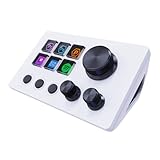
- 【Freely customizable】You can assign single or multiple actions by dragging and dropping the desired operation onto the six customizable keys and setting the properties. The uses are endless, such as performing game combos, launching apps, controlling media, etc.In addition, you can add images and animations (JPG, PNG, GIF) to each LCD key to enhance button recognition and memorization. With three dials, you can easily adjust the volume, fast forward and rewind playback, etc.
- 【Perform any operation with one click】The customizable macro keyboard allows you to work efficiently with one click. You can instantly perform any operation, such as launching macros, entering text, opening files and websites, controlling media, and switching OBS scenes, with one click. In addition, by utilizing the "Action Flow" function, you can perform multiple macro actions in a specific order and manage tasks freely.
- 【Various Compatibility]】This shortcut keyboard is compatible with both Windows and macOS. It works seamlessly with popular software such as OBS, PowerPoint, YouTube, Twitter, Discord, Excel, Word, Photoshop, and Adobe Premiere Pro to make your work even smoother.
- 【Multifunctional to meet your needs]】This shortcut keyboard's application space offers hundreds of plugins such as schedule reminders, clocks, stopwatches, weather, calendars, etc., making it not only a productivity tool but also a great desktop companion. In addition, 60 types of icon packs are available for you to download and use according to your needs.
- 【Customer Support】 If you are still unsure of how to set up or operate the product after reading the Quick Start Guide that comes with the product, you can get support in the following ways: 1. Please scroll down the product detail page to watch the tutorial videos in the product videos section. 2. Please select the "Ask a Question" button to contact us.
YouTube does not show a preview
Verify that the encoder is using the correct server URL and stream key for the selected YouTube stream, and that the encoder has actually started. Check channel eligibility and whether first-time live activation is still pending. Keep the stream key private and reset it if it may have been exposed.
The stream starts but later drops
A playlist loop is not a reconnection guarantee. Check encoder and network status, restore the feed if needed, and monitor the Live Control Room and watch page. For a long-running channel, choose a workflow with recovery suited to your operational requirements rather than assuming either playlist setting ensures continuity.
Or let it run in the cloud
StreamNeo is a cloud service for looping uploaded videos to YouTube Live. Upload a recording or build a playlist, add your YouTube stream key once, and go live. Your computer can be off; StreamNeo keeps the stream running from the cloud and automatically recovers if YouTube drops it.
Quick Recap
- Any quality up to 4K 60fps, streamed as uploaded, at one flat price per slot with no re-encode or quality tiers.
- The first day is free with no card required.
- Monthly: $9.99 per month.
Product prices and availability are accurate as of the date/time indicated and are subject to change. Any price and availability information displayed on Amazon at the time of purchase will apply.
Quick wins for a faster PC:
Clear out junk files and repair common Windows errorsFree Scan →Scan for outdated or missing drivers - takes under a minuteDriver Scan →
