
What’s actually slowing this PC down?
Pick the symptom - the matching free tool is one click away.
For a straightforward computer-based YouTube stream, the Shure MV7 is the most practical source-supported pick: it connects by USB, is designed for close-talk vocals, and also has a passive XLR output if you later want an interface-based setup. That makes it a flexible fit—not a claim that it sounds better than every alternative. If you already have an audio interface and want an XLR-only workflow, consider the Shure SM7B.
What is the best microphone for YouTube live streaming?
The best fit depends on what you need to connect and how much setup you want. The MV7 is a USB dynamic microphone with an additional XLR output, so you can connect it directly to a computer now and retain an XLR option. The SM7B is a dedicated XLR microphone; for a computer livestream, Shure’s livestream guidance says to connect it through a USB audio interface.
These are recommendations based on product type, connections, and manufacturer guidance—not a controlled listening comparison. The available information does not establish a universal sound-quality winner or a price ranking.
| Option | Connection to a computer | Best fit | Setup considerations |
|---|---|---|---|
| Shure MV7 | USB directly, or XLR through an interface | A simple USB setup with an optional path to XLR | USB cable and XLR cable inclusion should be checked for the specific purchase; Shure says the XLR cable is not included. Some stands may need a mount adapter. |
| Shure SM7B | XLR through a USB audio interface | A setup already built around an interface and XLR equipment | Allow for the interface, its connection to the computer, and the additional setup involved. |
Should I get a USB or XLR mic for streaming?
Choose USB for a simpler computer setup
A USB microphone can connect directly to the computer, avoiding a separate audio interface. Shure says the MV7 works with Windows and Mac computers without a driver. Check current operating-system and device compatibility before buying, particularly if you plan to use a phone rather than a computer.
Quick wins for a faster PC:
Clear out junk files and repair common Windows errorsFree Scan →Fix the driver behind crashes, sound loss and screen glitchesFind Drivers →#1 Best Overall

- [Natural Audio Clarity] Operated with frequency response of 50Hz-16KHz, the podcasting XLR mic delivers balanced audio range, likely to resonate with your audience. Directional cardioid dynamic microphone corded will not exaggerate your voice, while rejects unwanted off-axis noise for vocal originality and intelligibility during your PS5 gaming streaming video recording. (Tips: Keep the top of end-addressing XLR dynamic microphone AM8 facing audio source, and suggested recording range is 2 to 6 in.)
- [XLR Connection Upgrade-Ability] To use XLR connection, connect the podcast microphone to an audio interface (or mixer) using a separate XLR cable (NOT Included) . Well-connected and smooth operation improves audio flexibility to make you explore various types of music recording singing. The streaming mic isolates the pristine and accurate sound from ambient noise with greater no interference and fidelity. (RGB and function key on mic are INACTIVE when using XLR connection.)
- [USB Connection with Handy Mute] Skip the hassle of setting something up and plug the cable to play the dynamic USB microphone directly, which suits for beginner creators or daily podcast. You can quickly control the gamer mic with tap-to-mute that is independent of computer/Macbook programs to keep privacy when live streaming. LED mute reminder helps you get rid of forgetting to cancel the mute. (RGB and function key are only available for USB connection, but NOT for XLR connection)
- [Soothing Controllable RGB] RGB ring on the desktop gaming microphone for PC, with 3 modes and more than 10 light colors collection, matches your PC gears accessories for gaming synergy even in dim room. You can control the RGB key button of the dynamic microphone USB directly for game color scheme gaming or live streaming. Configured memory function, the streaming microphone RGB no need to repeated selections after turnning off and brings itself alive when power on. (Only available for USB connection)
- [More Function Keys] Computer microphone with headphones jack upgrades your rhythm game experience and gets feedback whether the real-time voice your audience hear as expected. Get the desired level via monitoring volume control when gaming recording. Smooth mic gain knob on the PC microphone gaming has some resistance to the point, easily for audio attenuation or boost presence to less post-production audio. (Only available for USB connection)
Choose XLR if your setup includes an interface
An XLR microphone needs an audio interface to connect to a computer. That adds hardware and another connection to configure, but it may suit a workflow that already uses an interface. Shure describes the SM7B as a cardioid dynamic vocal microphone for professional speech and recording uses; its livestream guidance specifies the interface requirement for computer streaming.
Consider a hybrid if you want both routes
The MV7 has both USB and passive XLR outputs. You can use its USB connection for a direct computer setup or use XLR with an interface. The two connection paths do not mean you should assume a cable or interface is included: verify the package contents and your existing equipment.
Rank #2

- USB/XLR Connectivity-AM8T comes with a dynamic microphone and a boom arm stand. Versatile PC gaming microphone kit with USB compatibility plug and play for PC in streaming or recording, without additional drivers. And also, while in XLR compatibility for mixer or sound card connection, the XLR studio vocal microphone is good at vocal, podcast, or musical instruments creation.
- Vibrant RGB Light-The streaming microphone RGB illuminates your gaming setup with customizable RGB lighting for a visually stunning game experience. You can easily control the RGB mode/colors or turn off by simply tapping the RGB button without making any complicated settings on specific software.
- Enhanced Features-Featured -50dB sensitivity and cardioid polar pattern, the USB recording mic kit not easily pick up background noise for delivering clear audio. The PC gaming microphone USB kit includes a boom arm for easy positioning, mute button and gain knob for precise control, headphones jack for real-time monitoring, and headphone volume control while streaming or recording.
- Decent for Gamers and Streamers-The XLR microphone designed specifically to meet the needs of gaming enthusiasts and streamers. Ideal for various applications, including gaming, streaming, podcasting, voiceovers, and more, which also works with popular streaming software like OBS and Streamlabs.
- Recording Microphone Kit-The dynamic microphone is more convenient for working from home or going out for podcasts, and the complete accessories allow for faster recording work due to its simple straightforward assembly. External windscreen of the XLR dynamic microphone filter out plosive voice.
How should you position a streaming microphone?
- Face the microphone toward your voice. Cardioid pickup favors sound from the front and reduces pickup from other directions. Shure’s guidance explains that cardioid or super-cardioid patterns pick up sound from the front and reject sound from other directions, reducing feedback.
- Place it close enough for a comfortable speaking position. The MV7 is intended for close-mic use. A closer directional microphone can make the voice more prominent relative to other sound, but moving it closer can also increase bass through the proximity effect.
- Listen and adjust distance. There is no single ideal distance established for every voice, room, or microphone. Monitor your voice and move the mic until the sound and speaking position feel natural.
- Use headphones if you want to monitor the signal. The MV7 has headphone monitoring. Monitoring can help you hear the captured audio while setting up; it does not replace checking the stream’s audio path.
Directional pickup and close placement can help reduce unwanted pickup, but they are not a substitute for room treatment and do not guarantee that room noise will disappear.
What should you check before buying?
- Connection: Confirm whether you need USB direct to computer or XLR plus an audio interface.
- Device and cable compatibility: Check the microphone’s current compatibility information for your computer or phone, and confirm which cables are included. Shure says compatible mobile use of the MV7 depends on applicable cables, which are not provided.
- Interface inputs: For an XLR setup, make sure the interface has the appropriate input and can connect to your computer.
- Mounting: The MV7 has a 5/8-inch-27 threaded mount. Some stands may require an adapter; check the stand’s thread and whether you need one.
- Room and speaking position: A directional mic still depends on aiming and placement. Do not buy on the assumption that a microphone alone will eliminate background noise.
Common setup problems and what to check
The computer does not receive audio from an XLR microphone
An XLR microphone cannot connect directly to a computer as an XLR plug. Connect it to a USB audio interface, then connect the interface to the computer and select the interface as the input device.
Rank #3

- USB/XLR Connectivity: The A04 Gen2 is a super versatile condenser microphone for capturing rich. Thanks to its dual XLR & USB connections, it's just at home in the studio as it is plugged straight into audio interface or mixer. And connected to PC or phone for plug-and-play recording. If you want to connect Windows, iOS, PAD, phone by XLR mode, please make sure you have phantom power ready (Note: Not compatible with XBOX)
- Studio-quality Sound: This condenser microphone has been designed with professional sound chipset, which let the USB mic hold high resolution 192kHz/24bit sampling rate. Smooth, flat frequency response of 30Hz-16kHz. Extended frequency response is excellent for podcasting, content creation and voiceover, Performed perfectly in reproduces sound, high quality mic ensure your exquisite sound reproduces on the internet
- Advanced Software Control: MAONO Link software takes your audio customization to the next level, allowing you to adjust various parameters and optimize your sound effortlessly setting the perfect vocal tone. You can adjust the microphone gain, turn on/off the noise reduction switch and select different noise reduction strengths through the software, also supports a variety of scene EQ presets, compressor and limiter, bringing an immersive experience(Only in USB Mode)
- Double Noise Reduction: microphone has cardioid polar pattern, eliminating unwanted off-axis noise. Comes with pop filter and windscreen foam that doesn't block the sound recording and also reduces noise. MAONO LINK software noise reduction can freely adjust the noise reduction level to adapt various usage environments to minimize the impact of ambient noise, whether you're a streaming, music production(Only in USB Mode)
- 16mm Mic Capsule: With the 16mm electret condenser transducer, can effectively pick up the sound coming from the front. Cardioid mic can give you a strong bass response, Picks up crystal clear audio,captures distortion-free loud sources for acoustic reproduction. A04 Gen2 is a new go-to studio condenser microphone with warm, silky character, ideal in a wide range of home recording applications (Best Rang: 2"-6")
The mic stand does not fit
Check the mount thread before assembling the setup. The MV7 uses a 5/8-inch-27 threaded mount; some stands may need an adapter. Confirm the stand and adapter requirements rather than assuming a particular stand is compatible.
The voice sounds too bass-heavy up close
Directional microphones can gain bass through proximity effect as they move closer to the speaker. Move the microphone slightly farther away and listen again, adjusting until the voice sounds natural.
Rank #4

- [Authentic Sound Integrity] Experience natural sound reproduction with the podcast microphone with boom arm to preserve the audio sound without distortion. The XLR dynamic microphone boasts a SPL of 130dB, delivering original and consistent recordings. Cardioid pattern reduces ambient noise, ensuring your voice takes center stage, free from distracting background sounds. (For better input volume, record within 2'' to 6'' from the dynamic microphone. )
- [Flexible Connectivity Options] Equipped with both USB and XLR connections, recording studio microphone kit offers versatility to suit your streaming/gaming needs. Seamlessly transition between plug-and-play USB convenience or enhanced XLR connectivity, providing flexibility and studio-grade sound reproduction.
- [Robust Boom Arm Support] Crafted from durable metal, the boom arm microphone stand ensure secure placement of the XLR/USB dynamic microphone. Whether you're podcasting or streaming, the sturdy suspension recording microphone kit lessen collisions and vibrations for uninterrupted and smooth audio quality.
- [Intuitive Controls] Manage your podcast session with intuitive controls. The USB microphone features a tap-to-mute button for instant muting without software adjustments. Fine-tune audio levels with the gain knob, while the headphone monitoring jack and volume knob keep you informed and in control, optimizing recording effectiveness. (All the function keys on the mic are invalid when XLR connection. You can operate on mixer or audio interface to control the XLR mic.)
- [Enhanced Noise Suppression] The included windscreen and shock mount set on the PC microphone for music recording effectively do away with harsh noises caused by explosive sounds and low-frequency vibrations. The heavy-duty boom arm maintains distance from your desktop, preventing noise interference, resulting in smoother, clearer vocals during voice-over and streams. (For optimal input volume, adjust input volume via the mic's gain knob in USB connection, or control on your audio interface when XLR connection.)
Room noise is still audible
Cardioid pickup favors the front rather than rejecting all sound in the room. Aim the front toward yourself, keep the mic at a practical close distance, and address the room or noise source if needed; the cited microphone guidance does not promise noise removal.
Independent reader supportYour contribution helps us test, update, and keep practical guides available for everyone.Or let it run in the cloud
A microphone handles live voice capture; StreamNeo is a separate option for keeping a YouTube channel live using uploaded videos. Upload a recording or build a playlist, add your YouTube stream key, and go live. StreamNeo loops the uploaded video from the cloud, so your computer and home connection do not need to stay on. It does not stream from a camera or replace a microphone for live speech.
Best Value
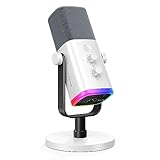
- Dual USB/XLR Connectivity-Seamlessly connect the PC gaming microphone to your devices. USB works greatly with PC, and XLR works greatly with mixer sound card. (Tips: Keep the top of end-addressing XLR dynamic microphone AM8 facing audio source, and suggested recording range is 2 to 6 in.)
- Mesmerizing RGB Lighting-The desktop gaming microphone illuminates your gaming setup with captivating RGB lighting, bringing a touch of elegance and beauty to your white-themed gaming station. And you can turn on/off and change the lighting by tapping RGB button. (Only available for USB connection)
- Sleek Desktop Design-The compact and stylish gaming mic for PC complements your white gaming setup, adding a stylish touch to your streaming sessions.
- Total Control at Your Fingertips-Adjust audio settings effortlessly with the tap-to-mute, gain knob, headphones jack and headphones volume control on the cardioid dynamic microphone, ensuring optimal sound quality. (Only available for USB connection)
- Versatility at Its Finest-Tailored specifically for gaming and streaming enthusiasts, The XLR microphone delivers exceptional audio performance for an immersive experience. This multipurpose microphone goes beyond gaming and streaming, ideal for podcasting, voiceovers, and various other creative endeavors.
Every slot supports uploaded quality up to 4K 60fps at one flat price per slot, with no re-encode or quality tiers, and includes automatic recovery if YouTube drops the stream. The first day is free with no card. The monthly option is $9.99 per month. See StreamNeo or start the free first day.
Quick Recap
Product prices and availability are accurate as of the date/time indicated and are subject to change. Any price and availability information displayed on Amazon at the time of purchase will apply.

