
Free tools Windows power users keep installed
One-click scans. No signup required.
The best video converter depends on what you need to deliver: HandBrake is a practical starting point for preset-based web and device exports; Shutter Encoder offers broader controls for editing-adjacent jobs; Adobe Media Encoder fits creators already working in Adobe apps; and DaVinci Resolve Studio is relevant when a delivery specification calls for advanced professional formats. This is a feature-based guide to the vendors’ documentation, not a hands-on speed or quality test.
Choose a converter by its output and your workflow
Start with the destination’s delivery requirements, then choose a tool that can produce them without unwanted changes. A general web upload, a device-specific file, and a broadcaster or distributor package can call for very different settings.
- Check the exact deliverable: identify required resolution, frame rate, audio layout, codec, profile, and file container. A filename extension alone is not a complete specification.
- Decide how much control you need: a preset can simplify routine exports, but may alter resolution, frame rate, or audio. Manual controls are useful when those details must be preserved or tailored.
- Account for your existing tools: an editor-integrated workflow can reduce handoffs, while a standalone converter may suit one-off jobs or specialized processing.
- Separate conversion from repair: changing a file’s format does not fix a poor source recording or guarantee that a platform will accept the result.
Container and codec are different
MOV, AVI, and MXF are containers: they can hold video and audio streams encoded using different codecs and settings. When a client or platform specifies “MOV,” confirm whether it also requires a particular codec, profile, frame rate, or audio format. Adobe’s format documentation explains the distinction and notes that available export choices can depend on installed applications and encoders (Adobe Media Encoder supported export formats; page last updated March 27, 2026).
Best video converter tools for creators
HandBrake: preset-based exports for web and devices
HandBrake’s presets group settings around a device or use case. Its documentation describes Creator presets for hosting services such as Vimeo and YouTube, with higher audio and video quality intended to reduce generational loss from additional platform encoding. Listed Creator examples use MP4, H.264, and AAC stereo (HandBrake official presets).
Recommended Free Tools
#1 Best Overall

- UPGRADE WITHOUT REPLACING CAMERAS: Still running analog security cameras but bought a new HDMI monitor or TV? This BNC to HDMI converter bridges the gap instantly, saving you the cost of replacing your entire camera system
- SUPPORTS MULTIPLE FORMATS: Works with TVI, CVI, AHD, and CVBS camera signals, making it useful for mixed or older CCTV systems. The converter automatically detects the video format for easier setup
- UP TO 8MP CAMERA INPUT: Supports 720P, 1080P, 3MP, 4MP, 5MP, and 8MP security camera input. A practical solution when working with different camera resolutions across a video surveillance system
- PAL AND NTSC SUPPORTED: Recognizes both PAL and NTSC video signals for broader camera support. Use it when connecting security cameras, CCTV equipment, or coaxial video sources to an HDMI monitor
- CRYSTAL CLEAR PICTURE QUALITY: This coax to HDMI converter outputs stable 1080P@60FPS video, so every face, license plate and detail stays sharp — no more blurry, laggy analog footage on your new display
Presets are a starting point, not a guarantee that every source property will be preserved or that a file meets a platform’s current recommendation. HandBrake documents that presets may limit resolution or frame rate and change audio handling. For example, its 720p30 preset can downscale 1080p60 footage and cap it at 30 fps. Inspect the selected preset before encoding.
- Consider it when: you want a recognizable preset workflow for common device or creator-web outputs.
- Check before export: output resolution, frame-rate limit, and audio behavior.
- Hardware encoding: HandBrake says its hardware presets use dedicated media engines in modern graphics hardware and are optimized for encoding speed. That is a documented design intent, not a controlled comparison of speed or quality against other tools.
Shutter Encoder: more controls for editing-adjacent work
Shutter Encoder describes itself as an FFmpeg-based converter. Its official site and documentation list trimming, queueing, subtitle handling, color adjustments and LUTs, color-space conversion, audio mapping, and MXF-related functions including OP-Atom, OP1a, AS-10, and AS-11 (Shutter Encoder; documentation).
Rank #2

- Compact but Powerful Design: ZowieBox is smaller than a phone, featuring a tally light and LCD screen for streaming status. Capture console gameplay in up to 4K with zero-lag HDMI passthrough, while the built-in video encoder converts video for IP streaming. The IP stream can also be decoded back to a 4K HDMI signal.
- Standalone Game Streaming: Just plug and play—ZowieBox enables PC-free live gaming without affecting gameplay. As an RTMP hardware encoder and HDMI streamer, it delivers stable streaming directly from your source, making it ideal for gaming, live events, and professional broadcasting.
- NDI|HX3 Converter Technology: ZowieBox converts HDMI signals to NDI|HX3/HX2/HX, functioning as an NDI video encoder, or NDI Video Decoder for flexible IP workflows. Certified NDI technology enables low-latency gameplay streaming through OBS/vMix. Note: Encoder and decoder modes cannot run simultaneously; full NDI signals are not supported.
- UVC to HDMI Conversion: Supporting up to 4K@30fps and 1080p@60fps decoding, ZowieBox enables flexible conversion for webcam and video workflows. As a video decoder and HDMI to IP converter, it expands connectivity options for professional video devices. Note: USB capture card functionality is not currently supported.
- All-around Configuration Options: Control ZowieBox through its web UI on a PC, phone, or tablet. Manage connected PTZ cameras, tally light, video/audio, OSD, work mode, streams, network, and system settings. Support for VISCA over IP encoder workflows enables flexible PTZ control, while the dashboard provides video preview and system status.
Some codecs permit cuts without re-encoding, according to the product documentation. It also describes embedding or burning subtitle formats including SRT, VTT, SCC, ASS, and SSA. These capabilities make it a candidate for ingest, delivery, or conversion jobs that need more than a basic preset. The documentation establishes feature availability, not comparative ease of use or encode speed.
Shutter Encoder’s site says Avid recommends the tool for Media Composer and ProTools ingest; that recommendation is reported by Shutter Encoder itself.
PC Slower Than It Used to Be?
A free scan shows the junk files, broken settings and background clutter dragging Windows down - then fixes them in one click.Free scan · Windows 10 & 11Outdated Drivers Are Slowing You Down
One free scan finds every outdated or missing driver and matches the right update for your exact hardware.Free scan · exact hardware matchRank #3
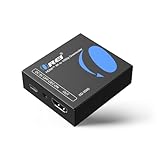
- Smooth 4K to 1080p Downscaling – Effortlessly converts 4K HDMI signals to 1080p, ensuring older TVs, monitors, and projectors work seamlessly with modern 4K sources like Blu-ray players, gaming consoles, and streaming devices.
- Ultra HD Video Support – Handles resolutions up to 4K@60Hz (4:4:4) with full HDMI 2.0 (18Gbps) bandwidth and HDCP 2.2 compliance, delivering crisp details, vibrant colors, and flawless playback for home theater and professional AV use.
- Stable & Reliable Signal Management – Built-in EDID and HDCP management guarantee smooth communication between devices, while the CEC block switch prevents unwanted device conflicts for uninterrupted performance.
- Flexible & Compact Design – Can be powered directly through HDMI or via USB-C for easy setup, with a slim, portable form factor that fits perfectly in entertainment centers, conference rooms, or portable AV kits.
- Package & Warranty – Includes 1x XD-3000 unit and 1x User Manual for quick setup. Backed by a 1-Year Warranty, ensuring long-lasting reliability and customer peace of mind.
Adobe Media Encoder: a natural fit for Adobe workflows
Adobe says Media Encoder is available as a standalone application and as a component of Premiere, After Effects, Audition, and Animate. The formats available in an installation depend on which Adobe applications and encoders are installed, so check the export options in the actual setup you use rather than assuming every installation offers identical support (Adobe’s supported-format documentation).
- Consider it when: your work already moves through Adobe applications and you want conversion or export within that workflow.
- Check first: that the required container, codec, and options are available in your installed version.
DaVinci Resolve Studio: for specified advanced delivery needs
Blackmagic Design lists advanced professional format and delivery capabilities for DaVinci Resolve Studio, including IMF encode and decode, Dolby Vision and HDR10+ delivery, and DCP support. The product page also describes optional third-party encoder packs for formats and workflows including XDCAM, XAVC, HEVC profiles, and AS-11 packaging (Blackmagic Design DaVinci Resolve Studio).
Rank #4

- RCA Female to HDMI Video Converters Adapter : The cable is used to convert analog composite input to HDMI 1080p output, displayed on a 1080p HD TV/TV/monitor.
- Input ports: 1xRCA Female (Yellow, White, Red), Output ports: 1xHDMI 1.3 1080p. NOT support 3D and 4K, NOT support HDMI Converts to AV
- AV to HDMI Converter: Plug and Play, Easy to Install and Operate, Powered by External USB Cable. Note: Please hook up the USB power cable (included) to 5V 1Apower source during use (not included power supply ).
- Support PAL, NTSC3.58, NTSC4.43, SECAM, PAL/M, PAL/N standard TV formats input. For PS2,PS3,Xbox,N64,STB, VHS, VCR, DVD Players and other devices with standard composite AV input.
- You Will Get : 1x RCA Female TO HDMI Converter, 1xHDMI cable, 1xUSB cable, 1xUser Manual. ONE YEAR WARRANTY - if you are not satisfied for any reason whatsoever, do not hesitate to contact us .
Choose Studio when a project specification calls for a capability it supports, and verify whether the specific format requires an optional encoder pack or other separate terms. These advanced requirements do not, by themselves, make Resolve the simplest choice for a routine web export. Check the current product documentation and version details before committing to a delivery workflow.
Quick comparison
| Tool | Best fit | Documented strengths | What to verify |
|---|---|---|---|
| HandBrake | Preset-driven device or creator-web output | Use-case presets; Creator examples with MP4, H.264, and AAC stereo; hardware presets intended for speed | Whether preset settings change resolution, frame rate, or audio from what you need |
| Shutter Encoder | Conversion plus specialized editing-adjacent operations | Trimming, some cuts without re-encoding, subtitles, color conversion, audio mapping, and MXF functions | Whether the required operation and format suit the particular job; documentation does not establish comparative ease or speed |
| Adobe Media Encoder | Creators working in Adobe applications | Standalone availability and connection to Premiere, After Effects, Audition, and Animate | Export options vary with installed Adobe applications and encoders |
| DaVinci Resolve Studio | Projects with advanced professional delivery specifications | IMF, Dolby Vision, HDR10+, and DCP capabilities listed by Blackmagic Design | Whether a feature or format requires an optional third-party encoder pack, and current version terms |
Check the export before you deliver it
- Get the destination specification. Use the client, distributor, broadcaster, or platform’s current requirements for container, codec and profile, resolution, frame rate, audio, and any packaging rules.
- Match the tool to the job. Start with HandBrake for a straightforward preset workflow, consider Shutter Encoder for its documented specialist operations, use Media Encoder when it fits your installed Adobe workflow, or assess Resolve Studio for advanced delivery requirements.
- Inspect the settings, not just the preset name or file extension. Confirm that the output dimensions, frame rate, codec, profile, and audio match the specification. A preset may resize or cap frame rate; a container label does not identify the codec inside.
- Review the exported file. Check playback, picture, sound, duration, and the properties your recipient requires. A successful encode alone does not establish that a platform or distributor will accept the file.
What this comparison can and cannot tell you
The distinctions above are based on official product documentation accessed October 3, 2026. No controlled benchmark or hands-on comparison supports a claim that one tool is universally faster, produces better quality, or is more popular. Features, format support, versions, and terms can change; Adobe’s available formats are installation-dependent, and Resolve’s optional encoder packs may affect a particular workflow. Confirm the current documentation and the recipient’s exact delivery specification before exporting.
Quick wins for a faster PC:
Fix the driver behind crashes, sound loss and screen glitchesFind Drivers →Clear out junk files and repair common Windows errorsFree Scan →Best Value

- Preserve Your Memories: DigitPro VCR to Digital Converter is a simple solution to bring those precious memories from Capturing and converting your VHS tapes, Hi8 Mini DV VCR tapes, DVD’s, Set top recorded videos to Digital Format (MP4). You can share the digital format of your old good memorries with your family and friends anywhere anytime.
- 4K VCR to Digital Converter: With its 4K recording resolution and next-gen digitization chip, DigitPro Video to Digital Converter capture the beauty of every moment with precision. Whether it’s the breathtaking natural scenery or unforgettable family gatherings, 4K recording clarity brings out the details in stunning resolution, making your memories come alive with vivid realism. You can also choose from 720p and 1080p resolution options.
- Standalone, No Computer or Software required: No Computer, drivers or softwares are required, you can capture video from HDMI video source and saves them in MP4 format onto SD card (included) or USB Flash Drive(not included). The internal 3.5mm mic jack allows you to add own live commentary.
- 5" Screen HI8 to Digital Converter: Built-in 5" screen and built-in speakers for previewing and playing video and audio, you can connect a larger screen via HDMI port to share with your family and friends, or connect headphones via the separate headphone jack to listen to high-quality audio.
- Built-in Stereo Speakers & 3.5mm Headphone Output &Audio Recording: Built-in 2000mAh battery and speakers, portable and easy to carry, can be used and playback watch your video on anywhere. Up to 3 hours of playback after a full charge. With an independent headphone jack, you can use your headphones to listen to high-quality audio.
Or let it run in the cloud
If your creator workflow includes keeping a pre-recorded YouTube stream live around the clock, StreamNeo handles that separate job from the cloud: upload a recording or build a playlist, add your YouTube stream key, and go live. Nothing has to stay on at home; uploaded video streams at its original quality up to 4K 60fps for one flat price per slot. StreamNeo can recover automatically if YouTube drops the stream. The first day is free with no card, and the Monthly price is $9.99 per month. Learn more at StreamNeo, or start your free day.
Quick Recap
Product prices and availability are accurate as of the date/time indicated and are subject to change. Any price and availability information displayed on Amazon at the time of purchase will apply.

