
Free tools Windows power users keep installed
One-click scans. No signup required.
RS-232 is a point-to-point serial interface that lets a computer or terminal exchange data with a modem, instrument, or other peripheral. It specifies electrical signaling, signal functions, and connector conventions—not the character encoding or serial settings used by an application. For a modern computer without a serial port, a compatible USB-to-RS-232 adapter is usually the simplest bridge.
What RS-232 is—and what it specifies
RS-232 belongs to the EIA/TIA-232 standards lineage, created to define the connection between data terminal equipment (DTE), such as a computer or terminal, and data circuit-terminating equipment (DCE), such as a modem. The formal EIA/TIA-232-E name is “Interface Between Data Terminal Equipment and Data Circuit-Termination Equipment Employing Serial Binary Data Interchange,” as quoted by Analog Devices in a 2001 technical article.
In practical terms, RS-232 covers three parts of an interface:
- Electrical: signal voltages, timing, slew rate, loading, and related electrical limits.
- Functional: what circuits such as transmit, receive, and handshaking signals do.
- Mechanical: connector conventions and pin identification.
It does not specify a character code, asynchronous frame format, parity choice, or application protocol. Those must be supported and configured by the devices and their software. For example, two connected devices can have sound wiring but still fail to communicate if their baud rate, data bits, parity, stop bits, or flow-control settings disagree.
The Tool Desk
Outbyte Driver Updater FREEScan for outdated or missing drivers - takes under a minuteDriver Scan →Outbyte PC Repair FREEClear out junk files and repair common Windows errorsFree Scan →#1 Best Overall

- !!Please NOTE: this is MALE RS232 to DB9 SERIAL CABLE ,Not VGA!!!It is 9 pin, NOT 15 pin!! Look carefully of the Pin is match with your device. Before ordering , please confirm the interface gender is waht you need. After receiving ,please read user manual /instruction at first and download the Driver at first from FT232 Official website or Cisco website . Customer service always online.
- Wide range of applications: USB to RS232 DB9 male serial adapter can work with your Windows (10 / 8.1 / 8 / 7 / Vista / XP), MAC or Linux system and other platforms. USB adapter is designed to connect to serial devices, such as serial modem with DB9, ISDN terminal adapter, digital camera, label writer, palm computer, barcode scanner, PDA, cash register, CNC, PLC controller, tax printer, POS, bar code scanner, label printer, etc
- High quality: ftdi usb serial,the latest ftdi chip set ensures more reliable and faster operation. USB 2.0 to RS232 male DB9 console cable will support 1Mbps date transfer rate.
- Most convenient: rs232 to usb simple installation, plug and play, COM port creation, baud rate can be changed to the required settings. USB power supply - no external power supply required.
- Exquisite design: usb-to-serial,Gold Plated USB RS232 connector and PVC cable ensure high performance and extra durability. Powered by USB port, this USB to DB9 series RS232 adapter cable is designed to fit easily into your handbag.
A short standards timeline
The lineage begins with the EIA’s RS-232 work around 1960. The EIA-232-E revision was introduced in 1962, according to Analog Devices’ 2001 article; the EIA-232-C catalog entry is dated August 1969. Later revisions are commonly referred to as EIA-232-D, EIA-232-E, and TIA-232-F. The label “RS-232” remains the familiar name for the interface family.
How data and control signals travel
RS-232 is single-ended and normally connects two devices directly. A DTE generally transmits on TXD and receives on RXD; a DCE presents the complementary directions. Signal ground is the common return. The standard’s voltage polarity is unusual if you are used to logic pins: a negative voltage represents mark (logic 1), while a positive voltage represents space (logic 0). Transceiver chips convert these voltages to and from the 3.3-V or 5-V logic used inside modern electronics.
Rank #2

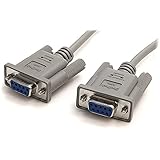
- Simple 6ft null modem extension cable (3 wire type and no hardware handshaking) extends a COM port connection between computer and some old device with RS-232 compatible
- Wired as a 9 pin serial cable male to female port cord that 2-3 line are crosslinked (only TX/RX data and signal ground wires connected); standard shielded with AL foil
- DB9 m/f adapter extender equipped with screws on each end to ensure an easy and solid connection for stable data communication
- The wires inside are of 30AWG gauge and easy to solder to, and they connect to the pins in the order of the standard wire color code
- 6 feet long RS232C cable for hooking up RS232C equipment like scanner, Modem, printer, plotter, camera, barcode / embroidery machine, touchscreen, microcontroller, factory test equipment
Some links need only transmit, receive, and signal ground. Others also use hardware handshaking: RTS/CTS or DTR/DSR, and sometimes DCD or RI. Whether those lines are necessary depends on the equipment and its configuration; a cable with only TXD, RXD, and ground will not satisfy a device that requires hardware flow control.
DB9 and DB25 pins: check the wiring, not just the plug
DB25 is the original full-size connector convention; DB9 became common on PCs and carries a smaller set of signals. Connector shape alone does not prove that two cables have compatible wiring. Identify both devices’ DTE/DCE roles and check their manuals or use a breakout board before connecting or rewiring.
Rank #3

- 9 pin serial cable 6ft connects your computer to device with RS-232 compatible (COM port) interface
- DB9 RS232 cable female to female connector on each end equipped with screws to ensure an easy and solid connection for stable data communication
- The wires inside are of 30AWG gauge and easy to solder to, and they connect to the pins in the order of the standard wire color code
- It is pin-to-pin wired as a DE9 9 pin serial cable Straight Through (pinout :1-1, 2-2, 3-3, 4-4,......, 8-8, 9-9, G-G); standard shielded rs232 cord with AL foil
- 6 feet RS232 serial cable f-f adapter for some old RS232C equipment like scanner, Modem, printer, plotter, switches, camera, barcode / embroidery machine, touchscreen, microcontroller, test equipment
For a typical PC-style DB9 DTE, the key pins are:
| DB9 pin | Typical DTE signal | Purpose |
|---|---|---|
| 2 | RXD | Receive data |
| 3 | TXD | Transmit data |
| 5 | Signal ground | Common signal return |
| 7 | RTS | Optional request-to-send handshaking |
| 8 | CTS | Optional clear-to-send handshaking |
| 4 | DTR | Optional data-terminal-ready signal |
| 6 | DSR | Optional data-set-ready signal |
These are typical PC-style DTE assignments, not a guarantee about every device with a DB9 connector. DCE equipment commonly reverses the transmit and receive roles. DB25 has its own pin assignments, so do not transfer DB9 pin numbers to a DB25 connector. Confirm the device’s pinout in its manual or a technical reference such as the University of Florida/CAMI RS-232 reference.
Straight-through or null-modem cable?
The right cable follows the devices’ roles and wiring, not the connector gender. A straight-through cable carries corresponding pins straight across and is commonly used between complementary DTE and DCE equipment. A null-modem cable crosses transmit and receive so two DTE devices can communicate directly. Depending on the devices, it may also need crossed or looped handshaking lines.
Rank #4
- Identify each endpoint. Check whether each device is DTE or DCE in its manual.
- Confirm the pinout. Verify TXD, RXD, signal ground, and any required handshake circuits at both ends.
- Choose the cable topology. Use straight-through wiring for complementary roles; use the appropriate null-modem wiring when both endpoints have the same role, commonly DTE-to-DTE.
- Check serial settings. Match baud rate, data bits, parity, stop bits, and flow control on both devices.
A breakout box or breakout board lets you inspect signals and test wiring before changing a cable. This is especially useful when a connector fits but the device documentation is unclear.
Speed and cable distance
The EIA-232-C catalog gives a nominal upper signaling-rate limit of 20,000 bits per second. That is a historical standard limit, not a guarantee that any particular pair of devices and cable will operate reliably at that rate; implementations may support different rates.
What’s actually slowing this PC down?
Pick the symptom - the matching free tool is one click away.
Best Value

- 1x DB9 Serial (male) connector
- 1x DB9 Serial (female) connector
- High quality shielding prevents EMI interference
- DB9 connectors with strain relief molding
There is no universal RS-232 distance limit independent of the cable and equipment. Oracle’s 2000 cable guidance uses 2,500 pF as a rule-of-thumb total cable capacitance for rates up to 57,600 baud, and Texas Instruments also discusses a 2,500-pF load in its RS-232 selection guide. These are implementation guidelines, not a promise that every 2,500-pF link will work at that rate. Distance depends on cable capacitance per unit length, baud rate, shielding, connector quality, and the transceivers at both ends. The often-repeated “50-foot” figure is shorthand tied to older cable and load assumptions, not a universal physical boundary. Oracle’s guidance is available in its serial cable reference.
Independent reader supportYour contribution helps us test, update, and keep practical guides available for everyone.RS-232, USB, RS-485, or Ethernet?
| Interface | Typical role | Signaling and topology | When it fits |
|---|---|---|---|
| RS-232 | Legacy and embedded serial equipment | Single-ended, point-to-point | Direct links to instruments, industrial devices, networking equipment, or older peripherals. |
| USB | Modern computer peripherals | USB host/device connection; not an RS-232 electrical port | Connecting current peripherals to a PC. Use a USB-to-RS-232 adapter when the peripheral itself still speaks RS-232. |
| RS-485 | Industrial serial buses | Differential signaling; supports bus and multidrop arrangements | When a longer link, multiple devices on a bus, or stronger noise immunity is needed. |
| Ethernet | Networked equipment | Packet-based networking | When routed networking or greater distance is required. |
USB displaced native serial ports on most PCs, but RS-232 remains in industrial, networking, scientific, and legacy equipment. RS-485 is not simply a longer RS-232 cable: it uses differential signaling and a different topology. Choose the interface the equipment supports, and use an appropriate converter when bridging standards.
Connecting RS-232 equipment to a modern computer
Look for a USB-to-RS-232 serial adapter, not an adapter that only provides USB-to-TTL UART logic. Check that the adapter works with your operating system, uses a supported chipset, has the correct connector gender, provides any required handshake lines, and matches the device’s RS-232 electrical interface. For embedded hardware, use an RS-232 transceiver module—often based on a MAX3232-class part—to convert the logic-level UART; do not connect MCU UART pins directly to an RS-232 port.
For a replacement cable, first establish the pinout and whether you need straight-through or null-modem wiring. Search terms such as “shielded DB9 RS-232 cable” or “RS-232 null-modem cable” are useful only after that check; the product name alone does not establish that its wiring suits your device.
Windows Errors? Fix Them Before They Spread
Repair common Windows errors and clear accumulated junk for a smoother, more stable PC - no reinstall needed.Free scan · no reinstallCrashes, No Sound, or Screen Glitches?
Random freezes, missing sound and display glitches usually trace back to one bad driver. Find and replace yours safely.Free scan · under a minuteQuick Recap
Troubleshooting a silent or unreliable link
- Verify electrical compatibility. Confirm both interfaces are RS-232, rather than TTL-level UART or RS-485.
- Check DTE/DCE roles and cable wiring. Confirm TXD reaches the other endpoint’s RXD, RXD reaches TXD, and signal ground is connected.
- Check required control lines. Determine whether the device expects RTS/CTS or DTR/DSR hardware handshaking; configure flow control accordingly.
- Match character settings. Set baud rate, data bits, parity, and stop bits identically on both ends. RS-232 itself does not dictate these settings.
- Inspect the physical link. Check connector pin numbers and cable quality; use a breakout to observe activity before rewiring.
- Reduce the link’s electrical burden. If communication is intermittent, consider whether cable capacitance, length, shielding, baud rate, or the endpoint transceivers are limiting the installation.
Product prices and availability are accurate as of the date/time indicated and are subject to change. Any price and availability information displayed on Amazon at the time of purchase will apply.

