
A game-box scan can return the wrong title even when the barcode was read correctly. The scanner decodes the printed bars into a number; the app then uses that number to look up a game in a catalog. A bad result can come from either stage, so first check the digits, then check whether the catalog matched the right platform, release, and region.
First, find out whether the barcode or the lookup is wrong
If your app shows the barcode digits, compare them with the number printed beneath the bars, if one is present. You can also decode the code with a separate scanner. If the digits differ or change between scans, investigate the barcode read. If the same digits keep producing the same incorrect title, the problem is more likely a catalog mapping, missing entry, or ambiguity between releases—not a scanner that needs replacing.
A barcode does not contain a game’s title. It provides an identifier that an app or catalog can use to find a record. That distinction is described in UPCs.com’s barcode explainer; LaunchBox likewise documents incorrect metadata as a record-matching issue. A barcode reader can decode a number, but it cannot verify that a catalog has associated the number with the right game.
If the decoded digits look wrong
Check that the barcode is visible and printed clearly, and confirm that the scanner supports the barcode format being used. Microsoft documents scanner symbologies such as UPC and EAN and how to configure accepted formats: Microsoft’s barcode scanner configuration guidance. Zebra notes that print defects, barcode dimensions, software settings, and scanner redundancy settings can affect decoding: Zebra’s barcode misdecode guidance.
Quick wins for a faster PC:
Clear out junk files and repair common Windows errorsFree Scan →Scan for outdated or missing drivers - takes under a minuteDriver Scan →Repair Windows errors before they cause bigger problemsFix Now →#1 Best Overall

- Bar Code Reader
- Bar Code Reader
- Laser Scanner
- Serial Connection
- RJ11 Adapter
Those checks help with a bad decode. They will not repair a catalog entry that links a correctly read number to the wrong game.
Check that the app matched the right release
Before accepting a result, compare the returned record with the physical copy. A familiar cover image is not sufficient: artwork can be associated with the wrong edition or regional release. LaunchBox’s metadata guidance recommends checking identifying fields and notes the importance of platform, region, and alternate titles when releases are similar: LaunchBox help.
Rank #2

- ✅Symcode Upgraded 2D Barcode Scanner: CMOS optical imaging scanning technology that is researched,With quick barcode scanning speed, 32Bit CPU super decoding ability that the speed up to 300/sec,Symcode scanner can easily scan 1D, 2D (QR, DataMatrix, PDF417, Aztec, Hanxin, etc)barcodes on labels, paper, and mobile phone or computer displays.Even if labels are on shrinkwrap, partly damaged, dirty or poorly printed.
- ✅Wireless & Bluetooth & USB 3-in-1 Connections,Symcode 2D Wireless barcode scanner can work with bluetooth & 2.4G wireless & usb wired. The transmission distance can be 200m in barrier free environment and 30m in obstacles environment using 2.4G USB dongle. It can be connected with a variety of devices, such as smartphones, computers, POS, iphones, ipads. In addition, it is also compatible with various operating systems, such as windows 11/10/8/7/xp, Mac OS, iOS, android, linux.
- ✅2000mAh battery squeeze up to 30 hours of continuous scanning for your inventories or working hours, easily recharge in only 2 hours via the included USB charging cable.Larger battery enables longer continuous usage and twice the stand-by time.
- ✅Versatile Customized Configuration Options: Handsfree Intelligent sensor mode/ Trigger scan mode. Vibration/buzzer settings. Data Storage/Instand Upload Mode. Multiple keyboard languages. Adding / hiding prefix / suffix including date and time, etc.
- ✅Superior Durability: Symcode Bluetooth barcode reader has great SHOCKPROOF function with strong ABS material, it is built to survive an 8 ft./2.4 m drops to concrete floor. The DUSTPROOF scanner with integrated housing which protect the scanner from heavy dust, can handle all harsh working conditions.
- Platform: Confirm the console and generation. A port or remake can have its own record even when the title is nearly identical.
- Region: Look for region or compatibility markings on the box or cartridge. Regional packaging may use another title or artwork.
- Title: Check the official title and any known regional alternate title.
- Developer, publisher, date, and edition: Compare these when the app provides them; they can distinguish releases with similar names.
- Artwork: Confirm that it belongs to the correct game, platform, region, and edition—not just a game with a matching name.
Region markings are system-specific. Nintendo’s guidance gives examples for Nintendo 3DS and older Nintendo systems. For 3DS games, it says a cartridge-label code that does not end in “USA” indicates an overseas-market game; that rule should not be applied to other platforms: Nintendo’s regional product guidance.
Correct a wrong match in LaunchBox
The following workflow is specific to LaunchBox; other collection apps may use different controls or terminology. LaunchBox’s documentation describes editing a game’s metadata, selecting its platform, searching for metadata, reviewing possible matches, and clearing an incorrect database ID before searching again: LaunchBox help.
Do these 3 things before closing this tab:
1Repair Windows errors before they cause bigger problems2Fix the driver behind crashes, sound loss and screen glitches3Clear out junk files and repair common Windows errorsRank #3

- Bar Code Reader
- Laser Scanner
- Serial Connection
- Connectivity technology: COM SERIAL, DCIM, PS/2 ports
- Open the game’s editor in your LaunchBox library.
- Set the correct platform and enter a recognizable title for the release you own.
- Search for metadata, then inspect the best match and other possible matches rather than choosing only the first result.
- Compare identifying fields—especially platform, region, developer, release date, and edition—and reject a result that only has familiar artwork.
- If the wrong database ID is attached, clear it before running the search again.
- Save the entry and check the library record to make sure the intended title and platform now appear.
If the correct game is missing or its details are wrong
If no result matches the physical release, correct known fields manually or submit a focused metadata update. Use verifiable information such as the title printed on the box, an official store page, or the game manual. LaunchBox’s help documentation recommends using reliable references for database updates: LaunchBox help.
- Correct only fields you can substantiate; leave uncertain details alone.
- If a regional release has a different known name, add it as an alternate title where the database supports that field rather than changing the primary title to a preferred variant.
- Check whether an existing record can be corrected before creating a duplicate.
For a different app, look for its edit-match, metadata correction, or report-data feature. Do not assume it has LaunchBox’s controls or shares LaunchBox’s database.
Rank #4
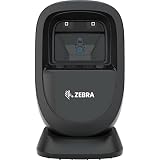
- Introducing the DS9308, new version of DS9208, the presentation scanner that fits anywhere, scans everything, and is built for all-day reliability. You get a compact form factor coupled with stylish aesthetics ideal for trendy boutiques or convenience stores with limited real-estate at the checkout counter. With the ability to scan challenging barcodes at your point of sale.
- The new design of the DS9308 is at home everywhere, from the trendiest boutique to a petroleum convenience store. With a near-zero footprint, there's always room for the DS9308, no matter how space-constrained your counters may be. And the 45° angle cable connector reduces the already tiny footprint, even when the scanner is tilted forward.
- Quickly and easily capture 1D and 2D barcodes, including tiny, high density codes, codes printed on a label or displayed on a phone, DotCode and dotted DataMatrix codes through cellophane, as well as new invisible Digimarc codes.
- Supported Host Interfaces: USB, RS232, Keyboard Wedge, TGCS (IBM) 46XX over RS485.
- The LEDs dynamically adapt to the environment, automatically dimming when not in use and activated when a barcode is present. The LEDs are also recessed and virtually invisible, reducing eye annoyance.
Why scans and matches go wrong
Catalog mapping errors
The number can be decoded correctly while the app’s database associates it with the wrong record—or has no suitable record. Since the title comes from a lookup rather than the barcode itself, a correct scan does not guarantee a correct game name.
Similar titles, platforms, and editions
A port, remake, regional release, or separate game with a similar title can be mistaken for another entry. Platform, edition, and release details help distinguish them; a cover image alone can mislead.
Best Value

- The Barcode Scanner Module (D) is a round 2D barcode scanner module with LED indicator, highly integrated and compact size, suitable for elevator and other code scanning applications.
- Adopts advanced image recognition algorithms, easy to decode various 1D or 2D codes.
- Onboard UART interface, can be easily integrated into kinds of embedded devices.
- Note: some supported barcode formats are disabled by default, you can scan 'configuration code' to enable it
Region and alternate names
Regional packaging can differ in title, artwork, and compatibility information. A catalog that lacks the relevant alternate name or region detail may present a plausible but incorrect match.
Barcode print or decoding problems
Print defects can interfere with reading the bars, producing incorrect digits. Confirm the decoded number before treating the result as a database problem.
Filename matching is a different problem
When importing game files rather than scanning a physical box, abbreviations, misspellings, extra tags, regional labels, hacks, prototypes, and multi-disc notation can make filename-based matching less reliable. Those issues apply to file imports, not to the barcode decoding of a physical box.
Should you get a different scanner?
Only consider scanner hardware if the barcode itself is not being read reliably. A different reader may help decode a code, but it cannot establish or repair the title associated with that number in a game catalog. If the digits are consistent and the same wrong game appears, focus on the match or metadata instead.
The Tool Desk
Outbyte PC Repair FREEClear out junk files and repair common Windows errorsFree Scan →Outbyte Driver Updater FREEScan for outdated or missing drivers - takes under a minuteDriver Scan →Quick Recap
Product prices and availability are accurate as of the date/time indicated and are subject to change. Any price and availability information displayed on Amazon at the time of purchase will apply.

