
OpenHamClock is a free, open-source amateur-radio dashboard that brings live operating information and station tools into one browser interface. You can use the hosted site without a Raspberry Pi, or self-host it—including on a Raspberry Pi kiosk—for a dedicated station display.
What is OpenHamClock?
OpenHamClock describes itself as “A real-time amateur radio dashboard for the modern operator.” It combines information that operators commonly check across separate services—such as DX spots, propagation and space weather—with radio-control, mapping and logging features. The project is released under the MIT License. Project repository and documentation · MIT License
What the dashboard includes
- Operating activity: DX Cluster spots, PSKReporter decodes, Reverse Beacon Network data, and POTA, SOTA, WWFF and WWBOTA activations.
- Propagation and space weather: propagation predictions, solar indices, band conditions and geomagnetic information. The project’s release notes describe current Kp tracking as using NOAA’s one-minute estimated planetary K-index, rather than waiting for the observed three-hour product.
- Station tools: WSJT-X decode integration, direct rig control, an in-browser logbook, and great-circle mapping.
- Additional views and integrations: satellite passes, emergency-communications mode, weather-provider selection, contest-calendar integration, band-plan overlays, worked-before badges, IBP listening logs, map layers, alert audio, APRS telemetry and aircraft-track prediction.
These capabilities are described in the project’s feature documentation and release notes. Feature availability and details can change as the project develops.
How to use OpenHamClock
The simplest option is the hosted website: open it in a modern browser on a desktop, tablet or phone. Project materials describe access without a login, advertisements or subscription. For a local installation, the project documents Docker, Node.js source installation, prebuilt executables for Windows, macOS, Linux and 64-bit Raspberry Pi, and installer scripts for Linux/macOS, Raspberry Pi kiosk use and Windows. See current setup instructions
#1 Best Overall

- Detachable Display Unit - The display unit and the radio body can be separated. This allows you to place the head remotely. FCC ID: 2BGMW-G90
- Wide Range Auto Antenna Tuner - Unlike other QRP radios, the G90 has a wide-range internal automatic antenna tuner so you can load up your favorite field antenna! The G90 also comes with a built-in mediumwave (AM broadcast) high-pass filter.
- Beautiful Color LCD Screen - All vital operating information is clearly visible in daylight conditions. 48KHZ wide spectrum display with waterfall gives you excellent awareness of the signal conditions around you.
- Easy to Use - You can use the Quick Mode button to turn on or off various functions. Instead of setting up different functions in the menu, you can directly adjust them by pressing corresponding function keys.
- We provide a 18 months warranty on Xiegu G90. As usual, if you modify the radio's hardware, the warranty is void. [Latest Firmware Version] - Firmware V1.81 is available on Radioddity official.
Run it with Docker
The documented Docker setup publishes port 3000. Follow the project’s current command and configuration guidance in its README; do not expose a self-hosted service to the public internet unless you have considered access controls and network security. On first launch, a setup wizard asks for your callsign and Maidenhead grid.
Use a Raspberry Pi as a kiosk
A Raspberry Pi is optional, not a prerequisite. It can suit an always-on station display, while the hosted dashboard works in an ordinary browser. For a self-hosted Pi installation, use the project’s Raspberry Pi-specific instructions and confirm compatibility with your board and operating system; the documented prebuilt executable target is 64-bit Raspberry Pi. Raspberry Pi installation guidance
Rank #2
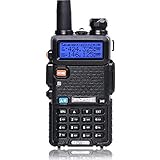
- Frequency Range: 144-148MHz, 420-450MHz. Please kindly know that UV-5R would not transmit without this frequency range.
- 128 Channels 50 CTCSS and 104 CDCSS Dual-Band Display, Dual Freq. Display, Dual-Standby, A/B band independent operation, High/Low TX power selectable: Busy channel lock-out(BCLO)
- High/Low TX power selectable: Busy channel lock-out(BCLO),128 Channels 50 CTCSS and 104 CDCSS Dual-Band Display, Dual Freq. Display, Dual-Standby, A/B band independent operation, Keypad Lock. Voice companding: 50 CTCSS/ 104 DCS coder & tone searching, Tri-color background light selectable: 0-9 grades VOX selectable. Large LCD Display, Emergency Alert: 12.5KHz Switchable, LED Flashlight: High/Low RF Power Switchable, Support manually program. Easy to program via PC. Support CHIRP quick programming
- Tri-color background light selectable: 0-9 grades VOX selectable. Large LCD Display
- Emergency Alert: 25KHz/12. 5KHz Switchable, LED Flashlight: Hight /Low RF Power Switchable
What data does the DX Cluster panel show?
The DX Cluster panel connects to the global DX Spider network and refreshes its live spot feed every five seconds, according to the project’s documentation. OpenHamClock project documentation
Viewing spots in the panel is distinct from submitting one: posting spots requires a direct telnet connection to a cluster node outside the dashboard. OpenHamClock therefore presents cluster activity, but the panel is not itself the route for publishing a spot.
Rank #3

- Powerful Performance: The QT40 10 meter radio boasts a 40 watts transmission power and 28.000-29.695MHz frequency range that delivers crystal-clear communication over long distances, making it an ideal choice for outdoor enthusiasts, truckers, and emergency responders. FCC ID: T4K-ARESII
- Noise Reduction: With TX and RX digital noise reduction technology, the QT40 ensures that you'll never have to strain to hear or be heard in noisy environments.
- Accurate Signal Meter: The PWR/RX RSSI Signal Meter provides you with a clear picture of your signal strength, helping you to optimize your communication for the best possible results.
- Weather Channel: With its impressive weather band and NOAA alert feature, you can stay ahead of the curve and be prepared for any sudden changes in the weather. Whether you're out camping, hiking, or simply enjoying a day out in the park, this radio has got you covered.
- Customizable Features: The QT40 is equipped with a range of customizable features, including CTCSS/DCS, ASQ, SQ function, RF gain control, TOT, VOX, HI-CUT function, and echo function, giving you complete control over your communication experience.
Is OpenHamClock free?
Yes. The project is open-source and MIT-licensed, which permits use, modification and self-hosting under that license. The hosted browser option is described without a subscription requirement; self-hosting may involve hardware or hosting costs you choose to incur. MIT License
If you omit Docker’s TZ setting, the application uses the visitor’s browser timezone for local-time display, according to the project documentation. Set the timezone explicitly if you need a fixed local-time basis for a shared display. Configuration documentation
Rank #4

- Dual Band Mobile Radio; 2 meter ham radio and 70cm mobile transceiver; it can quickly change the frequency band by the microphone; mini mobile two way radio; 6.42 x 4.88 x 1.54 inches; installation does not take up too much space; cables are included; FCC ID is 2ASNSRT95
- Upgrade mic gain; available via firmware upgrade; mic gain can make weak sounds louder; but the higher the level; the greater the background noise; please adjust the gain level appropriately to get clear sound
- VOX function frees your hands; especially when driving; built-in speakers in radio & microphone; give you a clear call experience
- 180 degree rotatable TFT LCD display; the screen can be rotated and the radio can be installed upside down; more options for installation positions; LCD brightness control for easy reading outdoors and indoors
- VFO Mode & CHIRP;the RT95 mobile ham radio has a VFO mode; which can change parameters such as frequency without a computer; Users can use the radio to complete 90% of operations and changes
Does OpenHamClock replace HamClock?
The Open HamClock organization says the original HamClock reached end of life at version 4.22 and that installations were expected to cease functioning in June 2026. That is the maintainers’ time-sensitive statement, not a guarantee that every existing installation stopped on that date. OpenHamClock presents itself as a modern, community-maintainable continuation, while also adding a broad set of dashboard integrations. Open HamClock organization · OpenHamClock project
Whether it is the right replacement depends on what you need: it can serve as a general-purpose operating console, but readers should compare its current integrations and controls with their specific HamClock workflow before switching.
What’s actually slowing this PC down?
Pick the symptom - the matching free tool is one click away.
Quick Recap
Best Value

- MENUS THAT MAKE SENSE. 1,000 MEMORIES. 10 NAMED ZONES. Built for amateur operators who want organized analog control. Use clear English menus and the full keypad for common changes; group home, travel, club, event, simplex, and receive channels as your plan grows.
- SCAN THE ZONES THAT MATTER. Choose which named zones scan together. Temporarily skip a busy channel without changing your saved scan list. Scanning is for conventional analog channels; it does not decode DMR/digital or trunked systems.
- MORE INFORMATION AT A GLANCE. Choose Name + Frequency in the two-channel view. Dual Watch alternates one receiver between the two displayed channels. Turn Dual Watch off and enable Single Watch for a full-screen view of one channel's name, zone, and frequency. Approximate dBm adds signal context.
- START ON THE RADIO. BUILD LARGER PLANS ON A COMPUTER. Make common changes from the keypad. For larger plans, use BTECH CPS or supported CHIRP-next with the separately sold PC03. Firmware updates require BTECH CPS, the PC03, and BTECH's matching instructions. USB-C charges the battery.
- TRI-BAND AMATEUR TRANSMIT. RECEIVE-ONLY LISTENING. Valid amateur authorization is required to transmit on amateur frequencies in the U.S.; use only supported amateur bands within your privileges. Airband AM, NOAA weather, and broadcast FM are receive-only.
Who should use OpenHamClock?
- Use the hosted dashboard if you want a convenient overview without installing software or buying a dedicated display.
- Self-host it if you want to run the service on your own machine or control how it is deployed.
- Consider a Raspberry Pi kiosk if you want a persistent station-screen setup; it is an optional hardware choice, not a requirement to try the service.
- Check the release notes if you depend on a particular radio, data source or panel, since integrations and features continue to evolve. OpenHamClock releases
Product prices and availability are accurate as of the date/time indicated and are subject to change. Any price and availability information displayed on Amazon at the time of purchase will apply.

