
Do these 3 things before closing this tab:
1Scan for outdated or missing drivers - takes under a minute2Repair Windows errors before they cause bigger problems3Fix the driver behind crashes, sound loss and screen glitchesTo copy photos from an Android phone to a photo stick, connect a compatible USB drive, open the phone’s file manager, and copy locally stored photo files to the drive. First check that the phone supports USB OTG and that the stick’s connector fits—or use a compatible data adapter. Some sticks use a companion app instead of a standard file-manager workflow.
Before you connect the photo stick
A photo stick is an external USB flash drive. Your phone needs to recognize the drive before you can copy files to it.
- Check the phone’s connector: Identify whether it has USB-C, Micro-USB, or another connector.
- Check OTG support: Confirm in the phone manufacturer’s documentation that the model supports USB OTG. PNY’s DUO-LINK OTG USB 3.0 Android manual recommends checking device compatibility, and SanDisk’s iXpand Transfer guide says OTG is required for that product’s Android workflow.
- Check the stick’s setup instructions: Some drives work through a file manager; others use a branded app. Confirm the exact model’s connector and requirements before buying.
- Use the right connection: If the phone and stick connectors differ, a compatible adapter may be needed. An adapter does not add OTG support to a phone that lacks it.
Copy photos using the phone’s file manager
- Connect the stick directly to the phone, or connect it through a compatible adapter. Unlock the phone and wait for a USB or storage notification.
- Open the phone’s file manager. The app name and drive label vary by Android model; look for an external storage or USB-drive location.
- Browse to the photos stored locally on the phone. Photo folders vary, so do not assume every image is in a single Camera folder.
- Select the photos or folders you want, choose Copy, then open the external drive location and choose the copy or paste action shown by the app. Copy keeps the phone originals in place.
- Wait for the operation to finish. Open the destination on the stick and check that the copied files appear before disconnecting it.
- Use the phone’s eject or safely remove option if it is available, then unplug the drive.
Labels and actions differ across file managers. If an app offers Move instead of Copy, moving can remove the selected files from their original location; choose it only if that is what you intend.
When the stick uses a companion app
Follow the instructions for the exact drive model if its manufacturer requires a dedicated app. SanDisk’s iXpand guide is an example of a branded Android workflow and specifies an OTG requirement; it does not establish that every photo stick works the same way or that the product is currently available. Check the model’s current documentation and listing for its app and compatibility requirements.
The Tool Desk
Outbyte PC Repair FREEClear out junk files and repair common Windows errorsFree Scan →Outbyte Driver Updater FREEFix the driver behind crashes, sound loss and screen glitchesFind Drivers →#1 Best Overall

- USB-C STORAGE ON THE GO: This sleek drive is supported by Samsung NAND flash and is incredibly compact to fit in the palm of your hand; Count on reliable performance and fast transfer speeds while staying compact
- PERFORMANCE WITH SPEED: No need to choose between performance and reliability; Experience a fast, powerful flash drive that transfers 4GB files in just 11 seconds with up to 400MB/s USB 3.2 Gen 1 read speeds and is backward compatible with USB 3.0/2.0
- MODERN MEETS ICONIC: The ultra-sleek USB-C drive looks as good as it performs; Featuring a reversible plug, the Type-C inserts into your devices seamlessly every time; Transfer large files with style and ease
- ALWAYS CONNECTED: USB-C is compatible across devices, including laptops, tablets, phones and cameras, with enough space for 63,730 photos or maximum 12 hours of 4K video; With up to 256GB of storage space, this pocket-sized thumb drive comes in handy wherever you go
- TOUGH & TRUSTED: Files stay secure, no matter the terrain; Samsung's flash memory technology makes the Type-C a trustworthy drive to store your valuable data; It's waterproof, shock-proof, magnet-proof, temperature-proof, and X-ray-proof body, plus it's backed by a 5-year limited warranty
What to know about Android USB file-transfer instructions
Google’s Android USB file-transfer guide describes connecting a phone to a computer: unlock the phone, connect it, choose File transfer from the USB notification, copy files, and eject before disconnecting. Those instructions are for a computer connection, not a universal direct-to-stick procedure. When a stick is connected directly, the phone’s file manager or the drive’s companion app determines how the drive appears and how copying works.
Google Android Help cautions: “Not all USB cables can transfer files.” For a direct connection, the drive, adapter, and phone must support a data connection, not merely charging.
Rank #2

- 【Important】: Default format of the usb flash drive 128gb is exFAT as this is the format recognized by the smartphones and tablets. These 128gb thumb drives are only compatible with C-Port enabled mobile phones & computers only. While formatting the usb flash drive dual type c usb 3.0 OTG keep a check on the drive format
- 【Easy to Use】: Directly plug the 2-in-1 USB flash drive and play, no need to install any software. The jump drive is easy to be recognized by computer, laptop, notebook, PC, car audio, speaker, smart TV, vidoe projector etc
- 【Fast Speed】: High-speed USB 3.0 flash drive for fast data transfer, backwards compatible with USB 2.0 easy to complete the storage and transport functions. USB 3.0 and Class A chip help you transfer a 4G movie from the thumb drive to your smartphone in about 40 seconds, and reverse transfer in 2 mins to save memory for your smartphone with Type C port.Save your time
- 【Good Compatibility】: Dual connectors USB type C + USB 3.0. Support windows 7 / 8 / 10 / XP / 2000 / ME / NT Linux and Mac OS, compatible withUSB 3.0 & USB 2.0 backwards USB1.1. Support videos formats: AVI, M4V, MKV, MOV, M P4, MPG, RM, RMVB, TS, WMV, FLV, 3GP; AUDIOS: FLAC, APE, AAC, AIF, M4A, MP3, WAV
- 【OTG Function】:Support nearly all mobile phones which support OTG function,and very easy to operate
Why the phone may not recognize the stick
- Check the fit: Make sure the plug or adapter is fully connected and is the correct type for the phone.
- Confirm OTG support: Recheck the phone’s model-specific documentation. A connector adapter alone cannot replace OTG support.
- Check the connection path: If you are using a cable or adapter, confirm it supports data transfer. Google notes that some USB cables are charge-only.
- Consult both manuals: The phone and drive may have model-specific requirements, setup steps, or app instructions.
Which photo stick should you choose?
Compare candidate drives on the details that determine whether you can use them with your phone:
| What to check | Why it matters |
|---|---|
| Connector compatibility | The drive must connect to the phone directly or through a compatible adapter. |
| OTG requirement | Confirm that the phone supports OTG when the drive’s instructions require it. |
| File-manager or app workflow | Some drives appear in the file manager; others rely on a manufacturer’s companion app. |
| Phone-specific support | Compatibility and instructions vary by phone model and drive. Check the relevant manuals and current product information. |
A generic search phrase for this category is “USB-C OTG flash drive for Android.” PNY’s DUO-LINK manual is one example of an Android OTG flash drive, while SanDisk’s iXpand guide documents a branded-app approach. Neither example establishes the availability or compatibility of every current model. The available product information does not support general comparisons of transfer speed, capacity, or durability; check those specifications for the exact drive you are considering.
Recommended Free Tools
Rank #3

- 【512GB Massive Storage,Fewer Painful Choices】LONGWIND photo stick holds thousands of photos and hours of video,giving you breathing room when phone storage runs low—so you do not have to rush to decide what to keep and what to delete.
- 【Back Up Photos,Make Room for More】Use LONGWIND flash drive to save photos and videos directly to the drive,with no Wi-Fi needed.Keep your favorites close,keep your phone ready for the next picture,video,or adventure.
- 【Back Up Live Photos,Preserve Motion and Sound】LONGWIND thumb drive backs up existing Live Photos with motion and sound,so your favorite moments stay more than a still image.Keep your live photos alive,more than a photo,more of the moment.
- 【Easy Backup,One Simple Step】LONGWIND photo stick makes photo backup simple.Just connect,choose what matters,and save your memories without complicated steps.No confusing setup,no extra hassle.IOS device need to download the app from the App Store before use,while Android only needs to open your OTG function.
- 【Portable Local Storage, Keep Memories Within Reach】LONGWIND USB drive gives you 512GB of storage you can carry,access,and manage yourself.Keep important memories stored locally,with no monthly cloud fees to keep using that space.Keep them close.Keep them yours.
Photos stored in a cloud library
The file-manager method applies to photos available on the phone’s local storage. A cloud-only photo may not be present as a file the phone can copy directly to the stick. Export or download it to the phone first, unless the chosen app explicitly supports transferring cloud-only items.
Quick Recap
Best Value
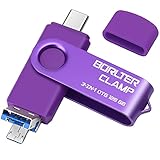
- 【3-in-1 Flash Drive】Free up your phone's memory and provide extra storage for your mobile device. With its USB 3.0 port and high-speed large capacity chip providing fast data transfer efficiency, you can easily backup photos and videos from your phone and computer. It has great compatibility and is compatible with most Android phones. Please note that it is not for iPhone.
- 【Photo Stick with 3 USB Ports】Its USB-A 3.0 port can be connected to computer, car USB port, TV, speakers, etc., and its USB Type-C or microUSB port can be connected to an Android phones or tablets. Interestingly, its microUSB port adopts a concealed design, which overlaps with the USB-A port and can be switched by simply flipping it.
- 【USB On-The-Go Supported】Plug and Play, it supports OTG function, no need to install any drivers. Compatible with almost all photo, video and audio formats. Compatible with Windows, macOS, Linux operating systems. With the BorlterClamp USB flash drive, you can enjoy photos, music and videos anytime, anywhere.
- 【Available External Storage】This 3-in-1 memory stick provides a large external data storage capacity for your phone, camera or tablet, you will never have to worry about running out of memory on your device again.
- 【Note Please】Please make sure you have turned on the OTG (USB On-The-Go) function on your phone before using it, and it is best to remove your phone case as it may prevent proper connection between the ports.
Rank #4

- USB-C 2-in-1 storage OTG: The Lexar JumpDrive Dual Drive D40E features USB Type-A and Type-C connectors in a slim, portable form factor for easy device compatibility
- Transfer speeds up to 100MB/s: Based on internal testing, performance may vary depending upon the host device, interface, and usage conditions. 1MB=1,000,000 bytes
- Plug and Play: Widely compatible with USB Type-C smartphones, tablets, laptops, Macs, and traditional Type-A devices, no software installation required. The 360° swivel design allows for easy switching between connectors without the hassle of losing a cap
- Durable & Compact: The Lexar D40E USB memory stick features a metal enclosure, withstands temperatures from 0° to 50° C (32°F to 122°F), and is lightweight at 26g with dimensions of 70.4 x 16.9 x 11.7mm
- Security & Warranty: Securely protects files using an advanced security software solution with 256-bit AES encryption. Backed by a Lexar 3-year limited warranty
Product prices and availability are accurate as of the date/time indicated and are subject to change. Any price and availability information displayed on Amazon at the time of purchase will apply.

