
Do these 3 things before closing this tab:
1Repair Windows errors before they cause bigger problems2Fix the driver behind crashes, sound loss and screen glitches3Clear out junk files and repair common Windows errorsRambus’s DDR5 SPD hub combines module configuration storage, I2C/I3C bus management, and temperature sensing in one device. The sensor helps a compatible system monitor a memory module; it does not replace the DRAM chips or make the RAM faster by itself. Whether the telemetry is useful depends on the module and platform supporting the management functions.
What the Rambus SPD hub does
SPD means Serial Presence Detect: the module stores identification and configuration information that a system can read. In Rambus’s SPD1605Gxx, that storage is 1,024 bytes of nonvolatile memory. The hub also manages communication between the host and the module’s local bus, supports write protection, and performs packet and parity checks. Rambus lists the device for server RDIMM and MRDIMM modules and client UDIMM, SODIMM, CUDIMM, CSODIMM, SOCAMM2, and LPCAMM2 formats.
The integrated temperature sensor adds thermal telemetry to that management device. Rambus describes the sensor as supporting system configuration and thermal management over I3C. It is not a performance accelerator, and the existence of an SPD hub alone does not guarantee a particular memory speed.
SPD1605Gxx interface specifications
| Feature | Rambus specification |
|---|---|
| Nonvolatile memory | 1,024 bytes |
| Interfaces | I2C and I3C Basic |
| Maximum I3C Basic operation | Up to 12.5 MHz, per Rambus product-page specification accessed in 2026 |
| Maximum I2C operation | Up to 1 MHz, per Rambus product-page specification accessed in 2026 |
| Other stated capabilities | Host-to-local-bus pass-through, write protection, packet/parity checks, and integrated temperature sensor |
These are device specifications, not a guarantee that every motherboard, server, firmware build, or DDR5 module exposes temperature readings to the user. Rambus’s documentation establishes the hub’s capabilities, not universal software visibility across systems.
Recommended Free Tools
#1 Best Overall

- The desktop DDR5 to laptop DDR5 adapter card can transfer your unused laptop DDR5 memory modules to the desktop computer for use, without the need to purchase new desktop DDR5 memory modules, reducing your usage costs.
- Connector 1: Desktop DDR5 plug; Connector 2: Notebook DDR5 slot; Working voltage: DC1.1V; Quantity: 1 pcs.
- The high-quality desktop DDR5 to laptop DDR5 adapter card adopts a high wear-resistant countersunk gold finger design, which has the characteristics of good contact, strong insertion and removal force, and wear resistance.
- The adapter card supports plug and play, without the need to install drivers, making it easy and convenient to use.
- Note: The adapter card only serves the purpose of conversion. Due to different memory manufacturers' chips, some laptop memories and motherboards may have compatibility issues. Compatibility can only be determined through actual testing on the computer, and is not related to the adapter card.
Does DDR5 RAM have a temperature sensor?
Rambus documents an integrated temperature sensor in its SPD1605Gxx DDR5 SPD hub. That establishes a sensor capability for modules using this hub; it does not establish that every DDR5 module uses this exact part or offers the same thermal telemetry. Check the module specification and the platform’s memory-monitoring support rather than assuming a temperature reading will be available because the memory is DDR5.
Why server DDR5 modules can have more thermal monitoring
In a Rambus RDIMM or MRDIMM design described in its TS1685XGxx product brief, two standalone temperature-sensor devices work alongside the SPD hub’s internal sensor. Rambus says this gives three thermal-telemetry points per DIMM. Multiple points can help a server platform track heat across a high-capacity module, a concern as AI and high-performance-computing workloads raise memory power and cooling demands.
Rank #2

- Boosts System Performance: 32GB DDR5 RAM laptop memory kit (2x16GB) that operates at 5600MHz, 5200MHz, or 4800MHz to improve multitasking and system responsiveness for smoother performance
- Accelerated gaming performance: Every millisecond gained in fast-paced gameplay counts—power through heavy workloads and benefit from versatile downclocking and higher frame rates
- Optimized DDR5 compatibility: Best for 12th Gen Intel Core and AMD Ryzen 7000 Series processors — Intel XMP 3.0 and AMD EXPO also supported on the same RAM module
- Trusted Micron Quality: Backed by 42 years of memory expertise, this DDR5 RAM is rigorously tested at both component and module levels, ensuring top performance and reliability
- ECC Type = Non-ECC, Form Factor = SODIMM, Pin Count = 262-Pin, PC Speed = PC5-44800, Voltage = 1.1V, Rank And Configuration = 1Rx8
The sensor is one part of a larger module chipset. Rambus describes server DDR5 designs as coordinating an SPD hub with a power-management IC (PMIC) and temperature-sensor devices. The PMIC handles power delivery; the sensors provide thermal information; the SPD hub supplies configuration data and management-bus functions.
How the DDR5 support-chip ecosystem is changing
Rambus’s April 2024 PMIC announcement covered three products: JEDEC extreme-current PMIC5020, high-current PMIC5000, and low-current PMIC5010. The company positioned them alongside its RCD, SPD hub, and temperature-sensor ICs for a range of DDR5 RDIMM configurations. In a separate 2024 Ask the Experts article, Rambus discussed server-platform support targeting 7,200 MT/s; that is a stated target in that discussion, not evidence that the SPD sensor itself produces a speed increase.
Free tools Windows power users keep installed
One-click scans. No signup required.
Rank #3
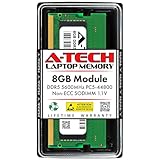
- A-Tech RAM Memory compatible for select DDR5 Laptop, Notebook, Mini PC, and All-in-One (AIO) Computers
- Single 8GB RAM Module; DDR5 SO-DIMM 262 Pin; Speeds up to 5600MHz PC5-44800 (PC5-5600B)
- NON-ECC Unbuffered; JEDEC DDR5 standard 1.1V
- Improves system speed, performance, and reduces bottlenecks by increasing memory RAM resources
- Quick and easy to install, no expertise required
Rambus’s 2024 next-generation chipset announcement described an RDIMM 8000 architecture and an MRDIMM 12800 architecture. Its stated RDIMM chipset includes a Gen5 RCD, PMIC5030, SPD hub, and temperature-sensor chips. The MRDIMM 12800 chipset uses an MRCD and MDB along with the same PMIC, SPD hub, and TS devices. These architecture names describe the announced designs; they should not be read as a standalone performance result attributable to the sensor.
Independent reader supportYour contribution helps us test, update, and keep practical guides available for everyone.Client and server module families: what the documentation establishes
| Module family | Rambus-supported formats stated | Thermal and support-chip details stated |
|---|---|---|
| Client | UDIMM, SODIMM, CUDIMM, CSODIMM, SOCAMM2, LPCAMM2 | Rambus lists the SPD1605Gxx hub with integrated temperature sensing. A specific sensor count per client module and PMIC requirement are not stated in the cited Rambus material. |
| Server | RDIMM, MRDIMM | For RDIMM/MRDIMM designs, Rambus’s TS1685XGxx brief describes two standalone TS devices plus the hub sensor, or three thermal-telemetry points per DIMM. Rambus describes PMICs as part of coordinated server DDR5 chipsets. |
The table reflects Rambus’s stated product families and designs; it is not a compatibility list for every board or server. Confirm the exact memory type, capacity, speed rating, and validation status for the platform before buying.
Rank #4

- 32GB DDR5 5600MT/S MODULE
What to check before buying DDR5 memory
- Match the module format to the system. A client desktop or laptop and a server may require different DDR5 module families. Verify the platform’s supported type rather than choosing by DDR5 branding alone.
- Check capacity and rated data rate. The SPD hub provides configuration information, but does not by itself raise the module’s rated speed or ensure the host can run it at that speed.
- Confirm ECC and platform validation. Check whether the system requires or supports ECC and whether the specific module is validated for its motherboard or server.
- Treat sensor monitoring as a platform feature. If temperature telemetry matters, confirm that the module includes the sensor capability and that the system can read and expose it.
Rambus’s materials establish the architecture and stated capabilities of its components, but do not independently benchmark performance gains caused solely by an SPD sensor or establish current retail availability for particular modules.
Quick Recap
Product prices and availability are accurate as of the date/time indicated and are subject to change. Any price and availability information displayed on Amazon at the time of purchase will apply.

