
Free tools Windows power users keep installed
One-click scans. No signup required.
If your robot vacuum’s saved map no longer matches the room, first check that the robot and dock are in the positions the map expects. Then use the app’s map-editing or restore option if your model supports it, or run a mission that explores the whole home. If the map is still wrong, delete it and remap—though the exact procedure depends on the robot’s brand and model.
Why moving furniture can leave the map wrong
A saved map can stop matching the current layout after furniture is moved or a room is renovated. The robot may need to explore the changed space before it can reflect the new arrangement. A room- or zone-specific clean may not do that: iRobot says a directed clean does not actively search for newly available space.
Try the least disruptive fix first
1. Check the robot and dock positions
Make sure the robot starts where the map expects it to, and check whether the dock has moved. For some models, the dock is a localization reference. iRobot advises remapping after moving the dock or making a major home-layout change; Roborock’s initial-map instructions say to start from the dock and leave it in place during mapping. These are model-specific instructions, not rules for every brand.
2. Run a mission that explores the home
For supported iRobot Imprint Smart Maps, iRobot recommends a mapping run or a clean-everywhere mission after rearranging furniture or renovating. A targeted room or zone clean may not discover newly opened space. Check your model’s instructions for the equivalent whole-home mapping or exploration option in its app.
The Tool Desk
Outbyte Driver Updater FREEFix the driver behind crashes, sound loss and screen glitchesFind Drivers →Outbyte PC Repair FREEClear out junk files and repair common Windows errorsFree Scan →#1 Best Overall

- Hepa filters for Ilife Vacuum model V3, V3s V3s pro V5 V5s V5s Pro Vacuum Cleaning Robot. Ilife Filter Replacement.
- ILIFE V3s pro Filters, Made of high quality efficient filter material.
- 100% Compatible with Original Ilife Filters. ILIFE V3s Replacement Filters, ILIFE V3s pro Filters
- Package include: 10 pcs Replacement Filters
- Good quality level of our ILIFE Robot Vacuum Replacement Parts/ ILIFE Hepa Filter, full money back for any quality problem within 2 months
3. Edit or restore the map if the app offers it
Some systems provide map editing or let you restore an earlier version. Dreame documents map-editing and restoration options. For supported iRobot Smart Maps, the guide describes opening a previous Clean Map report in History and choosing Update Smart Map. That restoration cannot be undone, although iRobot says another report can be applied afterward. Menu names and availability vary by model and app version.
When to delete the map and remap
If exploration, editing, or restoration does not correct the layout, remapping is the next option. Before deleting the map, check the manufacturer’s instructions for your exact model: deletion may discard a useful saved layout, and some models handle map changes differently.
Rank #2

- 【𝐂𝐨𝐦𝐩𝐚𝐭𝐢𝐛𝐥𝐞 𝐌𝐨𝐝𝐞𝐥𝐬】Our BR151 robot vacuum replacement parts perfectly fits for iMartine BR151, for XIEBro Life BR151, for MAMNV BR151, for ZCWA BR151, for ONSON BR151, for MANVN BR151, for ZC WAS BR151, for GOOVI BR151, for GTTVO BR151,for Tuya BR151, for bObsweep Leaf 000-BR-150, for bObsweep Charlotte, for Kilgone G20, for MANVINS G20. NOT compatible with other models. Please double-check your model before ordering
- 【𝐕𝐚𝐥𝐮𝐚𝐛𝐥𝐞 𝐏𝐚𝐜𝐤𝐚𝐠𝐞】The package includes 4 x BR151 robot vacuum filters, 4 x BR151 robot vacuum mop pads, 6 x BR151 robot vacuum brushes, and 1 x cleaning tool. Our BR151 accessory set is designed to save you the trouble of frequently purchasing individual accessories. Everything you need is in one set to keep your vacuum cleaner running smoothly and performing at a high level
- 【𝐒𝐮𝐩𝐞𝐫𝐢𝐨𝐫 𝐐𝐮𝐚𝐥𝐢𝐭𝐲】These BR151 replacement filters can attach 99.97% of particles as small as 0.3 microns, including dust, pollen, dirt, pet dander, hair, and more. The BR151 mop pads are made from premium microfiber material with high absorbency, effectively wiping away stubborn stains. The durable seam design ensures they withstand daily wear and tear. The 3-arm spin BR151 side brushes feature soft bristles that efficiently clean dirt, dust, and debris from corners and edges
- 【𝐃𝐢𝐬𝐭𝐢𝐧𝐠𝐮𝐢𝐬𝐡 𝐒𝐢𝐝𝐞 𝐁𝐫𝐮𝐬𝐡】Our BR151 robot vacuum side brushes are marked with "L" or "R" for easy identification, making replacement simple while ensuring efficient performance comparable to the original brushes. To maintain your robot vacuum cleaner at peak performance, we recommend replacing the brushes based on frequency of use
- 【𝐋𝐨𝐧𝐠-𝐋𝐚𝐬𝐭𝐢𝐧𝐠 𝐏𝐞𝐫𝐟𝐨𝐫𝐦𝐚𝐧𝐜𝐞】Our BR151 robot vacuum accessories are made from durable materials for easy installation and effective cleaning on all floor types. To maintain optimal performance, we recommend replacing them every 3 months - this extends your device's lifespan and ensures a cleaner home
iRobot i3, i4, and i5
iRobot says these models do not update their maps during cleaning. To modify the map after a layout change, delete the Smart Map and start a new mapping run.
Other supported iRobot Smart Maps
For map recovery, iRobot’s guide recommends trying a different mapping run if an earlier recovery attempt fails. If recovery still does not work, delete and recreate the map. An unsuccessful robot mission may prevent recovery from a Clean Map report.
Rank #3

- The replacement parts filters fit for MAMNV BR150/BR151, for ZCWA BR150/BR151, for GTTVO BR150/BR151, for ONSON BR150/BR151, for MANVN BR151, for ZC WAS BR151, for iMartine BR151, for Kilgone G20, for MANVINS G20 Robot Vacuum.
- This replacement filters can attach 99.97% particles as small as 0.3-micron in size, such as dust, dirt, pet dander, hair and etc.
- To ensure your vacuum cleaner maintains optimal performance, we recommend replacing the filter every 2-3 months. Regular replacement can extend the device's lifespan, improve cleaning efficiency, and keep your home environment cleaner.
- It is easy to be replaced and installed on br151 robot vacuums, Snap into place for quick and effortless routine replacement without tools.
- Package Include: 8 x br151 robot vacuum filters.
Dreame
Dreame’s troubleshooting guidance describes restoring a map or resetting mapping so the robot remaps during its next cleaning cycle, including when maps overlap or become skewed. Follow the app’s instructions for your specific model.
Roborock
The cited Roborock guidance covers creating an initial saved map rather than a complete post-furniture-change recovery procedure. For a clean remap, it says to enable Map Saving, start from the dock, open doors to rooms you want included, and let the robot finish by returning to the unmoved dock.
Quick Recap
Best Value

- ⚠️ CRITICAL SIZE WARNING - Replacement side brush HEPA filters compatible with M210/M210S/M210B/M213/M213S/N1/M210 Pro.NOT FIT FOR ALL M210/M210 PRO MODELS! Lefant manufactured the M210 and M210 Pro with MULTIPLE dust bin sizes across different production batches. This filter measures 5.0" x 1.9" (126mm x 47mm) ONLY. It does NOT fit 5.3" x 2.0" bins, 3.62" x 1.9" bins, or any other size variants. MEASURE YOUR ORIGINAL FILTER BEFORE ORDERING.
- VALUE KIT- Includes 8 side brushes, 8 hepa filters, and 1 cleaning tool ❗ READ BEFORE BUYING: The Lefant M210/M210 Pro series has been produced with at least 3 different dust bin filter sizes: (1) 5.0" x 1.9" - THIS product fits this size, (2) 5.3" x 2.0" - NOT compatible, (3) 3.62" x 1.9"- NOT compatible. Please remove your current filter and measure it with a ruler before purchasing. Ordering the wrong size is the #1 cause of returns. Save time and money by confirming your size first.
- HIGH-QUALITY PERFORMANCE- Precision-engineered to match original specifications for optimal suction, quiet operation, and durable cleaning. Extend vacuum life by replacing filters & brushes every 2-3 months
- ADVANCED WASHABLE HEPA FILTRATION- Engineered to prevent gaps and deformation, maintaining filtration integrity. Crafted from reusable HEPA material, these filters capture fine particles down to 0.3 microns. Wash, dry, and reuse as needed
- Customer Service-If you meet any quality or other problems after the purchase we will solve it in 24 hours
Rank #4
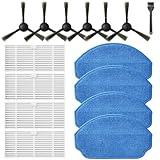
- Compatible Models: These accessories compatible for MAMNV BR151, for ZCWA BR151, for MANVINS G20, for Kilgone G20, for ONSON BR151, for GOOVI BR151, for MANVN BR151, for ZC WAS BR151, for iMartine BR151, for XIEBro Life BR151, for bObsweep Leaf 000-BR-150, for bObsweep Charlotte, for GTTVO BR151,for Tuya BR151 Robot Vacuum and Mop Combo
- Worthwhile Package: Great value br151 robot vacuum replacement parts. The package includes 6 x br151 robot vacuum brushes, 4 x br151 robot vacuum filters, 4 x br151 robot vacuum mop pads, 1 x Cleaning Tools
- Our accessories are designed to enhance cleaning efficiency and fit various models.Made from high-quality materials for durability, they are easy to install. Help your vacuum cleaner maintain peak performance.
- To ensure your vacuum cleaner maintains optimal performance, we recommend replacing the accessories every three months. Regular replacement can extend the device's lifespan, improve cleaning efficiency, and keep your home environment cleaner.
- Long-Lasting Performance: High-quality replacement parts help your vacuum perform like new, reducing wear and the need for frequent replacements. Designed to deliver thorough cleaning on all floor types, helping you save money while keeping your home fresh and tidy.
Choose the right option for your situation
| Situation | What to try |
|---|---|
| The furniture moved, but the dock stayed put and the map is mostly accurate | Run a whole-home mapping or clean-everywhere mission if the model supports it. |
| The app offers map editing or restoration | Use the supported option, checking whether restoration can be undone before applying it. |
| The layout changed substantially or the dock moved | Check the model’s instructions; iRobot advises remapping for major layout changes or dock moves on the models covered by its guide. |
| The map remains inaccurate after recovery or exploration | Delete and remap if the manufacturer supports that workflow. For iRobot i3/i4/i5, deletion and a new mapping run are required to modify the map. |
Set up a remap to capture the current layout
- Confirm the model’s mapping procedure. App labels and map features differ by brand, model, and software version.
- Put the dock where it should remain. For Roborock’s documented initial-map process, the robot starts at the dock and the dock stays unmoved.
- Open doors to the rooms you want mapped. Roborock includes this in its initial-map instructions.
- Choose a mapping or whole-home mission rather than a targeted room clean when the goal is to discover the current layout.
- Allow the run to finish and return to the dock when your model’s instructions require it to save the map.
What not to do
- Do not assume every robot updates its map while cleaning. iRobot specifically says i3/i4/i5 maps do not update during cleaning.
- Do not rely on a targeted clean to discover every newly open area. iRobot says directed cleaning will not actively search for new space.
- Do not buy a second dock to fix a furniture-related map error. iRobot’s second-dock suggestion is for people who regularly clean multiple separate spaces, not for correcting a changed room map.
Manufacturer guidance
- iRobot: Guide to Imprint Smart Maps
- iRobot: ClearView LiDAR mapping guidance
- Roborock: How to create a map for my house
- Dreame: How to edit a map
- Dreame: How to fix map issues
Product prices and availability are accurate as of the date/time indicated and are subject to change. Any price and availability information displayed on Amazon at the time of purchase will apply.

