
The Tool Desk
Outbyte PC Repair FREERepair Windows errors before they cause bigger problemsFix Now →Outbyte Driver Updater FREEFix the driver behind crashes, sound loss and screen glitchesFind Drivers →There is no single drive list that applies to every Dell PowerEdge server. A drive must match the server’s model and generation, bay and backplane, storage controller, interface, form factor and firmware—and Dell validation can affect whether the drive is supported. Use the exact model’s Dell manual and the controller documentation to check a replacement before buying or installing it.
What determines whether a drive is compatible?
Compatibility is a match across several parts, not just the connector. Check the exact PowerEdge model and generation, the installed backplane and available bays, and the PERC, HBA, BOSS or software-RAID controller. Then verify the drive’s interface, physical size, speed, capacity, sector format and firmware against the documentation for that combination.
A drive that fits the carrier may still be unsupported by the controller or backplane. Dell’s R730 service manual says to use only hard drives tested and approved for its hard-drive backplane. Dell’s guidance about approved drives and firmware is specific to supported configurations, not a guarantee that an arbitrary retail drive will work.
Which drive types can a PowerEdge use?
Dell documentation covers SAS, SATA HDDs and SSDs, Nearline SAS, and NVMe PCIe SSDs, but not every server or controller supports every type. Match the interface to the specific platform and controller documentation.
What’s actually slowing this PC down?
Pick the symptom - the matching free tool is one click away.
#1 Best Overall

- It Support 2.5 inch SAS or SATA drives, Heretom hard drive tray caddy is compatible for PowerEdge 17th-14th Generation, please check your server before purchase. PowerEdge 17th Generation R470, R570, R670, R770, R6715, R6725, R7715, R7725, R7725xd; PowerEdge 16th Generation: R760 R760xs R7615 R7625 R660 R6615 R6625 T560 HS5610 HS5620; PowerEdge 15th Generation: R750 R750xs R7515 R7525 R650 R650xs R6515 R6525 R550 T550 R450; PowerEdge 14th Generation: R7415 R7425 R6415 R740 R740xd R640 R440 R340.
- Compatible with Dell XC Series appliances XC640-4, XC640-4i, XC6420-6, XC740xd-24, XC940-24, XC6420-6.
- Part numbers DXD9H and 0DXD9H.
- You will get 4 trays with 16 srews and 8 sticker labels per purchase.
- SAS: Common in enterprise PowerEdge storage. The controller and backplane must support the drive’s interface speed and form factor.
- SATA HDD or SSD: Supported on documented systems and controllers. A SATA connector alone is not enough to establish support: for example, the PERC S150 guide excludes the M.2 SATA form factor.
- Nearline SAS: Listed in some model-specific drive tables, including the R730 documentation.
- NVMe PCIe SSD: Requires a platform and controller configuration that supports NVMe. The PERC S150 guide says only Dell-compliant NVMe PCIe SSDs are supported; it also identifies some non-Dell-certified device IDs as usable but unsupported.
NVMe is not simply another name for SAS or SATA. Confirm that the system has the necessary NVMe support rather than assuming a drive will work because its size or connector appears to fit.
How do the supported bays and controller examples differ?
The R730 owner’s manual lists different drive options for its eight- and sixteen-drive configurations. Dell’s PERC controller matrix also shows why the installed controller matters: interfaces and maximum drive counts differ by controller, and platform limits still apply.
Rank #2
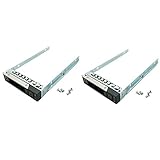
- 2 caddies and 8 screws in one box. Compatible Dell P/N: DXD9H, 0DXD9H. Compatible with Dell PowerEdge 14th 15th 16th Generation servers
- 14th Generation: R340, R440, R640, R740, R740xd, R840, R940, R940xa, R6415, R6516, R7415, R7425
- 15th Generation: R350, R450, T550, R550, R650xs, R750xs, R650, R750, R750xa, R6515, R6525, R7515, R7525, XE8545, C6520
- 16th Generation: T560, R660, R6615, R6625, R7615, R7625, R760, R760xa, R760xs, R860, R960, HS5610, HS5620
- XC640-4, XC640-4i, XC740xd-24, XC940-24, XC6420-6 and C6620, C6420/25
| Documented configuration | Drive support stated by Dell | Qualification |
|---|---|---|
| PowerEdge R730, eight-drive configuration | Up to eight 3.5-inch or 2.5-inch hot-swappable SAS, SATA or Nearline SAS drives | From the R730 owner’s manual; check the exact backplane and configuration. |
| PowerEdge R730, sixteen-drive configuration | Up to sixteen 2.5-inch hot-swappable SAS, SATA, SAS/SATA SSD or Nearline SAS drives | From the R730 owner’s manual; this is a distinct configuration from the eight-drive version. |
| PERC H965I, Series 12 entry | 22.5/12/6 Gb/s SAS, 6 Gb/s SATA/SAS, and Gen3/Gen4 NVMe are listed | From Dell’s controller matrix, accessed in 2026; this does not establish that every PowerEdge platform accepts this controller or every listed drive. |
| PERC S160 software RAID entry | Up to eight SATA or 30 NVMe drives | From Dell’s controller matrix, accessed in 2026; subject to platform limits. |
These examples are not interchangeable compatibility lists. The R730 bay table describes particular server configurations; controller-matrix entries describe controller capabilities that must also be supported by the platform and its configuration.
Can you use a non-Dell drive?
Do not treat the brand on a retail drive as proof of compatibility. Dell describes agnostic and branded SSDs with Dell firmware, PowerEdge-compatible mode-page settings, inventory VPD and Dell Update Package support. Those characteristics are part of Dell’s support context; a drive that merely operates in a server may still be outside Dell’s support promise.
Free tools Windows power users keep installed
One-click scans. No signup required.
Rank #3

- 3.5 Inch Hot Plug Hard Drive PowerEdge T340 Tower Server Chassis
- Microsoft Windows Server 2019 Standard Operating System
- Processors: Intel Xeon E-2124 Quad-Core 3.3GHz 8MB CPU, Up To 4.3GHz Turbo
- Memory: 32GB (2 x 16GB) DDR4 PC4-21300 2666MHz Unbuffered Memory
- Hard Drive: 8TB (4 x 2TB) 7.2K RPM 6Gb/s SATA 3.5 Inch HDDs in RAID
Dell’s agnostic SSD article names Micron, Intel, Kioxia (formerly Toshiba), Hynix and Samsung as approved SATA vendors, and Kioxia, Samsung and Western Digital as approved SAS vendors. This is supply-chain guidance, not a blanket approval of every retail model sold by those companies. Verify the exact drive and configuration in the applicable Dell documentation, especially where a controller guide requires Dell-compliant or Dell-validated drives.
Can SAS, SATA and NVMe drives share a RAID virtual disk?
Do not assume that drives can share a RAID virtual disk because their connectors match or because the controller supports both interfaces. Mixing rules depend on the controller and configuration.
Rank #4
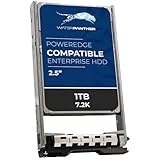
- SAS 12Gbps 2.5 INCH SFF disk drives compatible in Dell servers (2.5in)
- Equipped with a Dell Gen. 13 (13G) hot-swap HDD caddy
- Optimized for 24x7 availability in high workload environments
- Enterprise-grade reliability and performance for mission critical data centers
- Backed by a 2-year replacement warranty, expanded compatibility details within product description
- R730 SAS and SATA: Dell’s R730 service instructions say combining SAS and SATA hard drives in the same RAID volume is not supported.
- PERC S150 NVMe and SATA: The S150 guide says NVMe PCIe SSDs and SATA drives cannot be mixed in a single RAID virtual disk.
Check the RAID rules for your exact controller before adding or replacing a drive. Support for two drive families separately does not mean they can be combined in one virtual disk.
How to check a drive before buying or installing it
- Identify the server. Record the exact PowerEdge model, generation and service tag so you can find the correct system documentation.
- Find the model-specific drive table. In the Dell owner’s or installation manual for that server, check the supported hard-drive and SSD options and the configurations to which they apply.
- Identify the storage controller. Check the installed PERC, HBA, BOSS or software-RAID controller, then compare its supported interfaces and drive limits with Dell’s controller documentation.
- Match the physical and technical details. Verify the bay size and carrier—such as 2.5-inch SFF or 3.5-inch LFF—and the drive’s interface, speed, capacity and sector format against the system documentation.
- Confirm validation and firmware requirements. If the controller or system documentation requires Dell-compliant or Dell-validated drives, do not assume an uncertified drive is supported just because it is recognized.
- Check RAID and replacement rules. Confirm whether the intended drive can join the existing virtual disk and whether firmware requirements apply before inserting a replacement. Dell’s R730 service instructions direct users to use drives tested and approved for the backplane.
How much should older Dell compatibility lists be trusted?
Dell publishes compatibility information for multiple generations. Its compatible-server document groups sixth- through eleventh-generation PowerEdge systems, including rack, tower and blade families such as the R710, R610, T710 and M1000e. Such a list can help identify legacy systems, but it does not establish support for newer generations. Prefer the current Dell manual for the exact model and configuration.
Do these 3 things before closing this tab:
1Fix the driver behind crashes, sound loss and screen glitches2Repair Windows errors before they cause bigger problems3Scan for outdated or missing drivers - takes under a minuteBest Value

- WORK WITH- This tray can be used all DELL PowerEdge servers that use 2.5 inch SAS/SATA hotswap drives, compatible part number P/N: 08FKXC/ G176J / 0G176J / G281D / 0G281D / WX387
- COMPATIBLE MODELS- This tray is compatible with DELL PowerEdge: 14th Gen T440 T640 13th Gen R330 R430 T430 R630 T630 R730 R730XD R830 R930 XC630 XC730 XC730xd. 12th Gen R320 R420 T420 T620 R620 R720 R720XD R820 R920. 11th Gen R310 R410 R415 R510 R515 R610 M610 T710 R710 M710 R715 R810 R815 R910 M910
- EASY TO INSTALL- This hard drive tray is with SAS/ SATA disk port, support hot-plug, easy to install
- HIGH QUALITY- 100% brand new and replacement for DELL PowerEdge servers that accept 2.5" drives, tested before shipment
- PACKAGE INCLUDES- 4 x 2.5" SAS SATA Hard Drive Tray Caddy +16x Mounting Screws
Which phrase should you use when searching for a replacement?
Start with a model-qualified search, such as Dell PowerEdge [exact model] SAS SSD or Dell PowerEdge [exact model] SATA SSD. Add the bay size and controller model when known, then verify the candidate against the Dell manual and controller requirements. Searching only for a brand or a generic “Dell-compatible drive” is too broad to confirm support.
Quick Recap
Dell documentation referenced
- Dell PowerEdge R730 owner’s manual and service manual.
- Dell PERC S150 guide.
- Dell PERC controller matrix.
- Dell agnostic SSD article.
- Dell compatible-server document for sixth- through eleventh-generation systems.
Product prices and availability are accurate as of the date/time indicated and are subject to change. Any price and availability information displayed on Amazon at the time of purchase will apply.

