
Do these 3 things before closing this tab:
1Fix the driver behind crashes, sound loss and screen glitches2Repair Windows errors before they cause bigger problems3Scan for outdated or missing drivers - takes under a minuteTo activate a new account by email, create it in a pending state, send a single-use verification link or code to the submitted address, and mark the address verified only after the user successfully confirms it. Then require the user to sign in through the normal authentication flow. Email confirmation shows that someone can access that mailbox; it does not prove their real-world identity.
How email account activation works
- Collect and check the address. Use a tolerant format check rather than a rigid pattern that could reject valid addresses. A well-tested email-address library can help.
- Create a pending account. Store the submitted address and apply a documented, consistent comparison policy. OWASP recommends lowercasing the domain while preserving the original input; do not assume that dots, plus-addresses, or other provider-specific conventions mean the same thing for every provider.
- Generate a confirmation secret. Use a cryptographically secure random token or code, associate it with the intended account and verification purpose, and give it an expiry. It should work once only.
- Send the confirmation. Email a link or code with clear instructions, including how to request another message if needed.
- Validate the response. Check that the token or code belongs to the pending account, has not expired, and has not already been used. On success, mark the address verified and invalidate the secret.
- Require normal sign-in. Do not treat a visit to the verification link as an authenticated session. Have the user authenticate through the application’s ordinary sign-in process.
OWASP describes the common pattern as asking a user to click an emailed link or enter an emailed code in its Input Validation Cheat Sheet. The implementation details should fit the service’s risk and client environment.

Choose a link or a code
| Method | Typical user experience | Practical consideration |
|---|---|---|
| Email link | Usually a single click. | A mail scanner may open the link, or the message may be opened on a different device. Ensure confirmation is bound to the intended account and action. |
| Email code | The user switches to the app and enters the code. | Entering the code in the intended app session can suit environments where link handling is awkward. Protect it against guessing, reuse, and expiry. |
Neither method is universally better. Both need secure generation, account binding, one-time use, an expiry, and controls on repeated attempts. OWASP discusses both approaches in its confirmation guidance.
Set safe token and expiry rules
OWASP’s Input Validation Cheat Sheet gives a token length of at least 32 characters and an eight-hour expiry as examples for email ownership verification. These are implementation guidance, not universal legal limits. Generate tokens with a cryptographically secure source, bind each to the relevant pending account and purpose, allow only one successful use, and invalidate it on confirmation.
Quick wins for a faster PC:
Repair Windows errors before they cause bigger problemsFix Now →Scan for outdated or missing drivers - takes under a minuteDriver Scan →#1 Best Overall

- TokenWorks IDVisor Smart Plus reads Passports & Drivers License/IDs from all 50 states, Canadian provinces, and their Military IDs. Fast operation - 1 second per scan. 12+ hour battery operation, 350+ standby time. LIFETIME SOFTWARE UPDATES and complementary US-based phone/email support.
- Calculates Age Automatically - Intuitive Icons, Vibration & Human voice warnings. Notifications for Underage & ExpiredExpeired ID; Pop-Up alerts for Underage, Passback (Looping), Tagged. Challenge questions (Zodiac sign, state capital/motto, area code etc), customizable age verification for age restricted products depending on the jurisdiction.
- VIP/Banned Software – Tag customers with custom categories with expiration dates, add notes such as “VIP, banned started a fight, owes money, etc”. 6 expiration. FIND MY DEVICE- Through GPS locate your scanner, lock/erase its data remotely and see the scanner on Google Maps
- Customer Relationship Management: Highlights New vs Repeating Clients. Scan Count tracks Venue Occupancy & time of visit for Covide tracking. Options for manual email & phone numbers. Easily assign "Loyalty Membership" with the press of a button. Export Scan/Customer records in Excel Format through WiFi or USB. Optional Upload/Download records from a cloud networking available for multiple devices - IDVisor Sync database through WiFi or USB export/import.
- Price / Performance Leader – We dare you to Compare
For a narrower context, NIST SP 800-63A-4, published in July 2025, specifies that covered email confirmation codes have at least six decimal digits or equivalent, remain valid for no more than 24 hours, and are invalidated after use. Those requirements apply to the standard’s identity-proofing and enrollment scope; they should not be presented as a general rule for every consumer website. See the NIST SP 800-63A-4.
Decide how long pending accounts remain and what happens after a confirmation expires. The appropriate pending-account retention period is an application policy; do not confuse it with the validity of a particular token or code.
Rank #2

- Easy Setup - Features a quick, hassle-free installation. Just plug it in, and you’re ready to verify IDs in minutes, with no additional equipment required.
- Fast & Accurate ID Scanning - Scans IDs from all 50 states, Canadian provinces, Military IDs, and optional passports. Fast operation with 1-second scans. Motion-activated scanning allows for one-handed operation with no button press needed. Automatically calculates age with intuitive icons. Notifications for underage, expired IDs and barcode detective status, with customizable age verification for age-restricted products based on jurisdiction. Optional features include customer banning, photo capture, and Anti-passback.
- Loyalty Tracking - Tracks customer visit count directly on the screen, providing valuable information to identify new clients or frequent visitors who may pose less of a security risk.
- Advanced Fake ID Detection - Includes two features; a free subscription to Barcode Detective, which uses hidden barcode data to detect fake IDs. Advanced checks identify typos, jumbled info, misplaced data, and secret codes and a DMVCheck, a pay-per-use service that verifies scanned IDs with issuing DMVs in 40+ states.
- No Ongoing Fees - Lifetime software upgrades and complimentary US-based phone/email support included. No subscription fees required
If the activation email never arrives or the link expires
- Ask the user to check the address they entered, including spelling, and check spam or junk folders.
- Provide a resend action that issues a fresh, time-limited confirmation secret rather than extending or reusing a previously consumed token.
- Rate-limit resend requests and confirmation attempts, and monitor repeated activity.
- Use consistent responses so the resend flow does not reveal whether an address is already registered.
- Define what happens to stale pending accounts, such as allowing a new confirmation request or requiring registration to be restarted.
Keep the resend experience helpful without disclosing sensitive account state. OWASP’s Email Validation and Verification Cheat Sheet covers anti-enumeration, token handling, activation, and logging considerations.
Protect account state and user privacy
- Do not enable an unverified account. Keep it pending until confirmation succeeds.
- Do not log secrets. Avoid logging full verification URLs or tokens. Mask or pseudonymize addresses in logs.
- Limit guessing and replay. Rate-limit attempts, reject expired or previously used secrets, and bind a secret to the account and action for which it was issued.
- Normalize addresses deliberately. Preserve the original submitted value and apply the same comparison rules consistently; avoid provider-specific transformations unless the application fully controls that behavior.
- Do not equate mailbox access with identity. Email verification confirms access to an address, not the person’s identity or authorization to access protected information.
Registration assurance should match the sensitivity of the service. OWASP’s registration testing guidance frames registration requirements around the security needs of the information being protected.
What’s actually slowing this PC down?
Pick the symptom - the matching free tool is one click away.
Rank #3
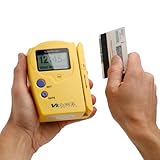
- Compatible States: Alabama, Arizona, Colorado, Louisiana, Minnesota, New Mexico, Ohio, British Columbia (Canada) ** as of 2025 NO LONGER COMPATIBLE with new California and Texas IDs.
- Magnetic Stripe Technology: Reads ONLY magnetic stripe ID/DL cards in the U.S. and Canada. DOES NOT scan Barcode formatted IDs
- Age Verification Display: Calculates and displays Age, name, and date of birth. Scroll to view additional data
- Expired ID Alert: Expired message displayed with double beep to alert the user
- Display and Audio Features: Graphic LCD with back light and audio output in form of buzzer
When a user changes their email address
Treat an address change as a sensitive account change, not as a routine edit. OWASP’s Authentication Cheat Sheet describes safeguards that include reauthentication, recording the proposed address as pending, notifying the old address, and confirming the new one. Keep the existing verified address in force until the new address is confirmed, according to the application’s policy.
Quick Recap
Product prices and availability are accurate as of the date/time indicated and are subject to change. Any price and availability information displayed on Amazon at the time of purchase will apply.

