
If you searched for Moltbot, the active project README identified in the available documentation now presents the assistant as OpenClaw. OpenClaw is a self-managed assistant that runs on your devices and connects to messaging channels through a Gateway. For current installation steps, use the project’s own documentation rather than older Moltbot-branded third-party tutorials.
What is Moltbot, and why is it called OpenClaw?
The name in the title reflects the project identity readers may have encountered as Moltbot. The repository README covered here identifies the project as OpenClaw and describes it as “a personal AI assistant you run on your own devices.” The README is the project’s statement, not a quotation from an individual.

OpenClaw is organized around a Gateway control plane: the Gateway connects the assistant with supported communication channels and tools. The assistant is intended to run on a device you manage, rather than being only a hosted chat webpage. The repository README is available at the OpenClaw project repository; check its current identity and linked documentation before installing, since names and software guidance can change.
What can OpenClaw connect to and do?
Messaging channels
The project README lists integrations including WhatsApp, Telegram, Slack, Discord, Google Chat, Signal, iMessage, IRC, Microsoft Teams, Matrix, Feishu, LINE, Mattermost, Nextcloud Talk, Nostr, Synology Chat, Tlon, Twitch, Zalo, WeChat, QQ, and WebChat. A listing does not mean every channel has identical features or setup steps. Use the project’s current channel documentation for the specific service you intend to connect.
Recommended Free Tools
#1 Best Overall
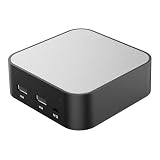
- LOCAL LLM DEPLOYMENT: Powered by RK3566/H618 ARM processor, enabling fully offline private AI computing without relying on cloud services.
- ULTRA-LOW POWER CONSUMPTION: Runs at just 5W, keeping energy usage minimal while staying online 24/7 as a home lab or personal web server.
- WHISPER-QUIET OPERATION: Fanless design operates at an ultra-silent 25dB, making it ideal for home or office environments without disruptive noise.
- PRIVATE DATA STORAGE: Keeps all AI workloads and data stored locally on-device, ensuring complete privacy with no data sent to external servers.
- VERSATILE CONNECTIVITY: Features dual USB ports and a TF card slot, supporting WeChat Claw-Bot integration and self-hosted AI assistant deployments.
Tools and companion apps
Documented first-class tools include browser, canvas, nodes, cron, and sessions, plus selected actions for Discord and Slack. The project also describes optional companion components: Windows Hub, a macOS menu bar app, and iOS and Android nodes. These are documented capabilities, not a guarantee that every device, tool, or channel is available in every configuration; consult the project documentation for details.
How to install OpenClaw
The repository’s setup guidance recommends Node 24, or Node 22.19 or later. It gives the following package installation and onboarding commands:
-
Install a supported Node.js version: Node 24, or Node 22.19 or later, according to the repository guidance.
-
Install OpenClaw globally with
npm install -g openclaw@latest.Free tools Windows power users keep installed
One-click scans. No signup required.
Special offer. See more information about Outbyte and uninstall instructions. Please review EULA and Privacy policy.Rank #2
Sale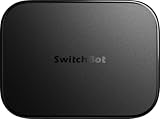 SwitchBot AI Hub, AI Smart Home Hub with OpenClaw Support, Local NVR Camera Storage, Home Assistant Pre-Installed, Matter Bridge, Dual-Band Wi-Fi, 16GB MicroSD Included
- OpenClaw Support Built In: AI Hub supports OpenClaw at home, connecting supported cameras and smart devices so compatible skills can use camera context, device actions, and chat-based control.
- Camera AI That Understands Context: Pair AI Hub with compatible SwitchBot cameras, Video Doorbell, or RTSP cameras to help describe visitors, pets, packages, and family activity. AI+ subscription required.
- Store Event Recordings at Home: Save camera events with the included 16GB MicroSD card, expand to a 1TB MicroSD card or up to a 16TB external hard drive, and manage up to 8 compatible cameras in one place.
- Faster Local Automations: AI Hub works as an edge hub for select SwitchBot BLE devices, with automations up to 4x faster under SwitchBot lab conditions; Home Assistant Pre-installed and Matter Bridge expand supported smart home setups.
- Built for Cameras and Smart Home Control: AI features require AI+ subscription and compatible cameras. AI Hub does not include IR control; for TVs or air conditioners, pair with a SwitchBot Hub that supports IR.
-
Start onboarding and install the daemon with
openclaw onboard --install-daemon. -
Follow onboarding to configure the Gateway, workspace, channels, and skills.
The daemon installation is intended to keep the Gateway running as a user service. The README also documents running in the foreground for debugging and links to a beginner guide. Follow the live project installation documentation for exact current instructions; runtime requirements and commands can change.
Should you use your current computer or a dedicated host?
OpenClaw is software, not a physical product, and the reviewed project material does not require buying a particular device or establish minimum hardware specifications. Your choice is mainly about availability and maintenance:
Rank #3

- [Plug & Play — Save Your Saturday] AgentBox P1 comes pre-installed with optimized Linux and OpenClaw. While a DIY single board computer kits build requires 3–5 hours of assembly, OS flashing, dependency installation, and software configuration (plus $150+ in accessories), AgentBox P1 is ready in 5 minutes. Just plug in power, connect to WiFi, and your private AI agent is live.
- [All-in-One AI Team] AgentBox P1 comes pre-installed with essential feature modules and is fully compatible with the community’s vast array of third-party Skills, making it easy to customize features to your needs. AgentBox P1 can turn your draft notes into polished presentations, condense a 50-page document into key takeaways, scan your emails and calendar, and send prioritized summaries to Telegram—all while running 24/7 on your private device, with no cloud storage or subscriptions required.
- [Your Data Stays at Home] All conversations, agent memory, and task logs run and store locally on the 64GB eMMC. No cloud uploads, no subscription lock-in. API keys are encrypted and stored in the secure local chip, making it ideal for privacy-sensitive users, developers, and small teams.
- [Multi-Model & Multi-Channel Ready] Native support for OpenAI, Claude, Gemini, DeepSeek, and custom APIs. Switch models freely and connect Telegram, WhatsApp, Slack and more with simple QR or token binding—turn your favorite chat apps into a 24/7 AI assistant.
- [Silent, Fanless, Always Working] Passive heatsink design runs whisper-quiet 24/7 at just 12W — costing less than $2/month in electricity. While you sleep, your AI agents keep working: answering messages on Telegram and WhatsApp, running scheduled tasks, monitoring webhooks, and preparing your morning briefing. Built-in system recovery and OTA rollback ensure stability. It's the most reliable teammate you'll ever have — and it never asks for vacation.
| Approach | Availability | Cost and maintenance | Best fit |
|---|---|---|---|
| Existing computer | The Gateway is available while that computer is on and running it. | Uses hardware you already own; you manage its uptime and software. | Trying the assistant or using it only when your everyday computer is on. |
| Dedicated always-on host | Can keep the Gateway available when your everyday computer is off, if configured to run continuously. | Requires a separate device and its ongoing power, updates, and maintenance. The project material does not specify a required model or minimum hardware. | Readers who want the assistant reachable more consistently. |
A mini PC is one possible category of dedicated host, not an OpenClaw requirement. No benchmark or hardware comparison is established by the project material cited here.
Is OpenClaw safe to run?
Safety depends substantially on who can reach the assistant and what permissions its tools receive. The README says tools run on the host by default for the main session. That means you should treat the assistant’s access as consequential, especially if it can interact with files, applications, or other host resources.
Understand pairing and sandboxing
The project describes pairing as the default for unknown senders on several channels: an unknown sender receives a code, and their message is not processed until approval. This is a useful gate, but it does not replace careful channel configuration or review of who can interact with the assistant.
For non-main sessions, the project describes sandboxing options, with Docker as the default sandbox backend. A sandbox changes the environment in which tools operate; it is not the same as granting unrestricted host access. Before using remote access or allowing multiple people to use the system, review the project’s security, Gateway exposure, and sandboxing documentation and choose settings deliberately.
Use official project channels
Security risks are not only theoretical. Axios reported in January 2026 on the assistant’s extensive potential access to a user’s machine and cited a contemporaneous report of exposed or misconfigured control panels; this is historical reporting, not a current count of exposed systems. TechRadar reported on January 29, 2026, that a fake VS Code extension impersonating Moltbot carried a trojan. Obtain software through official project channels and avoid unofficial extensions or lookalike downloads. See Axios’s January 2026 report and TechRadar’s January 2026 report.
Local access or remote access?
Keeping use local to the device or network limits the need to expose the Gateway beyond your immediate environment. Remote access can make the assistant reachable when you are away, but it also increases the importance of the project’s Gateway exposure guidance and access controls. The available project material describes Gateway exposure and security documentation but does not establish one universally safe remote-access configuration; follow the current official instructions rather than opening access casually.
Independent reader supportYour contribution helps us test, update, and keep practical guides available for everyone.What to decide before connecting a channel
-
Which messaging service you actually need, and what its current integration supports.
-
Who is allowed to message the assistant, and how unknown-sender pairing is configured for that channel.
Crashes, No Sound, or Screen Glitches?
Random freezes, missing sound and display glitches usually trace back to one bad driver. Find and replace yours safely.Free scan · under a minuteWindows Errors? Fix Them Before They Spread
Repair common Windows errors and clear accumulated junk for a smoother, more stable PC - no reinstall needed.Free scan · no reinstallSpecial offer. See more information about Outbyte and uninstall instructions. Please review EULA and Privacy policy.Best Value
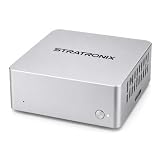 STRATRONIX STA-100 Workie – Private AI Office Assistant, Local AI Agent for Work & Everyday Productivity, Built on OpenClaw, Compact Desktop AI Device for Home & Small Business
- YOUR DATA STAYS LOCAL Privacy-First AI. No Cloud. No Tracking. STRATRONIX STA-100 processes and stores everything on-device. Documents, meeting notes, customer records, and market research never leave your hardware. Built for professionals, freelancers,private ones and small businesses who refuse to surrender their data to Big Tech. Zero cloud telemetry, zero third-party data sharing. It is equiped with 32GB inner storage and our SD card can support up to 512GB SD card. One time purchase, no monthly rent cost. All datas belong to user only.
- Easy Configuration. Zero IT Team. Pre-installed with OpenClaw AI agent platform, XFCE Linux desktop, and ready-to-use office templates (documents, meetings, after-sales, market analysis). Plug in power, connect Wi-Fi, add your AI API key (DeepSeek, Gemini, Claude, or ChatGPT), and your private AI assistant is running in 8-10 minutes. In future, it is wihtout issue and users don't need to be headache on its continous forced upgrading. We use Linux server OS to assure its stability in long term. In hardware, we develop our product from the driven layer all by self. We have made it the easest OpenClaw for the most public in principle.
- 24/7 ALWAYS-ON ASSISTANT Your AI Co-Worker Never Sleeps. Silent operation, small size and remote access from phone or laptop anywhere via IMS. STA-100 autonomously drafts documents, takes meeting notes, manages schedules, tracks customer service tickets, and scrapes market data — even when you're traveling, sleeping, or off the clock. One device, one dedicated AI role, zero idle time.
- One STA-100 Per Role. Multiple = AI Workflow Team. Each device handles a single specialized role (Documents Bot / Meeting Bot / Sales Support Bot / Finance Bot / Market Intel Bot). Stack multiple STA-100 units on your LAN to build an AI workgroup that coordinates via OpenClaw. Native inter-agent handoffs create closed-loop automation. Perfect for solo founders, agencies, consultancies, small e-commerce, and SMBs scaling without headcount.
-
Whether tools should operate with host access in the main session or within the documented sandbox options for non-main sessions.
-
Whether the Gateway needs to remain available when your everyday computer is off, which determines whether a separate always-on host is useful.
-
Whether you need remote access, and what additional exposure and controls that requires.
Quick Recap
Bestseller No. 1SaleBestseller No. 2Bestseller No. 4
Product prices and availability are accurate as of the date/time indicated and are subject to change. Any price and availability information displayed on Amazon at the time of purchase will apply.

