
Outdated Drivers Are Slowing You Down
One free scan finds every outdated or missing driver and matches the right update for your exact hardware.Free scan · exact hardware matchWindows Errors? Fix Them Before They Spread
Repair common Windows errors and clear accumulated junk for a smoother, more stable PC - no reinstall needed.Free scan · no reinstallThere is no reliable universal setting that makes commerce PDFs smaller without affecting speed or preservation. Build the report around your own representative documents and production-like infrastructure, and evaluate output size alongside ingest latency, sustained throughput, fidelity, and policy compliance.
What a useful compression report should measure
A final file size alone cannot tell you whether a compression option is suitable for an archive. A smaller file may take longer to produce, alter image content, affect searchability, or fail an applicable records requirement. Keep the measurements below together for each run.
- Input profile: Preserve the test set and record document class, input bytes, page count, and relevant text or image characteristics.
- Output size: Record output bytes, compression ratio (input bytes divided by output bytes), and percentage size reduction. Group results by document type and size band rather than relying only on an overall average.
- Processing performance: Record end-to-end elapsed time, per-document latency, documents or pages per second, concurrency, and resource use where available. Measure sustained throughput at the intended archive workload, not just the time to process one file.
- Pipeline configuration: Record the exact tool and version, runtime environment, PDF/A target if applicable, image resampling, color conversion, compression method, and any content removal.
- Preservation and compliance: Keep fidelity inspection, OCR/searchability checks where required, and validator or conformance results beside each size and performance result.
This is a practical test plan, not a published universal reporting standard; the cited sources do not establish a standard schema or a target throughput for commerce archives.
How to compare compression options fairly
Use the same preserved input sample for each option, then run each pipeline on the intended host and at the concurrency expected in production. Include the actual mix of records—such as born-digital invoices, scanned forms, or image-heavy statements only when those classes occur in your archive. Compare results by document class as well as across the collection, since content and conversion behavior influence both output and processing cost.
The Tool Desk
Outbyte Driver Updater FREEScan for outdated or missing drivers - takes under a minuteDriver Scan →Outbyte PC Repair FREEClear out junk files and repair common Windows errorsFree Scan →#1 Best Overall

- 256GB ultra fast USB 3.1 flash drive with high-speed transmission; read speeds up to 130MB/s
- Store videos, photos, and songs; 256 GB capacity = 64,000 12MP photos or 978 minutes 1080P video recording
- Note: Actual storage capacity shown by a device's OS may be less than the capacity indicated on the product label due to different measurement standards. The available storage capacity is higher than 230GB.
- 15x faster than USB 2.0 drives; USB 3.1 Gen 1 / USB 3.0 port required on host devices to achieve optimal read/write speed; Backwards compatible with USB 2.0 host devices at lower speed. Read speed up to 130MB/s and write speed up to 30MB/s are based on internal tests conducted under controlled conditions , Actual read/write speeds also vary depending on devices used, transfer files size, types and other factors
- Stylish appearance,retractable, telescopic design with key hole
- Establish the baseline: Run the current ingest path without changing settings and record its file sizes, end-to-end latency, sustained throughput, resource use, and validation results.
- Change one relevant setting or pipeline choice at a time: Examples include a different PDF/A target, lossless versus lossy image compression, or an image-resampling policy. Preserve the precise configuration for each run.
- Repeat under representative load: Measure per-document latency and sustained throughput at the target concurrency, rather than inferring archive performance from a single-file timing.
- Inspect preservation and compliance: Check visible content and imagery, OCR/searchability if required, and applicable validators or policy checks before accepting a smaller result.
- Report distributions and exceptions: Show results by document class and size band, and identify records that became larger, slower, or failed a preservation check instead of hiding them in a collection-wide average.
Evaluate each candidate across output size, ingest speed, fidelity and discoverability, compliance and portability, and operational cost. The Library of Congress describes the Archive Ingest and Handling Test as a practical test of transfer, ingest, management, and export between institutions; that workflow perspective supports assessing compression as part of the archive path rather than as an isolated file operation (Library of Congress: The Archive Ingest and Handling Test).
Why smaller output can carry trade-offs
Compression results depend on document contents and the conversion path. Lossless cleanup, such as removing duplicate resources, differs from lossy changes such as image downsampling or color conversion. Record whether image dimensions, color spaces, or visible content changed, and whether the chosen method is lossless or lossy. A smaller output is not automatically a better archival result.
Rank #2
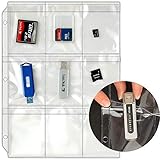
- Crafted of crystal clear 6-gauge vinyl.
- Nine pockets per page, with weatherproof flaps.
- Includes holes for use with three-ring binders.
- Overall size: 8 11/16" x 11 9/16".
- Inside capacity (of each pocket): 2 5/8" x 3 7/16".
A PDF Association article reporting Big Faceless Organization conversion tests illustrates how version and implementation can affect size. Across its 15,083-PDF corpus, enabling object compression in PDF/A-3 was estimated to save 5.1% of the original archive size; removing object compression in PDF/A-1 was estimated to cost 0.6%. These are results for that corpus and implementation, not forecasts for another archive (PDF Association: Large Scale Testing and Analysis of PDF to PDF/A Conversion).
The same article gives a single 32-page example: Flate took 5 seconds to rasterize and 8.4 seconds to compress the raster pages to 10.5% of the original size. JPEG 2000 reduced that result by about half again, but compression took 29.1 seconds and page generation took about three times longer. This example demonstrates a possible size-versus-time trade-off; it is not a general performance benchmark.
Recommended Free Tools
Rank #3
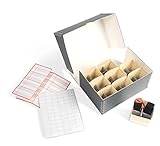
- Store your digital media storage in a central location to prevent the loss of precious memories
- Archival quality: acid-free, lignin-free, passed P.A.T. (Photographic Activity Test), pH 8.0-9.0, buffered
- Deep clamshell lid keeps out damaging dust, dirt and light
- Labels and indexing card makes sorting and identifying contents easy
- Includes one box, nine 20 pt. folder stock trays, nine E-flute dividers, 72 small white labels, and one indexing card
The article describes default Flate compression as lossless and fast, while DCT/JPEG is lossy and can introduce visible noise in line graphics or text. JPEG 2000 can be lossless or lossy, and the article notes it is unavailable for PDF/A-1. Datalogics’ vendor-authored comparison likewise reports variation across tools and inputs, and tests more than 20 tools and configurations; it should not be treated as an independent market ranking (Datalogics: PDF compression comparison).
Apply the records policy before choosing a setting
Compression limits depend on governing retention obligations and jurisdiction. NARA’s guidance concerns US federal digitized permanent paper records; it is not automatically binding on a private commerce archive or every other jurisdiction. For those federal records, NARA lists Deflate or lossless JPEG 2000 for PDF/A choices, and permits visually lossless JPEG 2000 up to 20:1 only after testing and visual evaluation for artifacts that obscure or alter information. NARA says it will not accept digitized PDFs saved with lossy compression to reduce file size, citing JPEG and JBIG2 as examples (NARA: Appendix A: Tables of File Formats).
Rank #4

- 【Free up phone and iPad memory space immediately】: If your Phone or iPad has almost used up all the memory space, this phone usb storage flash drive can help alleviate 256GB of storage space. Whether you like to shoot short videos or take selfies, our phone memory stick are perfect for you. You don't have to pay extra for additional storage space, just plug in the external storage space of your phone. Enjoy the extra space (256GB) of the phone flash drive.
- 【Securing Personal Files】: The phone photo transfer stick provides a separate password function to encrypt the file information in the app. You can set a password to effectively protect your private files and protect the whole storage or selected parts. In this way, you can use the phone thumb drive with confidence and enjoy a more comfortable and secure file storage experience.
- 【One-click backup】: Back up your files, photos, videos and Phone book with just one click. Our phone photo stick is easy to use and comes with an APP that allows you to back up your data quickly and easily. Our phone usb flash drive supports sharing photos to social media such as: Facebook, Twitter, etc., and you can even take photos or videos on our jump drive and save them directly to the zip drive. With 256GB of storage space, you'll have more space and time to do what you love.
- 【High transfer speed】: Transfer photos, videos, and files in seconds with our USB stick. With a write speed of up to 20 MB/s and a read speed of up to 25 MB/s, our flash drive for phone have higher performance than conventional usb storage flash drive. Save time and get more done with phone photo storage stick. (Tip: phone/iPad needs to download "EASYFLASH PRO" APP from APP Store when using memory stick; Android phone/PC no need to download APP).
- 【High Compatibility】: This thumb drive is compatible for devices running iOS 12.1 and above, supports Android phones with OTG enabled, and works with computers and other devices equipped with USB ports. Note: The displayed capacity may appear lower than 256GB/512GB because storage brands use 1GB = 1000MB, while computers read 1GB = 1024MB.
NARA also distinguishes embedded OCR from replacing the original image. Its guidance accepts embedded OCR when it does not substitute generated or modified content for the bitmapped original, and rejects OCR workflows that alter visible content, degrade the original image, or replace it with OCR text (NARA: Appendix A: Tables of File Formats). Commerce archives should define acceptance criteria from their own legal, contractual, and retention requirements, then validate outputs against those criteria.
Independent reader supportYour contribution helps us test, update, and keep practical guides available for everyone.Use published benchmarks only as context
Vendor and corpus figures can help frame what to test, but they do not establish expected results for a different archive or pipeline. Nutrient’s benchmark page reports a peak sustained rendering result of 112 pages per second for a simple-document profile on a 16-vCPU reference server. Its benchmark coverage describes defined document profiles from 90 KB to 25 MB, mean and P95 API-operation latency, a 16-vCPU/32-GiB reference configuration, and PDF/A/PDF/UA validation comparisons. The figure is rendering performance, not a PDF compression or archive-ingest throughput guarantee; Nutrient notes that production results depend on document mix, hardware, network conditions, and application calls (Nutrient: Document Engine benchmarks).
What’s actually slowing this PC down?
Pick the symptom - the matching free tool is one click away.
Best Value

- 【Compact Flash Drive Case】This compact thumb drive case is perfectly fit into backpacks and laptop bags, an ideal travel - friendly solution for keeping your USB drives safe on-the-go. Size~ 9.0 x 7.2 x 2.8 in
- 【USB Case Large Capacity】This USB holder case offers a large capacity, capable of holding 58 USB drives and 8 SD cards, with an extra zipper pocket providing space to store other small items like small hard drives
- 【USB Holder Case with Label】Comes with a sheet of 112 labels, allowing you to easily mark and organize your USB drives, ensuring you can quickly find the one you need
- 【Clear Flash Drive Holder】Featuring a transparent cover, it enables you to spot your USB drives much quicker when searching for the right one. Equipped with a red cord loop, perfect for attaching your air tag, enabling you to effortlessly keep track of your USB drives and SD cards at all times
- 【Ideal Gift】With high - quality tailoring and an elegant appearance, this USB drive case makes an ideal gift for anyone who owns USB drives
Before using vendor performance numbers for procurement, inspect the underlying reports and versions and compare their conditions with your intended workload. Your acceptance threshold should come from archive requirements and measured operational capacity, not from a published reference figure.
Quick Recap
Product prices and availability are accurate as of the date/time indicated and are subject to change. Any price and availability information displayed on Amazon at the time of purchase will apply.

