
Recommended Free Tools
The NVIDIA DGX Spark 64GB is a compact desktop system for developers, researchers and data scientists who want to build and run AI workflows locally—not simply use hosted AI apps. NVIDIA says the new configuration supports models of up to 100 billion parameters on-device and will start at $4,999 when partner availability begins October 23, 2026. Those are NVIDIA’s announced claims and terms, not independent benchmark results or confirmation of retail stock.
The practical appeal is having a local environment for experiments, inference, agents, fine-tuning and data science. Whether a particular model runs well depends on more than its parameter count: precision, context length, workload and performance expectations matter too.

What the DGX Spark 64GB is built to do
DGX Spark 64GB is an AI development computer, rather than a general consumer PC positioned mainly for everyday tasks. NVIDIA says the 64GB configuration retains the GB10 Grace Blackwell Superchip, DGX OS and NVIDIA AI software stack used by the 128GB model. Its intended users include developers, researchers and data scientists working on local AI projects.
NVIDIA describes uses including local experimentation and inference, agent development, fine-tuning and data science. In practical terms, that can mean testing a model or prototype on a desk, iterating on an AI application, or running an agent without sending every prompt and input to a hosted service.
#1 Best Overall

- Supercomputer performance directly to your desk in a compact, energy-efficient design, enabling enterprise-scale AI and high-performance computing right where you need it.
- The power of Grace Blackwell architecture, delivering up to 1 petaFLOP of AI performance for local model fine-tuning, inference, and analytics, accelerating your time-to-solution.
- Designed from the ground up to build and run AI, delivering seamless integration of the full NVIDIA AI software stack —so you can develop locally and deploy anywhere.
- NVIDIA DGX Spark gives you the freedom to experiment, prototype, and innovate faster by augmenting laptop, desktop, cloud, or data center resources. With more power to learn, prototype, test, and innovate, NVIDIA DGX Spark delivers exceptional ROI for increased productivity.
- Use NVIDIA DGX Spark to unlock new ideas and experiment with large models (up to 200 billion parameters at FP4) directly on your desktop with 128GB of unified memory. Empower rapid testing, validation, and iteration—driving innovation in a secure, high-performance setting.
What NVIDIA’s 100-billion-parameter claim means
NVIDIA advertises support for models of up to 100 billion parameters on one 64GB system. Treat that as a vendor capability claim—not a promise that every model at that size will run at a useful speed, precision or context length. Parameter count alone does not tell you how much memory a workload needs or how responsive it will feel.
Before choosing a model, check its memory requirements at the precision or quantization you intend to use, the context length your application needs, and whether you expect one user or several concurrent requests. Then confirm that the model and your tools are supported by the software stack. NVIDIA’s public product information surfaced for the older 128GB system should not be used as a specification sheet for the newly announced 64GB configuration.
What you can build with the software stack
NVIDIA lists the following as supported out of the box for the 64GB announcement: NVIDIA Agent Toolkit, CUDA-X AI libraries, Nemotron open models, Ollama, vLLM and PyTorch with CUDA. Its setup guidance also lists llama.cpp and LM Studio. This makes the platform relevant to people building local inference workflows, experimenting with open models, or developing agents and data-science applications around NVIDIA’s CUDA ecosystem.
Compatibility still deserves a project-by-project check. A familiar framework name does not establish that every model, extension, dependency or workflow runs identically on this system. Confirm support for the exact software versions and workload you plan to use before buying.
The Tool Desk
Outbyte Driver Updater FREEFix the driver behind crashes, sound loss and screen glitchesFind Drivers →Outbyte PC Repair FREEClear out junk files and repair common Windows errorsFree Scan →Rank #2
When two DGX Spark 64GB systems make sense
NVIDIA says two 64GB units connected by a QSFP cable can pool 128GB of memory and support models up to 200 billion parameters. The company also claims twice the memory bandwidth and up to 1.7x performance in its Qwen 3.8 27B test. That performance figure belongs to that named test; it should not be treated as a general speedup for every model or application. NVIDIA says the systems include ConnectX-7 networking and that Sync Cluster Assistant can configure the two-node cluster.
A second unit is an expansion path if a single system’s memory or workload capacity is not enough. It also means buying and operating another computer and connecting a cluster; compare that cost and complexity with a cloud GPU or a system designed for larger models. The best choice depends on whether your limiting factor is model fit, concurrent use, experimentation speed, or the convenience of keeping a workflow local.
Who should consider it—and who may need something else
It may fit developers and researchers who
- Want a dedicated local machine for experimenting with models and AI applications.
- Need to keep some data and development workflows on their own hardware, subject to their own security practices.
- Already use, or intend to use, CUDA-oriented tools and the frameworks NVIDIA lists.
- Value a path from one system to a two-unit setup if their model or workload needs grow.
A workstation, cloud GPU or larger-memory system may be better if
- Your target model, precision and context length do not fit comfortably within the available memory.
- You need predictable throughput or latency for a production workload and have not validated it on this hardware.
- Your software depends on a different accelerator ecosystem or specialized hardware.
- You need greater capacity now and do not want to buy and configure a second unit.
The available NVIDIA materials do not provide an independent side-by-side benchmark against desktop GPUs, Apple systems or cloud instances. Compare the options using your own model and workload, not a parameter-count headline alone.
64GB versus 128GB: do not mix the specifications
The new product announcement describes a 64GB configuration, but NVIDIA’s existing hardware guide and product page describe the original 128GB system. Those older materials list 128GB of LPDDR5x unified memory, 273 GB/s memory bandwidth, a 20-core Arm processor, ConnectX-7, Wi-Fi 7, a 10GbE port, 1TB or 4TB NVMe storage options, four USB-C ports, HDMI 2.1a and a 240W external power supply. These figures are for the documented 128GB system; they are not established specifications for the new 64GB model.
What’s actually slowing this PC down?
Pick the symptom - the matching free tool is one click away.
Rank #3
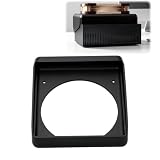
- 140MM FAN MOUNT: Built around a 140 mm fan layout with approximately 124.5 mm hole spacing, creating a defined top-mount position for a compact workstation cooling setup
- SINGLE-PIECE DUCT: One-piece fan shroud forms a simple airflow channel between the upper vent area and a 140 mm fan position, keeping the desktop workstation setup compact
- TOP-MOUNT LAYOUT: Designed to sit above a compatible compact AI workstation, the cooling duct uses the upper device area without requiring a larger external frame
- OPEN AIRFLOW PATH: The central round passage links the workstation vent area with the fan mount, giving the setup a clear physical airflow route without internal moving parts
- COMPACT SIZE: Approx. 157 x 178 x 51 mm body keeps the fan duct close to the workstation, fitting home lab, AI development desk, and compact compute setups
Likewise, NVIDIA’s claims of inference with models up to 200 billion parameters and fine-tuning up to 70 billion are tied to its 128GB product-page description. For the 64GB configuration, NVIDIA separately states support for models up to 100 billion parameters. Check the exact 64GB SKU’s specification sheet before relying on details such as ports, storage, power or memory bandwidth.
Independent reader supportYour contribution helps us test, update, and keep practical guides available for everyone.Price and announced availability
NVIDIA announced a starting price of $4,999 for the 64GB configuration and partner availability on Friday, October 23, 2026, through Acer, ASUS, Dell, GIGABYTE, HP and MSI. These are announced starting terms, not confirmation of current stock or a street price; check the manufacturer listing for your region and exact configuration before purchasing.
NVIDIA also says Blender is among the first creator-application providers supporting the platform, with a prebuilt installer “coming soon.” The announcement does not establish that the installer is already available.
Quick Recap
How to decide whether it suits your project
- Define the workload. Write down the model, intended precision or quantization, context length, expected concurrency and whether you are doing inference, fine-tuning, agent development or data science.
- Check the memory fit. Look for requirements for that exact model and configuration. Do not assume a model’s parameter count alone proves it will meet your speed or context needs.
- Verify the software path. Confirm that your frameworks, model formats, dependencies and development tools work with the NVIDIA stack on the exact system you plan to buy.
- Compare alternatives on the same task. Evaluate a local workstation, cloud GPU or larger-memory system using your own workload’s performance needs, data-handling requirements and total cost.
- Check the actual SKU and terms. Confirm the 64GB configuration’s full hardware specifications, regional availability and price with the named manufacturer before ordering.
Product prices and availability are accurate as of the date/time indicated and are subject to change. Any price and availability information displayed on Amazon at the time of purchase will apply.
Do these 3 things before closing this tab:
1Scan for outdated or missing drivers - takes under a minute2Repair Windows errors before they cause bigger problems3Fix the driver behind crashes, sound loss and screen glitches
