
Do these 3 things before closing this tab:
1Clear out junk files and repair common Windows errors2Scan for outdated or missing drivers - takes under a minute3Repair Windows errors before they cause bigger problemsThe Galaxy Tab S12 series—announced as the Tab S12 Ultra and Tab S12+—supports a range of note-taking, study, design, video-editing, and planning workflows. Samsung highlights apps including Photoshop, Notability, Goodnotes, LumaFusion, Notion, and Clip Studio Paint, alongside Samsung Notes. This is Samsung’s featured selection, not a complete catalog of professional Android apps; app features and offers can vary by region.
Note-taking and study apps
Samsung Notes
Samsung’s own Notes app is built around handwriting and annotation with the included S Pen. Samsung also highlights Note Assist for summarizing notes. Its examples include using Multi Window to keep Notes open alongside a lecture and an AI assistant; Samsung says Multi Window can show up to three sections. Exact software features may depend on region, account, connection, and software version. Samsung’s launch announcement describes these workflows.
Notability
Samsung describes Notability as a note-capture and organization app optimized for S Pen input, with AI-driven study tools. Samsung’s launch announcement says eligible users receive six months of access, after which another purchase is required for continued use. Availability and offer terms may vary by country and region.
Goodnotes
Goodnotes is positioned for note-taking and organization. Samsung’s global announcement advertises one year of access; Samsung US identifies the offer as Goodnotes Essential. Treat these as launch offers, not a guarantee of permanent free access or a universal entitlement.
Recommended Free Tools
#1 Best Overall

- BRILLIANCE ON DISPLAY: A large 11” Dynamic AMOLED 2X display¹ with Vision Booster provides clear text and rich colors for long session comfort whether you’re reading docs and slides or creating designs
- MULTITASKING CAPABILITY: This fast tablet with 12GB RAM quickly opens and switches between the wide range of Android apps without slowdowns for snappier multitasking and smoother workflow
- SUMMARIZE IN A SNAP: Quickly capture ideas with the pen-on-paper precision of the included Galaxy Tab S Pen and let Note Assist² with Galaxy AI³ keep them tidy and organized during meetings and lectures
- BRING YOUR IDEAS TO LIFE: Use the S Pen with Drawing Assist⁴ to turn your product team’s rough sketches into shareable mock-ups or note drawings into a sleek storyboards
- EXPANDABLE STORAGE: The microSD card allows you to use your tablet for keeping more files, movies or music to enjoy offline without running out of space. Ideal for creators wanting flexible storage
Image editing, design, and illustration
Adobe Photoshop for Tablet
Samsung says Photoshop for Tablet is preloaded in the Galaxy Picks folder and supports tablet-oriented image editing and design with S Pen input. Samsung lists Adobe Firefly-powered features including Generative Fill and Image to Video, as well as AI Assistant, which Samsung describes as being in beta.
As of October 2, 2026, Samsung’s announced Galaxy Store launch date for the tablet app was October 7, 2026, so that release was still in the future. Samsung says the app will be exclusive to the Galaxy Store for at least six months from launch. Eligible S12 users are described as receiving a four-month premium mobile subscription with 100 monthly generative credits. These are Samsung’s launch claims and offer terms, not independent app testing; check current availability and eligibility in your market. Samsung’s announcement has the launch details.
Rank #2

- NO Warranty in the USA. Tablets are only WIFI, no Calls or Data. Country selection may not be available during setup. select any country, as Country will updated later after Connecting to WIFI in Settings. English Language is available
- Connectivity Wi-Fi Wi-Fi 7 802.11a/b/g/n/ac/ax/be 2.4GHz+5GHz+6GHz, EHT320, MIMO, 4096-QAM USB USB 3.2 Gen 1 Bluetooth v5.3 Bluetooth Profiles A2DP,AVRCP,DI,HID,HOGP,OPP,PAN,PBP,TMAP Location Technology GPS,Glonass,Beidou,Galileo,QZSS Earjack USB Type-C MHL No Wi-Fi Direct Yes
- 14.6” Dynamic AMOLED 2X, 120Hz Anti-Reflective, 2960 × 1848 (WQXGA+) Accelerometer, Fingerprint Sensor, Gyro Sensor, Geomagnetic Sensor, Hall Sensor, Light Sensor Size (Main_Display) 369.9mm (14.6" full rectangle) / 367.2mm (14.5" rounded corners)
- Front: 12 MP UW Rear: 13 MP + 8 MP UW UHD 4K (3840 x 2160)@30fps dimmesion : 12.85 x 8.21 x 0.20 in.
Clip Studio Paint
Samsung names Clip Studio Paint for precision drawing and painting. Its global announcement mentions a six-month trial and 20% off the first subscription, while the Samsung US offer summary describes a six-month EX subscription offer. The plan and discount wording differs, so confirm the current regional terms before relying on either offer.
Video editing
LumaFusion
Samsung includes LumaFusion among the series’ professional creative apps and describes it as professional-grade video editing software. The launch announcement mentions a 66% discount. The available evidence does not establish that discount as universal or ongoing; check local eligibility and current terms.
What’s actually slowing this PC down?
Pick the symptom - the matching free tool is one click away.
Rank #3

- UNWIND WITH A BIG SCREEN: Kick back and relax with big, bright screens.¹ See every detail of your favorite shows, and get closer to the action on your favorite games with 90hz refresh rate. Plus, dual speakers make everything sound amazing.
- CIRCLE ANYTHING. SEARCH EVERYTHING: With Galaxy Tab S10 FE Series, you can simply circle anything on your screen to easily get search results on the spot using Circle to Search with Google.²
- HANDWRITING ASSIST MAKES YOUR UNTIDY NOTES NEAT: Tidy up your handwritten notes with Handwriting Assist.³ It easily straightens, aligns and adjusts the spacing of your words to create neater notes.
- DOES THE MATH FOR YOU: Make the grades using Math Solver.⁴ Simply use your S Pen to write out an equation on your screen. Math Solver can clean up your equations by turning them into text, just like that.
- WATER RESISTANT, FROM DROPS TO DUNKS: From droplets to splashes to full immersion in water, Galaxy Tab S10 FE Series is dependably durable.⁵
Writing, planning, and organization
Notion
Samsung describes Notion as an app for writing, planning, and organization. Its global launch announcement mentions one month of the Plus plan free, while Samsung US describes a one-month Business offer. Because the named plan differs by source and market, check the offer shown for your region rather than treating one plan as a global benefit.
Choosing a Tab S12 model and setup
The Samsung US product page lists a 14.6-inch display for the Tab S12 Ultra and a 12.6-inch display for the Tab S12+. Samsung lists the same MediaTek Dimensity 9500 processor for both. The Ultra’s larger screen gives more room for canvases, timelines, and split-screen work; the Plus is the smaller option if portability matters more. These are product specifications, not a finding that a particular app performs faster on either model. Samsung US product details and FAQ provide the regional specifications.
Rank #4
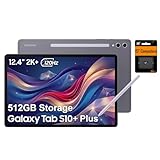
- PORTABLE DESIGN - Boasting a slim and lightweight design that’s easy to carry anywhere. Its IP68-rated water and dust resistance protects the tablet from spills, rain, and dust. It comes with up to 16 hours of battery life and fast-charge technology, letting you work and play freely without interruptions. Pre-equipped with Galaxy AI, the Tab puts a massive, AI-powered studio canvas in your hands for drawing, photo editing, and note-taking, making tasks faster and creative projects more fun
- STYLUS SUPPORT - The included magnetic S Pen features a responsive design for smooth drawing and precise note-taking. Use Circle to Search: circle anything on your screen to search it instantly. Use Solve Math: write down any equation and get instant answers. Use Handwriting Help: fixes messy notes automatically. Perfect for college, content creation, or entertainment, the S Pen turns your ideas into reality
- HIGH PERFORMANCE - The SAMSUNG Galaxy Tab is a premium tablet with an MT6989 processor and 12 GB RAM, delivering a lag-free experience for Linux environments, virtual machines, and high-frame-rate gaming. With 512 GB storage (256 GB built-in + 256 GB SD card), it provides ample space for files, photos, videos, and apps, with flexible expansion unmatched by other tablets
- EXCELLENT VISUALS - Enjoy a stunning 12.4'' WUXGA+ (2800 x 1752) glossy AMOLED 2X touchscreen with a 120Hz refresh rate, delivering crisp, vibrant visuals and ultra-smooth scrolling for gaming, streaming, and everyday use. Capture every detail with the 13MP main rear camera and 8MP secondary rear camera, while the single 12MP front camera ensures sharp, clear selfies and flawless video calls
- EFFECTIVE CONNECTIVITY - Supporting Wi-Fi for ultra-fast and stable internet connectivity, Bluetooth 5.3 for seamless wireless device pairing, and a USB Type-C port for quick charging, this device ensures you stay connected and productive with cutting-edge technology. Built-in Under-Display Fingerprint Sensor for fast, secure, and convenient login
Both models include an S Pen for handwriting, annotation, sketching, and precise input. For keyboard-heavy work, Samsung lists the separately sold Pro Keyboard and Book Cover Keyboard Slim. Its US page also lists a Book Cover, an Ultra-only Frame Cover, and an Anti-Reflecting Screen Protector. Verify the exact regional SKU and model compatibility before purchasing an accessory.
Independent reader supportYour contribution helps us test, update, and keep practical guides available for everyone.What to expect from professional apps on Android
Samsung’s selection covers several common creative and productivity tasks, but the presence of an app name does not establish that its Android tablet version has every feature of a desktop edition. Check the specific functions you rely on—such as file handling, advanced editing tools, external-service requirements, or collaboration features—against the app’s current tablet version. Samsung itself says specialized software may still require a laptop, even when the Ultra is paired with its Pro Keyboard and DeX. The launch materials do not provide independent app benchmarks or hands-on performance results.
Samsung also promotes Browser summaries across pages and tabs, Gemini, Galaxy AI tools, and Automated App Action. These are platform features that may assist with browsing or tasks; they should not be treated as substitutes for professional desktop applications. Availability can depend on account, region, connection, and software version.
How to interpret the app offers
The free periods, discounts, and subscriptions above are launch promotions described by Samsung, not proof that the apps are permanently included with every Tab S12. Samsung US and the global announcement do not always use the same plan names, and Samsung notes that availability and terms can vary by market. Check the offer terms presented for your country, including eligibility, renewal or payment requirements, and the date the promotion ends.
Quick Recap
Product prices and availability are accurate as of the date/time indicated and are subject to change. Any price and availability information displayed on Amazon at the time of purchase will apply.

