
No—not as a routine substitute. A 6-pin PCIe power plug is not interchangeable with an 8-pin GPU socket, and an adapter cannot make an undersized PSU lead deliver more power. Use the GPU’s specified power connectors, preferably from native PCIe 6+2-pin leads supported by your exact power supply. NVIDIA advises against adapters generally and recommends a PSU with native 8-pin cables.
Why a 6-pin plug is not equivalent to an 8-pin plug
The connectors differ in both pin arrangement and sense-pin configuration. NVIDIA’s connector pinout diagram shows the distinct layouts. An 8-pin socket is designed for a different connection than a plain 6-pin plug; do not assume that a plug can or should be forced into it.
Corsair lists ratings of 75 W for a 6-pin graphics-card connector and 150 W for an 8-pin connector in its PCIe cable guide. These are connector ratings, not a statement that every GPU with an 8-pin socket draws 150 W. A graphics card’s total board power and its power-connector requirements are model-specific.
What a 6-to-8-pin adapter can—and cannot—do
An adapter changes the connector at the end of a lead; it does not raise the lead’s or PSU rail’s electrical capacity. The fact that a 6-to-8-pin adapter exists, such as the cable listed in StarTech’s PCIEX68ADAP datasheet, does not establish that it is safe for a particular PSU and graphics card.
Do these 3 things before closing this tab:
1Scan for outdated or missing drivers - takes under a minute2Clear out junk files and repair common Windows errors3Fix the driver behind crashes, sound loss and screen glitches#1 Best Overall

- 6 Pin to 8 Pin PCIe Adapter: Connect a 6-pin male PCIe power plug from a compatible power supply to the 8-pin PCIe power input on a supported graphics card. Confirm the connector types before ordering
- For Compatible Low-Power GPUs: Use the PCIe power adapter only when the power supply and its 6-pin PCIe connection provide sufficient power for the graphics card. Check the documented power requirements of the PSU and GPU before installation
- 8 Pin to 6 Pin PCIe Adapter: The GPU power adapter changes a 6-pin PCIe connection into an 8-pin connector but does not increase the PSU wattage, current capacity, or available power. It is not suitable for bypassing GPU power requirements
- Secure PCIe Connections: The 8-pin male connector features a locking latch, while the 6-pin female connector uses a keyed housing to support proper alignment and help prevent accidental disconnection
- Convenient 2-Pack: Use the two PCIe adapter cables with separate compatible systems or keep one as a spare. Compatible with select Gigabyte, Radeon, and Sapphire graphics cards with an 8-pin PCIe power input. Check the GPU power requirements before use. Not compatible with CPU/EPS 8-pin ports
NVIDIA Support’s answer, updated September 29, 2021, says that a single-6-pin-to-8-pin adapter could potentially work only if the PSU manual confirms that the 6-pin PCIe rail can meet the 150 W capacity cited for an 8-pin cable. NVIDIA says it does not recommend using such adapters and recommends a PSU with native 8-pin power cables instead. The support guidance also warns that a dual-6-pin-to-8-pin adapter could damage the computer and says not to use that type. See NVIDIA’s adapter guidance.
NVIDIA’s separate workstation power guideline discusses combining two 6-pin connectors for an 8-pin connection only in a workstation context with a 12 V rail rated for at least 18 A. That specific guidance is not blanket approval for an unknown consumer PC or PSU. Follow the instructions for your exact equipment rather than applying the workstation condition to a different setup.
Rank #2
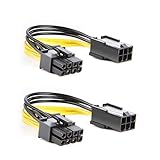
- 【Power Your 8 PIN Video card】this 6 pin to 8 pin PCI female to male Express Power Adapter Cable converts a 6-pin PCIe Power connector to a newer 8-pin PCIe Power Connector for GPU cards that require more power. It supports max 36W
- 【A Cost-Effective Solution】the PCIe 6 pin to 8 pin power adapter eliminates the expense of upgrading a computer power supply for the sake of compatibility with a newer video card
- 【Durable and Safe】This 8 pin gpu power cable is 18AWG pure copper conductor for safe and superior performance. RoHS certified
- 【Wide Compatibility】This 6 pin to 8 pin extension cable compatible with graphics cards with 8 pin PCIe connectors from popular manufacturers such as Gigabyte, Radeon, and Sapphire
- 【What You Get】2 x 6 pin to 8 pin PCIE Adapter. Backed with 24-Months Warranty and lifetime friendly customer service
What to use instead
Use a native PCIe 6+2-pin lead if your PSU supports it
A PCIe 6+2-pin plug combines a 6-pin section with two detachable pins to form the 8-pin GPU connector. Corsair identifies this as the PCIe cable form for an 8-pin video-card socket in its cable guide. Confirm that the lead belongs to, or is explicitly approved for, your PSU model.
Do not confuse PCIe power with CPU/EPS 8-pin power: they are different connector types, even if their plugs look similar. For modular PSUs, use only cables the PSU manufacturer approves for that exact unit; a cable that physically fits is not necessarily electrically compatible.
Crashes, No Sound, or Screen Glitches?
Random freezes, missing sound and display glitches usually trace back to one bad driver. Find and replace yours safely.Free scan · under a minutePC Slower Than It Used to Be?
A free scan shows the junk files, broken settings and background clutter dragging Windows down - then fixes them in one click.Free scan · Windows 10 & 11Rank #3

- Function: Solve the problem of graphics card power supply interface is not long enough.
- This 6-pin PCIe to 8-pin power converter cable, provide power to the graphics card from 6 Pin interface to 8 Pin, used for graphics card which needs external 8Pin power supply.
- The connector is designed for 6+2 Pin, which can be used as 8Pin or 6Pin.
- Compatible with graphics cards such as ASUS, Colorful, Galaxy, MSI, MAXSUN, Sapphire and XFX.
- Length:8.6’’ 22cm.
Replace the PSU if it lacks the required supported lead or capacity
If the GPU needs an 8-pin connector and your PSU has no approved native PCIe 6+2-pin lead, NVIDIA’s recommended solution is a power supply with native 8-pin cables. Check the PSU’s documented capacity and cable compatibility as well as the GPU’s connector requirements before choosing a replacement.
Do not treat an adapter as the default workaround
NVIDIA’s consumer support guidance advises against adapters generally. It describes a narrow condition under which a single-6-to-8 adapter might potentially operate, but only after the PSU manual confirms the required capacity. If that capacity is not explicitly supported for your exact PSU, do not use the adapter. Do not use a dual-6-to-8 adapter on the basis of the workstation guideline.
Rank #4

- Application: 6 pin to 8 Pin adapter powers your video card with this cable; It is perfect if you don't have enough PCI E power connectors to run your video card
- Durable Design: PVC flexible jacket, 18 AWG oxygen free copper and bare copper braided shielding prolong the life span of this cable
- Ideal Length and Secure Connection: 4 inch (10 cm) length connector: the video card power cable is perfect for internal cable management; Connecting a power supply to video card can decrease the risk of damaging internal connectors and offer a safer power supply condition
- High Compatibility: Widely applied to most video cards with 8 Pin PCIe power connectors, including ASUS, Gigabyte and SAPPHIRE ect
- Special Notice: Please confirm whether the power supply meets the maximum power consumption of video card before use
Check your GPU and PSU before connecting anything
- Identify the exact graphics-card model. Check its manufacturer specifications or manual for the type and number of required power sockets. MSI’s GPU power-requirement guidance also directs users to verify graphics-card and PSU requirements.
- Identify the exact PSU model. Check its manual for available PCIe leads and the documented capacity of the relevant rail or cable. Do not infer capacity from the number of pins on a plug.
- Verify cable compatibility. Use the PSU maker’s instructions, especially for modular models. Never swap in a modular cable solely because it fits.
- Connect every socket the GPU specifies. If the card has more than one power input, populate each one as directed by the card manufacturer; a single connection or adapter does not replace another required input.
Bottom line for a system without an 8-pin lead
A plain 6-pin PCIe plug is not a safe, general-purpose replacement for an 8-pin GPU connection. The best-supported option is a PSU lead native to the GPU connector—typically PCIe 6+2-pin—or a PSU replacement with the required native cable. Consider a single-6-to-8 adapter only if the exact PSU documentation explicitly confirms the necessary capacity, and do not use a dual-6-to-8 adapter based on a workstation-specific note.
Quick Recap
Product prices and availability are accurate as of the date/time indicated and are subject to change. Any price and availability information displayed on Amazon at the time of purchase will apply.

