
Quick wins for a faster PC:
Fix the driver behind crashes, sound loss and screen glitchesFind Drivers →Repair Windows errors before they cause bigger problemsFix Now →Scan for outdated or missing drivers - takes under a minuteDriver Scan →Power Usage Effectiveness (PUE) shows how much energy a data center uses for its facility infrastructure compared with the energy used by its IT equipment. A lower PUE means less facility overhead per unit of IT energy—but it does not, by itself, prove that a data center delivers more useful computing, uses less water, or has a lower carbon impact.
This guide is for businesses evaluating colocation providers and readers who want to understand data center efficiency. Facility operators control most building and cooling measures. Colocation customers can ask for meaningful performance information and improve their own IT demands; ordinary users of websites and cloud apps cannot directly change a provider’s facility PUE.
What PUE measures—and what it leaves out
PUE is calculated by dividing a data center facility’s total energy use over a year by the energy used by all of its IT equipment over that same period. The U.S. Department of Energy’s Federal Energy Management Program (DOE/FEMP) describes it as a measure of supporting-infrastructure efficiency, not total data center efficiency. Its 2024 guide puts it plainly: “It is important to note that PUE does not define the overall efficiency of an entire data center, but only the efficiency of the supporting equipment (the infrastructure) within a data center.” DOE/FEMP, Best Practices Guide for Energy-Efficient Data Center Design (2024)
For example, a lower PUE indicates that less energy is being used for facility overhead relative to IT energy within the metric’s boundary. It does not tell you how much useful computing a site delivers, what its water consumption is, or the carbon impact of the electricity it uses. Those questions require additional measures and clear reporting boundaries.
#1 Best Overall

- Bulk Purchasing for IT Departments: Multi-pack quantities designed for enterprise procurement, data centers, and system integrators. Reduce per-unit costs while maintaining standardized power cabling across workstations, server racks, and office deployments. Simplifies purchase orders and reduces vendor management overhead.
- Heavy-Duty Universal Compatibility: Features IEC 60320 C13 female to NEMA 5-15P plug connection with durable 18AWG wire construction. Compatible with desktops, monitors, printers, scanners, servers, projectors, powered speakers, HDTVs, and enterprise hardware. Reduces downtime with one standard cable across multiple devices.
- UL Listed for Professional Environments: Engineered to meet commercial safety standards with UL approval, 10A/300V rating, and grounded 3-prong design. Withstands continuous use in mission-critical environments including offices, data centers, schools, and government facilities. Built for long-lasting performance in demanding applications.
- Versatile Replacement & Expansion Solution: Perfect for replacing worn cables or extending reach in server rooms, office workstations, and classroom technology setups. Flexible yet durable build makes it easy to manage in tight spaces such as racks and office setups while maintaining reliable power delivery.
- Enterprise Procurement Ready: Available in standardized multi-pack bulk quantities ideal for schools, businesses, and government offices standardizing power cables across devices. Compatible with enterprise asset management systems and meets typical procurement specifications for professional power cabling solutions.
Is a lower PUE always better?
A lower PUE can indicate lower facility overhead, but it is not a complete ranking of facilities. Design, local climate, IT load, measurement period, and reliability or capacity requirements all affect comparisons. DOE/FEMP notes that there is no single most-efficient design for every scenario, so a PUE comparison is useful only when the sites’ operating context and measurement boundaries are understood.
DOE/FEMP’s 2024 guide describes 1.6 as an average data center PUE value. It also cites the Uptime Institute’s 2022 Global Data Center Survey, which reported an annual PUE of 1.55 for large data centers. These are guide-reported reference points, not a current universal industry average. The same DOE/FEMP guide describes several recent super-efficient data centers with PUE below 1.1; that is an example, not a general expectation for facilities.
Rank #2

- COMPLETE 2-PIECE POWER SUPPLY KIT - Includes 1x 14V 4A 56W power adapter and 1x AC wall power cord. No extra power cable required. Ready to connect and use with supported 14V Samsung display models.
- BUILT FOR SAFE DAILY USE - Over-voltage, over-current, overheating, and short-circuit protection for stable 14V output.
- COMPATIBLE SAMSUNG 14V MONITORS - Models: C24F390, C27F390, C27F396, C27R500, C32F391, S24F350, S27F350, S27D390, S27D590, U28E590D and more.
- CHECK CONNECTOR SIZE - Round barrel plug: 6.5mm outer x 4.4mm inner. NOT for 5.5x2.5mm, USB-C, or 19V monitors.
- WHAT IS IN THE BOX: 1x 14V 4A (56W) AC Adapter + 1x AC Power Cord. NOT for 12V, 19V, 24V, or USB-C monitors.
Which measures help complete the picture?
For a more useful comparison, pair PUE with metrics that address resources and useful output. Ask providers to state the reporting period, boundary, and methodology for each metric, and consider whether the facility is meeting the service requirements you need.
- Energy Reuse Effectiveness (ERE): adds context about energy recovered or reused rather than simply rejected.
- Water Usage Effectiveness (WUE): addresses water use, which PUE does not measure.
- Carbon Usage Effectiveness (CUE): addresses carbon impact, which depends in part on the electricity supply and is not captured by PUE.
- Useful work per unit of energy: an industry-appropriate measure, such as transactions per watt, relates energy to computing output.
These measures answer different questions; none should be treated as a substitute for understanding the service’s reliability, capacity, or operating conditions.
Rank #3

- Managed DC PDU: Input Voltage of 10 - 60 VDC; Total Capacity of 80 A divided into 8 outputs of 10 A each; Includes individual fuses for protection on each output. Applications CriticalPower Loads; TelecommunicationNetworks; DataCenters; RenewableEnergy Systems; Alarm Systems. Remote management and monitoring play a crucial role in these products. The models include a secure and user-friendly interface through a web browser, providing remote power monitoring, displaying information on voltage, current, and power for each output, alarms, and control of operations through an Ethernet connection, along with SNMP support for integration into your network management system.
What can data centers do to use less energy?
Most facility-efficiency decisions belong to operators, not individual users. DOE/FEMP’s 2024 guide covers opportunities across IT equipment and environmental conditions, airflow, cooling, electrical systems, heat recovery, and benchmarking.
Improve IT and thermal operations
Operators can use efficient IT equipment and optimize its intake temperatures while staying within equipment thermal guidelines. Where conditions permit, free cooling can reduce reliance on mechanical cooling. These choices depend on the equipment, climate, and required operating conditions.
Rank #4

- 3 AC Power + CAT6 + USB (data) + VGA + HDMI
- Desk Hole: 3.5" (9 cm)
- Extends Above Desk: 11" | Retracts Under Bezel: 14"
- Bezel Size W x H: 4"W x 3"H
- 6FT Power Cord | 5FT Data Cables
Optimize cooling and electrical systems
Fan and pump speeds can be adjusted to match actual needs, and UPS systems can be optimized to reduce electrical losses. Air management—including the separation of hot and cold aisles—can help cooling systems work more effectively.
Recover or reduce energy waste
Heat recovery can be useful when there is a suitable nearby heat user. DOE/FEMP also identifies rejecting remaining heat to dry coolers where feasible and maximizing renewable energy as measures to consider. Whether any of these approaches works well depends on the facility and its circumstances.
Free tools Windows power users keep installed
One-click scans. No signup required.
Best Value
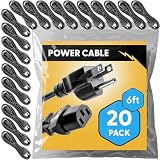
- Bulk Purchasing for IT Departments: Multi-pack quantities designed for enterprise procurement, data centers, and system integrators. Reduce per-unit costs while maintaining standardized power cabling across workstations, server racks, and office deployments. Simplifies purchase orders and reduces vendor management overhead.
- Heavy-Duty Universal Compatibility: Features IEC 60320 C13 female to NEMA 5-15P plug connection with durable 18AWG wire construction. Compatible with desktops, monitors, printers, scanners, servers, projectors, powered speakers, HDTVs, and enterprise hardware. Reduces downtime with one standard cable across multiple devices.
- UL Approved for Professional Environments: Engineered to meet commercial safety standards with UL approval, 10A/300V rating, and grounded 3-prong design. Withstands continuous use in mission-critical environments including offices, data centers, schools, and government facilities. Built for long-lasting performance in demanding applications.
- Versatile Replacement & Expansion Solution: Perfect for replacing worn cables or extending reach in server rooms, office workstations, and classroom technology setups. Flexible yet durable build makes it easy to manage in tight spaces such as racks and office setups while maintaining reliable power delivery.
- Enterprise Procurement Ready: Available in standardized multi-pack bulk quantities ideal for schools, businesses, and government offices standardizing power cables across devices. Compatible with enterprise asset management systems and meets typical procurement specifications for professional power cabling solutions.
What can a colocation customer ask or change?
The U.S. Environmental Protection Agency (EPA) summarized ENERGY STAR guidance for colocation customers in a May 17, 2023 release. It highlights airflow management, operating temperatures, cabling, and hot/cold aisle separation. EPA reported potential energy reduction of 15% from optimized airflow management; a 4% reduction in cooling costs for each degree of increased inlet temperature; and a 10–35% potential energy reduction from hot/cold aisle separation, depending on setup. These are attributed potential savings, not guaranteed results for every deployment. Any temperature change must remain within equipment guidelines. EPA also notes that proper cabling can support airflow and reduce equipment stress. EPA release (2023)
Questions for a provider
- What is the facility’s PUE, and what period and measurement boundary does it cover?
- Can you also provide WUE, CUE, or ERE, with the period and method used?
- How does the provider manage airflow, aisle separation, and operating temperatures while staying within equipment guidelines?
- What service capacity and reliability requirements are included in the figures being compared?
Actions within your own IT footprint
A colocation customer can review the efficiency and utilization of its own IT equipment, the workload it runs, its cabling, and the temperatures its equipment can safely support. That helps identify opportunities within the customer’s deployment, but it does not give the customer direct control over the provider’s building systems or facility-wide PUE.
How to interpret broader energy claims
EPA’s 2023 release attributed roughly 38% of data center energy consumption to setup and infrastructure, and cited about 1% of global energy consumption for data centers in 2018. The latter is a dated estimate, not a current share. These figures offer context for why infrastructure efficiency matters, but they should not be treated as measurements of a particular facility or as a present-day global estimate.
Quick Recap
Product prices and availability are accurate as of the date/time indicated and are subject to change. Any price and availability information displayed on Amazon at the time of purchase will apply.

