
Recommended Free Tools
For most embedded products, the lowest-risk way to add 802.11n is to use a certified Wi-Fi module or wireless SoC rather than design the RF section from scratch. Decide first whether the wireless device will run your application, provide networking services to an existing MCU, or act mainly as a link controller for an MCU or Linux MPU.
That choice determines the host interface, firmware split, memory budget, power behavior, antenna layout and remaining certification work. The guide below follows those decisions from architecture through board bring-up.
Choose the wireless architecture first
Embedded Wi-Fi designs generally use one of three patterns. Microchip describes these as standalone Wi-Fi MCU/module, network processor and link controller architectures.
| Architecture | What is integrated | Typical host connection | Best fit | Main trade-off |
|---|---|---|---|---|
| Standalone Wi-Fi MCU/module | Application MCU, radio and network stack | UART, SPI or vendor-specific control | Small products that can place the application on the wireless MCU | Less freedom to reuse an existing application MCU |
| Network processor module | Radio/MAC plus TCP/IP and often TLS services | SPI or a similar host interface | An existing MCU design that needs Internet connectivity | The host driver and interprocessor protocol must be integrated |
| Link-controller module | Wi-Fi radio and link controller | SPI, SDIO or UART, depending on the family | Linux MPU or MCU designs that retain more network software on the host | More host software and memory responsibility |
Standalone wireless MCU
Use this when the product can move its application onto the wireless device. It minimizes communication between two processors and can simplify the software partition, but it may require porting an existing application and accepting the module’s MCU resources and development environment.
#1 Best Overall

- ULTRA HIGH SPEED - Wireless Standards: IEEE 802.11n/g/b. MT 7601 Chipset, 2.4GHz Enhanced 150Mbps Wireless data transmission rate, wide range and ultra speed.
- Supports Windows10/ 8.1/8/7/XP/Vista(32-bit and 64-bit); Backward Compatible with 802.11 b/g/n Products
- Supports WMM (Wi-Fi Multimedia) Standard so that you can let different types of data have higher priority. It would allows better streaming of real-time data such as Video, Music, Skype etc
- Compatible with Windows 10, 8, 7, Vista, XP as well as Linux and Mac OS X 10.6-10.10
- 【WARRANTY-FREE】Yxflz WiFi adapter comes with 30 days money back and 12 months warranty guaranteed. Our friendly customer service are always ready to help you with any issues
Network processor
A network processor is a useful boundary when your product already has a qualified MCU. The module can supply embedded TCP/IP and TLS/SSL services while the host retains application control. The interface protocol, driver, firmware-update method and error recovery must be designed as part of the product, not treated as a transparent cable.
Link controller
A link controller leaves more of the networking work to the host. This can suit a Linux MPU or a higher-end MCU with an established networking stack, but it increases the importance of driver maturity, DMA or buffering design, host memory and update support.
Why a certified module is usually the starting point
A self-contained module normally includes the radio, baseband, matching network, calibration data and, in some designs, shielding and clock circuitry. That tested boundary reduces RF layout risk and assembly effort. Embedded.com notes that WLAN integration still requires attention to physical and electrical specifications, interface choice, host load, software architecture, power-save mechanisms, wireless performance and certification.
Rank #2

- 【Ultrafast Wi-Fi Speed】OKN AX210 Brings wifi into 6GHz, Update your wifi to Tri-Band. Max Speed up to 574Mbps @2.4GHz + 2400Mbps @5GHz +2400Mbps @6GHz. 2.4GHz for the long range, 5GHz for the high speed, 6GHz for the higher speed, Interference free and Ultra-low Latency
- 【WiFi 6E Technology 】AX210 wifi Module has the latest wifi 6 R2 technology and frequency band resources, which can be compatible with existing wifi routers and wifi routers to be released soon, such as ASUS, Netgear and tplink
- 【Upgraded from AX200】AX210 has all the features of AX200, such as MU-MIMO, 1024QAM, OFDMA, 160MHz, etc
- 【Compatible With BT 5.3】BT 5.3 is coming with AX210. Based on Bluetooth 5.2, it has larger capacity, higher speed, extremely low latency and stronger battery life
- 【WPA3 Network Security】Support WPA WPA2 WPA3 Network Security
STMicroelectronics’ AN4886 is specifically aimed at integrating SPWF01Sx small-form-factor 802.11 b/g/n modules. A module does not eliminate system engineering: its approved antenna options, keep-outs, supply behavior and enclosure assumptions still have to match your product.
Hardware integration checklist
1. Define the module boundary
Choose a certified, self-contained module when schedule, RF expertise or certification risk is limited. A discrete wireless SoC can offer more control over cost and layout, but it makes you responsible for RF matching, calibration, antenna implementation and a larger compliance effort.
2. Match every host signal
Check the exact revision data sheet for SPI, SDIO or UART signals, GPIO interrupt behavior, boot straps, reset timing and any coexistence pins. Confirm voltage levels, maximum clock rates, pull-up requirements and whether the host must keep a chip-select or wake signal asserted during transfers.
Rank #3
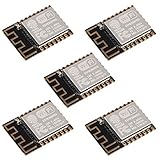
- ESP-12F module combines the ESP8266 microcontroller with 4MB of flash and a PCB antenna.
- The default firmware can add WIFI capability to another microcontroller, but it really shines when loaded with MicroPython, or NodeMCU.
- Support 3 modes: AP, STA, AP + STA
- Complete and self-contained Wi-Fi networking solution
- The ESP-12F is an improved version of the 12E, improve the peripheral circuit, the four laminates plate process, enhanced impedance matching, signal output is better.
3. Provide clock and power correctly
Follow the module’s reference-clock requirement; a stable frequency reference, usually a crystal oscillator, is a basic WLAN subsystem requirement. Copy the specified supply sequencing, peak-current capability, decoupling, sleep and wake timing rather than sizing rails from average current alone.
4. Treat the antenna as part of the RF design
Use the vendor’s approved PCB or external antenna arrangement, 50-ohm feed, ground clearances and keep-outs. Keep copper, batteries, displays, cables and shields out of the specified antenna region. The final enclosure can detune the antenna, so validate the assembled product rather than only the bare board.
5. Control noise and heat
Keep high-speed digital clocks and switching regulators away from the RF area, use the required uninterrupted reference ground, and check regulator and module temperature in the final enclosure. EMC behavior can change when the display, motor, cable harness or metal housing is installed.
Rank #4

- The ESP-12F module combines the ESP8266 microcontroller with 4MB of flash and a PCB antenna, with 16-bit Lite mode, clocked at Supports 80 MHz and 160 MHz, supports RTOS, and integrates Wi-Fi MAC/BB/RF/PA/LNA.
- The ESP-12F WiFi module supports the standard IEEE802.11 b/g/n protocol, a complete TCP/IP protocol stack. Users can use this module to add networking capabilities to existing devices or to build separate network controllers.
- The default firmware can add WIFI capability to another microcontroller, but it really shines when loaded with MicroPython, or NodeMCU.
- The ESP-12F is an improved version of the 12E, improve the peripheral circuit, the four laminates plate process, enhanced impedance matching, signal output is better, It is pin compatible with enhanced stability and a better antenna.
- Not recommended for users who are new to the ESP8266. New users should instead look at development boards with integrated USB.
6. Budget host resources
Decide where TCP/IP, TLS, DHCP, DNS, HTTP, credentials and OTA-update logic will run. A module that supplies those services can reduce host memory and code, while a link-controller design may require the host to provide the complete networking path.
7. Plan for the assembled product
Document antenna placement, enclosure materials, cable exits, test points and production programming before freezing the PCB. These details affect both radio performance and the configuration that can be covered by a module’s regulatory approvals.
Modules and SoCs to evaluate
| Device or family | Role | Documented details | Source and date |
|---|---|---|---|
| TI CC3200MOD | Wireless MCU module | Arm Cortex-M4 application MCU, 802.11 b/g/n radio, clocks, SPI flash, RF switch, passives and networking/security stacks integrated in the module | Texas Instruments product information, current page |
| TI CC3120MOD | Host-controlled network processor module | 802.11 b/g/n connectivity with embedded TCP/IP and TLS/SSL stacks | Texas Instruments product information, current page |
| Microchip WINC1500 | Wi-Fi network controller | SPI host interface and integrated TCP/IP services | Microchip Embedded Wi-Fi Developer Help, 2023 |
| Microchip WILC1000 | 1×1 link controller | IEEE 802.11 b/g/n; specified for up to 72 Mbps; station and Soft-AP modes | Microchip Embedded Wi-Fi Developer Help, 2023 |
| NXP 88MW320-88MW322 | Wireless MCU/SoC family | IEEE 802.11n/g/b; public data sheet, design application note and reference-design guide | NXP documentation, 2024 |
| Microchip SAMA5D27-WLSOM1 | Linux-capable wireless system-on-module | Combines an MPU, WILC3000 Wi-Fi/Bluetooth module, memory, PMIC and Ethernet PHY; 40.8 x 40.8 mm | Microchip product information, 2022 |
The 72 Mbps figure for WILC1000 is a published maximum for that 1×1 controller, not a guaranteed application throughput. The listed module dimensions are product specifications, not an indication of the space required for your antenna, connectors or keep-outs.
Do these 3 things before closing this tab:
1Clear out junk files and repair common Windows errors2Scan for outdated or missing drivers - takes under a minute3Repair Windows errors before they cause bigger problemsBest Value

- Intel WI-FI 6E AX210 module built-in
- Dedicated spectrum in 6GHz band for maximum speed and ultra-low latencies
- Support dual-stream Wireless in the 2.4GHz, 5GHz and 6GHz bands
- IEEE 802.11.acR2plusax compliant
- High speed wireless connection up to 2400Mbps
Partition the firmware deliberately
Write down the ownership of each service before writing the host driver:
- Transport and network services: identify whether the module or host owns TCP/IP, DHCP, DNS, sockets and TLS.
- Credentials: decide where Wi-Fi keys, certificates and private keys are stored, how they are protected and how they are replaced.
- Control protocol: define command framing, asynchronous events, timeouts, reset recovery and firmware-version compatibility across the MCU-module boundary.
- Power management: specify who requests sleep, who handles wake interrupts and how reconnect behavior works after a suspended radio.
- Updates: assign responsibility for module firmware, host firmware and OTA image validation; test interrupted downloads and rollback behavior.
TI documents embedded TCP/IP and TLS/SSL stacks in the CC3200MOD and CC3120MOD families. With other families, verify the exact stack boundary and API in the device documentation instead of assuming that similarly named modules behave alike.
A practical bring-up sequence
- Freeze the interface contract. Record signal names, voltage domains, boot straps, reset polarity, interrupt behavior and the module firmware version targeted for production.
- Copy the reference power and RF layout. Place decouplers, clock components, keep-outs, feed geometry and the antenna arrangement as specified by the vendor.
- Verify power before enabling the radio. Check sequencing, sleep and wake timing, reset release and peak-current margin with the final regulator and decoupling network.
- Bring up the host link. Confirm identification, interrupt handling, framing, retries and reset recovery before adding application traffic.
- Validate networking services. Exercise association, DHCP, DNS, TLS certificate validation and reconnect behavior using the same stack partition planned for production.
- Test the complete enclosure. Measure radio behavior, coexistence and EMC with the production antenna, housing, display, cables and power electronics installed.
- Lock the compliance configuration. Record the antenna part, gain limits, firmware settings, country or region selection, labeling and test results that apply to the shipping product.
What certification still remains
A module approval can reduce radio testing, but it is conditional. The final product must use the permitted antenna type and limits, observe installation and separation requirements, carry the correct regional labeling and pass any required system-level, EMC or unintentional-radiator tests. Changing the antenna, enclosure, output-power settings or host integration can move the product outside the module grant conditions.
Plan a compliance review for every market in which the device will be sold. Keep the module’s grant, antenna documentation, integration instructions, test configuration and production firmware revision in the product file.
The Tool Desk
Outbyte Driver Updater FREEFix the driver behind crashes, sound loss and screen glitchesFind Drivers →Outbyte PC Repair FREERepair Windows errors before they cause bigger problemsFix Now →Use these criteria in a design review
- Host interface quality, driver maturity and interrupt or DMA behavior
- Whether the application MCU is integrated or retained
- Location of TCP/IP, TLS, DHCP, DNS, HTTP and OTA functionality
- Peak and sleep power, wake latency and supply-current margin
- Antenna options, PCB keep-outs, enclosure constraints and cable placement
- Module dimensions, assembly process and production test access
- Regional certification conditions and documentation
- Security features, credential storage and update or rollback path
- Vendor lifecycle, firmware support and long-term availability
- Total bill of materials and engineering effort
Canonical vendor documents do not provide a neutral, current cross-vendor benchmark for range, throughput, power or total cost. Measure those values on your target board, antenna and enclosure; do not substitute a headline radio rate for a product-level result.
Quick Recap
Product prices and availability are accurate as of the date/time indicated and are subject to change. Any price and availability information displayed on Amazon at the time of purchase will apply.

