
To replace a Quadro K620 fan, match the replacement to the original fan’s connector, voltage, dimensions, mounting-hole pattern and shroud clearance—not just its pin count. One model-specific candidate identified for the K620 is the MGT5012XB-W10, listed as a 41 × 23 mm, 12 V, 4-pin fan. Check the actual fan in your card before ordering or installing it.
Choose a fan that fits your K620
NVIDIA specifies the Quadro K620 as a single-slot, low-profile card measuring 2.713 inches high by 6.3 inches long, with an ultra-quiet active fansink and 41 W maximum power consumption (NVIDIA K620 datasheet, 2014). Gigabyte’s Rev. 1.0 specification describes the same low-profile, single-slot dimensions and an active fansink, but lists maximum power consumption as 45 W (Gigabyte GV-N620D3-1GL Rev. 1.0 specifications). These are card specifications, not fan ratings; use the label on your original fan to confirm the replacement’s electrical requirements.
A Newegg listing identifies the MGT5012XB-W10 as a 41 × 23 mm, DC 12 V, 4-pin GPU fan compatible with the Quadro K620 and P620. The listing says its connector and mounting-hole positions match the original fan (Newegg listing). Treat that as a candidate, not a guarantee for every K620 board revision: compare it with your card before fitting. Marketplace stock and the listing’s current availability should be checked before purchase.
Compatibility checklist
- Connector: Compare the plug shape, pin count and orientation with the original.
- Voltage: Match the voltage printed on the original fan; the cited MGT5012XB-W10 listing specifies DC 12 V.
- Dimensions: Check the fan’s width, length and thickness. The cited listing gives a 41 × 23 mm footprint.
- Mounting: Compare screw-hole positions and spacing, not just the fan’s overall size.
- Clearance: Confirm the fan fits under the K620 shroud and does not interfere with the heatsink or nearby components.
- Cable: Make sure it can reach the header and be routed clear of the blades.
A generic 4-pin case fan is not automatically suitable: the K620’s fan must fit the shroud and mounting points, and its plug and electrical specifications must match.
Outdated Drivers Are Slowing You Down
One free scan finds every outdated or missing driver and matches the right update for your exact hardware.Free scan · exact hardware matchWindows Errors? Fix Them Before They Spread
Repair common Windows errors and clear accumulated junk for a smoother, more stable PC - no reinstall needed.Free scan · no reinstallQuick Recap
Best Value

- Made of high quality material, durable and practical
- Replacement for damaged, old and unusable cooling fans
- Improve the cooling performance of the equipment and extend its service life
- This product is a replacement fan
- Please measure the fan model and make sure it fits your product
Rank #4

- Made of high quality material, durable and practical
- Replacement for damaged, old and unusable cooling fans
- Improve the cooling performance of the equipment and extend its service life
- This product is a replacement fan
- Please measure the fan model and make sure it fits your product
Rank #3

- We are professional on graphics card fan , if you do not know which fan for your GPU, please feel free to contact us.
- Perfectly fit into OEM HP/Dell RTX 3060Ti Graphics Card
- The fan do not come with any screws, please keep the screws from your own graphics Card
Rank #2

- This fan is compatible with Quadro K620 P520 P40 P400 P600 P620 P1000 9500gt graphics cards
- Size: approx. 46* 46* 10mm / 1.81* 1.81* 0.39" ; Hole Spacing: approx. 39* 39* 39mm/1.53* 1.53* 1.53"
- Fan Number: MGT5012XF-W10 FS1250-S2053A
- Fan Parameters: 12V , 0.19A , 4-pin plug ; Compatible with: Video Card
- This fan comes with a three-month warranty. Similar models may be easily confused, so please verify the product details carefully before purchasing. If you have any questions, feel free to contact us anytime. Thank you!
#1 Best Overall
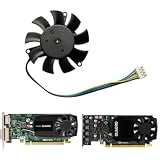
- -Replacement FOR LEADTEK GeForce Quadro K620 P620 P400 P600 P1000.Please check your GPU for compatibility.
- -Voltage: DC 12V / Current: 0.19AMP / Power Connector: 4-Pin Header
- -Fan Dimensions (L x W x H): approx. 46mm x 46mm / Mounting Holes Distance: approx.39mm x 39mm x 39mm(Center to Center)
- -The Video Card Fan do not coith any screws, please keep your own screws.
- -Please checek your GPU models and fans before place your order, any question, please feel free to contact us.
Replace the fan
- Power down and remove the card. Shut down the computer, switch off the power supply, unplug the power cord, and follow normal PCIe handling and electrostatic-discharge precautions when removing the card.
- Document the original installation. Photograph the cable route and connector before disassembly. Read the fan label and measure the fan; note its pin count, voltage, dimensions and screw-hole spacing.
- Access the fan. Remove only the shroud or heatsink fasteners needed to reach it. K620 board revisions can differ, so use the fasteners on your card rather than expecting a fixed screw count.
- Disconnect and compare. Grip the fan plug—not its wires—to disconnect it. Compare the replacement’s connector, polarity, mounting holes, thickness and clearance with the original before installing it.
- Install and reassemble. Secure the replacement fan, route its cable away from the blades, then reinstall the shroud or heatsink. Return the card to its original single-slot position.
- Check operation. On first boot, verify that the fan starts and the system reports normal GPU operation. If the fan does not start, shut down and recheck connector orientation, polarity and any mechanical obstruction.
What to check if the replacement does not work
- The fan does not spin: Power down before touching the card. Check that the plug is fully seated and correctly oriented, that the cable is not trapped, and that nothing blocks the blades.
- The plug or mounting holes do not match: Do not force the connector or alter the shroud to make it fit. Recheck the original fan’s label, dimensions and hole spacing, then choose a fan that matches those details.
- The cable reaches only across the blades: Re-route it using the original path. Do not leave it where the fan can catch it.
Product prices and availability are accurate as of the date/time indicated and are subject to change. Any price and availability information displayed on Amazon at the time of purchase will apply.

