
What’s actually slowing this PC down?
Pick the symptom - the matching free tool is one click away.
Usually, no. AMD Bulldozer-generation FX processors were designed for Socket AM3+, and a standard AM3 motherboard should not be assumed to support them. A small number of AM3 boards received manufacturer-specific hardware or BIOS support, so check the CPU-support list for your exact motherboard revision and FX model before buying or installing a processor.
Why AM3+ is the normal platform for Bulldozer
Bulldozer-era AMD FX processors, including models such as the FX-8150, FX-8120, and FX-4100, belong to the AM3+ generation. ASRock described AM3+ as the socket architecture for the Bulldozer/FX generation and said its latest BIOS update was required for AM3+ CPU support. ASRock launch material
That does not make every AM3+ board compatible with every FX processor: the exact CPU and minimum BIOS version still matter. It does mean that an ordinary AM3 board is not a safe compatibility assumption.
Can an AM3 motherboard support an FX processor?
Sometimes, but only where the motherboard maker explicitly enabled it. ASRock’s technical FAQ says, “For support AMD AM3+ CPU, it required correspond H/W or BIOS update.” ASRock technical FAQ The wording reflects the key limitation: compatibility may depend on both board hardware and firmware, not simply on whether a BIOS update exists.
The Tool Desk
Outbyte PC Repair FREERepair Windows errors before they cause bigger problemsFix Now →Outbyte Driver Updater FREEScan for outdated or missing drivers - takes under a minuteDriver Scan →#1 Best Overall

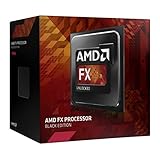
- Overclocking capabilities: Unlocked for a big boost in performance and speed.
- "Bulldozer" architecture: Designed to increase core communication for unparalleled multitasking and pure core performance.
- AMD Turbo Core Technology: A burst of speed for the task at hand. Delivers dynamic core performance boosts depending on users' workload at frequencies of up to 900MHz faster.
- AMD OverDrive software: Tuning controls to push performance to the limits and monitors system stability when overclocking
- 32NM die shrink: Stable and smooth performance with impressive energy efficiency
Manufacturer CPU tables illustrate how specific support can be. ASRock lists the FX-4100 on selected AM3+ boards with BIOS P1.30 or later; its FX-8120 table gives different BIOS thresholds for different boards. ASRock FX-4100 CPU support list ASRock FX-8120 CPU support list These entries are examples, not evidence that all AM3 boards—or all AM3+ boards—support those processors.
How to check your exact motherboard and FX model
- Identify the board and revision. Read the full motherboard model and hardware revision printed on the board or shown in its manual. Do not rely on the chipset name alone.
- Find the manufacturer’s CPU-support list. Search that list for the exact processor, such as FX-4100 or FX-8120. The board must be listed as supporting that specific CPU.
- Check the minimum BIOS version. Note the version specified for the processor. If an update is needed, install it using the board maker’s procedure while the currently supported CPU still boots.
- Verify power and cooling limits. Check the board revision, voltage-regulator module (VRM), processor TDP qualification, and cooler capacity. A CPU-support entry identifies a qualified pairing; it does not guarantee that every power-delivery or thermal setup will be adequate.
- Do not infer support from physical fit. If the exact processor is absent from the vendor’s list, treat the combination as unsupported even if the CPU appears to fit the socket.
Should you keep AM3 or move to AM3+?
If the exact FX processor is absent from your AM3 board’s support list, replacing the board with an AM3+ model that officially lists that CPU is the dependable route. Confirm the new board’s BIOS requirement and power support before purchase.
Rank #2

- Platform: Desktop
- Frequency: 4.0/4.2ghz (base/overdrive)
- Cores: 8
- Cache: 8/8mb (l2/l3)
- Socket type: am3Plus
An AM3+ board may also preserve compatibility with older AM3 processors and DDR3 hardware, but confirm those parts against the replacement board’s specifications. For example, Biostar’s TA970XE specification lists AMD FX, Phenom II, and Athlon II processor families on its AM3+ socket board. Biostar TA970XE specifications
Quick Recap
Best Value
Rank #4

- Overclocking capabilities - Unlocked for a big boost in performance and speed.
- "Bulldozer" architecture - Designed to increase core communication for unparalleled multitasking and pure core performance.
- AMD Turbo CORE Technology - A burst of speed for the task at hand. Delivers dynamic core performance boosts depending on users' workload at frequencies of up to 900MHz faster.
- AMD OverDrive software - Tuning controls to push performance to the limits and monitors system stability when overclocking.Operating Frequency: 3.1GHz
- 32nm die shrink - Stable and smooth performance with impressive energy efficiency
Rank #3

- 3.3GHz Operating Frequency,
- AM3+ Socket, FX-8300
- Shared L3 cache
- Dual 128-bit Floating point engines – capable of teaming together for 256-bit AVX instructions or operating separately with each core.
Product prices and availability are accurate as of the date/time indicated and are subject to change. Any price and availability information displayed on Amazon at the time of purchase will apply.

