
The Tool Desk
Outbyte Driver Updater FREEScan for outdated or missing drivers - takes under a minuteDriver Scan →Outbyte PC Repair FREEClear out junk files and repair common Windows errorsFree Scan →Logitech does not publish a specific idle-time interval for the original MX Keys backlight, and its official support pages do not document a setting to change that interval. The illumination is controlled by an ambient-light sensor and battery protection, so a light that disappears after inactivity may not be a timer event at all.
What Logitech officially says about MX Keys backlighting
The original MX Keys has an embedded ambient-light sensor that “reads and adapts the level of backlighting accordingly.” Logitech lists eight backlight levels. In a bright room, the keyboard may keep the illumination off because additional light is unnecessary.
Logitech also says backlighting is disabled when the battery is low. The battery indicator is green from 100% through 11% and red at 10% or below. Logitech states that the keyboard can provide more than 500 hours of typing without backlighting when the battery is low. See Logitech’s MX Keys support guide for the documented behavior.
Is there an MX Keys idle-time setting?
Not according to the official documentation reviewed. Logitech does not state how many minutes of inactivity elapse before the backlight goes dark, nor does it establish a user-adjustable timeout in that documentation. Therefore, an exact number such as five or ten minutes would be speculation.
#1 Best Overall

- Fluid Typing Experience: Laptop-like profile with spherically-dished keys shaped for your fingertips delivers a fast, fluid, precise and quieter typing experience
- Automate Repetitive Tasks: Easily create and share time-saving Smart Actions shortcuts to perform multiple actions with a single keystroke with the Logi Options+ app (1)
- Smarter Illumination: Backlit keyboard keys light up as your hands approach and adapt to the environment; Now with more lighting customizations on Logi Options+ (1)
- More Comfort, Deeper Focus: Work for longer with a solid build, low-profile design and an optimum keyboard angle that is better for your wrist posture
- Multi-Device, Multi OS Bluetooth Keyboard: Pair with up to 3 devices on nearly any operating system (Windows, macOS, Linux, Googlebook OS) via Bluetooth Low Energy or included Logi Bolt USB receiver (2)
The same limitation applies to the official MX Keys for Mac support guide: it describes backlighting that responds to ambient light and low-battery conditions but does not provide an idle interval or a control for changing one.
Why the light can look like an inactivity timeout
Ambient light changes
The sensor continually responds to room brightness. Sunlight, a brighter lamp, or moving the keyboard into a well-lit area can make the backlight turn off even when the keyboard is working normally.
Rank #2
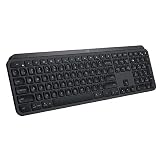
- PERFECT STROKE KEYS - Spherically-dished keys match the shape of your fingertips, offering satisfying feedback with every tap
- COMFORT AND STABILITY - Type with confidence on a keyboard crafted for comfort, stability, and precision
- SMART ILLUMINATION -Hand proximity detection and automatic backlighting
- FLOW CROSS-COMPUTER CONTROL - Type on multiple computers in one fluid workflow
- MULTI-DEVICE & MULTI-OS - Compatible with Windows, macOS, Linux, iOS, and Android systems ? pair with up to three devices
Low battery
When the battery reaches Logitech’s low-battery threshold, the keyboard turns off its backlight to conserve power. Check the battery indicator before treating the symptom as a timer problem.
Computer sleep is a different event
A sleeping display, a computer’s power-saving policy, or a wireless connection that wakes slowly is not the same as the keyboard’s backlight control. Test the keyboard by typing and checking whether keystrokes register; do not infer a backlight timeout from the computer screen alone.
Do these 3 things before closing this tab:
1Scan for outdated or missing drivers - takes under a minute2Repair Windows errors before they cause bigger problems3Fix the driver behind crashes, sound loss and screen glitchesRank #3

- Engineered for Speed and Precision: MX Keys S Wireless Keyboard features fast fluid laptop-like typing combined with the fast, precise scrolling of MX Master 3S Wireless Mouse
- Fluid Typing Experience: Laptop-like profile with spherically-dished keys shaped for your fingertips delivers a fast, fluid, precise and quieter typing experience
- Scroll 1000 Lines Per Second: With MagSpeed, Logitech’s fastest and most precise scroll wheel (3), and an 8K DPI sensor, this Logitech Mouse tracks anywhere – even on glass (4)
- Automate Repetitive Tasks: Easily create and share time-saving Smart Actions shortcuts that perform multiple actions with a single keystroke with the Logi Options+ app (1)
- Smarter Illumination: Backlit keyboard keys light up as your hands approach and adapt to the environment; now with more lighting customizations on Logi Options+ (1)
Practical checks before changing software settings
- Identify the exact keyboard. Confirm whether it is the original MX Keys, MX Keys S, MX Keys Mini, or a Mac-specific model. Support behavior and available controls can differ by generation.
- Check the room lighting. Test in a dimmer, consistent environment and manually select a backlight level if your model provides the backlight keys.
- Check battery status. If the indicator is red or the keyboard has been unused for a long period, charge it before diagnosing a timeout.
- Charge and retest. The original MX Keys charges through the USB-C port at the top-right corner and can be used while charging.
- Separate illumination from connectivity. Verify whether typing still works when the light is off. If typing works, the observation concerns illumination rather than an idle disconnect.
- Use model-specific Logitech instructions. Check Logitech Options or Options+ documentation only after confirming the model and operating system. The cited MX Keys pages do not promise a configurable backlight timer, so a control should not be assumed to exist.
What is and is not established for each variant
| Model or question | Documented by the cited Logitech pages | Not established by those pages |
|---|---|---|
| Original MX Keys | Ambient-light-responsive backlighting, eight levels, low-battery shutoff, USB-C charging while in use | Exact idle timeout or a setting to change it |
| MX Keys for Mac | Ambient-light-responsive backlighting and low-battery limitation | Exact idle timeout or a setting to change it |
| MX Keys S or MX Keys Mini | Not covered by the two cited pages for purposes of this question | Whether their timeout timing or controls match the original model |
When to contact Logitech support
Contact Logitech if the backlight remains off in a dim room after a full charge, the battery indicator behaves unexpectedly, or the keyboard stops registering keystrokes. Include the exact model name, operating system, connection method, and whether the light changes when you press the backlight keys. Those details let support distinguish a sensor or battery condition from a wireless or computer-power issue.
Independent reader supportYour contribution helps us test, update, and keep practical guides available for everyone.Bottom line on MX Keys idle time
There is no reliable, Logitech-published minute count for the MX Keys backlight’s inactivity behavior and no documented user setting that changes it. Treat the light going dark as an ambient-light or battery-protection symptom first, then verify the exact model before looking for software controls.
Quick Recap
Best Value

- Fluid Typing Experience: Laptop-like profile with spherically-dished keys shaped for your fingertips delivers a fast, fluid, precise and quieter typing experience
- Automate Repetitive Tasks: Easily create and share time-saving Smart Actions shortcuts to perform multiple actions with a single keystroke with the Logi Options+ app (1)
- Smarter Illumination: Backlit keyboard keys light up as your hands approach and adapt to the environment; Now with more lighting customizations on Logi Options+ (1)
- More Comfort, Deeper Focus: Work for longer with a solid build, low-profile design and an optimum keyboard angle that is better for your wrist posture
- Multi-Device, Multi OS Bluetooth Keyboard: Pair with up to 3 devices on nearly any operating system (Windows, macOS, Linux, Googlebook OS) via Bluetooth Low Energy or included Logi Bolt USB receiver (2)
Rank #4

- Perfect Stroke Typing with Smart Keys (1): Type on keys shaped for your fingertips, with voice to text Dictation (4), Mic Mute/Unmute, and Emoji keys
- Mini Size, Mighty Powerful: A layout designed for effortless precision, with a minimalist form for an ergonomic keyboard that's portable and can travel wherever you get work done
- Smart Illumination: The wireless keyboard's backlit keys light up the moment your hands approach, and automatically adjust to suit changing lighting conditions
- Multi-Device, Multi OS: Pair MX Keys Mini compact keyboard with up to 3 devices on nearly any operating system via Bluetooth Low Energy and switch between them seamlessly
- Multiple Computers, One Flow: Team the slim MX Keys Mini with MX Master 3 or MX Anywhere 3 and type across multiple computers or laptops in one fluid workflow(1)
Product prices and availability are accurate as of the date/time indicated and are subject to change. Any price and availability information displayed on Amazon at the time of purchase will apply.

