
A four-wire USB 2.0 device lead can connect to a 9-pin internal motherboard header only after you identify the four signals—+5 V, D−, D+, and ground—and match them to one USB port in the exact motherboard manual. “Four pin” does not identify a connector standard or wire order, so do not connect it by pin numbers, wire colors, or a diagram from another board.
What the four wires and 9-pin header represent
A USB 2.0 connection uses four signals:
- +5 V (VBUS) supplies power.
- D− carries the negative data signal.
- D+ carries the positive data signal.
- Ground completes the power circuit and signal reference.
A typical internal USB 2.0 motherboard header is a two-row connector commonly described as “9-pin.” It provides two USB ports, with a keyed or no-connect position used to prevent reversed insertion. The exact physical pin numbering and orientation vary by motherboard, so the board manual—not a generic diagram—controls the connection.
Before you connect anything
- Shut down the computer, switch off the power supply, and unplug the AC power cord.
- Identify the device and inspect its plug or individual leads. Confirm from the device documentation or reliable markings that the wires are USB 2.0 +5 V, D+, D−, and ground.
- Find the exact motherboard model and open its manual. Locate the internal USB 2.0 header diagram, pin 1, the key/no-connect position, and the signal labels for one port.
- Do not proceed if the lead order is unknown, the connector could be for another interface, or the manual does not clearly identify the header.
How to wire a loose four-wire USB lead
- Choose one USB port’s complete signal group on the motherboard diagram.
- Match the device’s +5 V wire to that port’s +5 V position.
- Match ground to the same port’s ground position.
- Match D+ to USB data+ and D− to USB data−. Keep both data wires together on the same port; do not combine a data wire from one port with the other port’s pair.
- Leave the key/no-connect position unused. Recheck orientation and every signal against the manual before restoring power.
Use signal names rather than wire colors. Colors are not a dependable identification method on an unknown or modified cable, and a pin number copied from another motherboard may put power on a data or ground contact.
Why a generic “9-pin USB pinout” is unsafe
Motherboard headers share common USB signal names, but their numbering and orientation are board-specific. ASUS PRIME B760-PLUS D4 documentation, for example, labels +5 V, USB data−, USB data+, ground, and no-connect positions and warns that plugging an IEEE 1394 cable into a USB connector can damage the motherboard. The ASUS PRIME H610M-E manual shows the same USB 2.0 signal scheme and states support up to 480 Mb/s. Those diagrams explain the signals; they do not prove the pin numbering for a Soyo, ASUS, or any other unidentified board.
#1 Best Overall
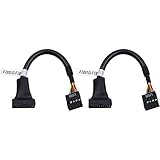
- 19 pin USB 3.0 motherboard adapter offers a throughput of up to 4.8Gbps when used with a USB 3.0 host and device , which astounding the capability of USB 2.0 (480Mbps).
- usb 3.0 header to usb 2.0 adapter cable use molded-strain relief construction for flexible movement, durability, and fit.
- USB 3.0 to USB 2.0 motherboard adapter cable complies with fully rated cable specification using braid-and-foil shield protection.
- USB3.0 technology of USB 3.0 motherboard adapter is similar to PCI Express 2.0(5 Gbit/s) It uses 8 B10B encoding,linear feedback shift register (LFSR) scrambling for data, spread spectrum.
- Let your USB 3.0 motherboard adapter 19 pin device connected the USB 2.0 9 pin motherboard.
The historical Mitsumi/Soyo example
An April 21, 2005 AnandTech forum question concerned a Mitsumi FA404M floppy/USB card reader and a Soyo Dragon 2 Plus v1.0 motherboard. The device leads were identified as +5 VDC, data+, data−, and ground. A reply advised connecting power and ground to the corresponding USB-header signals and the two data leads to one port’s matching positive/negative pair, while warning that incorrect wiring could damage the motherboard.
This is useful as an illustration of the method, not as a universal pin-number recipe. The forum post is not an official Soyo manual, and its mapping should not be applied to another board without that board’s documentation.
Rank #2
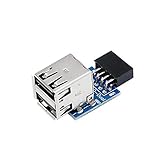
- 9pin USB 2.0 Female Pin Dual .Connect devices designed to plug into 9 pin motherboard header connection to an standard USB 2.0 type A connector,Backwards compatible with USB1.1
- Expand two USB2.0 A Female Ports from your 9pin USB2.0 pin header.There are times you may when using two devices at the same time, such as keyboard,Mouse .SinLoon 9pin USB 2.0 Female Pin Dual Adapter can easily help you solve the problem
- A cost-effective solution for any application requiring internal USB 2.0 female ports, e.g. wireless Lan card OR wireless receiver OR Bluetooth OR using a bootable USB flash drive as a SSD cd-rom , floppy drive panel etc.
- USB nternal connectivity design, Ample space is provided to install two devices in it.Let your device no longer stick out of the front of the chassis,So 9pin USB 2.0 Female Pin Dual is a good way to hide it. works fantastic.Easy to use and install
- USB 2.0 to 9 Pin Header adapter Support system:Window2000/WindowXP/Window7/Window8/Window10
When an adapter is the safer approach
If the device has loose wires or a nonstandard four-position plug, a keyed internal USB 2.0 motherboard-header adapter can make orientation clearer. An adapter does not remove the need to verify the device’s lead order and the motherboard header. Before buying one, check that it is intended for an internal USB 2.0 header, preserves the unused/key position, and matches the device connector or provides individually identified leads. No particular adapter model or compatibility guarantee is established here.
Symptoms of a wrong connection
- The computer does not detect the device.
- The device repeatedly disconnects or resets.
- The USB header, cable, or device becomes hot or shows visible damage.
- The motherboard fails to start or reports a USB fault.
Power off immediately if anything becomes hot, smells burnt, or behaves unexpectedly. Do not keep testing an uncertain wiring arrangement; verify the signal mapping with the exact manuals or obtain a correctly keyed cable.
The Tool Desk
Outbyte Driver Updater FREEScan for outdated or missing drivers - takes under a minuteDriver Scan →Outbyte PC Repair FREEClear out junk files and repair common Windows errorsFree Scan →Rank #3

- 19 pin USB 3.0 motherboard adapter offers a throughput of up to 4.8Gbps when used with a USB 3.0 host and device , which astounding the capability of USB 2.0 (480Mbps).
- USB 3.0 header to usb 2.0 adapter cable use molded-strain relief construction for flexible movement, durability, and fit.
- USB 3.0 to USB 2.0 motherboard adapter cable complies with fully rated cable specification using braid-and-foil shield protection.
- USB3.0 technology of USB 3.0 motherboard adapter is similar to PCI Express 2.0(5 Gbit/s) It uses 8 B10B encoding,linear feedback shift register (LFSR) scrambling for data, spread spectrum.
- Let your USB 3.0 motherboard adapter 19 pin device connected the USB 2.0 9 pin motherboard.
Connection checklist
- Exact device model and lead functions identified.
- Exact motherboard model and USB 2.0 header diagram consulted.
- +5 V, D−, D+, and ground matched by label.
- Both data wires assigned to one USB port.
- Key/no-connect position left unused.
- Computer unplugged during wiring and orientation checked before power-up.
The Bottom Line
There is no safe universal answer for a “4-pin plug to 9-pin header.” Identify the four USB signals, use the exact motherboard manual, connect one complete port, and leave the keyed/no-connect position unused. If any lead or pin is uncertain, do not power the system until the mapping is verified.
Quick Recap
Best Value

- Universal Connectivity: This USB 2.0 adapter cable provides flexible connection between motherboard 9-pin headers and standard USB Type A ports, serving as essential computer peripheral equipment and industrial computer accessory.
- Precise Pin Configuration: Engineered with accurate pin definition starting from the red wire: red for V+ power, white for D- data, green for D+ data, and black for GND ground with yellow shielded GND. The clear color-coding prevents installation errors and simplifies connection processes for both beginners and experienced technicians.
- Great Signal Quality: Constructed with all-copper core conductors and comprehensive aluminum foil shielding, this USB to 9-pin data cable minimizes signal attenuation and electromagnetic interference. The enhanced shielding technology preserves data integrity during transmission, making it ideal for sensitive digital products and precision industrial equipment.
- Durable Construction: Featuring quality PVC exterior that remains soft yet durable through repeated use, this USB 2.0 adapter cable combines flexibility with long-term reliability. The lightweight design reduces strain on motherboard headers while the reinforced connectors withstand frequent plugging and unplugging cycles.
- Broad Compatibility Range: Compatible with numerous devices including computer peripherals, digital products, industrial computers, card readers, and various USB 2.0 compatible equipment. This USB mainboard connector supports standard USB 2.0 data transfer speeds while providing the physical adaptability needed for custom installations and system upgrades.
Rank #4

- USB header to USB : USB 2.0 A Male to 9 Pin Dupont Male Dupont Cable.
- Note:Only the bottom 5 pins are wired to the USB connector intended for single USB connection header devices; Please check your USB header device to confirm that it is properly wired to connect to the primary bottom 5 Pin row.
- Functions:allow you to connect many USB devices originally intended for motherboard headers to A standard USB port.
- Cable Length (Including Connectors):7.8inch/20cm.
- Package include:usb 2.0 header to usb port.
Product prices and availability are accurate as of the date/time indicated and are subject to change. Any price and availability information displayed on Amazon at the time of purchase will apply.

