
Recommended Free Tools
Motherboard makers still include USB 2.0 because many PC devices do not need USB 3.x bandwidth. Keyboards, mice, wireless receivers, RGB and fan controllers, liquid-cooler controllers, Bluetooth modules and many printers use only a small amount of data. USB 2.0 remains compatible, electrically simpler and available as a native resource in current chipsets.
That does not make USB 2.0 a good choice for every workload. External SSDs, capture devices, fast card readers, high-speed Ethernet adapters and docks should use a port whose advertised speed matches their needs. A board having USB 2.0 is therefore normal; it is a problem only if you need more high-speed connections than the board provides.
USB 2.0 is slower, but most peripherals are slower still
USB 2.0 High-Speed has a nominal link rate of 480Mbps. Common USB 3.x implementations advertise 5, 10 or 20Gbps. Those are theoretical link rates, not guaranteed file-transfer speeds: protocol overhead, the device, cable quality, controller sharing and the chipset uplink all affect the result. Intel documents the 5, 10 and 20Gbps USB 3.2 modes and support for older USB traffic in its current xHCI documentation (Intel xHCI documentation).
A keyboard or mouse does not need USB 2.0 specifically; it needs only a tiny fraction of that bandwidth. The same is true of wireless receivers, game-controller dongles, basic DACs, many webcams, printers, RGB controllers and cooler-control cables. Connecting one of these to a USB 3.x port normally provides no performance benefit.
#1 Best Overall
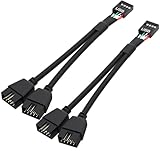
- USB2.0 9Pin Header Splitter: the USB2.0 1 to 2 splitter can solve the lack of your interface USB ports of your motherboard. Convert a USB2.0 9 Pin on motherboard to dual 9Pin ports.
- Shielded Cable Design: the shielded cbale has 3 functions: 1. Prevent interference, 2. Protect your USB device, 3. Improve transmission speed. In short,USB with a shielded cable has many beneficial effects, for users who have high requirements for speed and stability of USB transmission, the use of USB devices with a shielded cable can better meet their needs.
- Premium Material: the cable is made of 24AWG tinned coppre wire and premium aluminum foil, braided wtih tinned copper and nylon woven, the USB2.0 header use integrative injection mold process, make the splitter is better quality than normal splitters.
- Mistake Proofing Design: Using a standard USB header with a misatek proof design, as long as it can be inserted, it can be used (with a blocking hole design to prevent incorrect plug in ).
- Package included: 2 PCS USB2.0 Splitter 6.3inch black
USB 3.x compatibility does not make every port identical
USB 3.x ports are backward-compatible because a capable connector carries both USB 2.0 D+/D− signaling and separate SuperSpeed signaling pairs. Intel describes this combined arrangement for USB 3.2-capable walk-up ports (Intel USB documentation).
A USB 2.0-only connector or internal header does not require the additional SuperSpeed path. The board maker can route, validate and allocate it as a simpler low-speed connection. That is an engineering and resource-allocation advantage, not evidence that the manufacturer is merely reusing obsolete parts.
There is also no universal per-port saving that can be quoted. Board layout, retimers, connectors, controllers, validation and sourcing vary. The defensible point is that a mix of USB 2.0 and faster ports lets a manufacturer provide more total connections while reserving high-speed implementation for ports where it changes the user experience.
Current chipsets still provide USB 2.0 natively
USB 2.0 remains a platform feature. Intel’s 800-series chipset documentation lists up to 14 USB 2.0 signal pairs and 10 USB 3.2 signal pairs, with SKU and motherboard implementation limits (Intel 800-series USB resources). Its overview also lists separate maximum counts for different USB generations (Intel 800-series overview).
Quick wins for a faster PC:
Scan for outdated or missing drivers - takes under a minuteDriver Scan →Clear out junk files and repair common Windows errorsFree Scan →Fix the driver behind crashes, sound loss and screen glitchesFind Drivers →Rank #2
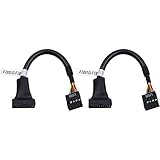
- 19 pin USB 3.0 motherboard adapter offers a throughput of up to 4.8Gbps when used with a USB 3.0 host and device , which astounding the capability of USB 2.0 (480Mbps).
- usb 3.0 header to usb 2.0 adapter cable use molded-strain relief construction for flexible movement, durability, and fit.
- USB 3.0 to USB 2.0 motherboard adapter cable complies with fully rated cable specification using braid-and-foil shield protection.
- USB3.0 technology of USB 3.0 motherboard adapter is similar to PCI Express 2.0(5 Gbit/s) It uses 8 B10B encoding,linear feedback shift register (LFSR) scrambling for data, spread spectrum.
- Let your USB 3.0 motherboard adapter 19 pin device connected the USB 2.0 9 pin motherboard.
AMD’s AM5 chipset matrix likewise differentiates 5Gbps, 10Gbps, 20Gbps, USB4, SATA and PCIe resources by chipset tier (AMD AM5 chipset specifications). A motherboard manufacturer chooses how to expose those resources; the chipset maximum is not a promise that every board has that many ports or that all can run at full rate simultaneously.
USB 2.0 is also still a maintained standard. The USB Implementers Forum lists a USB 2.0 specification package dated June 3, 2025 and current compliance material in its document library (USB-IF USB 2.0 specification; USB-IF document search).
Internal USB 2.0 headers are often the real reason
Rear I/O is only part of a motherboard’s USB design. Internal headers connect case and control hardware that rarely needs SuperSpeed bandwidth:
- case front-panel USB 2.0 ports;
- liquid-cooler USB control cables;
- RGB and fan controllers;
- internal Bluetooth or Wi-Fi modules;
- display, monitoring and proprietary control hubs.
Current boards show this is not a legacy-only provision. ASUS’s PRIME B650EM-A-CSM lists a USB 5Gbps header alongside two USB 2.0 headers supporting four additional USB 2.0 ports (ASUS PRIME B650EM-A-CSM specifications). The B850M AYW GAMING OC WIFI7 W lists the same combination (ASUS B850M AYW specifications).
Rank #3

- 【Splitter Cable】SSSUWP Motherboard 9pin extension cable, expands two USB2.0 9pin male header from a motherboard 9pin USB header.
- 【Shielded】The 9pin cable with shielded to reduce electromagnetic interference and ensure signal integrity.
- 【USB2.0 Spec.】High speed USB2.0 Spec, support maximum data transfer speed 480Mbps.
- 【Sleeved】Black sleeved cable, neater appearance.
- 【What you’ll get】1x 9pin USB2.0 to Dual 9pin splitter extension cable(16cm /6" approx).
For a builder, header count can matter more than the number of rear ports. Several controllers, a cooler and an internal Bluetooth module can exhaust two headers even when the rear I/O still has spare sockets. A compatible internal hub may solve a header shortage; check its power limits and the documentation for every connected device.
When USB 2.0 becomes a practical limitation
Use a 5Gbps, 10Gbps, 20Gbps or USB4 connection when the workload can exceed 480Mbps:
- external SSDs and fast flash drives;
- external capture hardware;
- high-speed card readers;
- USB-to-Ethernet adapters faster than 480Mbps;
- external hard-drive enclosures used for large transfers;
- docks carrying several high-speed devices.
A fast device plugged into a USB 2.0-only port is limited by the slower link. Conversely, a USB 2.0 device plugged into USB 3.x remains limited by its own USB 2.0 capability. A USB hub also shares its upstream link; it cannot turn USB 2.0 into USB 3.x.
USB 3.2 naming is not one speed
| Label | Nominal link rate |
|---|---|
| USB 3.2 Gen 1×1 | 5Gbps |
| USB 3.2 Gen 2×1 | 10Gbps |
| USB 3.2 Gen 2×2 | 20Gbps |
Connector shape and protocol are separate. USB-C may carry USB 2.0, USB 3.x or USB4, and may also support DisplayPort Alt Mode or charging. Use the motherboard’s specification and manual rather than the connector shape or port color.
Rank #4

- Universal Connectivity: This USB 2.0 adapter cable provides flexible connection between motherboard 9-pin headers and standard USB Type A ports, serving as essential computer peripheral equipment and industrial computer accessory.
- Precise Pin Configuration: Engineered with accurate pin definition starting from the red wire: red for V+ power, white for D- data, green for D+ data, and black for GND ground with yellow shielded GND. The clear color-coding prevents installation errors and simplifies connection processes for both beginners and experienced technicians.
- Great Signal Quality: Constructed with all-copper core conductors and comprehensive aluminum foil shielding, this USB to 9-pin data cable minimizes signal attenuation and electromagnetic interference. The enhanced shielding technology preserves data integrity during transmission, making it ideal for sensitive digital products and precision industrial equipment.
- Durable Construction: Featuring quality PVC exterior that remains soft yet durable through repeated use, this USB 2.0 adapter cable combines flexibility with long-term reliability. The lightweight design reduces strain on motherboard headers while the reinforced connectors withstand frequent plugging and unplugging cycles.
- Broad Compatibility Range: Compatible with numerous devices including computer peripherals, digital products, industrial computers, card readers, and various USB 2.0 compatible equipment. This USB mainboard connector supports standard USB 2.0 data transfer speeds while providing the physical adaptability needed for custom installations and system upgrades.
BIOS, boot and reliability caveats
It is too broad to say that a PC requires USB 2.0 for BIOS access. Modern xHCI controllers can handle USB 2.0 devices through USB 3.x ports, although firmware and older boot environments can be less forgiving. Microsoft documents the transition to xHCI and compatibility considerations involving older BIOS environments (Microsoft USB FAQ).
BIOS Flashback is a separate firmware path. Some boards specify a particular rear port, filesystem and file name; others do not. Follow the exact motherboard manual and identified Flashback port instead of inferring requirements from a connector’s color. Ordinary keyboard use, booting an installer and Flashback should not be treated as the same procedure.
USB 2.0’s lower-speed signaling can simplify some implementation and signal-integrity decisions, but it is not universally more reliable. Cables, power, firmware, controllers and devices can cause problems on either generation. Intel’s published errata include USB behavior under particular platform conditions, reinforcing that reliability claims must be model-specific (Intel 800-series errata).
Independent reader supportYour contribution helps us test, update, and keep practical guides available for everyone.How to evaluate USB on a motherboard
- List the fast devices. Count external SSDs, capture hardware, fast networking, card readers and docks that need more than USB 2.0.
- Check rear I/O by speed. Record the number of USB-A and USB-C ports explicitly labeled 5Gbps, 10Gbps, 20Gbps or USB4.
- Count internal headers. Match cooler, RGB, fan, Bluetooth and case connectors to the board’s USB 2.0, USB 5Gbps and front-panel USB-C headers.
- Read sharing notes. The chipset link and controllers have finite capacity; several ports may share resources even when each has its own connector.
- Verify firmware features. Note the documented BIOS Flashback port and procedure.
- Choose expansion only for a real shortage. A PCIe USB card can add ports or an independent controller, but requires a suitable slot, compatible drivers and attention to lane sharing. A keyboard alone is not a reason to replace a motherboard.
Is USB 2.0 obsolete?
USB 2.0 is obsolete for high-speed storage and similar data-transfer workloads, but it is not obsolete as a supported interface. Its bandwidth, compatibility and native chipset availability still fit a large class of peripherals and internal motherboard functions. Premium boards may add USB4 and more 20Gbps ports while retaining USB 2.0 headers for the controllers and accessories that do not benefit from those speeds.
PC Slower Than It Used to Be?
A free scan shows the junk files, broken settings and background clutter dragging Windows down - then fixes them in one click.Free scan · Windows 10 & 11Crashes, No Sound, or Screen Glitches?
Random freezes, missing sound and display glitches usually trace back to one bad driver. Find and replace yours safely.Free scan · under a minuteBest Value
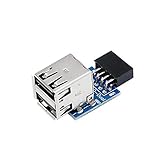
- 9pin USB 2.0 Female Pin Dual .Connect devices designed to plug into 9 pin motherboard header connection to an standard USB 2.0 type A connector,Backwards compatible with USB1.1
- Expand two USB2.0 A Female Ports from your 9pin USB2.0 pin header.There are times you may when using two devices at the same time, such as keyboard,Mouse .SinLoon 9pin USB 2.0 Female Pin Dual Adapter can easily help you solve the problem
- A cost-effective solution for any application requiring internal USB 2.0 female ports, e.g. wireless Lan card OR wireless receiver OR Bluetooth OR using a bootable USB flash drive as a SSD cd-rom , floppy drive panel etc.
- USB nternal connectivity design, Ample space is provided to install two devices in it.Let your device no longer stick out of the front of the chassis,So 9pin USB 2.0 Female Pin Dual is a good way to hide it. works fantastic.Easy to use and install
- USB 2.0 to 9 Pin Header adapter Support system:Window2000/WindowXP/Window7/Window8/Window10
Frequently Asked Questions
Will a USB 2.0 keyboard work in a USB 3.x port?
Usually yes. USB 3.x ports include USB 2.0 signaling, although a particular firmware or troubleshooting situation may make another port preferable.
Should I avoid a motherboard because it has USB 2.0 ports?
No. Compare the board’s high-speed rear ports, USB-C capability and internal header count with your actual devices. USB 2.0 is a disadvantage only when you need more than its bandwidth or lack enough faster ports.
Can a USB 2.0 header run several RGB or cooler devices?
Sometimes, through a compatible internal hub, but check device documentation, header power limits and the hub’s own requirements. A hub does not increase USB bandwidth.
Quick Recap
Product prices and availability are accurate as of the date/time indicated and are subject to change. Any price and availability information displayed on Amazon at the time of purchase will apply.
Free tools Windows power users keep installed
One-click scans. No signup required.

